
ASP.NET Core 2.2 基础知识(二) 中间件
中间件是一种装配到应用管道以处理请求和相应的软件.每个软件都可以:
1.选择是否将请求传递到管道中的下一个组件;
2.可在调用管道中的下一个组件前后执行工作.
管道由 IApplicationBuilder 创建:
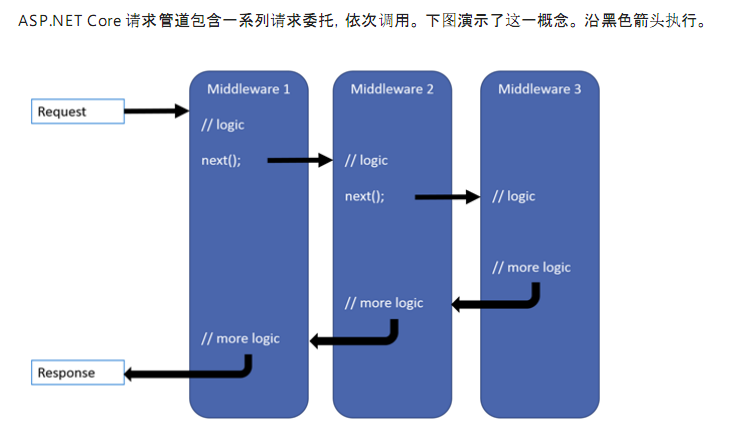
每个委托都可以在下一个委托前后执行操作,.此外,委托还可以决定不将请求传递给下一个委托,这就是对请求管道进行短路.通常需要短路,是因为这样可以避免不必要的工作.比如:
1.静态文件中间件可以返回静态文件请求并使管道的其余部分短路;
2.现在管道中调用异常处理委托,以便他们可以捕获在管道的后期阶段所发生的异常.
委托的添加方式一共有3种:
1.Run
该方法的XML注释是这样写的:
Adds a terminal middleware delegate to the application's request pipeline.向应用程序请求管道添加一个终端中间件.
通俗来讲,意思就是该方法添加的委托,会使"请求管道短路",不管该委托是否提前响应都会短路.比如下面代码中标红的部分,不管有没有这一句代码,下面的所有代码都不会执行.
        public void Configure(IApplicationBuilder app, IHostingEnvironment env)

        {

            app.Run(async context =>

            {

                await context.Response.WriteAsync("Hello World!");

            });

            //下面的都不会执行了,因为上面的委托已经终止了管道,或者说:"已经让管道短路了"

          ...

        }
2.Use
该方法的XML注释是这样写的:
Adds a middleware delegate defined in-line to the application's request pipeline.和上面的 Run 方法相比,少了"terminal".意义就已经很明显了.
                //用 Use 将多个请求委托链接在一起. next 参数表示管道中的下一个委托,可通过不调用 next 参数使管道短路.

                //通常可在下一个委托前后执行操作,如以下示例

                app.Use(async (context, next) =>

                {

                    var name = context.Request.Query["name"];

                    if (!string.IsNullOrWhiteSpace(name))

                    {

                        await context.Response.WriteAsync($"hello world , {name}");

                    }

                    await next.Invoke();

                });
请求一:
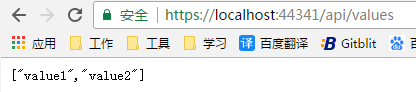
请求二:

3.Map
根据给定请求路径的匹配项来创建请求分支.如果请求路径以给定的路径开头,则执行分支,如红色部分代码
        public void Configure(IApplicationBuilder app, IHostingEnvironment env)

        {

            //Map

            app.Map(new PathString("/map1"), MapTest1);

            app.Map("/map2", MapTest2);

            app.MapWhen(context => !string.IsNullOrWhiteSpace(context.Request.Query["name"]), MapTest3);

            if (env.IsDevelopment())

            {

                app.UseDeveloperExceptionPage();

            }

            else

            {

                app.UseHsts();

            }

            app.UseHttpsRedirection();

            app.UseMvc();

        }

        public void MapTest1(IApplicationBuilder app)

        {

            app.Run(async context => { await context.Response.WriteAsync("this is maptest1"); });

        }

        public void MapTest2(IApplicationBuilder app)

        {

            app.Run(async context => { await context.Response.WriteAsync("this is maptest2"); });

        }

        public void MapTest3(IApplicationBuilder app)

        {

            app.Run(async context => { await context.Response.WriteAsync("this is maptest3"); });

        }
另外,Map 支持嵌套 : app.Map("/map2", builder => { builder.Map("/map22", MapTest22); });
封装中间件
在实际运用过程中,我们通常将中间件封装在类中,然后通过扩展方法公开出来.方式有两种:
一.启动时构造
1.自定义中间件
    public class MyMiddleware

    {

        private readonly RequestDelegate _next;

        public MyMiddleware(RequestDelegate next)

        {

            _next = next;

        }

        //方法名必须是 Invoke 或者 InvokeAsync

        public async Task InvokeAsync(HttpContext context)

        {

            var name = context.Request.Query["name"];

            if (!string.IsNullOrWhiteSpace(name))

            {

                await context.Response.WriteAsync($"hello world,{name}");

            }

            else

            {

                await _next(context);

            }

        }

    }
2.通过扩展方法公开
    public static class MyMiddlewareExtensions

    {

        public static IApplicationBuilder UseMyMiddleware(this IApplicationBuilder app)

        {

            return app.UseMiddleware<MyMiddleware>();

        }

    }
3.调用自定义的中间件.
        public void Configure(IApplicationBuilder app, IHostingEnvironment env)

        {

            if (env.IsDevelopment())

            {

                app.UseDeveloperExceptionPage();

            }

            else

            {

                app.UseHsts();

            }

            //调用自制中间件

            app.UseMyMiddleware();

            app.UseHttpsRedirection();

            app.UseMvc();

        }
这种方式编写的中间件,是在web应用启动时构造的,而不是按请求构造的,因此相当于单例.
所以,如果想正确使用中间件依赖项的生存期,则需要将这些依赖项添加到 Invoke 或者 InvokeAsync 方法的入参里面,如:
    public class Person

    {

        public string Name { get; set; }

    }
    public class Startup

    {

        ...other codes

        public void ConfigureServices(IServiceCollection services)

        {

            services.AddMvc().SetCompatibilityVersion(CompatibilityVersion.Version_2_2);

            //services.AddSingleton(new Person() { Name = "admin" });

            //services.AddTransient<Person>();

            services.AddScoped<Person>();

        }

        ...other codes

    }
        //方法名必须是 Invoke 或者 InvokeAsync

        public async Task InvokeAsync(HttpContext context, Person person)

        {

            var name = context.Request.Query["name"];

            if (!string.IsNullOrWhiteSpace(name))

            {

                await context.Response.WriteAsync($"hello world,{name},the person`s hashcode is {person.GetHashCode()}");

            }

            else

            {

                await context.Response.WriteAsync($"hello world,{person.Name},the person`s hashcode is {person.GetHashCode()}");

            }

        }
二.按请求激活
该方式需要自定义中间件实现 IMiddleware 接口.
    public class MyMiddleware : IMiddleware

    {

        private readonly Person _person;

        public MyMiddleware(Person person)

        {

            _person = person;

        }

        public async Task InvokeAsync(HttpContext context, RequestDelegate next)

        {

            var name = context.Request.Query["name"];

            if (!string.IsNullOrWhiteSpace(name))

            {

                await context.Response.WriteAsync($" {name} , hello ! the model`s hashcode is {this.GetHashCode()}");

            }

            else

            {

                await context.Response.WriteAsync($" {_person.Name} hello ! the model`s hashcode is {this.GetHashCode()}");

            }

        }

    }
扩展方法的代码没变:
    public static class MyMiddlewareExtensions

    {

        public static IApplicationBuilder UseMyMiddleware(this IApplicationBuilder app)

        {

            return app.UseMiddleware<MyMiddleware>();

        }

    }
调用自制的中间件:
    public class Startup

    {

        public void ConfigureServices(IServiceCollection services)

        {

            services.AddMvc().SetCompatibilityVersion(CompatibilityVersion.Version_2_2);

            //将中间件对象按我们需要的生存期注入到容器中.

            //services.AddTransient<MyMiddleware>();

            //services.AddScoped<MyMiddleware>();

            services.AddSingleton<MyMiddleware>();

        services.AddSingleton(new Person { Name = "admin" });

        }

        public void Configure(IApplicationBuilder app, IHostingEnvironment env)

        {

            //注册我们的中间件

            app.UseMyMiddleware();

            app.UseHttpsRedirection();

            app.UseMvc();

        }

    }
...未完待续
ASP.NET Core 2.2 基础知识(二) 中间件的更多相关文章
- ASP.NET Core 2.2 基础知识(十二) 发送 HTTP 请求
可以注册 IHttpClientFactory 并将其用于配置和创建应用中的 HttpClient 实例. 这能带来以下好处: 提供一个中心位置,用于命名和配置逻辑 HttpClient 实例. 例如 ...
- ASP.NET Core 2.2 基础知识(十八) 托管和部署 概述
为了方便演示,以 .NET Core 控制台应用程序讲解. 我们新建一个控制台应用程序,安装 "Newtonsoft.Json" Nuget 包,然后右键点击该项目,选择" ...
- ASP.NET Core 2.2 基础知识(十六) SignalR 概述
我一直觉得学习的最好方法就是先让程序能够正常运行,才去学习他的原理,剖析他的细节. 就好像这个图: 所以,我们先跟着官方文档,创建一个 SignalR 应用: https://docs.microso ...
- ASP.NET Core 2.2 基础知识(十四) WebAPI Action返回类型(未完待续)
要啥自行车,直接看手表 //返回基元类型 public string Get() { return "hello world"; } //返回复杂类型 public Person ...
- ASP.NET Core 2.2 基础知识(九) 使用托管服务实现后台任务
在 ASP.NET Core 中,后台任务作为托管服务实现.托管服务是一个类,而且必须实现 IHostedService 接口,该接口定义了两个方法: StartAsync(CancellationT ...
- ASP.NET Core 2.2 基础知识(六) 配置(内含MySql+EF)
先上一段代码,了解一下 .NET Core 配置数据的结构. 新建一个 控制台项目,添加一个文件 json.json ,文件内容如下: { "country": "cn& ...
- ASP.NET Core 2.2 基础知识(五) 环境
一.环境变量 系统启动时,会读取环境变量 ASPNETCORE_ENVIRONMENT ,并将该变量的值存储在 IHostingEnvironment.EnvironmentName 字段中.如: 新 ...
- ASP.NET Core 2.2 基础知识(四) URL重写中间件
说到URL重写就不得不提URL重定向. URL重定向 URL重定向是客户端操作,指示客户端访问另一个地址的资源.这需要往返服务器,并且当客户端对资源发出请求时,返回客户端的重定向URL会出现在浏览器的 ...
- ASP.NET Core 2.2 基础知识(十三) WebAPI 概述
我们先创建一个 WebAPI 项目,看看官方给的模板到底有哪些东西 官方给出的模板: [Route("api/[controller]")] [ApiController] pub ...
随机推荐
- Android 多线程: 完全解析线程池ThreadPool原理&使用
目录 1. 简介 2. 工作原理 2.1 核心参数 线程池中有6个核心参数,具体如下 上述6个参数的配置 决定了 线程池的功能,具体设置时机 = 创建 线程池类对象时 传入 ThreadPoolExe ...
- 在iis上部署ssl证书 https
1.取走证书下载下来的文件.解压iis的压缩包. 2.打开internet信息服务iis管理器 3.双击打开后,选择导入,导入我们刚刚解压得到的pfx文件,这个pfx文件就是你需要部署域名的那个文件. ...
- mybatis学习(七)——resultType解析
resultType是sql映射文件中定义返回值类型,返回值有基本类型,对象类型,List类型,Map类型等.现总结一下再解释 总结: resultType: 1.基本类型 :resultType= ...
- ansible 批量修改root密码
[root@sz_fy_virt_encrypt_33_239 fetch]# cat /opt/passwd.yml - hosts: web vars: path: /home/opsadmin ...
- css3中-moz、-ms、-webkit分别代表的意思
这三个分别是目前流行的三种浏览器的私有属性 -moz代表firefox浏览器私有属性 -ms代表ie浏览器私有属性(360浏览器是ie内核) -webkit代表safari.chrome私有属性 -o ...
- canvas知识01
本文转自:http://www.cnblogs.com/jsdarkhorse/archive/2012/06/29/2568451.html 更多参考:http://www.cnblogs.com/ ...
- 在Servlet中出现一个输出中文乱码的问题
添加:reqeust.setCharacterEncoding("utf-8");
- 【git】git提交忽略不必要的文件或文件夹
对于经常使用Git的朋友来说,.gitignore配置一定不会陌生.废话不说多了,接下来就来说说这个.gitignore的使用. 首先要强调一点,这个文件的完整文件名就是".gitignor ...
- Hadoop安装过程
1.安装JDK apt-get install openjdk-7-jdk 2.配置环境变量 vim /etc/profile 编辑: export JAVA_HOME=/usr/lib/jvm/ja ...
- IPython Notebook error: Error loading notebook
打开jupyter突然报错: An unknown error occurred while loading this notebook. This version can load notebook ...