
1.1(Mybatis学习笔记)初识Mybatis
一、Mybatis下载与使用
下载地址:https://github.com/mybatis/mybatis-3/releases

下载后解压目录:

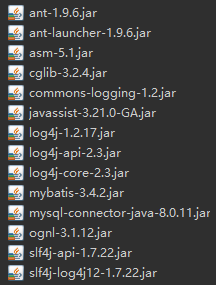
需要将lib下的jar包和mybatid-x-x-x.jar包导入(数据库驱动也需要导入)。
二、mybatis工作流程
2.1 读取mybatis-config.xml配置文件。
2.2 根据mybatis-config.xml中的<mappers>读取映射文件。
2.3 通过mybatis-config.xml构建SqlSessionFactory。
2.4 通过SqlSessionFactory创建sqlSession(包含执行SQL的烦烦烦)。
2.5 mybatis生成executor接口用于操作数据库,它会根据传递的参数来生成需要执行的sql语句。
2.6 executor接口有一个MapperStatement类型的参数(包含SQL语句的id、参数等信息)。
2.7 MapperStatement将传递的参数映射到需要执行的sql语句中,类似JDBC中给sql语句设置参数。
2.8 execute将数据库执行结果映射到对应java对象。
三、Mybatis基本增删改查
首先 建立t_customer表,建表语句如下:
CREATE TABLE `t_customer` (

  `id` int(32) NOT NULL AUTO_INCREMENT,

  `username` varchar(50) DEFAULT NULL,

  `jobs` varchar(50) DEFAULT NULL,

  `phone` varchar(16) DEFAULT NULL,

  PRIMARY KEY (`id`)

) ENGINE=InnoDB AUTO_INCREMENT=9 DEFAULT CHARSET=utf8;

建立完表后,我们首先使用mybatis添加数据。
准备工作:
首先需要在src目录下新建log4j.properties文件(可用采用Properties)。
log4j.properties
# Global logging configuration

log4j.rootLogger=ERROR, stdout

# MyBatis logging configuration...

log4j.logger.com.mybatis=DEBUG  //com.mybatis是本地包名,指该包下所有类的日志级别为DEBUG

# Console output...

log4j.appender.stdout=org.apache.log4j.ConsoleAppender

log4j.appender.stdout.layout=org.apache.log4j.PatternLayout

log4j.appender.stdout.layout.ConversionPattern=%5p [%t] - %m%n
3.1增加用户
Customer.java (用户类)
public class Customer {

    private Integer id;

    private String username;

    private String jobs;

    private String phone;

    public int getId() {

        return id;

    }

    public void setId(Integer id) {

        this.id = id;

    }

    public String getUsername() {

        return username;

    }

    public void setUsername(String username) {

        this.username = username;

    }

    public String getJobs() {

        return jobs;

    }

    public void setJobs(String jobs) {

        this.jobs = jobs;

    }

    public String getPhone() {

        return phone;

    }

    public void setPhone(String phone) {

        this.phone = phone;

    }

    @Override

    public String toString() {

        return "Customer [id=" + id + ", username=" + username + ", jobs=" + jobs + ", phone=" + phone + "]";

    }

}
在src目录下创建一个包(com.xxx.xxx.mapper),在该包下创建文件CustomerMapper.xml
CustomerMapper.xml
<?xml version="1.0" encoding="UTF-8"?>

<!DOCTYPE mapper PUBLIC "-//mybatis.org//DTD Mapper 3.0//EN"

    "http://mybatis.org/dtd/mybatis-3-mapper.dtd">

    <!-- 指定命名空间,一般为包名+映射文件名 -->

    <mapper namespace = "com.mybatis.mapper.CustomerMapper" >

        <!-- 添加用户 id为唯一标识符, 设置参数类型为Customer类型 -->

        <insert id = "addCustomer" parameterType = "com.mybatis.first.Customer">

            insert into t_customer(username, jobs,phone)

            value(#{username}, #{jobs}, #{phone})

        </insert>

    </mapper>
#{}代表一个占位符,#{username}代表接收Customer类型中属性名为username的属性值。
在src目录下创建mybatis-config.xml
mybatis-config.xml
<?xml version="1.0" encoding="UTF-8"?>

<!DOCTYPE configuration PUBLIC "-//mybatis.org//DTD Config 3.0//EN"

    "http://mybatis.org/dtd/mybatis-3-config.dtd">

<configuration>

    <!-- 配置默认环境为mysql -->

    <environments default = "mysql">

    <!-- 配置id为SQL的数据库环境 -->

        <environment id = "mysql">

        <!-- 设置事务管理类型为JDBC -->

            <transactionManager type = "JDBC"/>

            <!-- 设置数据源 -->

            <dataSource type = "POOLED">

                <property name = "driver" value = "com.mysql.jdbc.Driver" />

                <property name = "url" value = "jdbc:mysql://localhost:3306/mybatis" />

                <property name = "username" value = "root" />

                <property name = "password" value = "123456" />

            </dataSource>

        </environment>

    </environments>

    <!-- 设置映射文件 -->

    <mappers>

        <mapper resource = "com/mybatis/mapper/CustomerMapper.xml"/>

    </mappers>

</configuration>
测试添加用户:
import java.io.IOException;

import java.io.InputStream;

import java.util.List;

import org.apache.ibatis.io.Resources;

import org.apache.ibatis.session.SqlSession;

import org.apache.ibatis.session.SqlSessionFactory;

import org.apache.ibatis.session.SqlSessionFactoryBuilder;

public class MybatisTest {

    public static void main(String[] args) throws IOException {

        String resource = "mybatis-config.xml";

        //获取配置文件输入流

        InputStream inputStream = Resources.getResourceAsStream(resource);

        //通过配置文件输入流构建sqlSessionFactory,

        SqlSessionFactory sqlSessionFactory = new SqlSessionFactoryBuilder().build(inputStream);

        //通过sqlSessionFactory获取sqlSession,true代表设置为自动提交。

        SqlSession sqlSession = sqlSessionFactory.openSession(true);

        //创建客户

        Customer customer = new Customer();

        customer.setUsername("hcf");

        customer.setJobs("student");

        customer.setPhone("13611110007");

        //执行CustomerMapper.xml文件中,id为xxxCustomer的语句,参数为customer对象。

        int num = sqlSession.insert("com.mybatis.mapper.CustomerMapper.addCustomer", customer);

        System.out.println(num);

        //如果没有设置自动提交,使用insert、update、delete时需要使用sqlSession.commit()手动提交。

        sqlSession.close();

    }

}


传递的参数为customer,插入语句中#{xxx}代表对象中属性名为xxx的值。
3.2删除客户
再CustomerMapper.xml文件中添加删除语句即可。
<?xml version="1.0" encoding="UTF-8"?>

<!DOCTYPE mapper PUBLIC "-//mybatis.org//DTD Mapper 3.0//EN"

    "http://mybatis.org/dtd/mybatis-3-mapper.dtd">

    <mapper namespace = "com.mybatis.mapper.CustomerMapper" >

        <!-- 添加用户 -->

        <insert id = "addCustomer" parameterType = "com.mybatis.first.Customer">

            insert into t_customer(username, jobs,phone)

            value(#{username}, #{jobs}, #{phone})

        </insert>

        <!-- 删除用户 传递的参数类型为Integer -->

        <delete id = "deleteCustomer" parameterType = "Integer">

            delete from t_customer where id = #{id}

        </delete>

    </mapper>
测试删除
import java.io.IOException;

import java.io.InputStream;

import java.util.List;

import org.apache.ibatis.io.Resources;

import org.apache.ibatis.session.SqlSession;

import org.apache.ibatis.session.SqlSessionFactory;

import org.apache.ibatis.session.SqlSessionFactoryBuilder;

public class MybatisTest {

    public static void main(String[] args) throws IOException {

        String resource = "mybatis-config.xml";

        //获取配置文件输入流

        InputStream inputStream = Resources.getResourceAsStream(resource);

        //通过配置文件输入流构建sqlSessionFactory,

        SqlSessionFactory sqlSessionFactory = new SqlSessionFactoryBuilder().build(inputStream);

        //通过sqlSessionFactory获取sqlSession,true代表设置为自动提交。

        SqlSession sqlSession = sqlSessionFactory.openSession(true);

        //创建客户

        Customer customer = new Customer();

        customer.setId(9);

        customer.setUsername("hcf");

        customer.setJobs("student");

        customer.setPhone("13611110007");

        //执行CustomerMapper.xml文件中,id为xxxCustomer的语句,参数为Integer对象。

        int num = sqlSession.delete("com.mybatis.mapper.CustomerMapper.deleteCustomer", 9);

        System.out.println(num);

        //如果没有设置自动提交,使用insert、update、delete时需要使用sqlSession.commit()手动提交。

        sqlSession.close();

    }

}


3.3修改用户
<?xml version="1.0" encoding="UTF-8"?>

<!DOCTYPE mapper PUBLIC "-//mybatis.org//DTD Mapper 3.0//EN"

    "http://mybatis.org/dtd/mybatis-3-mapper.dtd">

    <mapper namespace = "com.mybatis.mapper.CustomerMapper" >

        <!-- 添加用户 参数类型为Customer-->

        <insert id = "addCustomer" parameterType = "com.mybatis.first.Customer">

            insert into t_customer(username, jobs,phone)

            value(#{username}, #{jobs}, #{phone})

        </insert>

        <!-- 更新(修改)用户 参数类型为Customer -->

        <update id = "updateCustomer" parameterType = "com.mybatis.first.Customer">

            update t_customer set

            username = #{username}, jobs = #{jobs}, phone = #{phone}

            where id = #{id}

        </update>

        <!-- 删除用户 传递的参数类型为Integer -->

        <delete id = "deleteCustomer" parameterType = "Integer">

            delete from t_customer where id = #{id}

        </delete>

    </mapper>
测试修改:
import java.io.IOException;

import java.io.InputStream;

import java.util.List;

import org.apache.ibatis.io.Resources;

import org.apache.ibatis.session.SqlSession;

import org.apache.ibatis.session.SqlSessionFactory;

import org.apache.ibatis.session.SqlSessionFactoryBuilder;

public class MybatisTest {

    public static void main(String[] args) throws IOException {

        String resource = "mybatis-config.xml";

        //获取配置文件输入流

        InputStream inputStream = Resources.getResourceAsStream(resource);

        //通过配置文件输入流构建sqlSessionFactory,

        SqlSessionFactory sqlSessionFactory = new SqlSessionFactoryBuilder().build(inputStream);

        //通过sqlSessionFactory获取sqlSession,true代表设置为自动提交。

        SqlSession sqlSession = sqlSessionFactory.openSession(true);

        //创建客户

        Customer customer = new Customer();

        customer.setId(9);

        customer.setUsername("hcf");

        customer.setJobs("student");

        customer.setPhone("13611110007");

        //执行CustomerMapper.xml文件中,id为xxxCustomer的语句,参数为customer对象。

        int num = sqlSession.update("com.mybatis.mapper.CustomerMapper.updateCustomer", customer);

        System.out.println(num);

        //如果没有设置自动提交,使用insert、update、delete时需要使用sqlSession.commit()手动提交。

        sqlSession.close();

    }

}
首先数据库类有一条数据:

然后我们运行修改语句。


3.4查询用户
<?xml version="1.0" encoding="UTF-8"?>

<!DOCTYPE mapper PUBLIC "-//mybatis.org//DTD Mapper 3.0//EN"

    "http://mybatis.org/dtd/mybatis-3-mapper.dtd">

    <mapper namespace = "com.mybatis.mapper.CustomerMapper" >

        <!-- 根据ID查询 -->

        <select id="findCustomerById" parameterType = "Integer"

        resultType = "com.mybatis.first.Customer">

            select * from t_customer where id = #{id}

        </select>

        <!-- 根据用户名模糊查询 -->

        <select id = "findCustomerByName" parameterType = "String"

                resultType = "com.mybatis.first.Customer">

            select * from t_customer where username like '%${value}%'

        </select>

        <!-- 添加用户 -->

        <insert id = "addCustomer" parameterType = "com.mybatis.first.Customer">

            insert into t_customer(username, jobs,phone)

            value(#{username}, #{jobs}, #{phone})

        </insert>

        <!-- 更新用户 -->

        <update id = "updateCustomer" parameterType = "com.mybatis.first.Customer">

            update t_customer set

            username = #{username}, jobs = #{jobs}, phone = #{phone}

            where id = #{id}

        </update>

        <!-- 删除用户 传递的参数类型为Integer -->

        <delete id = "deleteCustomer" parameterType = "Integer">

            delete from t_customer where id = #{id}

        </delete>

    </mapper>
测试查询
import org.apache.ibatis.io.Resources;

import org.apache.ibatis.session.SqlSession;

import org.apache.ibatis.session.SqlSessionFactory;

import org.apache.ibatis.session.SqlSessionFactoryBuilder;

public class MybatisTest {

    public static void main(String[] args) throws IOException {

        String resource = "mybatis-config.xml";

        //获取配置文件输入流

        InputStream inputStream = Resources.getResourceAsStream(resource);

        //通过配置文件输入流构建sqlSessionFactory,

        SqlSessionFactory sqlSessionFactory = new SqlSessionFactoryBuilder().build(inputStream);

        //通过sqlSessionFactory获取sqlSession,true代表设置为自动提交。

        SqlSession sqlSession = sqlSessionFactory.openSession(true);

        //执行CustomerMapper.xml文件中,id为xxxCustomer的语句,参数为Integer对象。

        List<Customer> customers = sqlSession.selectList("com.mybatis.mapper.CustomerMapper.findCustomerById", 9);

        for(Customer temp : customers) {

            System.out.println(customers);

        }

        //如果没有设置自动提交,使用insert、update、delete时需要使用sqlSession.commit()手动提交。

        sqlSession.close();

    }

}

1.1(Mybatis学习笔记)初识Mybatis的更多相关文章
- Mybatis学习笔记(一) —— mybatis介绍
一.Mybatis介绍 MyBatis 本是apache的一个开源项目iBatis, 2010年这个项目由apache software foundation 迁移到了google code,并且改名 ...
- Mybatis学习笔记(八) —— Mybatis整合spring
一.整合思路 1.SqlSessionFactory对象应该放到spring容器中作为单例存在. 2.传统dao的开发方式中,应该从spring容器中获得sqlsession对象. 3.Mapper代 ...
- MyBatis学习笔记一:MyBatis最简单的环境搭建
MyBatis的最简单环境的搭建,使用xml配置,用来理解后面的复杂配置做基础 1.环境目录树(导入mybatis-3.4.1.jar包即可,这里是为后面的环境最准备使用了web项目,如果只是做 my ...
- MyBatis学习笔记(一)——MyBatis快速入门
转自孤傲苍狼的博客:http://www.cnblogs.com/xdp-gacl/p/4261895.html 一.Mybatis介绍 MyBatis是一个支持普通SQL查询,存储过程和高级映射的优 ...
- MyBatis学习笔记(七)——Mybatis缓存
转自孤傲苍狼的博客:http://www.cnblogs.com/xdp-gacl/p/4270403.html 一.MyBatis缓存介绍 正如大多数持久层框架一样,MyBatis 同样提供了一级缓 ...
- 1.2(Mybatis学习笔记)Mybatis核心配置
一.Mybatis核心对象 1.1SqlSeesionFactory SqlSessionFactory主要作用是创建时SqlSession. SqlSessionFactory可通过SqlSessi ...
- Mybatis学习笔记(九) —— Mybatis逆向工程
一.什么是Mybatis逆向工程? 简单的解释就是通过数据库中的单表,自动生成java代码. 我们平时在使用Mabatis框架进行Web应用开发的过程中,需要根据数据库表编写对应的Pojo类和Mapp ...
- Mybatis学习笔记(二) —— mybatis入门程序
一.mybatis下载 mybaits的代码由github.com管理,下载地址:https://github.com/mybatis/mybatis-3/releases 下载完后的目录结构: 二. ...
- MyBatis学习笔记二:MyBatis生产中使用环境搭建
这里是在上一个环境的基础上修改的,这里就不在给出所有的配置,只给出哪里修改的配置 1.修改POJO对象为注解方式 2.创建Dao层接口 package com.orange.dao; import c ...
- Mybatis学习笔记导航
Mybatis小白快速入门 简介 本人是一个Java学习者,最近才开始在博客园上分享自己的学习经验,同时帮助那些想要学习的uu们,相关学习视频在小破站的狂神说,狂神真的是我学习到现在觉得最GAN的老师 ...
随机推荐
- 设置edittext的样式
1.在res->drawable编写 <?xml version="1.0" encoding="utf-8"?> <shape xml ...
- ansible 部署jdk
playbook 剧本如下 [root@sz_fy_virt_encrypt_33_239 x]# cat jdk.yml - hosts: web remote_user: opsadmin bec ...
- C# using一般用法 (转)
using一般有着以下几种用法: 1.直接引入命名空间 a.using System ,这个是最常用的,就是using+命名空间,这样就可以直接使用命名空间中的类型,而免去了使用详细的命名空间 b.使 ...
- 复选框 checkbox 选中事件
项目中用的jquery-1.11 今天需要检测一个checkbox的选中状态,想当然的用 .attr("checked") ,结果发现,无论是否选中,这个值都是 undefined ...
- java消息中间件入门
消息中间件来解耦服务调用 比如1个登录系统,登录的话需要调用很多系统的其他服务,如果中间调用失败,可能会导致登录信息一致无法返回,同时也增加了系统的耦合度.而用消息中间件的话,则是不发送服务到其他系统 ...
- bzoj1036: [ZJOI2008]树的统计Count link-cut-tree版
题目传送门 这 算是link-cut-tree裸题啊 不过以前好像没有写过单点修改.............. #include<cstdio> #include<cstring&g ...
- bzoj 2749 杂题
我们可以发现,phi(x)与x相比,相当于x的每个质因子-1后再分解质因数,添加到现有的质因子中,比如质因子13相当于将13变成12,然后分解成2*2*3,再将2的质数+2,3的指数+1,除了质因子2 ...
- java 获取当前应用程序路径
package javaapplication1; import javax.swing.JOptionPane; /** * * @author Administrator */ public cl ...
- Linux 开机自动挂载windows分区
blkid 查看 uuid如下ps:或者使用uuidgen <设备>查看具体设备的uuidreddusty@reddusty-X550JK:~$ sudo blkid[sudo] pass ...
- linux下su和su - 的区别
linux使用中常会使用su来切换用户 使用su切换为tom用户 [root@bogon ~]# su tom[tom@bogon root]$ [tom@bogon root]$ pwd/root ...