
1.2(Mybatis学习笔记)Mybatis核心配置
一、Mybatis核心对象
1.1SqlSeesionFactory
SqlSessionFactory主要作用是创建时SqlSession。
SqlSessionFactory可通过SqlSessionFactoryBuild构建,
调用器build方法,方法参数为配置文件的输入流。
String resource = "mybatis-config.xml";

        //获取配置文件输入流

        InputStream inputStream = Resources.getResourceAsStream(resource);

        //通过配置文件输入流构建sqlSessionFactory,

        SqlSessionFactory sqlSessionFactory = new SqlSessionFactoryBuilder().build(inputStream);
1.2SqlSession
SqlSession负责程序与持久层之间的交互操作。
SqlSession中包含了所有执行SQL语句的方法,
且该对象是线程不安全的。
SqlSession主要方法:
<T> T selectOne(String statement);
执行查询方法,statement代表mapper文件中<select>元素对应的id.
方法结束会返回一个对象。
<T> T selectOne(String statement,Object parameter);
执行查询方法,statement代表mapper文件中<select>元素对应的id,
parameter代表查询语句所需的参数。
<E> List<E> selectList(String statement, Object parameter)
与上列函数功能相同,返回的是一个List对象。
int insert(String statement)
statement表示mapper文件中<insert>元素的id,执行插入语句后,返回受影响的行数。
int insert(String statement, Object parameter)
parameter代表插入语句所需的参数对象,结果返回受影响函数。
int update(String statement)
执行更新语句,statement为mapper文件中<update>元素的id,返回受影响函数。
int update(String statement, Object parament);
执行更新语句,parameter为语句所需参数,返回受影响行数。
int delete(String statement)//执行删除语句,statement为<delete>元素id,返回受影响行数
int delete(String statement, Object parameter);执行删除语句,parameter为语句所需参数。
void commit()//提交事务
voidrollBack();//回滚事务。
二、mybatis配置元素
2.1<configuration>
<configuration>根元素,mybatis的其他配置元素都需要在该元素类配置。
2.2<properties>
<properties>:通过外部的配置动态替换内部的配置。
例如:
2.2.1在src目录下新建一个db.properties
#dataSource

#Sat Mar 02 13:31:50 CST 2019

jdbc.url=jdbc\:mysql\://localhost\:3306/mybatis

jdbc.driver=com.mysql.jdbc.Driver

jdbc.username=root

jdbc.password=123456
2.2.2 在mybatis-config.xml中配置<properties>
<properties resource = "db.properties">
2.2.3 修改mybatis-congfig.xml中的DataSource配置
<dataSource type = "POOLED">

                <property name = "driver" value = "${jdbc.driver}" />

                <property name = "url" value = "${jdbc.url}" />

                <property name = "username" value = "${jdbc.username}" />

                <property name = "password" value = "${jdbc.password}" />

            </dataSource>
2.3<settings>
<settings>:更改mybatis的运行行为,例如开启二级缓存,开启延迟等。图片来自:https://blog.csdn.net/fageweiketang/article/details/80767532
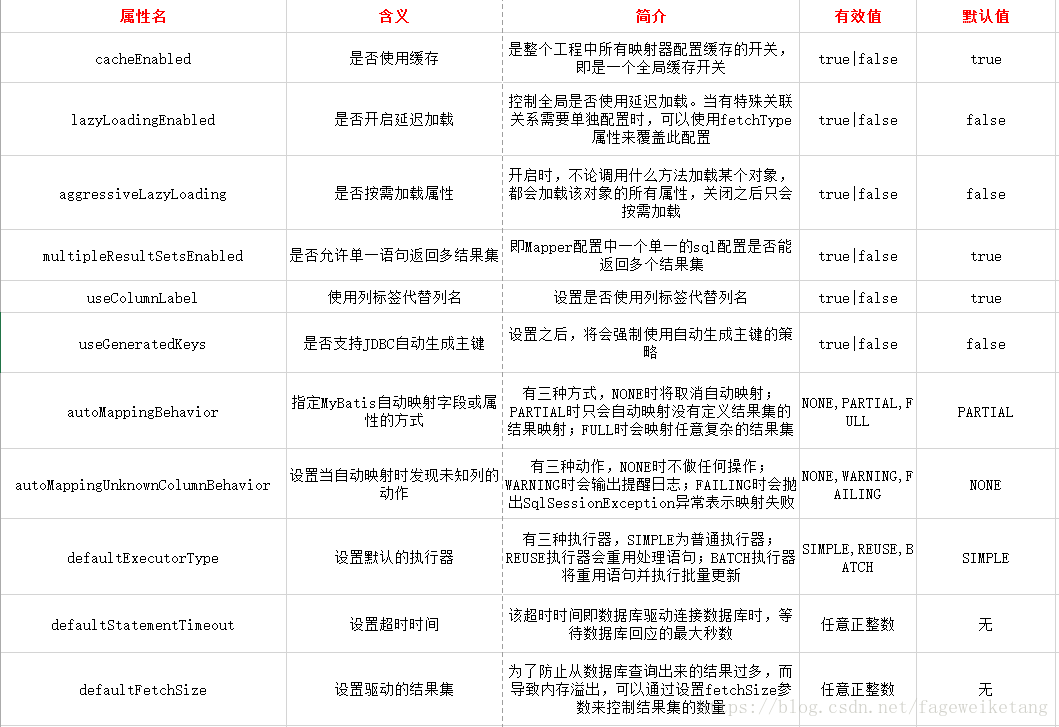
使用时指定属性name和value即可,具体如下:
<settings>

    <setting name="cacheEnabled" value="true"/>

    <setting name="lazyLoadingEnabled" value="true"/>

    <setting name="multipleResultSetsEnabled" value="true"/>
            ...

</settings>
2.4<typeAliases>:为配置文件中的java了设置别名。
<typeAliases>

    <typeAlias> alias = "user" type = "com.xxx.xxx.User" />

</typeAliases>
将com.xxx.xxx.User起一个别名uesr。如果alias缺省,则会自动将类名首字母小写后作为别名。
<typeAliases>

   <package name = "com.xx.xxx"/>

</typeAliases>
自动扫描指定包下所有类,自动将类名首字母为小写作为别名。
例如com.xxx.xxx.User的别名为user。
可以使用注解指定别名
@Alias("author")

public class Author {

    ...

}
mybatis默认别名:
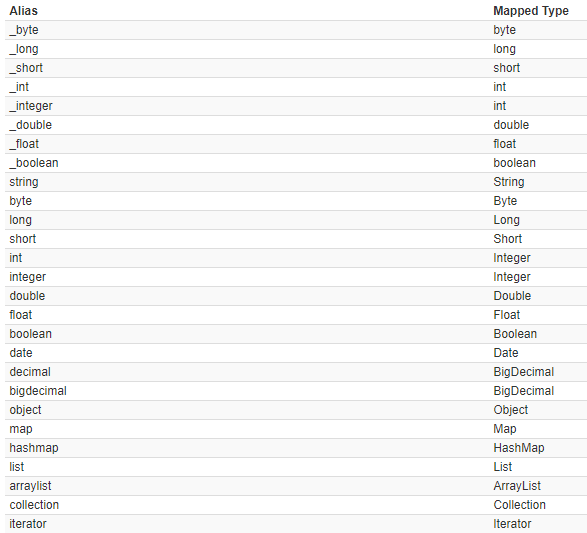
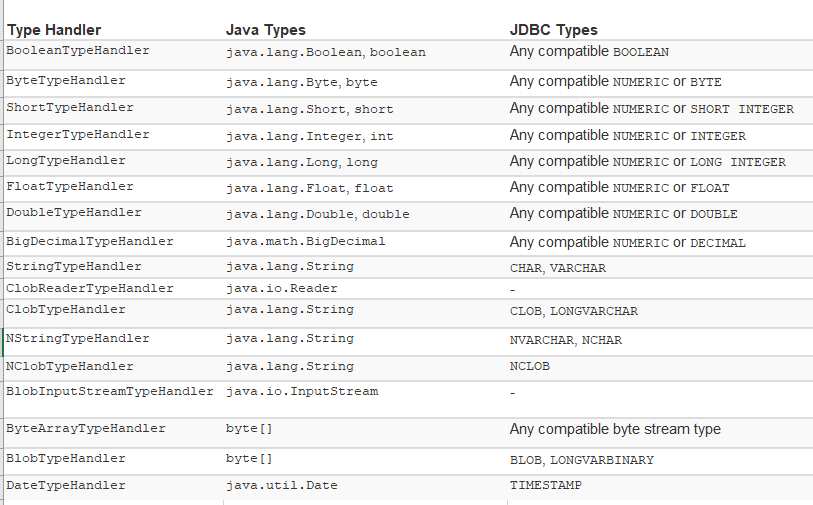
2.5<typeHandlers>

2.6<objectFactory>
每次MyBatis创建结果对象的新实例时,都会使用ObjectFactory实例来执行此操作。
2.7<plugins>
MyBatis允许在映射语句的执行过程中的某一点进行拦截调用。
2.8<environments>
<environments>主要对环境进行配置,内部可包含多个<environment>,其实就是数据源的配置,MyBatis允许配置多个数据源。
<environment>中不同的id区分不同的数据源,需要注意的是每一个数据库都对应一个SqlSessionFactory实例。如果有两个
数据库则需要构建两个实例。
构建不同的SqlSessionFactory实例,通过<environment>的id区分。
SqlSessionFactory factory = new SqlSessionFactoryBuilder().build(reader, environment);
例如配置如下:
<environments default = "mysql">

    <!-- 配置id为SQL的数据库环境 -->

        <environment id = "my">  <!--区分不同数据库,构建不同的SqlSessionFactory-->

        <!-- 设置事务管理类型为JDBC -->

            <transactionManager type = "JDBC"/>

            <!-- 设置数据源 -->

            <dataSource type = "POOLED">

                <property name = "driver" value = "${jdbc.driver}" />

                <property name = "url" value = "${jdbc.url}" />

                <property name = "username" value = "${jdbc.username}" />

                <property name = "password" value = "${jdbc.password}" />

            </dataSource>

        </environment>
     <environment id= "you">
        ...
     </environment>

    </environments>
     String resource = "mybatis-config.xml";

        //获取配置文件输入流

        InputStream inputStream = Resources.getResourceAsStream(resource);

        //通过配置文件输入流构建sqlSessionFactory,

        SqlSessionFactory sqlSessionFactory = new SqlSessionFactoryBuilder().build(inputStream,"my");//不同的id区分数据库
SqlSessionFactory sqlSessionFactory = new SqlSessionFactoryBuilder().build(inputStream,"you");//不同的id区分数据库
2.9<transactionManager>
在MyBatis中可以配置两种事务管理类型,一种是JDBC、一种是MANAGED。
JDBC:这种配置只是直接使用JDBC提交和回滚功能。它依赖从数据源检索到的连接来管理事务的范围。
MANAGED:此配置几乎不起作用。它从不提交或回滚连接。相反,它允许容器管理事务的整个生命周期
(例如,JEE应用程序服务器上下文)。默认情况下,它会关闭连接。但是,有些容器并不期望这样做,
因此如果需要阻止它关闭连接,请将“closeConnection”属性设置为false。
<transactionManager type="MANAGED">

  <property name="closeConnection" value="false"/>

</transactionManager>
注:如果计划将MyBatis与Spring一起使用,则无需配置任何TransactionManager,因为Spring模块将设置一个覆盖以前任何设置的配置。
2.10<dataSource>
<dataSource>:dataSource元素用于配置JDBC连接资源对象,使用标准的JDBC数据资源接口。
该元素有三种数据源类型(UNPOOLED、POOLED、JNDI)
UNPOOLED:每次请求数据源时,该数据源的实现只需打开和关闭一个连接。虽然速度有点慢,
但对于不需要立即可用连接性能的简单应用程序来说,这是一个不错的选择。
因此对于某些人来说,池可能不那么重要,这种配置将是理想的。
属性配置:
driver:JDBC驱动的java类,(例如com.mysql.jdbc.Driver)
url:数据库的连接地址。
username:数据库登录名
password:登录密码
defaultTransactionlsolationLevel:默认的连接事务隔离级别。
POOLED:他实现了连接池JDBC连接对象,以避免创建新连接实例所需的初始连接和身份验证时间。
这是一种流行的并发Web应用程序实现最快响应的方法。
属性配置:
除了上述五个配置外,该类型还支持如下配置:
poolMaximumActiveConnections :这是可以在任何给定时间存在的活动(即正在使用)连接数。默认值:10
poolMaximumIdleConnections :任意给定时间能够存在的空闲连接数。
poolMaximumCheckoutTime:
poolTimeToWait 使池有机会打印日志状态,并在连接花费异常长的情况下重新尝试获取连接
(以避免在池配置错误的情况下永远无提示地失败)。默认值:20000ms(即20秒)
poolMaximumLocalBadConnectionTolerance 如果获得一个坏的连接,它还有机会重新尝试获得另一个有效的连接。
但重试时间不应超过该属性设置的值。
poolPingQuery :ping查询被发送到数据库,以验证连接是否处于良好的工作状态,并准备好接受请求。
默认值是“no ping query set”,这将导致大多数数据库驱动程序失败,并显示一条错误消息。
poolPingEnabled :可以启用或禁止ping query,如果启用,还必须使用有效的SQL语句设置PoolpingQuery属性.默认为false.
JNDI:可以在EJB或者引用服务器等容器中使用,容器可以集中或在外部配置数据源,然后放置一个JNDI上下文引用。
配置属性:
initial_context:主要用于在InitialContext中寻找上下文,该属性为可选属性。
data_source:此属性表示引用数据源实例位置的上下文路径。
2.11<mappers>
定义了映射SQL语句后,需要告诉MyBtis在哪里找到映射文件,<mappers>就是提供这样的功能。
可以通过一下方法告知映射文件位置:
2.11.1使用类路径相关资源
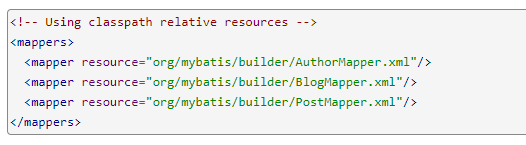
2.11.2使用URL路径
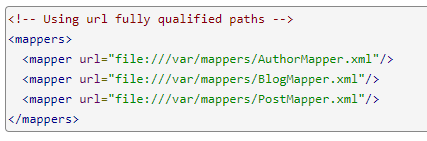
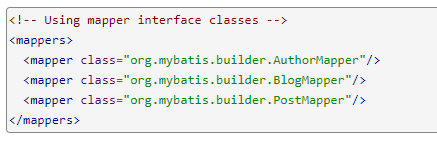
2.11.3使用接口类
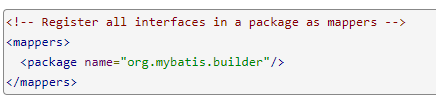
2.11.4将包下所有接口注册为映射
三、映射文件配置元素
3.1 <select>
<select>元素主要用于编写查询语句,可指定属性:
id:唯一标识符,代表该语句。
parameterType:传递的参数类型。
resultType:返回值类型。
flushCache:设置是否清空缓存,默认为fasle。
userCache:是否开启缓存,默认为true.
timeout:设置超时时间。
fetchSize:指定获取记录的总条数。
statementType:指定语句的类型.(例如Statement,PreparedStatement...)
resultSetType:表示结果集类型。
<select id="findCustomerById" parameterType = "Integer"

        resultType = "com.mybatis.first.Customer">

            select * from t_customer where id = #{id}

        </select>
参数类型为Integer,返回值类型为Customer,#{}类似占位符,#{id}代表为其设置的参数。
3.2<insert>
该元素用于映射插入语句,返回一个数字表示插入的行数。
属性:
keyProperty:(仅对update、insert有效)将插入或删除语句的返回值赋给PO类的某个属性。
useGeneratedKeys:获取数据库主键(数据库内部自动增加的字段),默认为fasle.
两者需要配合使用,设置useGeneratedKeys=“true”并将keyProperty设置为目标属性。
<!-- 添加用户 -->

        <insert id = "addCustomer" parameterType = "com.mybatis.first.Customer"

                keyProperty="id" useGeneratedKeys="true">

            insert into t_customer(username, jobs,phone)

            value(#{username}, #{jobs}, #{phone})

        </insert>
import java.io.IOException;

import java.io.InputStream;

import java.util.HashMap;

import java.util.Iterator;

import java.util.List;

import java.util.Map;

import java.util.Set;

import org.apache.ibatis.io.Resources;

import org.apache.ibatis.session.SqlSession;

import org.apache.ibatis.session.SqlSessionFactory;

import org.apache.ibatis.session.SqlSessionFactoryBuilder;

public class MybatisTest {

    public static void main(String[] args) throws IOException {

        String resource = "mybatis-config.xml";

        //获取配置文件输入流

        InputStream inputStream = Resources.getResourceAsStream(resource);

        //通过配置文件输入流构建sqlSessionFactory,

        SqlSessionFactory sqlSessionFactory = new SqlSessionFactoryBuilder().build(inputStream,"my");

        //通过sqlSessionFactory获取sqlSession,true代表设置为自动提交。

        SqlSession sqlSession = sqlSessionFactory.openSession(true);

        //执行CustomerMapper.xml文件中,id为xxxCustomer的语句,参数为Integer对象。

        Customer customer = new Customer();

        customer.setJobs("student");

        customer.setPhone("135xxxx9876");

        customer.setUsername("zrx");

        int customers = sqlSession.insert("com.mybatis.mapper.CustomerMapper.addCustomer", customer);

        System.out.println(customer.getId());

        System.out.println(customers);

        //如果没有设置自动提交,使用insert、update、delete时需要使用sqlSession.commit()手动提交。

        sqlSession.close();

    }

}


对于不支持主键自动增长的数据库,可通过如下方式实现主键自动增长。
    <!-- 添加用户 -->

        <insert id = "addCustomer" parameterType = "com.mybatis.first.Customer" >

            <selectKey keyProperty = "id" resultType = "Integer" order = "BEFORE">

                select if(max(id) is null,1,max(id) + 1) as newId from t_customer

            </selectKey>

            insert into t_customer(id,username, jobs,phone)

            value(#{id},#{username}, #{jobs}, #{phone})

        </insert>
寻找表中最大id,如果为空则设置为1,不为空则设置为最大id+1。
order属性可设置为:BEFORE,AFTER。BEFORE代表在执行语句之前执行
<selectKey>,AFTER代表在<selectKey>之后执行语句。
3.3 update和delete
update和delete的属性与上述语句中属性基本一样。
<update

    id = "updateCustomer"

    parameterType = "com.xxx.xxx.Customer"

    flushCache = "true"

    statementType = "PREPARED"

    timeout = "20">

......

</update>
<delete

    id = "updateCustomer"

    parameterType = "com.xxx.xxx.Customer"

    flushCache = "true"

    statementType = "PREPARED"

    timeout = "20">

......

</delete>
3.4<sql>
<sql>元素用于定义可重用的SQL代码片段,然后在其他语句中应用这个定义的片段。
例如:
<sql   id = "customerColumns">

    id,username,jobs,phone

</sql>

<select>

      select <include refid = "customerColumns"/>

      from t_customer

      where id = #{id}

</select>
其实还可以更灵活的使用<sql>元素:
<sql   id = "customerColumns">

    id,username,jobs,phone

</sql>

<sql id = "tablename">

    ${prefix}customer

</sql>

<sql id = "someinclude">

    from

    <include refid = "${include_target}"/>

</sql>

<sql>

<select id = "findCustomerById" parameterType = "Integer"

    resultType = "com.xxx.xxx.Customer">

    select

    <include refid = "customerColumns"/>

    <include refid = "someinclude">

        <property name = "prefix" value = "t_"/>

        <property name = "include_target" value = "tablename"/>

    </include>

    where id = #{id}

</select>
首先<insert>中首先包含"customerColumns",语句就变成了select id,username,jobs,phone
然后再包含"someinclude", someinclude中首先有from,然后又包含了refid = ${include_targer},
${include_targer}即获取include_target属性的值,就变成了refid = "tablename".
tablename中同样先获取prefix属性的值(${prefix})“t_”,于是语句最后就变成了:
select id,username,jobs,phone from t_customer where id = #{id}。
3.5<resultMap>
<resultMap>主要用于建立数据库中列名与POJO类属性的映射关系,
当列名与POJO类属性同名时,MyBatis会自动填充。但如果不同名时,
需要指定映射关系,MyBatis才会对其填充。
属性:
id:<resutlMap>的唯一标识符
type:需要映射的POJO类。
子元素:
id:指定主键与POJO属性之间映射,property指定POJO类属性名,column指定列名。
result:指定列名和POJO类属性映射,property指定POJO类属性名,column指定列名。
Customer.java
public class Customer {

    private Integer id;

    private String username;

    private String jobs;

    private String phone;

    public int getId() {

        return id;

    }

    public void setId(Integer id) {

        this.id = id;

    }

    public String getUsername() {

        return username;

    }

    public void setUsername(String username) {

        this.username = username;

    }

    public String getJobs() {

        return jobs;

    }

    public void setJobs(String jobs) {

        this.jobs = jobs;

    }

    public String getPhone() {

        return phone;

    }

    public void setPhone(String phone) {

        this.phone = phone;

    }

    @Override

    public String toString() {

        return "Customer [id=" + id + ", username=" + username + ", jobs=" + jobs + ", phone=" + phone + "]";

    }

}
创建t_custoemr表:
CREATE TABLE `t_customer` (

  `t_id` int(32) NOT NULL AUTO_INCREMENT,

  `t_username` varchar(50) DEFAULT NULL,

  `t_jobs` varchar(50) DEFAULT NULL,

  `t_phone` varchar(16) DEFAULT NULL,

  PRIMARY KEY (`t_id`)

) ENGINE=InnoDB AUTO_INCREMENT=16 DEFAULT CHARSET=utf8;

CustomerMapper.xml
<?xml version="1.0" encoding="UTF-8"?>

<!DOCTYPE mapper PUBLIC "-//mybatis.org//DTD Mapper 3.0//EN"

    "http://mybatis.org/dtd/mybatis-3-mapper.dtd">

    <mapper namespace = "com.mybatis.mapper.CustomerMapper" >

   <!--结果映射,将列名与Customer属性建立映射关系-->

    <resultMap type="com.mybatis.first.Customer" id="re">

        <id property="id" column="t_id"/>

        <result property = "username" column="t_username"/>

        <result property = "jobs" column="t_jobs"/>

        <result property="phone" column="t_phone" />

    </resultMap>

        <!--查找所有用户-->

        <select id="findAllCustomer" resultMap="re">

            select * from t_customer

        </select>

        <!-- 添加用户 -->

        <insert id = "addCustomer" parameterType = "com.mybatis.first.Customer" >

            <selectKey keyProperty = "id" resultType = "Integer" order = "BEFORE">

                select if(max(t_id) is null,1,max(t_id) + 1) as newId from t_customer

            </selectKey>

            insert into t_customer(t_id,t_username, t_jobs,t_phone)

            value(#{id},#{username}, #{jobs}, #{phone})

        </insert>

    </mapper>
测试:
import java.io.IOException;

import java.io.InputStream;

import java.util.HashMap;

import java.util.Iterator;

import java.util.List;

import java.util.Map;

import java.util.Set;

import org.apache.ibatis.io.Resources;

import org.apache.ibatis.session.SqlSession;

import org.apache.ibatis.session.SqlSessionFactory;

import org.apache.ibatis.session.SqlSessionFactoryBuilder;

public class MybatisTest {

    public static void main(String[] args) throws IOException {

        String resource = "mybatis-config.xml";

        //获取配置文件输入流

        InputStream inputStream = Resources.getResourceAsStream(resource);

        //通过配置文件输入流构建sqlSessionFactory,

        SqlSessionFactory sqlSessionFactory = new SqlSessionFactoryBuilder().build(inputStream,"my");

        //通过sqlSessionFactory获取sqlSession,true代表设置为自动提交。

        SqlSession sqlSession = sqlSessionFactory.openSession(true);

        //执行CustomerMapper.xml文件中,id为xxxCustomer的语句,参数为Integer对象。

        Customer customer = new Customer();

        customer.setJobs("student");

        customer.setPhone("135xxxx9876");

        customer.setUsername("zrx");

        int num = sqlSession.insert("com.mybatis.mapper.CustomerMapper.addCustomer",customer);

        List<Customer> customers = sqlSession.selectList("com.mybatis.mapper.CustomerMapper.findAllCustomer", customer);

        for(Customer temp : customers) {

            System.out.println(customers);

        }

        //如果没有设置自动提交,使用insert、update、delete时需要使用sqlSession.commit()手动提交。

        sqlSession.close();

    }

}


参考资料:
http://www.mybatis.org/mybatis-3/sqlmap-xml.html
1.2(Mybatis学习笔记)Mybatis核心配置的更多相关文章
- MyBatis学习笔记-1 Idea配置MyBatis
一.创建工程 1.创建Java项目,勾选Java EE,Next,修改名称,Finish 2.在WEB-INF下创建两个文件夹classes和lib,分别用作输出文件目录和库文件目录 3.File-P ...
- Mybatis学习笔记-Mybatis简介
如何获得Mybatis 中文文档 https://github.com/tuguangquan/mybatis Github https://github.com/mybatis/mybatis-3 ...
- mybatis学习笔记(一)
mybatis学习笔记 mybatis简介 Mybatis 开源免费框架.原名叫iBatis,2010在googlecode,2013年迁移到 github 作用: 数据访问层框架,底层对JDBC进行 ...
- MyBatis:学习笔记(1)——基础知识
MyBatis:学习笔记(1)--基础知识 引入MyBatis JDBC编程的问题及解决设想 ☐ 数据库连接使用时创建,不使用时就释放,频繁开启和关闭,造成数据库资源浪费,影响数据库性能. ☐ 使用数 ...
- Mybatis学习笔记二
本篇内容,紧接上一篇内容Mybatis学习笔记一 输入映射和输出映射 传递简单类型和pojo类型上篇已介绍过,下面介绍一下包装类型. 传递pojo包装对象 开发中通过可以使用pojo传递查询条件.查询 ...
- Mybatis学习笔记之二(动态mapper开发和spring-mybatis整合)
一.输入映射和输出映射 1.1 parameterType(输入类型) [传递简单类型] 详情参考Mybatis学习笔记之一(环境搭建和入门案例介绍) 使用#{}占位符,或者${}进行sql拼接. [ ...
- mybatis学习笔记(五):mybatis 逆向工程
mybatis学习笔记(五):mybatis 逆向工程 在日常开发中,如果数据库中存在多张表,自己手动创建 多个pojo 类和编写 SQL 语法配置文件,未免太过繁琐,mybatis 也提供了一键式生 ...
- mybatis 学习笔记(四):mybatis 和 spring 的整合
mybatis 学习笔记(四):mybatis 和 spring 的整合 尝试一下整合 mybatis 和 spring. 思路 spring通过单例方式管理SqlSessionFactory. sp ...
- mybatis 学习笔记(一):mybatis 初认识
mybatis 学习笔记(一):mybatis 初认识 简介 MyBatis是一个Java持久层框架,它通过XML描述符或注解把对象与存储过程或SQL语句关联起来.mybatis 可以将 prepar ...
- mybatis学习笔记之基础框架(2)
mybatis学习笔记之基础框架(2) mybatis是一个持久层的框架,是apache下的顶级项目. mybatis让程序将主要精力放在sql上,通过mybatis提供的映射方式,自由灵活生成满足s ...
随机推荐
- B. Minimum Ternary String (这个B有点狠)
B. Minimum Ternary String time limit per test 1 second memory limit per test 256 megabytes input sta ...
- photo@PKU
- bzoj Gty的超级妹子树 块状树
Gty的超级妹子树 Time Limit: 7 Sec Memory Limit: 32 MBSubmit: 500 Solved: 122[Submit][Status][Discuss] De ...
- Activiti工作流引擎核心介绍
引言 Activiti 作为一个遵从 Apache 许可的工作流和业务流程管理开源平台,其核心是基于 Java 的超快速.超稳定的 BPMN 2.0 流程引擎,强调流程服务的可嵌入性和可扩展性,同时更 ...
- HDU3790---(双权最短路径)
题目:http://acm.hdu.edu.cn/showproblem.php?pid=3790 最短路径问题 Time Limit: 2000/1000 MS (Java/Others) M ...
- [洛谷P2124] 奶牛美容
洛谷题目链接:奶牛美容 题目描述 输入输出格式 输入格式: 输出格式: 输入输出样例 输入样例#1: 6 16 ................ ..XXXX....XXX... ...XXXX... ...
- [BZOJ1004] [HNOI2008]Cards解题报告(Burnside引理)
Description 小春现在很清闲,面对书桌上的N张牌,他决定给每张染色,目前小春只有3种颜色:红色,蓝色,绿色.他询问Sun有多少种染色方案,Sun很快就给出了答案.进一步,小春要求染出Sr张红 ...
- React第三次入门
传统HTML开发在处理越来越多的服务器数据和用户交互数据反应到复杂界面的时候,代码量越来越大,难以维护. Angular是基于MVVM的开发框架,重量级..不适用于移动端的web栈, 其UI组件的封装 ...
- Linux上使用程序相对路径访问文件【转】
转自:http://blog.csdn.net/yinxusen/article/details/7444249 今天一个朋友问我这个问题,说为什么在Windows上跑得很好的应用程序,移植到Linu ...
- python学习笔记 可变参数关键字参数**kw相关学习
在Python中可以定义可变参数,顾名思义,可变参数就是传入参数是可变的.可以是任意个,以一个简单的数学编程为例,计算 sum = a * a + b * b + .....z * z 函数定义可以如 ...