
Django celery 使用
0.安装包
cachetools              3.1.1
celery                  3.1.26.post2
celery-with-redis       3.0
certifi                 2019.9.11
Django                  2.2.6
django-allauth          0.40.0
django-appconf          1.0.3
django-celery           3.3.1
django-celery-results   1.0.0
django-compressor       2.3
django-contrib-comments 1.9.1
django-cors-headers     3.1.1
django-crispy-forms     1.8.0
django-environ          0.4.5
django-filter           2.2.0
django-fluent-comments  2.1
django-formtools        2.1
django-haystack         2.8.1
django-import-export    1.2.0
django-markdownx        2.0.28
django-redis            4.10.0
django-redis-cache      2.1.0
django-redis-sessions   0.6.1
django-rest-auth        0.9.5
django-rest-framework   0.1.0
django-reversion        3.0.4
django-tag-parser       3.1
django-taggit           1.1.0
django-test-plus        1.3.1
django-tinymce          2.8.0
django-validator        0.2.7
djangorestframework     3.10.3
djangorestframework-jwt 1.11.0
flower                  0.9.3
PyMySQL                 0.9.3
redis                   2.10.6
tornado                 5.1.1
1.celery设置
INSTALLED_APPS = [
    'django.contrib.admin',
    'django.contrib.auth',
    'django.contrib.contenttypes',
    'django.contrib.sessions',
    'django.contrib.messages',
    'django.contrib.staticfiles',
    'steam_user',  # steam
    'djcelery',    # celery  注册到应用中
    'rest_framework',
]

REDIS_HOST = '10.133.3.26'
REDIS_POST = 6379
REDIS_DATABASE = 3
REDIS_PASSWORD = ''

import djcelery

djcelery.setup_loader()
# celery中间人 redis://redis服务所在的ip地址:端口/数据库号
BROKER_URL = 'redis://:{}@{}:{}/{}'.format(REDIS_PASSWORD, REDIS_HOST, REDIS_POST, REDIS_DATABASE)
# celery结果返回,可用于跟踪结果
CELERY_RESULT_BACKEND = 'redis://:{}@{}:{}/{}'.format(REDIS_PASSWORD, REDIS_HOST, REDIS_POST, REDIS_DATABASE)
CELERY_IMPORTS = ('apps.steam_user.tasks')  # tasks 路径
CELERY_BROKER_URL = 'redis://:{}@{}:{}/{}'.format(REDIS_PASSWORD, REDIS_HOST, REDIS_POST, REDIS_DATABASE)

# celery内容等消息的格式设置
CELERY_ACCEPT_CONTENT = ['application/json', ]
CELERY_TASK_SERIALIZER = 'json'
CELERY_RESULT_SERIALIZER = 'json'

# celery时区设置,使用settings中TIME_ZONE同样的时区
CELERY_TIMEZONE = 'Asia/Shanghai'
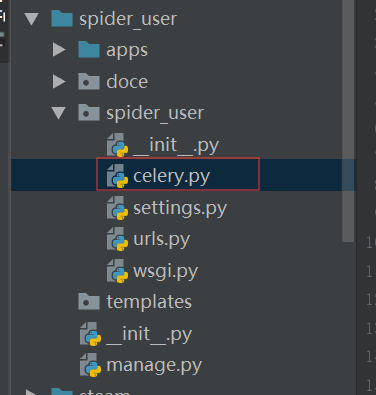
2.在项目目录下创建celery.py文件 与setting.py同级目录
from __future__ import absolute_import, unicode_literals

from celery import Celery
from django.conf import settings
from os import path, environ

project_name = path.split(path.dirname(__file__))[-1]  # okr_manage
project_settings = "{}.settings".format(project_name)
# 设置环境变量
environ.setdefault("DJANGO_SETTINGS_MODULE", project_settings)

# 实例化Celery
app = Celery(project_name)

# 使用django的settings文件配置celery
app.config_from_object("django.conf:settings")

# Celery加载所有注册的应用
app.autodiscover_tasks(lambda: settings.INSTALLED_APPS)

@app.task(bind=True)
def debug_task(self):
    print("Request: {0!r}".format(self.request))
3.在应用下创建tasks.py文件
from __future__ import absolute_import, unicode_literals
import time, requests, json, hashlib
from celery import task, shared_task
from apps.steam_user.query import game_app_query, achievement_query, delete_games_query, steam_friends_query, \
    delete_friends_query, steam_wishlist_query, delete_wishlist_query
from spider_user.settings import MD5_KEY
from apps.steam_user.request_data import user_info

@shared_task()   # 装饰
def steam_game_app(user_id, body):   # 游戏  游戏成就
    headers = {
        "User-Agent": "Mozilla/5.0 (Windows NT 10.0; Win64; x64) AppleWebKit/537.36 (KHTML, like Gecko) Chrome/54.0.2840.99 Safari/537.36",
        "Accept-Language": "zh-CN,zh;q=0.9,en;q=0.8", }
    response = requests.get(
        url='http://api.steampowered.com/IPlayerService/GetOwnedGames/v1?key=23241F06EEB8234C46D8F390A718F71F&steamid={}&include_appinfo=true&include_played_free_games=true'.format(
            user_id),
        headers=headers, verify=False).content.decode('utf-8')
    app_origin_id_lists = []
    data_dict = json.loads(response)
    if data_dict['response']:
        for data in data_dict['response']['games']:
            item = {}
            item['steamid'] = user_id
            item['appid'] = data['appid']
            app_origin_id_lists.append(item['appid'])
            item['create_time'] = time.strftime("%Y-%m-%d %X")
            item['play_tim'] = data['playtime_forever']
            try:
                item['last_run_time'] = data['playtime_2weeks']
            except:
                item['last_run_time'] = 0
            game_app_query(item)
            achievement_response = requests.get(
                url='http://api.steampowered.com/ISteamUserStats/GetPlayerAchievements/v1/?key=23241F06EEB8234C46D8F390A718F71F&steamid={}&appid={}&l=schinese'.format(
                    user_id, item['appid']),
                headers=headers, verify=False).content.decode('utf-8')
            data_dict = json.loads(achievement_response)
            try:
                data_list = data_dict['playerstats']['achievements']
            except:
                data_list = []
            for data in data_list:
                item['is_finish'] = data['achieved']
                item['english_name'] = data['apiname']
                item['achieve_name'] = data['name'].replace('"', '“')
                item['achieve_time'] = time.strftime('%Y-%m-%d %H:%M:%S', time.localtime(int(data['unlocktime'])))
                achievement_query(item)
        if app_origin_id_lists:
            print(app_origin_id_lists)
            print('*' * 100)
            item = {}
            item['steamid'] = user_id
            item['spider_member_app_list'] = app_origin_id_lists
            delete_games_query(item)
        item = {
            'code': 0,
            'message': '抓取成功'.encode("utf-8").decode("latin1"),
            'body': body['body'],
        }
        local_time = str(int(time.time() * 1000))
        md_data = '{}&{}&{}'.format(json.dumps(body, ensure_ascii=False), MD5_KEY, local_time).replace(' ', '')
        access_token = hashlib.md5(md_data.encode('utf-8')).hexdigest()
        headers = {
            'Content-Type': 'application/json',
            'time': local_time,
            'accessToken': access_token,
            'isTimer': 'False'
        }
        requests.post(url='http://10.133.3.144:7071/spider/callback', data=json.dumps(item, ensure_ascii=False),
                      headers=headers)
        return 'ok'
    else:
        item = {
            'code': 403,
            'message': '用户设为隐私'.encode("utf-8").decode("latin1"),
            'body': body['body'],
        }
        local_time = str(int(time.time() * 1000))
        md_data = '{}&{}&{}'.format(json.dumps(body, ensure_ascii=False), MD5_KEY, local_time).replace(' ', '')
        access_token = hashlib.md5(md_data.encode('utf-8')).hexdigest()
        headers = {
            'Content-Type': 'application/json',
            'time': local_time,
            'accessToken': access_token,
            'isTimer': 'False'
        }
        requests.post(url='http://10.133.3.144:7071/spider/callback', data=json.dumps(item, ensure_ascii=False),
                      headers=headers)
        return 'ok'

@shared_task()
def steam_friends(user_id, body):   # 用户好友
    headers = {
        "User-Agent": "Mozilla/5.0 (Windows NT 10.0; Win64; x64) AppleWebKit/537.36 (KHTML, like Gecko) Chrome/54.0.2840.99 Safari/537.36",
        "Accept-Language": "zh-CN,zh;q=0.9,en;q=0.8", }
    response = requests.get(
        url='http://api.steampowered.com/ISteamUser/GetFriendList/v1/?key=23241F06EEB8234C46D8F390A718F71F&steamid={}'.format(
            user_id),
        headers=headers, verify=False).content.decode('utf-8')

    if json.loads(response):
        friends_list = []
        for data in json.loads(response)['friendslist']['friends']:
            item = {}
            item['steamid_pid'] = user_id
            item['steamid'] = data['steamid']
            friends_list.append(item['steamid'])
            item['relationship'] = data['relationship']
            item['friend_since'] = time.strftime('%Y-%m-%d %H:%M:%S', time.localtime(int(data['friend_since'])))
            item['create_time'] = time.strftime("%Y-%m-%d %X")
            data = user_info(item)
            item['personaname'] = data['personName']
            item['avatarfull'] = data['headPortrait184']
            steam_friends_query(item)
        if friends_list:
            item = {}
            item['steamid_pid'] = user_id
            item['friends_list'] = friends_list
            delete_friends_query(item)
        item = {
            'code': 0,
            'message': '抓取成功'.encode("utf-8").decode("latin1"),
            'body': body['body'],
        }
        local_time = str(int(time.time() * 1000))
        md_data = '{}&{}&{}'.format(json.dumps(body, ensure_ascii=False), MD5_KEY, local_time).replace(' ', '')
        access_token = hashlib.md5(md_data.encode('utf-8')).hexdigest()
        headers = {
            'Content-Type': 'application/json',
            'time': local_time,
            'accessToken': access_token,
            'isTimer': 'False'
        }
        requests.post(url='http://10.133.3.144:7071/spider/callback', data=json.dumps(item, ensure_ascii=False),
                      headers=headers)
        return 'ok'
    else:
        item = {
            'code': 403,
            'message': '用户设为隐私'.encode("utf-8").decode("latin1"),
            'body': body['body'],
        }
        local_time = str(int(time.time() * 1000))
        md_data = '{}&{}&{}'.format(json.dumps(body, ensure_ascii=False), MD5_KEY, local_time).replace(' ', '')
        access_token = hashlib.md5(md_data.encode('utf-8')).hexdigest()
        headers = {
            'Content-Type': 'application/json',
            'time': local_time,
            'accessToken': access_token,
            'isTimer': 'False'
        }
        requests.post(url='http://10.133.3.144:7071/spider/callback', data=json.dumps(item, ensure_ascii=False),
                      headers=headers)
        return 'ok'

@shared_task()
def steam_wishlist(user_id, body):   # 愿望单
    headers = {
        "User-Agent": "Mozilla/5.0 (Windows NT 10.0; Win64; x64) AppleWebKit/537.36 (KHTML, like Gecko) Chrome/54.0.2840.99 Safari/537.36",
        "Accept-Language": "zh-CN,zh;q=0.9,en;q=0.8", }
    response = requests.get(
        url='https://store.steampowered.com/wishlist/profiles/{}/wishlistdata/'.format(
            user_id),
        headers=headers, verify=False).content.decode('utf-8')

    app_origin_id_list = []
    data_dict = json.loads(response)
    if data_dict:
        for data in data_dict.keys():
            item = {}
            item['steamid'] = user_id
            item['appid'] = data
            app_origin_id_list.append(item['appid'])
            item['create_time'] = time.strftime("%Y-%m-%d %X")
            item['add_time'] = time.strftime('%Y-%m-%d %H:%M:%S', time.localtime(int(data_dict[data]['added'])))
            steam_wishlist_query(item)
    if app_origin_id_list:
        item = {}
        item['steamid'] = user_id
        item['spider_member_wishlist_list'] = app_origin_id_list
        delete_wishlist_query(item)
    item = {
        'code': 0,
        'message': '抓取成功'.encode("utf-8").decode("latin1"),
        'body': body['body'],
    }
    local_time = str(int(time.time() * 1000))
    md_data = '{}&{}&{}'.format(json.dumps(body, ensure_ascii=False), MD5_KEY, local_time).replace(' ', '')
    access_token = hashlib.md5(md_data.encode('utf-8')).hexdigest()
    headers = {
        'Content-Type': 'application/json',
        'time': local_time,
        'accessToken': access_token,
        'isTimer': 'False'
    }
    requests.post(url='http://10.133.3.144:7071/spider/callback', data=json.dumps(item, ensure_ascii=False),
                  headers=headers)
    return 'ok'
4.views.py中使用
from django.views import View
from django.http import HttpResponse, JsonResponse
from apps.steam_user import tasks
from rest_framework import status
from rest_framework.views import APIView
from rest_framework.response import Response
from steam_user.exceptions import NotFound, BadRequest, Forbidden
from spider_user.settings import MD5_KEY
import hashlib, json, time, requests
from apps.steam_user.request_data import user_info
from django.core.cache import cache

# Create your views here.

class SteamUserState(APIView):

    def post(self, request, *args, **kwargs):
        '''
        请求用户资料状态
        '''
        post_data = request.data
        local_time = request.META.get('HTTP_TIME')
        accessToken = request.META.get('HTTP_ACCESSTOKEN')
        body = post_data
        user_id = body['body']['userId']
        print(post_data)
        if int(time.time() * 1000) - 60000000000 < int(local_time):
            md_data = '{}&{}&{}'.format(json.dumps(body, ensure_ascii=False), MD5_KEY, local_time).replace(' ', '')
            access_token = hashlib.md5(md_data.encode('utf-8')).hexdigest()
            print(access_token)
            if access_token == accessToken:
                if body['body']['platformId'] == 1 and body['body']['kind'] == 1:
                    data = user_info(user_id)
                    item = {
                        'code': 0,
                        'message': '成功',
                        'body': dict(data, **body['body']),
                    }
                    cache.set('steam_{}'.format(user_id), data['userState'])
                    return Response(item, status=status.HTTP_200_OK)
                if body['body']['platformId'] == 1 and body['body']['kind'] == 2:
                    tasks.steam_game_app.delay(user_id, body)  # 传递参数
                    item = {
                        'code': 0,
                        'message': '爬取中',
                    }
                    return Response(item, status=status.HTTP_200_OK)
                if body['body']['platformId'] == 1 and body['body']['kind'] == 3:
                    tasks.steam_wishlist.delay(user_id, body)   # 传递参数
                    item = {
                        'code': 0,
                        'message': '爬取中',
                    }
                    return Response(item, status=status.HTTP_200_OK)
                if body['body']['platformId'] == 1 and body['body']['kind'] == 4:
                    tasks.steam_friends.delay(user_id, body)   # 传递参数
                    item = {
                        'code': 0,
                        'message': '爬取中',
                    }
                    return Response(item, status=status.HTTP_200_OK)
            else:
                return Response({'code': 401, 'message': 'accessToken失效'}, status=status.HTTP_401_UNAUTHORIZED)
        else:
            return Response({'code': 401, 'message': 'accessToken失效'}, status=status.HTTP_401_UNAUTHORIZED)
5.启动项目
python3.6 manage.py runserver 10.133.3.34:8000   # 启动Django项目

python3.6 manage.py celery worker --loglevel=info    # 启动worker

python3.6 manage.py celery flower   # 启动celery flower

访问   http://10.133.3.34:5555/  可以看到任务
Django celery 使用的更多相关文章
- django+celery+redis环境搭建
初次尝试搭建django+celery+redis环境,记录下来,慢慢学习~ 1.安装apache 下载httpd-2.0.63.tar.gz,解压tar zxvf httpd-2.0.63.tar. ...
- django celery redis 定时任务
0.目的 在开发项目中,经常有一些操作时间比较长(生产环境中超过了nginx的timeout时间),或者是间隔一段时间就要执行的任务. 在这种情况下,使用celery就是一个很好的选择. cele ...
- 基于Django+celery二次开发动态配置定时任务 ( 一 )
需求: 前端时间由于开发新上线一大批系统,上完之后没有配套的报表系统.监控,于是乎开发.测试.产品.运营.业务部.财务等等各个部门就跟那饥渴的饿狼一样需要 各种各样的系统数据满足他们.刚开始一天一个还 ...
- 基于Django+celery二次开发动态配置定时任务 ( 二)
一.需求 结合上一篇,使用djcelery模块开发定时任务时,定时任务的参数都保存在djcelery_periodictask表的args.kwargs字段里,并且是json格式.那么,当定时任务多了 ...
- django celery异步框架
描述:实现运维平台的异步执行与定时任务,以下简单描述了安装过程及使用. 安装django和celery pip install django pip install celery pip inst ...
- django+celery+redis实现运行定时任务
0.目的 在开发项目中,经常有一些操作时间比较长(生产环境中超过了nginx的timeout时间),或者是间隔一段时间就要执行的任务. 在这种情况下,使用celery就是一个很好的选择. cele ...
- 结合Django+celery二次开发定时周期任务
需求: 前端时间由于开发新上线一大批系统,上完之后没有配套的报表系统.监控,于是乎开发.测试.产品.运营.业务部.财务等等各个部门就跟那饥渴的饿狼一样需要 各种各样的系统数据满足他们.刚开始一天一个还 ...
- django & celery - 关于并发处理能力和内存使用的小结
背景 众所周知,celery 是python世界里处理分布式任务的好助手,它的出现结合赋予了我们强大的处理异步请求,分布式任务,周期任务等复杂场景的能力. 然鹅,今天我们所要讨论的则是如何更好的在使用 ...
- Configuring and Running Django + Celery in Docker Containers
Configuring and Running Django + Celery in Docker Containers Justyna Ilczuk Oct 25, 2016 0 Commen ...
- Django+Celery框架自动化定时任务开发
本章介绍使用DjCelery即Django+Celery框架开发定时任务功能,在Autotestplat平台上实现单一接口自动化测试脚本.业务场景接口自动化测试脚本.App自动化测试脚本.Web自动化 ...
随机推荐
- Python高级特性——切片(Slice)
摘录廖雪峰网站 定义一个list: L = ['haha','xixi','hehe','heihei','gaga'] 取其前三个元素: >>> L[0],L[1],L[2] (' ...
- JPA的entityManager的find、getReference、persisit、remove方法的使用
场景 JPA入门简介与搭建HelloWorld(附代码下载): https://blog.csdn.net/BADAO_LIUMANG_QIZHI/article/details/103473937 ...
- Windows10安装Elasticsearch IK分词插件
安装插件 cmd切换到Elasticsearch安装目录下 C:\Users\Administrator>D: D:\>cd D:\Program Files\Elastic\Elasti ...
- Entity Framework Core Code First 项目实践
Entity Framework Core Code First 实践 任何一种技术的出现都是为了解决一系列特定的问题,只有了解了技术所要解决的关键问题,才能理解它的真正用途,之后,才能在实践中用好它 ...
- CAD怎么算面积?这种方法你要知道
在CAD中,打开可能都是用过CAD制图软件,这是一个比较强大的绘图软件,可以绘制出各种类型的CAD图纸文件,还可以将绘制好的图纸面积进行测量.那CAD怎么算面积?其实计算面积的方法有很多中,下面给大家 ...
- springboot传值踩坑
由于我现在写的项目都是前后端分离的,前端用的是vue,后端springboot,于是前后端传值的问题就是一个比较重要的问题,为此我还特意去学了一下vue的传值,其实就是用一个axios组件,其实就是基 ...
- 发送RCS成功的消息log_1
//12-02 16:39:00.869323 24174 27394 I CarrierServices: [1172] cpb.x: Send INVITE//12-02 16:39:00.920 ...
- TCP安全,SYN Flooding 和 nmap
目录 SYN flooding nmap nmap idle SYN flooding 简介:向target持续发送SYN=1的TCP报文,使target因内存满而拒绝服务. 命令:netwox 76 ...
- SQL Server优化技巧——如何避免查询条件OR引起的性能问题
之前写过一篇博客"SQL SERVER中关于OR会导致索引扫描或全表扫描的浅析",里面介绍了OR可能会引起全表扫描或索引扫描的各种案例,以及如何优化查询条件中含有OR的SQL语句的 ...
- 运维工程师必会工具(Nmap和TCPdump)
1.NMap工具 主要功能:探测主机是否在线.扫描主机开放端口和嗅探网络服务,用于网络探测和安全扫描. NMap支持很多扫描技术,例如:UDP.TCPconnect().TCPSYN(半开扫描).ft ...