
Windows10安装Elasticsearch IK分词插件
安装插件
cmd切换到Elasticsearch安装目录下
C:\Users\Administrator>D:

D:\>cd D:\Program Files\Elastic\ElasticSearch\6.8.4\bin
安装的插件需要跟Elasticsearch的版本匹配,也就是说我要装的是6.8.4版本的ik分词插件。
访问下载页面:Releases · medcl/elasticsearch-analysis-ik
找到6.8.4的下载链接,执行以下命令
elasticsearch-plugin install https://github.com/medcl/elasticsearch-analysis-ik/releases/download/v6.8.4/elasticsearch-analysis-ik-6.8.4.zip
执行结果示例:
D:\Program Files\Elastic\Elasticsearch\6.8.4\bin>elasticsearch-plugin install https://github.com/medcl/elasticsearch-analysis-ik/releases/download/v6.8.4/elasticsearch-analysis-ik-6.8.4.zip

-> Downloading https://github.com/medcl/elasticsearch-analysis-ik/releases/download/v6.8.4/elasticsearch-analysis-ik-6.8.4.zip

[=================================================] 100%??

@@@@@@@@@@@@@@@@@@@@@@@@@@@@@@@@@@@@@@@@@@@@@@@@@@@@@@@@@@@

@     WARNING: plugin requires additional permissions     @

@@@@@@@@@@@@@@@@@@@@@@@@@@@@@@@@@@@@@@@@@@@@@@@@@@@@@@@@@@@

* java.net.SocketPermission * connect,resolve

See http://docs.oracle.com/javase/8/docs/technotes/guides/security/permissions.html

for descriptions of what these permissions allow and the associated risks.

Continue with installation? [y/N]y

-> Installed analysis-ik
不知道如何验证是否安装成功,可以先使用帮助命令elasticsearch-plugin -h查看可用的命令
D:\Program Files\Elastic\Elasticsearch\6.8.4\bin>elasticsearch-plugin -h

A tool for managing installed elasticsearch plugins

Commands

--------

list - Lists installed elasticsearch plugins

install - Install a plugin

remove - removes a plugin from Elasticsearch

Non-option arguments:

command

Option         Description

------         -----------

-h, --help     show help

-s, --silent   show minimal output

-v, --verbose  show verbose output
由上文得出,可以使用elasticsearch-plugin list查看已安装得插件。
D:\Program Files\Elastic\Elasticsearch\6.8.4\bin>elasticsearch-plugin list

analysis-icu

analysis-ik
analysis-ik ik插件已成功安装。
测试ik分词
测试ik分词可以由多种方式
chrome浏览器插件elasticsearch-head
下载地址:ElasticSearch Head - Chrome 网上应用店
如果不能咳咳,可以访问 mobz/elasticsearch-head: A web front end for an elastic search cluster按照指示自行安装。
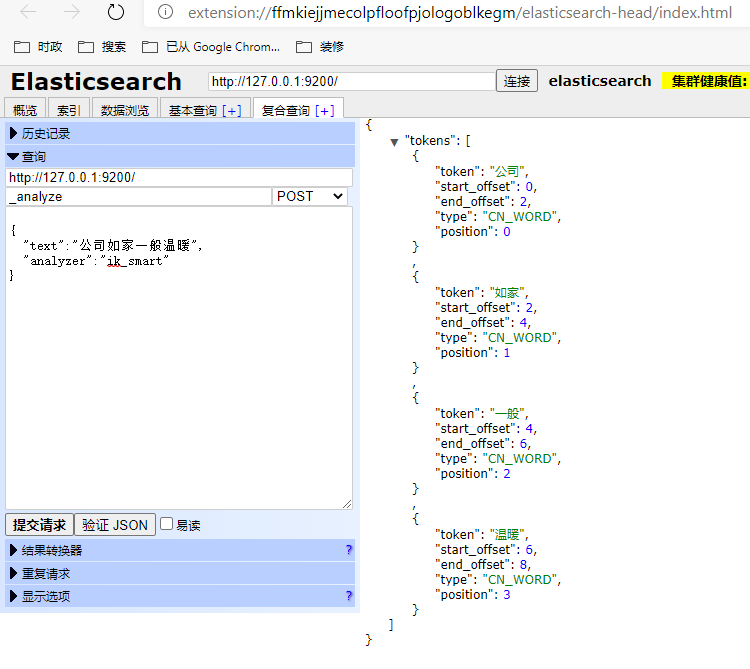
测试结果类似以下界面
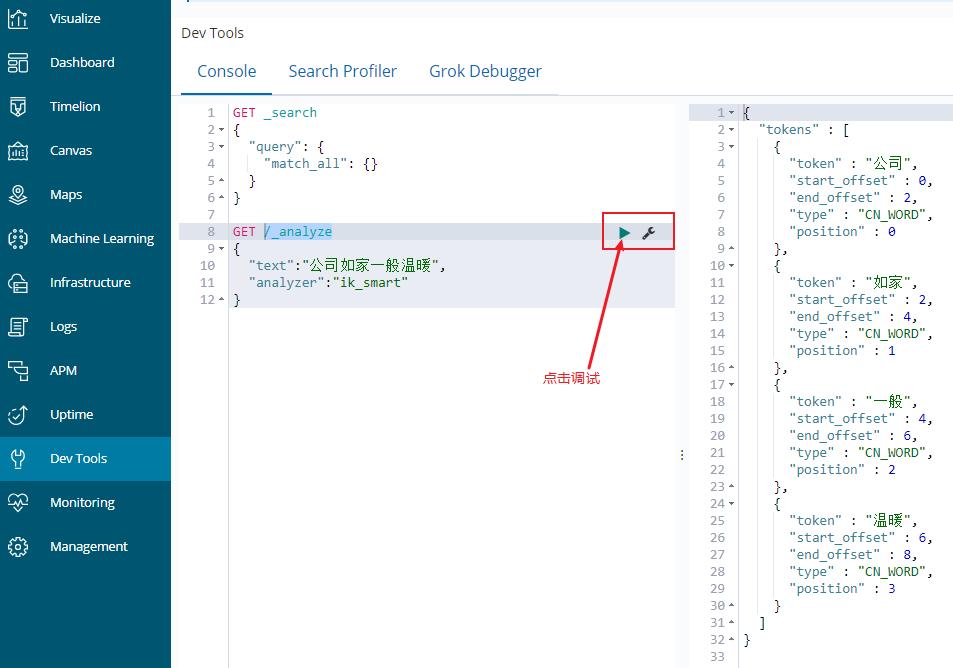
kibana的Dev Tools
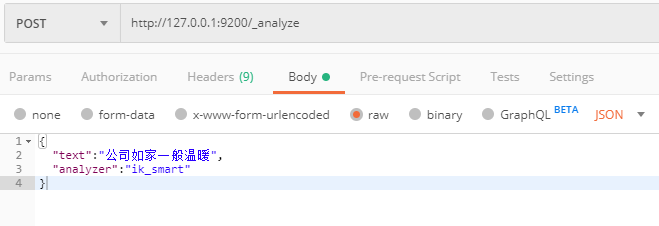
Postman
自定义词典
词典配置IKAnalyzer.cfg.xml,我的配置路径D:\ProgramData\Elastic\Elasticsearch\config\analysis-ik\
<?xml version="1.0" encoding="UTF-8"?>

<!DOCTYPE properties SYSTEM "http://java.sun.com/dtd/properties.dtd">

<properties>

	<comment>IK Analyzer 扩展配置</comment>

	<!--用户可以在这里配置自己的扩展字典 -->

	<entry key="ext_dict"></entry>

	 <!--用户可以在这里配置自己的扩展停止词字典-->

	<entry key="ext_stopwords"></entry>

	<!--用户可以在这里配置远程扩展字典 -->

	<!-- <entry key="remote_ext_dict">words_location</entry> -->

	<!--用户可以在这里配置远程扩展停止词字典-->

	<!-- <entry key="remote_ext_stopwords">words_location</entry> -->

</properties>
初始配置如上所示,配置文件当前目录下,新建文本文件temp.dic
输入以下内容,保存,不同词之间使用换行
如家

周树人
修改配置如下,保存,然后重启Elasticsearch服务,即可使用拓展词典。
<?xml version="1.0" encoding="UTF-8"?>

<!DOCTYPE properties SYSTEM "http://java.sun.com/dtd/properties.dtd">

<properties>

	<comment>IK Analyzer 扩展配置</comment>

	<!--用户可以在这里配置自己的扩展字典 -->

	<entry key="ext_dict">temp.dic;</entry>

	 <!--用户可以在这里配置自己的扩展停止词字典-->

	<entry key="ext_stopwords"></entry>

	<!--用户可以在这里配置远程扩展字典 -->

	<!-- <entry key="remote_ext_dict">words_location</entry> -->

	<!--用户可以在这里配置远程扩展停止词字典-->

	<!-- <entry key="remote_ext_stopwords">words_location</entry> -->

</properties>
多个词典,以英文分号分隔。
Windows10安装Elasticsearch IK分词插件的更多相关文章
- ES之一:Elasticsearch6.4 windows安装 head插件ik分词插件安装
准备安装目标:1.Elasticsearch6.42.head插件3.ik分词插件 第一步:安装Elasticsearch6.4 下载方式:1.官网下载 https://www.elastic.co/ ...
- elasticsearch之分词插件使用
elasticsearch对英文会拆成单个单词,对中文会拆分成单个字.下面来看看是不是这样. 首先测试一下英文: GET /blog/_analyze { "text": &quo ...
- elasticsearch ik分词
elasticsearch 默认并不支持中文分词,默认将每个中文字切分为一个词,这明显不符合我们的业务要求.这里就需要用到ik分词插件. 本文主要囊括了以下几部分,ik插件安装.ik用法介绍.自定义词 ...
- ElasticSearch(三) ElasticSearch中文分词插件IK的安装
正因为Elasticsearch 内置的分词器对中文不友好,会把中文分成单个字来进行全文检索,所以我们需要借助中文分词插件来解决这个问题. 一.安装maven管理工具 Elasticsearch 要使 ...
- ElasticSearch 中文分词插件ik 的使用
下载 IK 的版本要与 Elasticsearch 的版本一致,因此下载 7.1.0 版本. 安装 1.中文分词插件下载地址:https://github.com/medcl/elasticsearc ...
- 安装ik分词插件
下载IK安装包 https://github.com/medcl/elasticsearch-analysis-ik https://github.com/medcl/elasticsearch-an ...
- Docker 下Elasticsearch 的安装 和ik分词器
(1)docker镜像下载 docker pull elasticsearch:5.6.8 (2)安装es容器 docker run -di --name=changgou_elasticsearch ...
- ElasticSearch ik分词安装
1.下载对应版本的ES ik分词 https://github.com/medcl/elasticsearch-analysis-ik/releases 2.解压elasticsearch-analy ...
- es ik分词插件安装
1.ik下载(下载es对应版本的ik分词包) https://github.com/medcl/elasticsearch-analysis-ik/releases 2.mac cd /usr/loc ...
随机推荐
- javaWeb学习总结——文件上传、下载
目录 1.文件上传环境搭建 2.文件上传代码实现 3.关于下载 @ 嘿,熊dei,你不得不知道在Web开发中,文件上传和下载功能是非常常用的功能,关于文件上传,浏览器上传[文件以流的形式传输]--&g ...
- 安装破解版IntelliJ IDEA
1.下载IntelliJ IDEA http://www.jetbrains.com/idea/download/#section=windows 选择Ultimate版本 2.注册码破解 http: ...
- 洛谷 题解 P1842 【奶牛玩杂技】
本蒟蒻又双叒叕被爆踩辣! Solution: 我们先看数据,50000,那么O(n)或者O(n log(n))是可以过的,非严格O(n * sqrt(n))要卡卡常,说不定也可以过. 那么什么算法可以 ...
- unrecognized selector sent to class 0x10a4ce490 我躺过的坑
错误现象:unrecognized selector sent to class 0x102265ad8’ 错误原因: Other Linker Flags 链接设置错误导致类扩展不知道如何正确读取, ...
- CSU OJ1960
有一棵由N个结点构成的树,每一条边上都有其对应的权值.现在给定起点,求从该点出发的一条路径(至少有一条边)使得这条路径上的权值之和最大,并输出这个最大值. Input 第一行一个正整数T,代表数据组数 ...
- 史上最全的iptables应用
第14章 防火墙的使用 14.1 防火墙的概念 将不安全的网络流量信息进行隔离 14.2 防火墙的实现 14.2.1 硬件实现 思科,华为防火墙服务器 14.2.2 软件实现 iptables(cen ...
- 这3步简单搭建Python http服务器 你肯定不会吧?
前言 本文的文字及图片来源于网络,仅供学习.交流使用,不具有任何商业用途,版权归原作者所有,如有问题请及时联系我们以作处理. 作者:stark张宇 趁着周末的闲暇时光看看Python是什么鬼 给疲倦的 ...
- C++使用libcurl做HttpClient 和 curl_easy_setopt
curl_easy_setopt 参数设置 https://curl.haxx.se/libcurl/c/curl_easy_setopt.html 使用libcurl做HttpClient #if ...
- 笔记||Python3之字符串
字符串是Python中最常用的数据类型.我们可以使用引号('或''或''')来创建字符串. 三引号特点:可以多行,也可以多行注释. a = 'hello world' a = "hello ...
- [vue]数据来源
1.组件data函数return的数据 作用域是组件本身 可以在模板template及计算属性computed和方法methods中使用 2.父传子,props数据 来自父级:可以是写死的,或者是来自 ...