
JS+Jquery自定义格式导出HTML为Word(下列插件同样可以用于Excel导出)
这里的word导出主要采用了jquery.wordexport.js、FileSaver.js,做功能之前我也是找了很多网上的资料,里面涉及到js导出word的用的都是这个插件,只是在自定义样式这一块一直没有找到合适的方法,后来根据一个网民的提示找到一个合适的方法 那就是把样式用style直接写到表单上,或者把css的内容存放,到存储导出内容的div里面就可以了
实际Demo百度云下载地址:
Demo下载链接:https://pan.baidu.com/s/1Erl_VKtAxfoWoWew62w7Cw 提取码:rm9n
jquery.wordexport.js文件的代码如下:
if (typeof jQuery !== "undefined" && typeof saveAs !== "undefined") {
(function ($) {
$.fn.wordExport = function (fileName) {
fileName = typeof fileName !== 'undefined' ? fileName : "jQuery-Word-Export";
var statics = {
mhtml: {
top: "Mime-Version: 1.0\nContent-Base: " + location.href + "\nContent-Type: Multipart/related; boundary=\"NEXT.ITEM-BOUNDARY\";type=\"text/html\"\n\n--NEXT.ITEM-BOUNDARY\nContent-Type: text/html; charset=\"utf-8\"\nContent-Location: " + location.href + "\n\n<!DOCTYPE html>\n<html>\n_html_</html>",
head: "<head>\n<meta http-equiv=\"Content-Type\" content=\"text/html; charset=utf-8\">\n<style>\n_styles_\n</style>\n</head>\n",
body: "<body>_body_</body>"
}
};
var options = {
maxWidth: 624
};
// Clone selected element before manipulating it
var markup = $(this).clone();
// Remove hidden elements from the output
markup.each(function () {
var self = $(this);
if (self.is(':hidden'))
self.remove();
});
// Embed all images using Data URLs
var images = Array();
var img = markup.find('img');
for (var i = 0; i < img.length; i++) {
// Calculate dimensions of output image
var w = Math.min(img[i].width, options.maxWidth);
var h = img[i].height * (w / img[i].width);
// Create canvas for converting image to data URL
var canvas = document.createElement("CANVAS");
canvas.width = w;
canvas.height = h;
// Draw image to canvas
var context = canvas.getContext('2d');
context.drawImage(img[i], 0, 0, w, h);
// Get data URL encoding of image
var uri = canvas.toDataURL("image/png/jpg");
$(img[i]).attr("src", img[i].src);
img[i].width = w;
img[i].height = h;
// Save encoded image to array
images[i] = {
type: uri.substring(uri.indexOf(":") + 1, uri.indexOf(";")),
encoding: uri.substring(uri.indexOf(";") + 1, uri.indexOf(",")),
location: $(img[i]).attr("src"),
data: uri.substring(uri.indexOf(",") + 1)
};
}
// Prepare bottom of mhtml file with image data
var mhtmlBottom = "\n";
for (var i = 0; i < images.length; i++) {
mhtmlBottom += "--NEXT.ITEM-BOUNDARY\n";
mhtmlBottom += "Content-Location: " + images[i].location + "\n";
mhtmlBottom += "Content-Type: " + images[i].type + "\n";
mhtmlBottom += "Content-Transfer-Encoding: " + images[i].encoding + "\n\n";
mhtmlBottom += images[i].data + "\n\n";
}
mhtmlBottom += "--NEXT.ITEM-BOUNDARY--";
//TODO: load css from included stylesheet
//var styles=' /* Font Definitions */@font-face{font-family:宋体;panose-1:2 1 6 0 3 1 1 1 1 1;mso-font-alt:SimSun;mso-font-charset:134;mso-generic-font-family:auto;mso-font-pitch:variable;mso-font-signature:3 680460288 22 0 262145 0;} @font-face{font-family:"Cambria Math";panose-1:2 4 5 3 5 4 6 3 2 4;mso-font-charset:1;mso-generic-font-family:roman;mso-font-format:other;mso-font-pitch:variable;mso-font-signature:0 0 0 0 0 0;} @font-face{font-family:"\@宋体";panose-1:2 1 6 0 3 1 1 1 1 1;mso-font-charset:134;mso-generic-font-family:auto;mso-font-pitch:variable;mso-font-signature:3 680460288 22 0 262145 0;}/* Style Definitions */p.MsoNormal, li.MsoNormal, div.MsoNormal{mso-style-unhide:no;mso-style-qformat:yes;mso-style-parent:"";margin:0cm;margin-bottom:.0001pt;mso-pagination:widow-orphan;font-size:14.0pt;font-family:宋体;mso-bidi-font-family:宋体;}p.MsoHeader, li.MsoHeader, div.MsoHeader{mso-style-noshow:yes;mso-style-priority:99;mso-style-link:"页眉 Char";margin:0cm;margin-bottom:.0001pt;text-align:center;mso-pagination:widow-orphan;layout-grid-mode:char;font-size:9.0pt;font-family:宋体;mso-bidi-font-family:宋体;}p.MsoFooter, li.MsoFooter, div.MsoFooter{mso-style-noshow:yes;mso-style-priority:99;mso-style-link:"页脚 Char";margin:0cm;margin-bottom:.0001pt;mso-pagination:widow-orphan;layout-grid-mode:char;font-size:9.0pt;font-family:宋体;mso-bidi-font-family:宋体;}p.MsoAcetate, li.MsoAcetate, div.MsoAcetate{mso-style-noshow:yes;mso-style-priority:99;mso-style-link:"批注框文本 Char";margin:0cm;margin-bottom:.0001pt;mso-pagination:widow-orphan;font-size:9.0pt;font-family:宋体;mso-bidi-font-family:宋体;}span.Char{mso-style-name:"页眉 Char";mso-style-noshow:yes;mso-style-priority:99;mso-style-unhide:no;mso-style-locked:yes;mso-style-link:页眉;font-family:宋体;mso-ascii-font-family:宋体;mso-fareast-font-family:宋体;mso-hansi-font-family:宋体;}span.Char0{mso-style-name:"页脚 Char";mso-style-noshow:yes;mso-style-priority:99;mso-style-unhide:no;mso-style-locked:yes;mso-style-link:页脚;font-family:宋体;mso-ascii-font-family:宋体;mso-fareast-font-family:宋体;mso-hansi-font-family:宋体;}span.Char1{mso-style-name:"批注框文本 Char";mso-style-noshow:yes;mso-style-priority:99;mso-style-unhide:no;mso-style-locked:yes;mso-style-link:批注框文本;font-family:宋体;mso-ascii-font-family:宋体;mso-fareast-font-family:宋体;mso-hansi-font-family:宋体;}p.msochpdefault, li.msochpdefault, div.msochpdefault{mso-style-name:msochpdefault;mso-style-unhide:no;mso-margin-top-alt:auto;margin-right:0cm;mso-margin-bottom-alt:auto;margin-left:0cm;mso-pagination:widow-orphan;font-size:10.0pt;font-family:宋体;mso-bidi-font-family:宋体;}span.msonormal0{mso-style-name:msonormal;mso-style-unhide:no;}.MsoChpDefault{mso-style-type:export-only;mso-default-props:yes;font-size:10.0pt;mso-ansi-font-size:10.0pt;mso-bidi-font-size:10.0pt;mso-ascii-font-family:"Times New Roman";mso-hansi-font-family:"Times New Roman";mso-font-kerning:0pt;}/* Page Definitions */ @page WordSection1{size:595.3pt 841.9pt;margin:72.0pt 90.0pt 72.0pt 90.0pt;mso-header-margin:42.55pt;mso-footer-margin:49.6pt;mso-paper-source:0;}div.WordSection1{page:WordSection1;}';
var styles = "";
// Aggregate parts of the file together
var fileContent = statics.mhtml.top.replace("_html_", statics.mhtml.head.replace("_styles_", styles) + statics.mhtml.body.replace("_body_", markup.html())) + mhtmlBottom;
// Create a Blob with the file contents
var blob = new Blob([fileContent], {
type: "application/msword;charset=utf-8"
});
saveAs(blob, fileName + ".doc");
};
})(jQuery);
} else {
if (typeof jQuery === "undefined") {
console.error("jQuery Word Export: missing dependency (jQuery)");
}
if (typeof saveAs === "undefined") {
console.error("jQuery Word Export: missing dependency (FileSaver.js)");
}
}
FileSaver.js源码如下:
/* FileSaver.js
* A saveAs() FileSaver implementation.
* 1.3.2
* 2016-06-16 18:25:19
*
* By Eli Grey, http://eligrey.com
* License: MIT
* See https://github.com/eligrey/FileSaver.js/blob/master/LICENSE.md
*/
/*global self */
/*jslint bitwise: true, indent: 4, laxbreak: true, laxcomma: true, smarttabs: true, plusplus: true */
/*! @source http://purl.eligrey.com/github/FileSaver.js/blob/master/FileSaver.js */
var saveAs = saveAs || (function (view) {
"use strict";
// IE <10 is explicitly unsupported
if (typeof view === "undefined" || typeof navigator !== "undefined" && /MSIE [1-9]\./.test(navigator.userAgent)) {
return;
}
var
doc = view.document
// only get URL when necessary in case Blob.js hasn't overridden it yet
, get_URL = function () {
return view.URL || view.webkitURL || view;
}
, save_link = doc.createElementNS("http://www.w3.org/1999/xhtml", "a")
, can_use_save_link = "download" in save_link
, click = function (node) {
var event = new MouseEvent("click");
node.dispatchEvent(event);
}
, is_safari = /constructor/i.test(view.HTMLElement)
, is_chrome_ios = /CriOS\/[\d]+/.test(navigator.userAgent)
, throw_outside = function (ex) {
(view.setImmediate || view.setTimeout)(function () {
throw ex;
}, 0);
}
, force_saveable_type = "application/octet-stream"
// the Blob API is fundamentally broken as there is no "downloadfinished" event to subscribe to
, arbitrary_revoke_timeout = 1000 * 40 // in ms
, revoke = function (file) {
var revoker = function () {
if (typeof file === "string") { // file is an object URL
get_URL().revokeObjectURL(file);
} else { // file is a File
file.remove();
}
};
setTimeout(revoker, arbitrary_revoke_timeout);
}
, dispatch = function (filesaver, event_types, event) {
event_types = [].concat(event_types);
var i = event_types.length;
while (i--) {
var listener = filesaver["on" + event_types[i]];
if (typeof listener === "function") {
try {
listener.call(filesaver, event || filesaver);
} catch (ex) {
throw_outside(ex);
}
}
}
}
, auto_bom = function (blob) {
// prepend BOM for UTF-8 XML and text/* types (including HTML)
// note: your browser will automatically convert UTF-16 U+FEFF to EF BB BF
if (/^\s*(?:text\/\S*|application\/xml|\S*\/\S*\+xml)\s*;.*charset\s*=\s*utf-8/i.test(blob.type)) {
return new Blob([String.fromCharCode(0xFEFF), blob], { type: blob.type });
}
return blob;
}
, FileSaver = function (blob, name, no_auto_bom) {
if (!no_auto_bom) {
blob = auto_bom(blob);
}
// First try a.download, then web filesystem, then object URLs
var
filesaver = this
, type = blob.type
, force = type === force_saveable_type
, object_url
, dispatch_all = function () {
dispatch(filesaver, "writestart progress write writeend".split(" "));
}
// on any filesys errors revert to saving with object URLs
, fs_error = function () {
if ((is_chrome_ios || (force && is_safari)) && view.FileReader) {
// Safari doesn't allow downloading of blob urls
var reader = new FileReader();
reader.onloadend = function () {
var url = is_chrome_ios ? reader.result : reader.result.replace(/^data:[^;]*;/, 'data:attachment/file;');
var popup = view.open(url, '_blank');
if (!popup) view.location.href = url;
url = undefined; // release reference before dispatching
filesaver.readyState = filesaver.DONE;
dispatch_all();
};
reader.readAsDataURL(blob);
filesaver.readyState = filesaver.INIT;
return;
}
// don't create more object URLs than needed
if (!object_url) {
object_url = get_URL().createObjectURL(blob);
}
if (force) {
view.location.href = object_url;
} else {
var opened = view.open(object_url, "_blank");
if (!opened) {
// Apple does not allow window.open, see https://developer.apple.com/library/safari/documentation/Tools/Conceptual/SafariExtensionGuide/WorkingwithWindowsandTabs/WorkingwithWindowsandTabs.html
view.location.href = object_url;
}
}
filesaver.readyState = filesaver.DONE;
dispatch_all();
revoke(object_url);
}
;
filesaver.readyState = filesaver.INIT;
if (can_use_save_link) {
object_url = get_URL().createObjectURL(blob);
setTimeout(function () {
save_link.href = object_url;
save_link.download = name;
click(save_link);
dispatch_all();
revoke(object_url);
filesaver.readyState = filesaver.DONE;
});
return;
}
fs_error();
}
, FS_proto = FileSaver.prototype
, saveAs = function (blob, name, no_auto_bom) {
return new FileSaver(blob, name || blob.name || "download", no_auto_bom);
}
;
// IE 10+ (native saveAs)
if (typeof navigator !== "undefined" && navigator.msSaveOrOpenBlob) {
return function (blob, name, no_auto_bom) {
name = name || blob.name || "download";
if (!no_auto_bom) {
blob = auto_bom(blob);
}
return navigator.msSaveOrOpenBlob(blob, name);
};
}
FS_proto.abort = function () { };
FS_proto.readyState = FS_proto.INIT = 0;
FS_proto.WRITING = 1;
FS_proto.DONE = 2;
FS_proto.error =
FS_proto.onwritestart =
FS_proto.onprogress =
FS_proto.onwrite =
FS_proto.onabort =
FS_proto.onerror =
FS_proto.onwriteend =
null;
return saveAs;
}(
typeof self !== "undefined" && self
|| typeof window !== "undefined" && window
|| this.content
));
// `self` is undefined in Firefox for Android content script context
// while `this` is nsIContentFrameMessageManager
// with an attribute `content` that corresponds to the window
if (typeof module !== "undefined" && module.exports) {
module.exports.saveAs = saveAs;
} else if ((typeof define !== "undefined" && define !== null) && (define.amd !== null)) {
define([], function () {
return saveAs;
});
}
HTML导出源码:
<!DOCTYPE html>
<html>
<head lang="en">
<meta charset="UTF-8">
<title>html导出生成word文档</title>
</head>
<body>
<div class="word">
<style type="text/css">
table {
border-right: 1px solid black;
border-bottom: 1px solid black;
border-collapse:collapse;
}
table td {
border-left: 1px solid black;
border-top: 1px solid black;
text-align: center;
}
table td{
height: 35px;
}
.td_title{
text-align: left;
border-bottom: none;
}
.td_result
{
height: 100px;
border-top: none;
}
.td2_result
{
height: 50px;
border-top: none;
}
</style>
<table width="700px" style="font-size: 12px;" align="center" style="border:none;">
<tr style="height: 30px;"><td colspan="4"style="border:none;text-align: center;font-weight: bold;font-size: 15px;">涵洞经常检查记录表</td></tr>
<tr style="height: 30px;">
<td style="border:none;text-align: right;width: 15%;">项目公司:</td>
<td style="border:none;text-align: left; width: 35%;"><label id="ProjectCompany"></label></td>
<td style="border:none;text-align: right;width: 15%;">日常养护单位:</td>
<td style="border:none;text-align: left; width: 35%;"><label id="MaintenanceUnit "></label></td>
</tr>
</table>
<table style="clear:both; font-size: 12px;" align="center" border="0px" width="700px">
<body>
<tr>
<td width="10%">路线编号及名称</td>
<td width="20%"><label id="RoadName"></label></td>
<td width="10%">涵洞类型</td>
<td width="10%"><label id="CulvertTypeName"></label></td>
<td rowspan="2" colspan="2" width="15%">是否过水涵洞</td>
<td rowspan="2" width="15%"><label id="OverflowOrLevel"></label></td>
</tr>
<tr>
<td>涵洞桩号</td>
<td colspan="3"><label id="Mileage"></label></td>
</tr>
<tr>
<td rowspan="2" colspan="2">检查内容</td>
<td colspan="2" >检查结果</td>
<td rowspan="2" colspan="3">检查情况说明</td>
</tr>
<tr>
<td class="result">是</td>
<td class="result">否</td>
</tr>
<tr>
<td colspan="2">进出口是否堵塞</td>
<td><label id="IsCheck1"></label></td>
<td><label id="IsCheck_1"></label></td>
<td colspan="3"><label id="InspectionDescribe1"></label></td>
</tr>
<tr>
<td colspan="2">洞内是否淤塞及排水不畅</td>
<td><label id="IsCheck2"></label></td>
<td><label id="IsCheck_2"></label></td>
<td colspan="3"><label id="InspectionDescribe2"></label></td>
</tr>
<tr>
<td colspan="2">洞口周围是否有杂物堆积</td>
<td><label id="IsCheck3"></label></td>
<td><label id="IsCheck_3"></label></td>
<td colspan="3"><label id="InspectionDescribe3"></label></td>
</tr>
<tr>
<td colspan="2">涵洞是否清洁、漏水</td>
<td><label id="IsCheck4"></label></td>
<td><label id="IsCheck_4"></label></td>
<td colspan="3"><label id="InspectionDescribe4"></label></td>
</tr>
<tr>
<td colspan="2">涵洞结构是否损坏</td>
<td><label id="IsCheck5"></label></td>
<td><label id="IsCheck_5"></label></td>
<td colspan="3"><label id="InspectionDescribe5"></label></td>
</tr>
<tr>
<td colspan="2">涵身、涵顶是否存在裂缝</td>
<td><label id="IsCheck6"></label></td>
<td><label id="IsCheck_6"></label></td>
<td colspan="3"><label id="InspectionDescribe6"></label></td>
</tr>
<tr>
<td colspan="2">
涵洞周围路基填土是否稳定、完整
</td>
<td><label id="IsCheck7"></label></td>
<td><label id="IsCheck_7"></label></td>
<td colspan="3"><label id="InspectionDescribe7"></label></td>
</tr>
<tr>
<td colspan="2">
</td>
<td></td>
<td></td>
<td colspan="3"></td>
</tr>
<tr>
<td colspan="3" class="td_title">处理意见:</td>
<td colspan="4" class="td_title">处理结果:</td>
</tr>
<tr>
<td colspan="3" class="td_result"><label id="DealSuggest"></label></td>
<td colspan="4" class="td_result"><label id="DealResult"></label></td>
</tr>
<tr>
<td colspan="7" class="td_title">备注:<label id="Remark"></label></td>
</tr>
<tr>
<td>检查、记录人</td>
<td><label id="OperatorName"></label></td>
<td rowspan="2">桥梁养护工程师</td>
<td colspan="2" rowspan="2"></td>
<td colspan="2" style="text-align: left;">检查日期:</td>
</tr>
<tr>
<td>复核人</td>
<td><label id="AuditorName"></label></td>
<td colspan="2">2019年07月23日</td>
</tr>
</body>
</table>
</div>
<input type="button" value="导出word">
<script src="js/jquery.js"></script>
<script type="text/javascript" src="js/FileSaver.js"></script>
<script type="text/javascript" src="js/jquery.wordexport.js"></script>
<script>
$(function () {
$("input[type='button']").click(function (event) {
$(".word").wordExport('word文档');
});
})
</script>
</body>
</html>
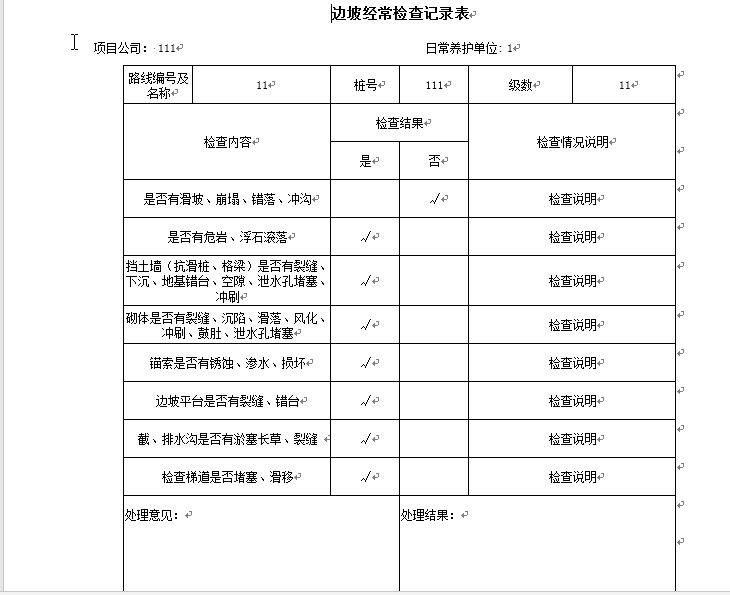
导出效果图:
JS+Jquery自定义格式导出HTML为Word(下列插件同样可以用于Excel导出)的更多相关文章
- .NET Excel导出方法及其常见问题详解
摘要:.NET Excel导出方法及其常见问题详解. 一.Excel导出的实现方法 在.net 程序开发中,对于Excel文件的导出我们一共有三种导出方式: 利用文件输出流进行读写操作 这种方式的导出 ...
- java利用EasyPoi实现Excel导出功能
easypoi功能如同名字easy,主打的功能就是容易,让一个没见接触过poi的人员 就可以方便的写出Excel导出,Excel模板导出,Excel导入,Word模板导出,通过简单的注解和模板 语言( ...
- excel导出功能优化
先说说优化前,怎么做EXCEL导出功能的: 1. 先定义一个VO类,类中的字段按照EXCEL的顺序定义,并且该类只能用于EXCEL导出使用,不能随便修改. 2. 将查询到的结果集循环写入到这个VO类中 ...
- C# 实现NPOI的Excel导出
技术点: 1.自定义attribute属性 2.通过反射取类及其属性的attribute属性值 3.NPOI包常用属性及方法(我也仅仅知道用到过的,陌生的要么见名知意,要么百度查) 实现功能点: Li ...
- jquery.validate.js 一个jQuery验证格式控件
官网地址:http://bassistance.de/jquery-plugins/jquery-plugin-validation jQuery plugin: Validation 使用说明 转载 ...
- jQuery时间格式插件-moment.js的使用
jQuery时间格式插件-moment.js的使用 moment.js插件的使用,使用之前在页面引入对应的js文件: 详细的操作可见moment中文官网:http://momentjs.cn/ 日期格 ...
- js进阶 13-4 jquery自定义动画animate()如何使用
js进阶 13-4 jquery自定义动画animate()如何使用 一.总结 一句话总结:animate(params,[speed],[easing],[fn]),参数:params:一组包含作为 ...
- js/jquery/html前端开发常用到代码片段
1.IE条件注释 条件注释简介 IE中的条件注释(Conditional comments)对IE的版本和IE非IE有优秀的区分能力,是WEB设计中常用的hack方法.条件注释只能用于IE5以上,IE ...
- 通用的web系统数据导出功能设计实现(导出excel2003/2007 word pdf zip等)
前言 我们在做web系统中,导出也是很常用的一个功能,如果每一个数据列表都要对应写一个导出的方法不太现实.现在就想设计一个共通的功能来实现这个导出. 需求分析 在开始之前我们先要明白我们要实现怎样一个 ...
随机推荐
- C++字符串的操作(简单全面)
void *memccpy (void *dest, const void *src, int c, size_t n); 从src所指向的对象复制n个字符到dest所指向的对象中.如果复制过程中遇到 ...
- 静态编译 Qt 5.6
源码下载 Qt git地址:git://code.qt.io/qt/qt5.git 推荐用 SourceTree 客户端来克隆源码 准备工作 系统 Windows 7 或者 Windows 10 编译 ...
- C++与QML混合编程实现2048
http://blog.csdn.net/ieearth/article/details/42705305
- C#每天进步一点--事件
事件:如果类型定义了事件成员,那么类型就可以通知其他对象发生了特定的事情.例如,Button类提供了一个名为Click的事件.应用程序中的一个或者多个对象可能想接收关于这个事件的通知,以便在Butto ...
- Android开发之旅(1) 之 Android 开发环境搭建
工作室原创出品,欢迎转载,欢迎交流. 转载请注明原文:http://www.cnblogs.com/wangleiblog/p/6019063.html Android开发之旅目录 1 前言 很多朋友 ...
- Ubuntu --- Virtualbox 和 宿主机文件夹共享
1.在设置里面共享文件夹 2.在Ubuntu中配置 sudo mount -t vboxsf share /var/www/html/ 无需重启即可生效 3.实现系统重启后也自动挂载 在文件 /etc ...
- Angular4.0从入门到实战打造在线竞拍网站学习笔记之一--组件
Angular4.0基础知识之组件 Angular4.0基础知识之路由 Angular4.0依赖注入 Angular4.0数据绑定&管道 最近搞到手了一部Angular4的视频教程,这几天正好 ...
- 【设计模式】【最后一个】结构型07适配器模式(Adapter Pattern)
适配器模式(Adapter Pattern) 推荐一个很全面的博客:https://blog.csdn.net/zxt0601/article/details/52848004 定义:将一个类的接口转 ...
- denied: requested access to the resource is denied
1.vim /etc/docker/daemon.json 增加一个daemon.json文件 { "insecure-registries":["192.168 ...
- c语言:链表
1.链表概述: 链表是一种数据结构,它采用动态分配存储单元方式.它能够有效地节省存储空间(同数组比较). 由于链表中的节点是一个结构体类型,并且结点中有一个成员用于指向下一个结点.所以定义作为结点的格 ...