
spring boot发送其他邮件
前面已经讲了使用springboot采用常规的javaweb方式发送邮件和使用spring模板发送邮件。但是发送的都是文本文件,现在来说一下使用spring模板发送一些其他的邮件。
1.pom.xml依赖
     <!--spring发送邮件-->

        <dependency>

            <groupId>org.springframework.boot</groupId>

            <artifactId>spring-boot-starter-mail</artifactId>

        </dependency>

        <!--模板邮件-->

        <dependency>

            <groupId>org.springframework.boot</groupId>

            <artifactId>spring-boot-starter-freemarker</artifactId>

        </dependency>

        <dependency>

            <groupId>commons-collections</groupId>

            <artifactId>commons-collections</artifactId>

        </dependency>
2.配置文件:
#####163邮箱########

spring.mail.host=smtp.163.com

spring.mail.username=xxxxxxx@163.com

#163邮箱授权码

spring.mail.password=*********

spring.mail.properties.mail.smtp.auth=true

spring.mail.properties.mail.smtp.starttls.enable=true

spring.mail.properties.mail.smtp.starttls.required=true
3.发送各种邮件方法:
@Controller

public class ModelController {

    @Autowired

    private JavaMailSender mailSender;

    @Value("${spring.mail.username}")

    private String Sender; //读取配置文件中的参数

    @Autowired

    private FreeMarkerConfigurer freeMarkerConfigurer;

    /**

     * spring发送文本邮件

     */

    @RequestMapping("/mail")

    @ResponseBody

    public String sendMail(){

        SimpleMailMessage message = new SimpleMailMessage();

        message.setFrom(Sender);

        message.setTo("*********@qq.com");

        message.setSubject("主题:简单邮件");

        message.setText("测试邮件内容");

        mailSender.send(message);

        return "发送成功!";

    }

    /**

     * spring发送Html邮件

     */

    @RequestMapping("/mailHtml")

    @ResponseBody

    public String sendHtmlMail(){

        MimeMessage message = null;

        try {

            message = mailSender.createMimeMessage();

            MimeMessageHelper helper = new MimeMessageHelper(message, true);

            helper.setFrom(Sender);

            helper.setTo("*********@qq.com");

            helper.setSubject("标题:发送Html内容");

            StringBuffer sb = new StringBuffer();

            sb.append("<h1>大标题-h1</h1>")

                    .append("<p style='color:#F00'>红色字</p>")

                    .append("<p style='text-align:right'>右对齐</p>");

            helper.setText(sb.toString(), true);

        } catch (Exception e) {

            e.printStackTrace();

        }

        mailSender.send(message);

        return "发送成功!";

    }

    /**

     * spring发送带附件的邮件

     */

    @RequestMapping("/mailAttach")

    @ResponseBody

    public String sendAttachmentsMail(){

        MimeMessage message = null;

        try {

            message = mailSender.createMimeMessage();

            MimeMessageHelper helper = new MimeMessageHelper(message, true);

            helper.setFrom(Sender);

            helper.setTo("*********@qq.com");

            helper.setSubject("主题:带附件的邮件");

            helper.setText("带附件的邮件内容");

            //注意项目路径问题,自动补用项目路径

            FileSystemResource file = new FileSystemResource(new File("F:\\临时\\SpringBoot\\src\\main\\resources\\static\\image\\迪丽热巴.jpg"));

            //加入邮件

            helper.addAttachment("热巴.jpg", file);

        } catch (Exception e){

            e.printStackTrace();

        }

        mailSender.send(message);

        return "发送成功!";

    }

    /**

     * spring发送带静态资源的邮件,资源直接发在邮件内容里,不是附件形式。

     */

    @RequestMapping("/mailLine")

    @ResponseBody

    public String sendInlineMail(){

        MimeMessage message = null;

        try {

            message = mailSender.createMimeMessage();

            MimeMessageHelper helper = new MimeMessageHelper(message, true);

            helper.setFrom(Sender);

            helper.setTo("*********@qq.com");

            helper.setSubject("主题:带静态资源的邮件");

            //第二个参数指定发送的是HTML格式,同时cid:是固定的写法

            helper.setText("<html><body>带静态资源的邮件内容 图片:<img src='cid:picture' /></body></html>", true);

            FileSystemResource file = new FileSystemResource(new File("F:\\临时\\SpringBoot\\src\\main\\resources\\static\\image\\迪丽热巴.jpg"));

            helper.addInline("picture",file);

        } catch (Exception e){

            e.printStackTrace();

        }

        mailSender.send(message);

        return "发送成功!";

    }

    /**

     * spring发送模板邮件

     */

    @RequestMapping("/mailTemplate")

    @ResponseBody

    public String sendTemplateMail(){

        MimeMessage message = null;

        try {

            message = mailSender.createMimeMessage();

            MimeMessageHelper helper = new MimeMessageHelper(message, true);

            helper.setFrom(Sender);

            helper.setTo("*********@qq.com");

            helper.setSubject("主题:模板邮件");

            Map<String, Object> model = new HashedMap();

            model.put("username", "zggdczfr");

            //修改 application.properties 文件中的读取路径

//            FreeMarkerConfigurer configurer = new FreeMarkerConfigurer();

//            configurer.setTemplateLoaderPath("classpath:templates");

            //读取 html 模板

            Template template = freeMarkerConfigurer.getConfiguration().getTemplate("mail.html");

            String html = FreeMarkerTemplateUtils.processTemplateIntoString(template, model);

            helper.setText(html, true);

        } catch (Exception e) {

            e.printStackTrace();

        }

        mailSender.send(message);

        return "发送成功!";

    }

}
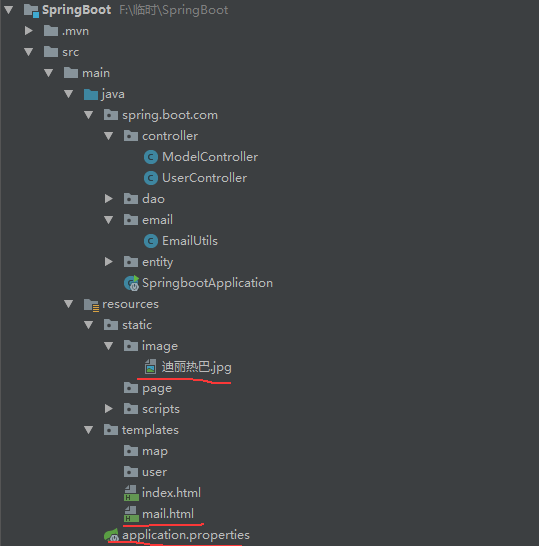
4.图片和模板存放位置:
spring boot发送其他邮件的更多相关文章
- Spring Boot实战系列-----------邮件发送
快速导航 添加Maven依赖 配置文件增加邮箱相关配置 Service.Test项目代码构建 五种邮件发送类型讲解 文本邮件 html邮件 附件邮件 html内嵌图片邮件 模板邮件 问题汇总 添加ma ...
- Spring Boot Mail 实现邮件发送
此 demo 主要演示了 Spring Boot 如何整合邮件功能,包括发送简单文本邮件. 邮件服务在开发中非常常见,比如用邮件注册账号.邮件作为找回密码的途径.用于订阅内容定期邮件推送等等,下面就简 ...
- spring boot:发送带附件的邮件和html内容的邮件(以163.com邮箱为例/spring boot 2.3.2)
一,网站哪些情况下需要发送电子邮件? 作为一个电商网站,以下情况需要发邮件通知用户: 注册成功的信息 用邮箱接收验证码 找回密码时发链接 发送推广邮件 下单成功后的订单通知 给商户的对账单邮件 说明: ...
- Spring Boot (十):邮件服务
Spring Boot 仍然在狂速发展,才几个多月没有关注,现在看官网已经到 2.1.0.RELEASE 版本了.准备慢慢在写写 Spring Boot 相关的文章,本篇文章使用 Spring Boo ...
- (转)Spring Boot (十):邮件服务
http://www.ityouknow.com/springboot/2017/05/06/spring-boot-mail.html Spring Boot 仍然在狂速发展,才几个多月没有关注,现 ...
- Spring Boot笔记之邮件(spring-boot-starter-mail)
Spring Boot环境中发送邮件 pom.xml引入`spring-boot-starter-mail` application.yml配置 163邮箱 QQ邮箱 Gmail邮箱 发送邮件 ser ...
- spring boot集成spring-boot-starter-mail邮件功能
前情提要 以目前IT系统功能来看,邮件功能是非常重要的一个功能.例如:找回密码.邮箱验证,邮件动态码.忘记密码,邮件营销等,都需要用到邮件功能.结合当下最流行的spring boot微服务,推出了sp ...
- spring boot 加入mail邮件支持
一.添加依赖 <!-- 邮件整合 --> <dependency> <groupId>org.springframework.boot</groupId> ...
- 使用Spring Mail发送QQ邮件
一.邮箱设置 QQ邮箱设置:http://service.mail.qq.com/cgi-bin/help?id=28, 下面这些服务需要开启(需要设置邮箱独立密码): 二.applicationCo ...
随机推荐
- Netty学习(五)-DelimiterBasedFrameDecoder
上一节我们说了LineBasedframeDecoder来解决粘包拆包的问题,TCP以流的方式进行数据传输,上层应用协议为了对消息进行区分,一般采用如下4种方式: 消息长度固定,累计读取到消息长度总和 ...
- IntelliJ IDEA + Maven + Jetty + Jersey搭建RESTful服务
这次参考的是这个博客,完全按照这个我这里会出一些问题,一会再说就是了. https://www.cnblogs.com/puyangsky/p/5368132.html 一.首先新建一个项目,选择Ja ...
- 《深入理解Java虚拟机》-(实战)练习修改class文件
这是一篇修改class文件的文章.注释并不完全,要抓住这次练习的目的: boolean在虚拟机中是以何种方式解读的 好的,开始我的表演 1.安装asmtools.jar 2.编写一个java文件,并编 ...
- django前后端分离部署
部署静态文件: 静态文件有两种方式1:通过django路由访问2:通过nginx直接访问 方式1: 需要在根目录的URL文件中增加,作为入口 url(r'^$', TemplateView.as_vi ...
- spring-boot-plus快速开始 Quick Start(一)
spring-boot-plus快速开始 Quick Start 1. clone项目到本地 shell script git clone git@github.com:geekidea/spring ...
- Java 并发:学习Thread 类
Java 中 Thread类 的各种操作与线程的生命周期密不可分,了解线程的生命周期有助于对Thread类中的各方法的理解.一般来说,线程从最初的创建到最终的消亡,要经历创建.就绪.运行.阻塞 和 消 ...
- C++11——智能指针
1. 介绍 一般一个程序在内存中可以大体划分为三部分——静态内存(局部的static对象.类static数据成员以及所有定义在函数或者类之外的变量).栈内存(保存和定义在函数或者类内部的变量)和动态内 ...
- unity_小功能实现(碰撞检测)
1.触发器Trigger:勾选IsTrigger属性 //当player刚进入触发区域的时刻发生触发检测,比如在靠近门的某个区域门一直处于开着状态 void OnTriggerEnter(Collid ...
- [Python] 通过采集23万条数据,对《哪吒》影评分析
一.说明 数据来源:猫眼: 运行环境:Win10/Python3.7 和 Win7/Python3.5: 分析工具:jieba.WorldCloud.pyecharts和matplotlib: 程序基 ...
- 分布式任务调度框架 Azkaban —— Flow 2.0 的使用
一.Flow 2.0 简介 1.1 Flow 2.0 的产生 Azkaban 目前同时支持 Flow 1.0 和 Flow2.0 ,但是官方文档上更推荐使用 Flow 2.0,因为 Flow 1.0 ...