
Hive 学习之路(三)—— Hive CLI和Beeline命令行的基本使用
一、Hive CLI
1.1 Help
使用hive -H或者 hive --help命令可以查看所有命令的帮助,显示如下:
usage: hive
 -d,--define <key=value>          Variable subsitution to apply to hive
                                  commands. e.g. -d A=B or --define A=B  --定义用户自定义变量
    --database <databasename>     Specify the database to use  -- 指定使用的数据库
 -e <quoted-query-string>         SQL from command line   -- 执行指定的SQL
 -f <filename>                    SQL from files   --执行SQL脚本
 -H,--help                        Print help information  -- 打印帮助信息
    --hiveconf <property=value>   Use value for given property    --自定义配置
    --hivevar <key=value>         Variable subsitution to apply to hive  --自定义变量
                                  commands. e.g. --hivevar A=B
 -i <filename>                    Initialization SQL file  --在进入交互模式之前运行初始化脚本
 -S,--silent                      Silent mode in interactive shell    --静默模式
 -v,--verbose                     Verbose mode (echo executed SQL to the  console)  --详细模式
1.2 交互式命令行
直接使用Hive命令,不加任何参数,即可进入交互式命令行。
1.3 执行SQL命令
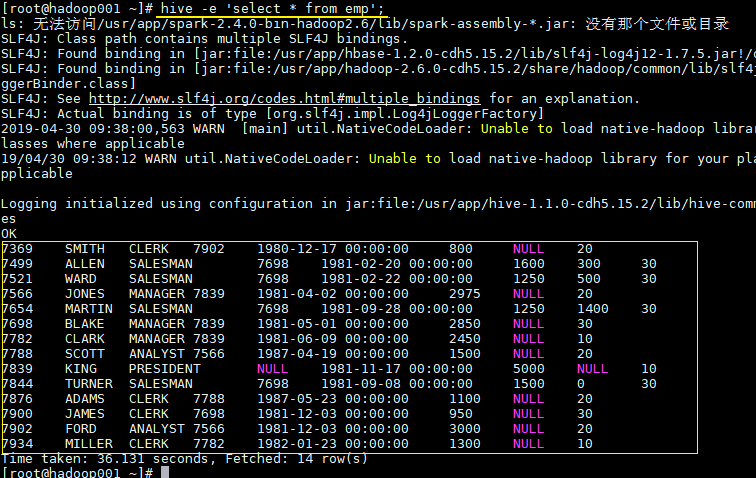
在不进入交互式命令行的情况下,可以使用hive -e执行SQL命令。
hive -e 'select * from emp';
1.4 执行SQL脚本
用于执行的sql脚本可以在本地文件系统,也可以在HDFS上。
# 本地文件系统
hive -f /usr/file/simple.sql;

# HDFS文件系统
hive -f hdfs://hadoop001:8020/tmp/simple.sql;
其中simple.sql内容如下:
select * from emp;
1.5 配置Hive变量
可以使用--hiveconf设置Hive运行时的变量。
hive -e 'select * from emp' \
--hiveconf hive.exec.scratchdir=/tmp/hive_scratch  \
--hiveconf mapred.reduce.tasks=4;
hive.exec.scratchdir:指定HDFS上目录位置,用于存储不同map/reduce阶段的执行计划和这些阶段的中间输出结果。
1.6 配置文件启动
使用-i可以在进入交互模式之前运行初始化脚本,相当于指定配置文件启动。
hive -i /usr/file/hive-init.conf;
其中hive-init.conf的内容如下:
set hive.exec.mode.local.auto = true;
hive.exec.mode.local.auto 默认值为false,这里设置为true ,代表开启本地模式。
1.7 用户自定义变量
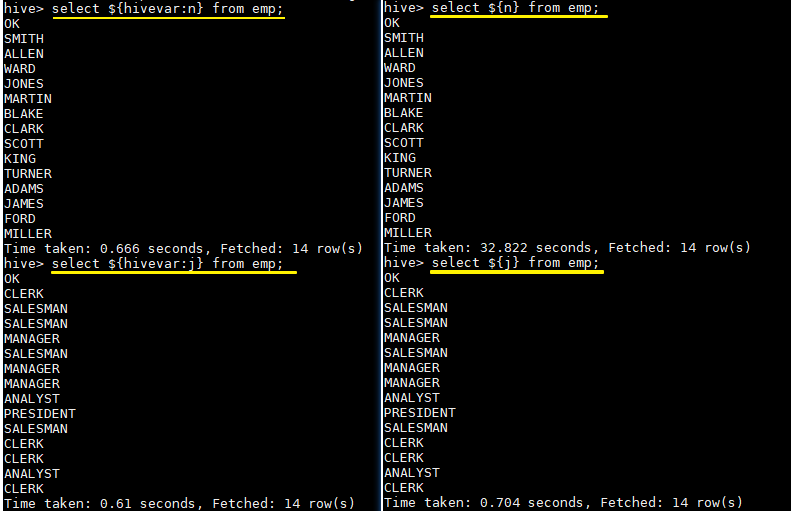
--define <key=value>和--hivevar <key=value>在功能上是等价的,都是用来实现自定义变量,这里给出一个示例:
定义变量:
hive --define n=ename --hiveconf --hivevar j=job;
在查询中引用自定义变量:
# 以下两条语句等价
hive > select ${n} from emp;
hive >  select ${hivevar:n} from emp;

# 以下两条语句等价
hive > select ${j} from emp;
hive >  select ${hivevar:j} from emp;
结果如下:
二、Beeline
2.1 HiveServer2
Hive内置了HiveServer和HiveServer2服务,两者都允许客户端使用多种编程语言进行连接,但是HiveServer不能处理多个客户端的并发请求,所以产生了HiveServer2。
HiveServer2(HS2)允许远程客户端可以使用各种编程语言向Hive提交请求并检索结果,支持多客户端并发访问和身份验证。HS2是由多个服务组成的单个进程,其包括基于Thrift的Hive服务(TCP或HTTP)和用于Web UI的Jetty Web服务器。
HiveServer2拥有自己的CLI(Beeline),Beeline是一个基于SQLLine的JDBC客户端。由于HiveServer2是Hive开发维护的重点(Hive0.15后就不再支持hiveserver),所以Hive CLI已经不推荐使用了,官方更加推荐使用Beeline。
2.1 Beeline
Beeline拥有更多可使用参数,可以使用beeline --help 查看,完整参数如下:
Usage: java org.apache.hive.cli.beeline.BeeLine
   -u <database url>               the JDBC URL to connect to
   -r                              reconnect to last saved connect url (in conjunction with !save)
   -n <username>                   the username to connect as
   -p <password>                   the password to connect as
   -d <driver class>               the driver class to use
   -i <init file>                  script file for initialization
   -e <query>                      query that should be executed
   -f <exec file>                  script file that should be executed
   -w (or) --password-file <password file>  the password file to read password from
   --hiveconf property=value       Use value for given property
   --hivevar name=value            hive variable name and value
                                   This is Hive specific settings in which variables
                                   can be set at session level and referenced in Hive
                                   commands or queries.
   --property-file=<property-file> the file to read connection properties (url, driver, user, password) from
   --color=[true/false]            control whether color is used for display
   --showHeader=[true/false]       show column names in query results
   --headerInterval=ROWS;          the interval between which heades are displayed
   --fastConnect=[true/false]      skip building table/column list for tab-completion
   --autoCommit=[true/false]       enable/disable automatic transaction commit
   --verbose=[true/false]          show verbose error messages and debug info
   --showWarnings=[true/false]     display connection warnings
   --showNestedErrs=[true/false]   display nested errors
   --numberFormat=[pattern]        format numbers using DecimalFormat pattern
   --force=[true/false]            continue running script even after errors
   --maxWidth=MAXWIDTH             the maximum width of the terminal
   --maxColumnWidth=MAXCOLWIDTH    the maximum width to use when displaying columns
   --silent=[true/false]           be more silent
   --autosave=[true/false]         automatically save preferences
   --outputformat=[table/vertical/csv2/tsv2/dsv/csv/tsv]  format mode for result display
   --incrementalBufferRows=NUMROWS the number of rows to buffer when printing rows on stdout,
                                   defaults to 1000; only applicable if --incremental=true
                                   and --outputformat=table
   --truncateTable=[true/false]    truncate table column when it exceeds length
   --delimiterForDSV=DELIMITER     specify the delimiter for delimiter-separated values output format (default: |)
   --isolation=LEVEL               set the transaction isolation level
   --nullemptystring=[true/false]  set to true to get historic behavior of printing null as empty string
   --maxHistoryRows=MAXHISTORYROWS The maximum number of rows to store beeline history.
   --convertBinaryArrayToString=[true/false]    display binary column data as string or as byte array
   --help                          display this message
2.3 常用参数
在Hive CLI中支持的参数,Beeline都支持,常用的参数如下。更多参数说明可以参见官方文档 Beeline Command Options
| 参数 | 说明 |
|---|---|
| -u <database URL> | 数据库地址 |
| -n <username> | 用户名 |
| -p <password> | 密码 |
| -d <driver class> | 驱动(可选) |
| -e <query> | 执行SQL命令 |
| -f <file> | 执行SQL脚本 |
| -i (or)–init <file or files> | 在进入交互模式之前运行初始化脚本 |
| –property-file <file> | 指定配置文件 |
| –hiveconf property*=*value | 指定配置属性 |
| –hivevar name*=*value | 用户自定义属性,在会话级别有效 |
示例: 使用用户名和密码连接Hive
$ beeline -u jdbc:hive2://localhost:10000 -n username -p password
三、Hive配置
可以通过三种方式对Hive的相关属性进行配置,分别介绍如下:
3.1 配置文件
方式一为使用配置文件,使用配置文件指定的配置是永久有效的。Hive有以下三个可选的配置文件:
- hive-site.xml :Hive的主要配置文件;
- hivemetastore-site.xml: 关于元数据的配置;
- hiveserver2-site.xml:关于HiveServer2的配置。
示例如下,在hive-site.xml配置hive.exec.scratchdir:
 <property>
    <name>hive.exec.scratchdir</name>
    <value>/tmp/mydir</value>
    <description>Scratch space for Hive jobs</description>
  </property>
3.2 hiveconf
方式二为在启动命令行(Hive CLI / Beeline)的时候使用--hiveconf指定配置,这种方式指定的配置作用于整个Session。
hive --hiveconf hive.exec.scratchdir=/tmp/mydir
3.3 set
方式三为在交互式环境下(Hive CLI / Beeline),使用set命令指定。这种设置的作用范围也是Session级别的,配置对于执行该命令后的所有命令生效。set兼具设置参数和查看参数的功能。如下:
0: jdbc:hive2://hadoop001:10000> set hive.exec.scratchdir=/tmp/mydir;
No rows affected (0.025 seconds)
0: jdbc:hive2://hadoop001:10000> set hive.exec.scratchdir;
+----------------------------------+--+
|               set                |
+----------------------------------+--+
| hive.exec.scratchdir=/tmp/mydir  |
+----------------------------------+--+
3.4 配置优先级
配置的优先顺序如下(由低到高):
hive-site.xml - >hivemetastore-site.xml- > hiveserver2-site.xml - >-- hiveconf- > set
3.5 配置参数
Hive可选的配置参数非常多,在用到时查阅官方文档即可AdminManual Configuration
参考资料
更多大数据系列文章可以参见个人 GitHub 开源项目: 程序员大数据入门指南
Hive 学习之路(三)—— Hive CLI和Beeline命令行的基本使用的更多相关文章
- Hive 系列(三)—— Hive CLI 和 Beeline 命令行的基本使用
一.Hive CLI 1.1 Help 使用 hive -H 或者 hive --help 命令可以查看所有命令的帮助,显示如下: usage: hive -d,--define <key=va ...
- [转帖]Hive学习之路 (一)Hive初识
Hive学习之路 (一)Hive初识 https://www.cnblogs.com/qingyunzong/p/8707885.html 讨论QQ:1586558083 目录 Hive 简介 什么是 ...
- Hive学习之路(一)Hive初识
Hive简介 什么是Hive Hive由Facebook实现并开源 是基于Hadoop的一个数据仓库工具 可以将结构化的数据映射为一张数据库表 提供HQL(Hive SQL)查询功能 底层数据是存储在 ...
- Redis——学习之路三(初识redis config配置)
我们先看看config 默认情况下系统是怎么配置的.在命令行中输入 config get *(如图) 默认情况下有61配置信息,每一个命令占两行,第一行为配置名称信息,第二行为配置的具体信息. ...
- 学习之路三十九:新手学习 - Windows API
来到了新公司,一开始就要做个程序去获取另外一个程序里的数据,哇,挑战性很大. 经过两周的学习,终于搞定,主要还是对Windows API有了更多的了解. 文中所有的消息常量,API,结构体都整理出来了 ...
- Hive Beeline 命令行参数
[hadoop@hive ~]$ beeline --help[中文版] The Beeline CLI 支持以下命令行参数: Option Description --autoCommit=[tru ...
- Hive学习之路 (一)Hive初识
Hive 简介 什么是Hive 1.Hive 由 Facebook 实现并开源 2.是基于 Hadoop 的一个数据仓库工具 3.可以将结构化的数据映射为一张数据库表 4.并提供 HQL(Hive S ...
- Hive学习之路 (二十一)Hive 优化策略
一.Hadoop 框架计算特性 1.数据量大不是问题,数据倾斜是个问题 2.jobs 数比较多的作业运行效率相对比较低,比如即使有几百行的表,如果多次关联多次 汇总,产生十几个 jobs,耗时很长.原 ...
- Hive学习之路 (十八)Hive的Shell操作
一.Hive的命令行 1.Hive支持的一些命令 Command Description quit Use quit or exit to leave the interactive shell. s ...
随机推荐
- CentOS6.5系统挂载NTFS分区的移动硬盘
CentOS6.5系统挂载NTFS分区的移动硬盘 作为IT的工作者,避免不了使用Linux系统,我如今使用的系统是CentOS6.5 X86_64位版本号,可是插入NTFS移动硬盘没有办法识别.通过以 ...
- Visual Studio 2012以后无法保存只读文件的问题
https://stackoverflow.com/questions/12497216/visual-studio-2012-will-not-save-overwrite-read-only-fi ...
- Erlang实现进程池
开发工作中,经常会碰到进程池或者线程池,或者其它的资源池.在这里,用erlang实现一个简单的进程池. erlang进程是非常轻量级的,这个进程池的主要目的是用一种通用的方式去管理和限制系统中运行的资 ...
- JS数组操作:去重,交集,并集,差集
原文:JS数组操作:去重,交集,并集,差集 1. 数组去重 方法一: function unique(arr) { //定义常量 res,值为一个Map对象实例 const res = new Map ...
- SQL Server 2017 正式发布:同时支持 Windows 和 Linux(现在看下来,当年那德拉的“云优先,移动优先”是有远见的,而且是有一系列的措施和产品相配合的,只是需要一点时间而已。真是佩服!!)
微软在去年 3 月首次对外宣布了 Linux 版的 SQL Server,并于今年 7 月发布了首个公开 RC 版.前几日在美国奥兰多召开的微软 Ignite 2017 大会上,微软宣布 SQL Se ...
- 如何删除您的注册js图书馆bower私人图书馆
建立你自己bower 这样的私人图书馆参考http://blog.csdn.net/nsrainbow/article/details/35988611 本文 假设我们想注册自己的创作js私人图书馆图 ...
- WPF党旗和国徽!
原文:WPF党旗和国徽! 版权声明:本文为博主原创文章,未经博主允许不得转载. https://blog.csdn.net/yangyisen0713/article/details/18087007 ...
- WPF实现弹幕
实现效果 运用WPF的DoubleAnimation实现桌面端的弹幕效果 示例代码 https://github.com/zLulus/BarrageDemo
- NPM镜像设置方法!
使用npm安装一些包失败了的看过来(npm国内镜像介绍) 发布于 2012-4-26 04:19 最后一次编辑是 2013-12-11 23:21 这个也是网上搜的,亲自试过,非常好用! 镜像使用方法 ...
- WPF 4 Ribbon 开发 之 应用程序菜单(Application Menu)
原文:WPF 4 Ribbon 开发 之 应用程序菜单(Application Menu) 在上一篇中我们完成了快捷工具栏的开发,本篇将讲解应用程序菜单开发的相关内容.如下图所示,点击程序窗 ...