
Flink之state processor api实践
前不久,Flink社区发布了FLink 1.9版本,在其中包含了一个很重要的新特性,即state processor api,这个框架支持对checkpoint和savepoint进行操作,包括读取、变更、写入等等。
savepoint的可操作带来了很多的可能性:
- 作业迁移
1.跨类型作业,假如有一个storm作业,将状态缓存在外部系统,希望更好的利用flink的状态机制来增加作业的稳定和减少数据的延迟,但如果直接迁移,必然面临状态的丢失,这时,可以将外部系统的状态转换为flink作业的savepoint来启动。
2.同类型作业,假如有一个flink作业已经在运行,一个新的flink作业希望复用之前的某些状态,也可以将savepoint进行处理重新写入,进而使得新的flink作业可以在某个基础上运行。
- 作业升级
1.有UID升级,一般情况下,如果升级前的operator已经设置了uid,那么可以直接升级,但是如果希望在之前的状态数据上做些变更,这里就提供了一种接口。
2.无UID升级,在特殊情况下,一开始编写了没有UID的作业,后来改成了标准的有UID的作业,反而无法在之前的savepoint上启动了,这时也可以对savepoint同时做升级。
- 作业校验
1.异步校验,一般而言,flink作业的最终结果都会持久化输出,但在面临问题的时候,如何确定哪一级出现问题,state processor api也提供了一种可能,去检验state中的数据是否与预期的一致。
- 作业扩展
1.横向扩展,如果在flink作业一开始运行的时候,因为面对的数据量较小,设置了比较小的最大并行度,但在数据量增大的时候,却没办法从老的savepoint以一个比之前的最大并行度更大的并行度来启动作业,这时,也需要复写savepoint的同时更改最大并行度。
2.纵向扩展,在flink作业中新添加了一个operator,从savepoint启动的时候这个operator默认无状态,可以手动构造数据,使得这个operator的表现和其他operator保持一致。
可以对savepoint进行哪些操作?
- 读取savepoint
1.验证,读取出来的savepoint会转换为一个dataSet,随后可以以标准批处理的方式来验证你的业务预期;
2.source,也可以以savepoint作为数据源,来作为你另一个作业的输入。
- 写入savepoint
1.写入新的savepoint,可以写入一个全新的savepoint,这个savepoint是独立的存在,他可以有新的operator uid,新的operator state,以及新的max parallism等等。
2.复用原来的savepoint,可以在原来的savepoint的基础上加入新的operator的state,在新的savepoint被使用之前,老的savepoint不允许被删除。
那么究竟哪些state是可读的?有哪些接口了?
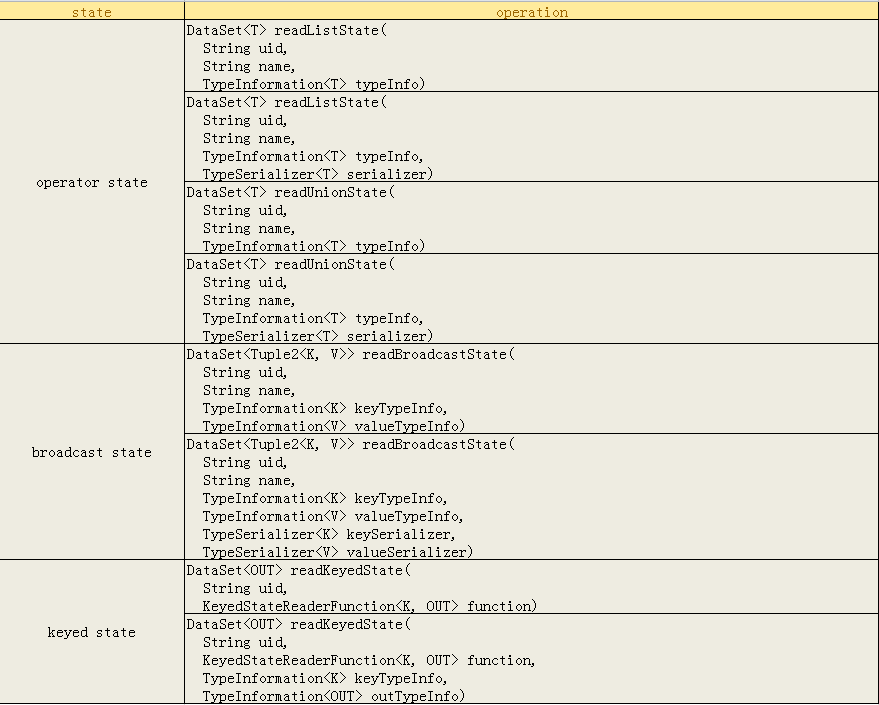
可以看到,主要提供对三种state的访问,operator state和broadcast state,其中broadcast state是一种特殊的operator state,因为他也支持自定义的serializer。
通关程序
目前在社区或者网上并没有完整的样例供大家参考,下面这个例子是完全在测试环境中跑通的,所有的flink相关组件的版本依赖都是1.9.0。
下面我们说明如何使用这个框架。
1.首先我们创建一个样例作业来生成savepoint
主类代码
 final StreamExecutionEnvironment env = StreamExecutionEnvironment.getExecutionEnvironment();

         env.enableCheckpointing(60*1000);

         DataStream<Tuple2<Integer,Integer>> kafkaDataStream =

                 env.addSource(new SourceFunction<Tuple2<Integer,Integer>>() {

             private boolean running = true;

             private int key;

             private int value;

             private Random random = new Random();

             @Override

             public void run(SourceContext<Tuple2<Integer,Integer>> sourceContext) throws Exception {

                 while (running){

                     key = random.nextInt(5);

                     sourceContext.collect(new Tuple2<>(key,value++) );

                     Thread.sleep(100);

                 }

             }

             @Override

             public void cancel() {

                 running = false;

             }

         }).name("source").uid("source");

         kafkaDataStream

                 .keyBy(tuple -> tuple.f0)

                 .map(new StateTest.StateMap()).name("map").uid("map")

                 .print().name("print").uid("print");
在上面的代码中,只需要注意在自定义的source中,发送tuple2消息,而做savepoint的
关键在于状态,状态在StateMap这个类中,如下:
 public static class StateMap extends RichMapFunction<Tuple2<Integer,Integer>,String>  {

         private transient ListState<Integer> listState;

         @Override

         public void open(Configuration parameters) throws Exception {

             ListStateDescriptor<Integer> lsd =

                     new ListStateDescriptor<>("list",TypeInformation.of(Integer.class));

             listState = getRuntimeContext().getListState(lsd);

         }

         @Override

         public String map(Tuple2<Integer,Integer> value) throws Exception {

             listState.add(value.f1);

             return value.f0+"-"+value.f1;

         }

         @Override

         public void close() throws Exception {

             listState.clear();

         }

     }
在上面的Map中,首先在open中声明了一个ListState,然后在消息处理的逻辑中,也很简单的只是把tuple2的值放进了listState中。然后提交作业,等作业运行一段时间之后,触发一个savepoint,
并记录savepoint的地址。至此,完成了state processor api验证工作的数据准备。
2.利用state processor api读取savepoint
这一步只是简单验证下savepoint是否能够被正确读取,代码如下:
 public class ReadListState {

     protected static final Logger logger = LoggerFactory.getLogger(ReadListState.class);

     public static void main(String[] args) throws Exception {

         final String operatorUid = "map";

         final String savepointPath =

                 "hdfs://xxx/savepoint-41b05d-d517cafb61ba";

         final String checkpointPath = "hdfs://xxx/checkpoints";

         // set up the batch execution environment

         final ExecutionEnvironment env = ExecutionEnvironment.getExecutionEnvironment();

         RocksDBStateBackend db = new RocksDBStateBackend(checkpointPath);

         DataSet<String> dataSet = Savepoint

                 .load(env, savepointPath, db)

                 .readKeyedState(operatorUid, new ReaderFunction())

                 .flatMap(new FlatMapFunction<KeyedListState, String>() {

                     @Override

                     public void flatMap(KeyedListState keyedListState, Collector<String> collector) throws Exception {

                         keyedListState.value.forEach(new Consumer<Integer>() {

                             @Override

                             public void accept(Integer integer) {

                                 collector.collect(keyedListState.key + "-" + integer);

                             }

                         });

                     }

                 });

         dataSet.writeAsText("hdfs://xxx/test/savepoint/bravo");

         // execute program

         env.execute("read the list state");

     }

     static class KeyedListState {

         Integer key;

         List<Integer> value;

     }

     static class ReaderFunction extends KeyedStateReaderFunction<Integer, KeyedListState> {

         private transient ListState<Integer> listState;

         @Override

         public void open(Configuration parameters) {

             ListStateDescriptor<Integer> lsd =

                     new ListStateDescriptor<>("list", TypeInformation.of(Integer.class));

             listState = getRuntimeContext().getListState(lsd);

         }

         @Override

         public void readKey(

                 Integer key,

                 Context ctx,

                 Collector<KeyedListState> out) throws Exception {

             List<Integer> li = new ArrayList<>();

             listState.get().forEach(new Consumer<Integer>() {

                 @Override

                 public void accept(Integer integer) {

                     li.add(integer);

                 }

             });

             KeyedListState kl = new KeyedListState();

             kl.key = key;

             kl.value = li;

             out.collect(kl);

         }

     }

 }
在读取了savepoint中的状态之后,成功将其转存为一个文件,文件的部分内容如下,每行的内容分别为key-value对:

3.利用state processor api重写savepoint
savepoint是对程序某个运行时点的状态的固化,方便程序在再次提交的时候进行接续,但有时候需要对savepoint中的状态进行改写,以方便从特定的状态来启动作业。
 public class ReorganizeListState {

     protected static final Logger logger = LoggerFactory.getLogger(ReorganizeListState.class);

     public static void main(String[] args) throws Exception {

         final String operatorUid = "map";

         final String savepointPath =

                 "hdfs://xxx/savepoint-41b05d-d517cafb61ba";

         final String checkpointPath = "hdfs://xxx/checkpoints";

         // set up the batch execution environment

         final ExecutionEnvironment env = ExecutionEnvironment.getExecutionEnvironment();

         RocksDBStateBackend db = new RocksDBStateBackend(checkpointPath);

         DataSet<KeyedListState> dataSet = Savepoint

                 .load(env,savepointPath,db)

                 .readKeyedState(operatorUid,new ReaderFunction())

                 .flatMap(new FlatMapFunction<KeyedListState, KeyedListState>() {

                     @Override

                     public void flatMap(KeyedListState keyedListState, Collector<KeyedListState> collector) throws Exception {

                         KeyedListState newState = new KeyedListState();

                         newState.value = keyedListState.value.stream()

                         .map( x -> x+10000).collect(Collectors.toList());

                         newState.key = keyedListState.key;

                         collector.collect(newState);

                     }

                 });

         BootstrapTransformation<KeyedListState> transformation = OperatorTransformation

                 .bootstrapWith(dataSet)

                 .keyBy(acc -> acc.key)

                 .transform(new KeyedListStateBootstrapper());

         Savepoint.create(db,128)

                 .withOperator(operatorUid,transformation)

                 .write("hdfs://xxx/test/savepoint/");

         // execute program

         env.execute("read the list state");

     }

     static class KeyedListState{

         Integer key;

         List<Integer> value;

     }

     static class ReaderFunction extends KeyedStateReaderFunction<Integer, KeyedListState> {

         private transient ListState<Integer> listState;

         @Override

         public void open(Configuration parameters) {

             ListStateDescriptor<Integer> lsd =

                     new ListStateDescriptor<>("list",TypeInformation.of(Integer.class));

             listState = getRuntimeContext().getListState(lsd);

         }

         @Override

         public void readKey(

                 Integer key,

                 Context ctx,

                 Collector<KeyedListState> out) throws Exception {

             List<Integer> li = new ArrayList<>();

             listState.get().forEach(new Consumer<Integer>() {

                 @Override

                 public void accept(Integer integer) {

                     li.add(integer);

                 }

             });

             KeyedListState kl = new KeyedListState();

             kl.key = key;

             kl.value = li;

             out.collect(kl);

         }

     }

     static class KeyedListStateBootstrapper extends KeyedStateBootstrapFunction<Integer, KeyedListState> {

         private transient ListState<Integer> listState;

         @Override

         public void open(Configuration parameters) {

             ListStateDescriptor<Integer> lsd =

                     new ListStateDescriptor<>("list",TypeInformation.of(Integer.class));

             listState = getRuntimeContext().getListState(lsd);

         }

         @Override

         public void processElement(KeyedListState value, Context ctx) throws Exception {

             listState.addAll(value.value);

         }

     }

 }
这里的关键在于根据上一步读取出来dataSet,转换的过程中将其值全部累加10000,然后将这个dataSet作为输入来构建一个BootstrapTransformation,然后创建了一个空的savepoint,并把指定
operatorUid的状态写为一个savepoint,最终写入成功,得到了一个新的savepoint,这个新的savepoint包含的状态中的value相比原先的值发生了变化。
4.验证新生产的savepoint是否可用
由于验证用的state是ListState,换言之,是KeyedState,而KeyedState是属于Flink托管的state,意味着Flink自己掌握状态的保存和恢复的逻辑,所以为了验证作业是否正确从新的savepoint
中启动了,对之前的StateMap改写如下:
 public static class StateMap extends RichMapFunction<Tuple2<Integer,Integer>,String>  {

         private transient ListState<Integer> listState;

         @Override

         public void open(Configuration parameters) throws Exception {

             ListStateDescriptor<Integer> lsd =

                     new ListStateDescriptor<>("list",TypeInformation.of(Integer.class));

             listState = getRuntimeContext().getListState(lsd);

         }

         @Override

         public String map(Tuple2<Integer,Integer> value) throws Exception {

             listState.add(value.f1);

             log.info("get value:{}-{}",value.f0,value.f1);

             StringBuilder sb = new StringBuilder();

             listState.get().forEach(new Consumer<Integer>() {

                 @Override

                 public void accept(Integer integer) {

                     sb.append(integer).append(";");

                 }

             });

             log.info("***********************taskNameAndSubTask:{},restored value:{}"

                     ,getRuntimeContext().getTaskNameWithSubtasks(),sb.toString());

             return value.f0+"-"+value.f1;

         }

         @Override

         public void close() throws Exception {

             listState.clear();

         }

     }
由于无法在state恢复之后立刻就拿到相应恢复的数据,这里之后在每次消息达到的时候输出下state中的内容,变通的看看是否恢复成功,结果如下:

可以对比看下上图中key为4的输出,可以看到输出的值即为修改后的值,验证成功。
5.结语
上面我们以一个keyedState来对state processor api做了验证,但Flink的state分为KeyedState,OperatorState和BroadcastState,在state processor api中都提供相应的处理接口。
另外,对于keyedState,如果作业的并行度发生了变化会如何?如果Key发生了变化会如何?都需要进一步探究。
官方文档参见:
https://flink.apache.org/feature/2019/09/13/state-processor-api.html
https://ci.apache.org/projects/flink/flink-docs-release-1.9/dev/libs/state_processor_api.html
Flink之state processor api实践的更多相关文章
- Flink之state processor api原理
无论您是在生产环境中运行Apache Flink or还是在过去将Flink评估为计算框架,您都可能会问自己一个问题:如何在Flink保存点中访问,写入或更新状态?不再询问!Apache Flink ...
- State Processor API:如何读取,写入和修改 Flink 应用程序的状态
过去无论您是在生产中使用,还是调研Apache Flink,估计您总是会问这样一个问题:我该如何访问和更新Flink保存点(savepoint)中保存的state?不用再询问了,Apache Flin ...
- ASP.NET Web API实践系列04,通过Route等特性设置路由
ASP.NET Web API路由,简单来说,就是把客户端请求映射到对应的Action上的过程.在"ASP.NET Web API实践系列03,路由模版, 路由惯例, 路由设置"一 ...
- MonkeyImage API 实践全记录
1. 背景 鉴于网上使用MonkeyImage的实例除了方法sameAs外很难找到,所以本人把实践各个API的过程记录下来然自己有更感性的认识,也为往后的工作打下更好的基础.同时也和上一篇文章& ...
- ASP.NET Web API实践系列07,获取数据, 使用Ninject实现依赖倒置,使用Knockout实现页面元素和视图模型的双向绑定
本篇接着上一篇"ASP.NET Web API实践系列06, 在ASP.NET MVC 4 基础上增加使用ASP.NET WEB API",尝试获取数据. 在Models文件夹下创 ...
- ASP.NET Web API实践系列05,消息处理管道
ASP.NET Web API的消息处理管道可以理解为请求到达Controller之前.Controller返回响应之后的处理机制.之所以需要了解消息处理管道,是因为我们可以借助它来实现对请求和响应的 ...
- state thread api 查询
state thread api 查询: http://state-threads.sourceforge.net/docs/reference.html
- 从udaf谈flink的state
1.前言 本文主要基于实践过程中遇到的一系列问题,来详细说明Flink的状态后端是什么样的执行机制,以理解自定义函数应该怎么写比较合理,避免踩坑. 内容是基于Flink SQL的使用,主要说明自定义聚 ...
- RESTful Web API 实践
REST 概念来源 网络应用程序,分为前端和后端两个部分.当前的发展趋势,就是前端设备层出不穷(手机.平板.桌面电脑.其他专用设备...). 因此,必须有一种统一的机制,方便不同的前端设备与后端进行通 ...
随机推荐
- 微信小程序 没有找到可以构建的npm包
问题如图: 1.进入小程序根目录,打开cmd,输入:npm init:然后,输入命令后一直点回车 2.输入命令:npm i vant-weapp -S --production 执行命令完之后,然后再 ...
- 【面试】Java中sleep和wait的区别
1.sleep方法是Thread类的静态方法: wait方法是Object类的成员方法 2.sleep方法使当前线程暂停执行指定的时间,让出cpu给其他线程,但是它的监控状态依然保持着,当指定的时间到 ...
- 安装v2sora@y
v2r@y安装 1. 安装nginx 这儿使用tengine进行安装, 可以看以前的博客 1.1) 注意带 http_v2 编译 ./configure --with-http_v2_module 不 ...
- Java入门系列之字符串创建方式、判断相等(一)
前言 陆续从0开始学习Java出于多掌握一门语言以后的路也会更宽,.NET和Java兼顾,虽然路还很艰难,但事在人为.由于Java和C#语法相似,所以关于一些很基础的内容不会再重头讲,Java系列中所 ...
- qt 界面去掉系统边框
该代码在Qt5框架编辑,使用该类时, 直接继承这个类就可以了. 实现了拖拽功能和关闭功能,如果需要放大缩小功能, 需自己实现. 1 #ifndef CUSTOMIZE_QWIDGET_H #defin ...
- 帝国CMS QQ登陆接口插件 适用于所有帝国7.2版本
插件名称:帝国CMS-QQ登录插件 插件作者:帝国CMS官方 插件介绍:帝国CMS系统的QQ登录插件. 官方网站:http://www.phome.net ---------------------- ...
- 并发—JVM内部机制和外部机制处理方法
并发常见的编程场景,一句话概括就是,需要协调多个线程之间的协作,已保证程序按照自己原本的意愿执行.那么究竟应该如何协调多个线程? 这个问题比较宽泛,一般情况下,我们按照方式的纬度去简单区分,有以下两种 ...
- react网页版聊天|仿微信、微博web版|react+pc端仿微信实例
一.项目介绍 基于react+react-dom+react-router-dom+redux+react-redux+webpack2.0+nodejs等技术混合开发的仿微信web端聊天室react ...
- Android 安全攻防(三): SEAndroid Zygote
转自:http://blog.csdn.net/yiyaaixuexi/article/details/8495695 在Android系统中,所有的应用程序进程,以及系统服务进程SystemServ ...
- typora使用说明
一级标题 # 空格 编写内容 二级标题 ## 空格 编写内容 有序内容 1.+Tab 无序内容 -+Tab 代码块 print("hello wrold") typora快捷键 c ...