
sonar安装和使用
安装
1. 从官网下载,https://www.sonarqube.org/downloads/
2. 下载之前要看好要求,我安装的是7.6的版本,要求是jdk1.8,mysql 5.6 到8 ,我使用的是5.7
3. 下载之后解压出来,运行bin 》 windows-x86-64 》 StartSonar.bat 不同操作系统不同。访问localhost:9000,能看到页面,就说明环境没问题。否则会提升jdk版本不对。
4. 在conf 》 sonar.properties中,加入如下配置,再执行3。记得删掉注释。如果启动后日志报错,可以清楚任务管理中所有的java进程,再启动。
如果启动成,在刚建的数据中,会有表生成。
sonar.jdbc.url=jdbc:mysql://localhost:3306/sonarqube?useUnicode=true&characterEncoding=utf8&rewriteBatchedStatements=true&useConfigs=maxPerformance&useSSL=false

sonar.jdbc.username=用户名  // 刚刚创建的sonarQube用户

sonar.jdbc.password=密码   // 创建用户对应的密码

sonar.sorceEncoding=UTF-8 // 设置编码格式为UTF-8
5. 访问http://localhost:9000 默认账号密码都是admin
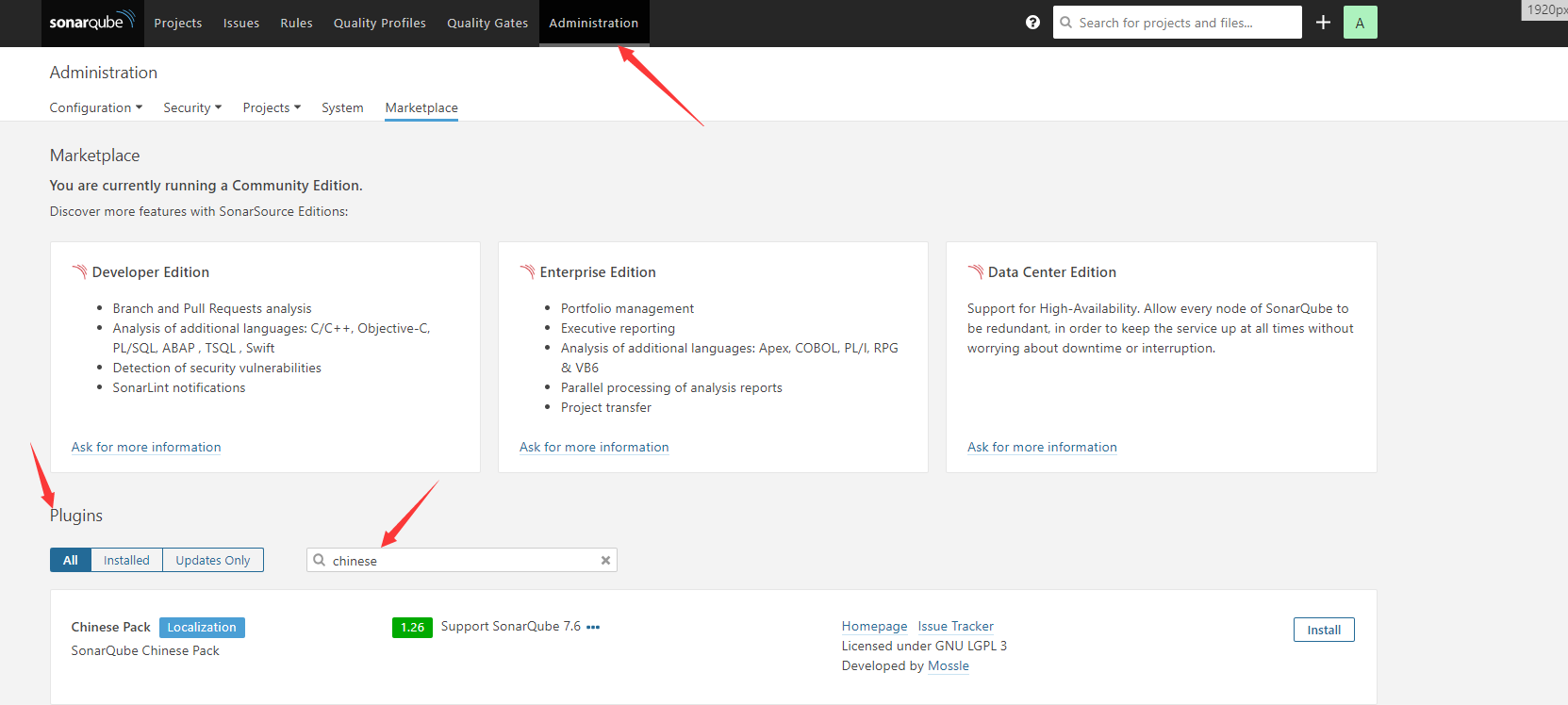
安装中文
下载地址:https://github.com/SonarQubeCommunity/sonar-l10n-zh
1. extensions 》 plugins
如下所示,点击下载,之后等待安装完成后重启。
安装sonar-scanner
下载地址:https://docs.sonarqube.org/latest/analysis/scan/sonarscanner/
解压出来,将bin目录加到path中,在cmd中,执行sonar-scanner -v,有日志输出即可。
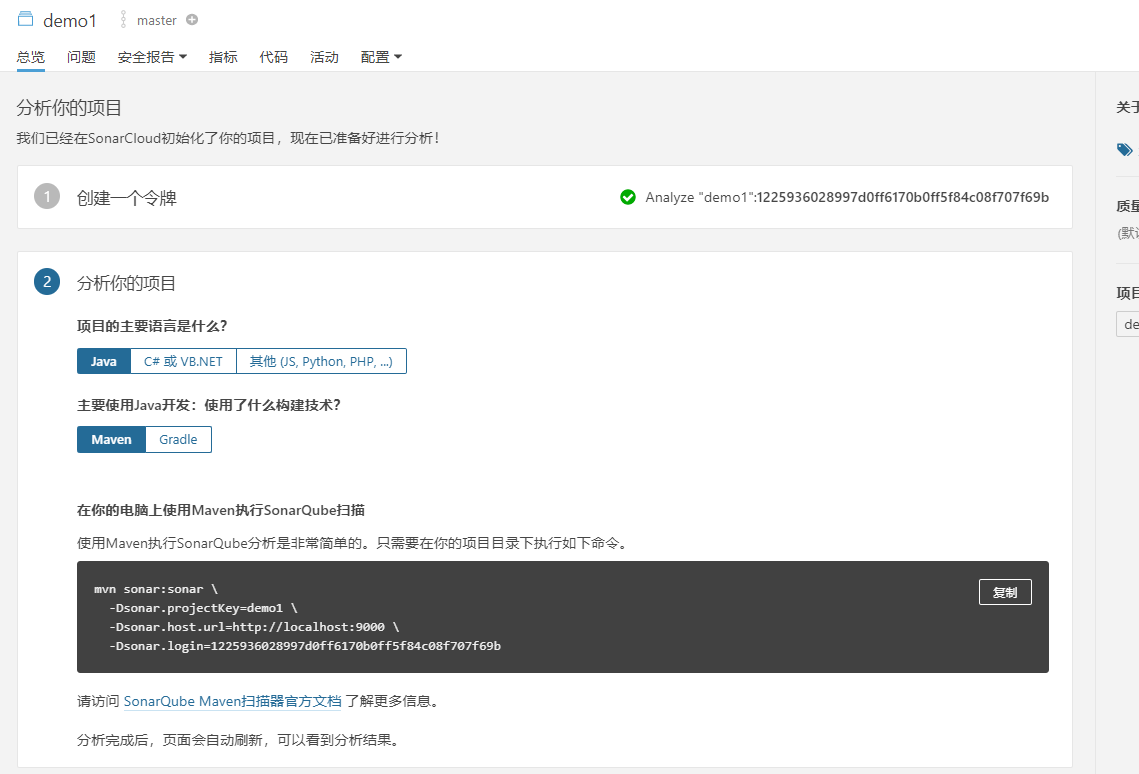
使用方式一
在sonar的页面上,建立项目,我这里用的java ,用maven 构建的
使用方式二
使用sonar-scanner来扫描
1. 在项目下新建文件sonar-project.properties
# must be unique in a given SonarQube instance

sonar.projectKey=demo1

# this is the name and version displayed in the SonarQube UI. Was mandatory prior to SonarQube 6.1.

sonar.projectName=demo1

sonar.projectVersion=1.0

# Path is relative to the sonar-project.properties file. Replace "\" by "/" on Windows.

# This property is optional if sonar.modules is set.

# Encoding of the source code. Default is default system encoding

#sonar.sourceEncoding=UTF-8

sonar.login=39aff716f3014a7d341f6eae2ac4aec8887b9ce7

sonar.sources=src

# sonar.projectKey=项目的key(自定义)

# sonar.projectName=项目名称

# sonar.projectVersion=项目版本

# sonar.sources=项目路径

#添加下面这行

sonar.java.binaries=./target/classes

#只检查java文件

sonar.inclusions=src/main/java/com/demo/**/*.java
2. 运行 sonar-scanner.bat -Dsonar.login=39aff716f3014a7d341f6eae2ac4aec8887b9ce7 -Dsonar.java.binaries=./target/classes ,到项目目录下执行。
执行完,会生成检测报告
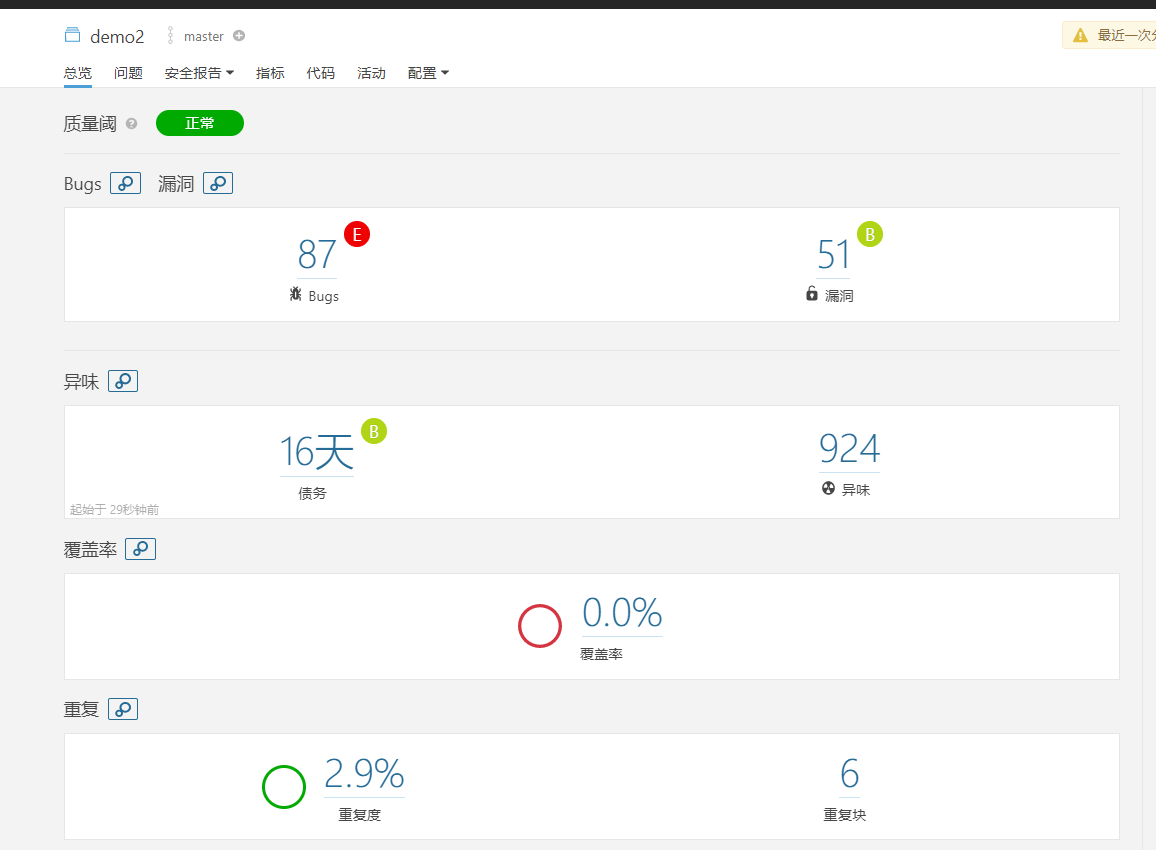
个人感觉第二种方便些。
参考资料:
sonar配置:https://blog.csdn.net/weixin_40861707/article/details/82117232
scan配置:https://my.oschina.net/guiguketang/blog/1814985
sonar安装和使用的更多相关文章
- Sonar安装与使用说明
我总结的Sonar安装与使用说明,需要的可以去网盘下载. 网盘地址: http://pan.baidu.com/s/199BII
- findbug、p3c、checkstyle、sonar安装使用
idea插件安装方式: Preferences—>Plugins—>查找插件—>Install Preferences—>Plugins—>Install plug fr ...
- sonar安装
##jdk不要用yum下载的 一.下载sonar源码 cd /usr/local/src wget https://sonarsource.bintray.com/Distribution/sonar ...
- Java代码质量监控工具Sonar安装
1. 代码质量七宗罪 Sonar是一个代码质量管理系统.它的帮助文档开篇明义,提出了代码质量的七宗罪.总结的比較到位.最好还是一看: 1. Bug和隐藏Bug(Bugs and Pot ...
- 高版本sonar安装遇到的坑-sonar 6.6
最近安装了6.6版本的sonar,发现里面的坑还是很多,下面列举下遇到的坑 sonar插件地址:https://docs.sonarqube.org/display/PLUG/Plugin+Libra ...
- jenkins + sonar 安装配置
最近把snoar 添加上了 [root@snoar data]# wget https://sonarsource.bintray.com/Distribution/sonarqube/sonar ...
- 高版本sonar安装遇到的坑-sonar 6.7.5
最近安装了6.7.5版本的sonar,发现里面的坑还是很多,下面列举下遇到的坑 sonar插件地址:https://docs.sonarqube.org/display/PLUG/Plugin+Lib ...
- Sonar安装-Linux[20171227]
前言 一款不错的代码质量管理工具Sonar 前期准备 官方参考文档 https://docs.sonarqube.org/display/SONAR/Documentation ...
- 代码检查工具 Sonar 安装&使用
本文主要说明Sonar的安装方式并附上依赖安装包,本文目标只实现本地搭建测试的Sonar环境,以及本地的测试项目的非定制化扫描 本机测试环境:Win10-X64,.vs2017 依赖包: 1 ...
随机推荐
- 【IntelliJ IDEA】IDEA自动生成serialVersionUID的办法
digest:实体对象实现了java.io.Serializable接口后,一般都会提供一个serialVersionUID一做版本区分.在IDEA里,可以通过一些设置,帮助我们快速生成serialV ...
- spring奇怪异常记录(会逐渐记录)
1 严重: Context initialization failedorg.springframework.beans.factory.BeanCreationException: Error cr ...
- 使用 Flask 和 Vue.js 来构建全栈单页应用
在这个教程中,我将向你展示如何将 Vue 的单页面应用和 Flask 后端连接起来. 简单的来说,如果想在 Flask 中使用 Vue 框架是没有什么问题的. 但在实际中存在一个明显的问题就是 Fla ...
- 把Git Repository建到U盘上去
Git很火.原因有三: 它是大神Linus Torvalds的作品,天然地具备神二代的气质和品质: 促进了生产力的发展,Git的分布式版本控制理念,并非首创,但非常适合开源社区的协作方式(不存在mas ...
- #华为云·寻找黑马程序员#【代码重构之路】如何“消除”if/else
1. 背景 if/else是高级编程语言中最基础的功能,虽然 if/else 是必须的,但滥用 if/else,特别是各种大量的if/else嵌套,会对代码的可读性.可维护性造成很大伤害,对于阅读代码 ...
- 谁说微服务是Spring Cloud的独角戏?Service Mesh了解一下?
Service Mesh 的概念自 2017 年初提出之后,受到了业界的广泛关注,作为微服务的下一代发展架构在社区迅速发酵,并且孵化出了诸如 Istio 等广受业界关注的面向于云原生 (Cloud N ...
- .Net core_Excel 导出二维码(以导出箱单为例)
[AccessLogAttribute(Note = "导出条形码箱单 — 条形码")]public ActionResult ExportContract(string INNE ...
- vue axios 总结篇
1.npm --save 和 --save-dev 有什么区别 发布到线上的叫生产环境~,在本地开发的时候叫开发环境,--save就是会打包到线上去并且在线上环境能用到的,比如你npm install ...
- luogu P1316 丢瓶盖 |二分答案
题目描述 陶陶是个贪玩的孩子,他在地上丢了A个瓶盖,为了简化问题,我们可以当作这A个瓶盖丢在一条直线上,现在他想从这些瓶盖里找出B个,使得距离最近的2个距离最大,他想知道,最大可以到多少呢? 输入格式 ...
- SpringBoot整合邮件发送
本节介绍SpringBoot项目如何快速配置和发送邮件,包括简单的邮件配置.发送简单邮件.发送HTML邮件.发送携带附件的邮件等. 示例源码在:https://github.com/laolunsi/ ...