
JavaScript自定义浏览器滚动条兼容IE、 火狐和chrome
今天为大家分享一下我自己制作的浏览器滚动条,我们知道用css来自定义滚动条也是挺好的方式,css虽然能够改变chrome浏览器的滚动条样式可以自定义,css也能够改变IE浏览器滚动条的颜色。但是css只能是改变IE浏览器的颜色,而且CSS不能做到改变火狐浏览器的样式和颜色。所以只能是通过JavaScript来实现了。也有插件可以做到。我分享一下我自己使用原生JavaScript实现的思路。先上个图看下效果:
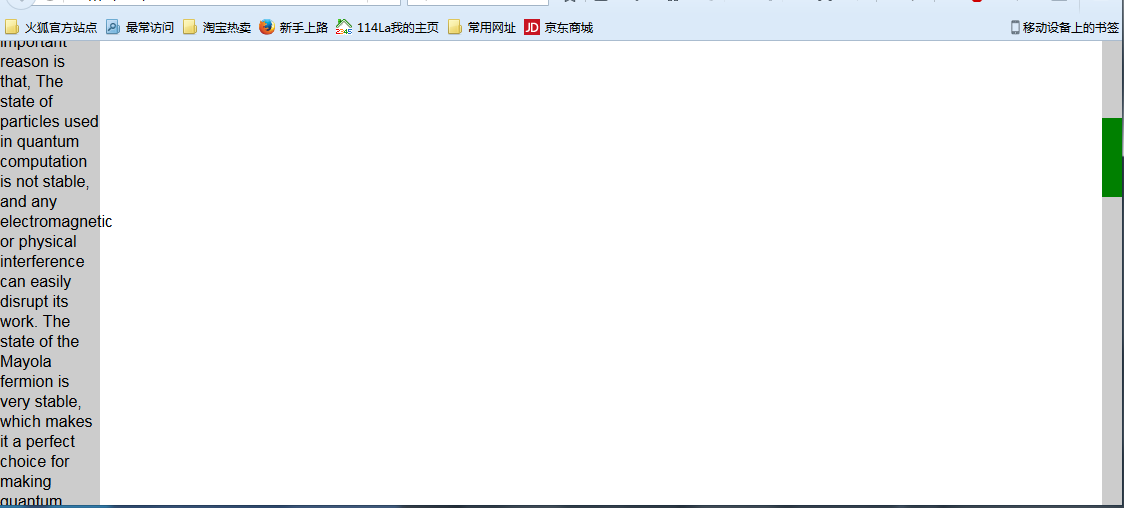
JavaScript实现的思路就是模拟浏览器自身滚动条。我制作的思路是先将整个文档放在一个容器里面,然后通过改变容器里面的div的top值来实现滚动效果布局如下:
 <style>

     *{

         margin:0;

         padding:0;

     }

     body{

         overflow:hidden;

     }

     #box{

         float:right;

         top:0;

         right:0;

         width:20px;

         background:#ccc;

         position:relative;

     }

     #drag{

         position: absolute;

         top:0

         left:0;

         width:20px;

         background:green;

     }

     #content{

         position:absolute;

         left: 0;

     }

 </style>

 <body>

     <div id="box">

         <div id="drag"></div>

     </div>

     <div id="content">

         <div style="background:#ccc;width: 100px;">

             Although many people talk about the super performance of quantum computing, such as one second to complete the current supercomputer computing tasks for several years, but so far did not create a true sense of the quantum computer, one of the very important reason is that, The state of particles used in quantum computation is not stable, and any electromagnetic or physical interference can easily disrupt its work. The state of the Mayola fermion is very stable, which makes it a perfect choice for making quantum computers. Six months ago in the laboratory of Shanghai Jiaotong University, Jia Jinfeng successfully captured it.

             Speaking of the scene, Jia Jinfeng said: "In fact, I started to hear the Mayolana fermions, I think this thing may not be done 20 years out.

             Using a special material preparation method, Jia Jinfeng's research team has grown topological insulators on the superconductors with thickness of 5 nanometers. The topological superconductor materials are prepared and finally the Mayolana fermions are found at the interface of the topological superconductors. The mysterious particles were captured 80 years, but also let Jia Jinfeng more firm with its confidence in the manufacture of quantum computers.

             Speaking of the future of the plan, Jia Jinfeng said: "I hope to within a few years to do the topological quantum bit!" (Before) the world has not, so if we cut into this from the point, we are the same with the world The starting line, for our country, this is able to catch up with the footsteps of quantum computing, a starting point.

         <div>

     </div>

 </body>
先定义滑块和滑动条,然后在定义一个装内容的盒子,布局很简单,body的 overflow设置成hidden隐藏默认滚动条。
实现主要思路就是:滑块移动距离/滑块滚动范围=内容滚动距离/内容可滚动高度;滑块移动距离就是鼠标按下后拖动的距离,
内容可滚动高度就是内容总高度减去可视区域高度。另外,滚动条的总高度就是可视区域的高度,滑块的高度=可视区域的高度/内容的总高度*可视区域的高度。最后就是判断浏览器是否是火狐。
 <script type="text/javascript">

 window.onload=function(){

     var oBox=document.getElementById('box');

     var oDrag=document.getElementById('drag');

     var content=document.getElementById('content');

     var viewHeight=document.documentElement.clientHeight;

     var conHeight=content.clientHeight

     oBox.style.height=viewHeight+'px';

     oDrag.style.height=viewHeight/conHeight*viewHeight+'px';

     window.onresize = function(){

         viewHeight=document.documentElement.clientHeight;

         oBox.style.height=viewHeight+'px';

         oDrag.style.height=viewHeight/conHeight*viewHeight+'px';

         oDrag.style.top=-content.offsetTop/(content.clientHeight-viewHeight)*(oBox.clientHeight-oDrag.clientHeight)+'px';

     }

     oDrag.onmousedown=function (ev){

         //阻止默认事件

         var e=ev||window.event;

         if (e.preventDefault) {

             e.preventDefault();

         } else{

             e.returnValue=false;

         };

          //e.clientY鼠标当前坐标

         var downY=e.clientY-oDrag.offsetTop;

         document.onmousemove=function (ev){

             var e=ev||window.event;

             var top=e.clientY-downY;

             if (top<=0) {

                 top=0;

             };

             if (top>=oBox.clientHeight-oDrag.clientHeight) {

                 top=oBox.clientHeight-oDrag.clientHeight;

             };

             var scale=top/(oBox.clientHeight-oDrag.clientHeight);

             var contentY=scale*(content.clientHeight-viewHeight);

             oDrag.style.top=top+'px';

             content.style.top=-contentY+'px';

         }

         document.onmouseup=function (){

             document.onmousemove=null;

         }

     }

     var str=window.navigator.userAgent.toLowerCase();

     //火狐浏览器

     if (str.indexOf('firefox')!=-1){

          document.addEventListener('DOMMouseScroll',function (e){

             e.preventDefault();//阻止窗口默认的滚动事件

             if (e.detail<0) {

                 var scrollHei=content.offsetTop+25;

                 if (scrollHei>=0) {

                     scrollHei=0;

                 };

                 if (scrollHei<=-(content.clientHeight-viewHeight)) {

                     scrollHei=-(content.clientHeight-viewHeight);

                 };

                 var scale=scrollHei/(content.clientHeight-viewHeight);

                 var top=scale*(oBox.clientHeight-oDrag.clientHeight);

                 content.style.top=scrollHei+'px';

                 oDrag.style.top=-top+'px';

             }

             if (e.detail>0) {

                 var scrollHei=content.offsetTop-25;

                 if (scrollHei>=0) {

                     scrollHei=0;

                 };

                 if (scrollHei<=-(content.clientHeight-viewHeight)) {

                     scrollHei=-(content.clientHeight-viewHeight);

                 };

                 var scale=scrollHei/(content.clientHeight-viewHeight);

                 var top=scale*(oBox.clientHeight-oDrag.clientHeight);

                 content.style.top=scrollHei+'px';

                 oDrag.style.top=-top+'px';

             };

         },false);

     }

     else{//非火狐浏览器

         document.onmousewheel=function (ev){

             var e=ev||window.event;

             if (e.preventDefault) {

                 e.preventDefault();

             } else{

                 e.returnValue=false;

             };

             if (e.wheelDelta>0) {

                 var scrollHei=content.offsetTop+25;

                 if (scrollHei>=0) {

                     scrollHei=0;

                 };

                 if (scrollHei<=-(content.clientHeight-viewHeight)) {

                     scrollHei=-(content.clientHeight-viewHeight);

                 };

                 var scale=scrollHei/(content.clientHeight-viewHeight);

                 var top=scale*(oBox.clientHeight-oDrag.clientHeight);

                 content.style.top=scrollHei+'px';

                 oDrag.style.top=-top+'px';

             };

             if (e.wheelDelta<0) {

                 var scrollHei=content.offsetTop-25;

                 if (scrollHei>=0) {

                     scrollHei=0;

                 };

                 if (scrollHei<=-(content.clientHeight-viewHeight)) {

                     scrollHei=-(content.clientHeight-viewHeight);

                 };

                 var scale=scrollHei/(content.clientHeight-viewHeight);

                 var top=scale*(oBox.clientHeight-oDrag.clientHeight);

                 content.style.top=scrollHei+'px';

                 oDrag.style.top=-top+'px';

             };

         }

     }

 }

 </script>
以上就是我自己实现的整个过程,其中也存在不少BUG,比如没有解决浏览器缩放时候的问题。感谢大家的阅读,如有指正的地方欢迎大家指正纠错
JavaScript自定义浏览器滚动条兼容IE、 火狐和chrome的更多相关文章
- 自定义浏览器滚动条的样式,打造属于你的滚动条风格——兼容IE和webkit(ff不支持)
前段时间,到网上找素材时,看到了一个很个性的滚动条式,打开Chrome的调试工具看了一下,发现不是用JavaScript来模拟实现的,觉得 有必要折腾一下.于是在各大浏览器中对比了一下,发现只用Chr ...
- javascript自定义浏览器右键菜单
javascript自定义浏览器右键菜单 在书上看到document对象还有一个contextmenu事件,但是不知为什么w3school中找不到这个耶... 利用这个特性写了个浏览器的右键菜单, ...
- 总结JavaScript中浏览器的兼容问题
浅析JavaScript中浏览器的兼容问题 浏览器兼容性问题是在实际开发中容易忽略而又最重要的一部分.我们在讲老版本浏览器兼容问题之前,首先要了解什么是能力检测,它是来检测浏览器有没有这种能力,即判断 ...
- 网站开发中使用javascript获取浏览器滚动条宽度
在网站开发中,有时候需要获取浏览器滚动条的宽度,在武汉蚂蹄软件服务中心的技术人员指导之下,我实现了该需求.记录如下: 首先说明一下原理: ①生成一个div,设置滚动条不可见,记录其宽度: ②将上面的d ...
- javascript多浏览器的兼容
一.document.formName.item(”itemName”) 问题 问题说明:IE下,可以使用 document.formName.item(”itemName”) 或 document. ...
- CSS3自定义浏览器滚动条样式
一个完整滚动条右以下部分组成: ::-webkit-scrollbar 滚动条整体部分,常用属性:width,height,background,border: ::-webkit-scrollbar ...
- 新版本火狐 ,Chrome不支持showModalDialog解决办法
平常的网站中,有时我们会希望使用者按下按钮后开启一个保持在原窗口前方的子窗口,在IE中,我们可以使用showModalDialog来达成,但是chrome早就不支持showModalDialog,最近 ...
- javascript自定义滚动条插件,几行代码的事儿
在实际项目中,经常由于浏览器自带的滚动条样式太戳,而且在各个浏览器中显示不一样,所以我们不得不去实现自定义的滚动条,今天我就用最少的代码实现了一个自定义滚动条,代码量区区只有几十行,使用起来也非常方便 ...
- 兼容ie[6-9]、火狐、Chrome、opera、maxthon3、360浏览器的js本地图片预览
html代码: <div id="divPreview"> <img id="imgHeadPhoto" src="Images/H ...
随机推荐
- ASP.NET Core MVC/WebAPi 模型绑定探索
前言 相信一直关注我的园友都知道,我写的博文都没有特别枯燥理论性的东西,主要是当每开启一门新的技术之旅时,刚开始就直接去看底层实现原理,第一会感觉索然无味,第二也不明白到底为何要这样做,所以只有当你用 ...
- Angular企业级开发-AngularJS1.x学习路径
博客目录 有链接的表明已经完成了,其他的正在建设中. 1.AngularJS简介 2.搭建Angular开发环境 3.Angular MVC实现 4.[Angular项目目录结构] 5.[SPA介绍] ...
- iOS逆向工程之Theos
如果你对iOS逆向工程有所了解,那么你对Tweak并不陌生.那么由Tweak我们又会引出Theos, 那么什么是Theos呢,简单一句话,Theos是一个越狱开发工具包,Theos是越狱开发工具的首先 ...
- 修改eclipse皮肤
习惯了vim黑色背景的程序猿们想必用eclipse时会倍感的不适应吧,不过没关系,因为eclipse的皮肤是可以自己定制的! 下面是我电脑上的eclipse界面,看到这个是不是找回了vim的感觉呢? ...
- spring remoting源码分析--Hessian分析
1. Caucho 1.1 概况 spring-remoting代码的情况如下: 本节近分析caucho模块. 1.2 分类 其中以hession为例,Hessian远程服务调用过程: Hessian ...
- web服务器集群
概述 集群和分布式都是从集中式进化而来的.分布式和集群会相互合作的,同时的集群和分布式.在这里重点说说集群 集群是什么? 集群能提高单位时间内处理的任务数量,提升服务器性能 有多台服务器去处理任务,但 ...
- 解决:SharePoint当中的STP网站列表模板没有办法导出到其它语言环境中使用
首在在你的英文版本上,导出列表或是网站的模板,这个文件可能是这样滴:template.stp 把这个文件 template.stp 命名为 template.cab 解压 这个 *.cab 文件 在解 ...
- Android开发学习—— Fragment
#Fragment* 用途:在一个Activity里切换界面,切换界面时只切换Fragment里面的内容* 生命周期方法跟Activity一致,可以理解把其为就是一个Activity* 定义布局文件作 ...
- Atitit.软件开发的三层结构isv金字塔模型
Atitit.软件开发的三层结构isv金字塔模型 第一层,Implements 层,着重与功能的实现.. 第二次,spec层,理论层,设计规范,接口,等.流程.方法论 顶层,val层,价值观层,原则, ...
- vim安装中文帮助手册
安装方法: 在下面的网站下载中文帮助的文件包:$wget http://nchc.dl.sourceforge.net/sourceforge/vimcdoc/vimcdoc-1.5.0.tar. ...