
Struts2访问Servlet
知识点:
servlet是单例的,Action是多例的,一次请求,创建一个Action的实例
结果页面分为全局和局部两类(局部优先级更高)
result标签:
name : 默认succes
type :页面跳转类型
dispatcher 默认值,请求转发(action转发jsp)
redirect 重定向(action重定向jsp)
chain 转发(action转发action)
redirectAction 重定向(action重定向action)
stream struts2中提供文件下载的功能
代码如下
struts.xml
<?xml version="1.0" encoding="UTF-8"?>

<!DOCTYPE struts PUBLIC

        "-//Apache Software Foundation//DTD Struts Configuration 2.5//EN"

        "http://struts.apache.org/dtds/struts-2.5.dtd">

<struts>

    <package name="demo1" extends="struts-default">

        <!--全局结果页面-->

        <global-results>

            <result name="success">servlet1/demo2.jsp</result>

        </global-results>

        <action name="requestDemo1" class="com.jinke.servlet1.RequestDemo1"/>

        <action name="requestDemo2" class="com.jinke.servlet1.RequestDemo2"/>

        <action name="requestDemo3" class="com.jinke.servlet1.RequestDemo3"/>

        <!--局部结果页面-->

        <action name="requestDemo1" class="com.jinke.servlet1.RequestDemo1">

            <result name="success">servlet1/demo2.jsp</result>

        </action>

        <action name="requestDemo2" class="com.jinke.servlet1.RequestDemo2">

            <result name="success">servlet1/demo2.jsp</result>

        </action>

        <action name="requestDemo3" class="com.jinke.servlet1.RequestDemo3">

            <result name="success">servlet1/demo2.jsp</result>

        </action>

    </package>

</struts>
web.xml
<?xml version="1.0" encoding="UTF-8"?>

<web-app xmlns="http://xmlns.jcp.org/xml/ns/javaee"

         xmlns:xsi="http://www.w3.org/2001/XMLSchema-instance"

         xsi:schemaLocation="http://xmlns.jcp.org/xml/ns/javaee http://xmlns.jcp.org/xml/ns/javaee/web-app_4_0.xsd"

         version="4.0">

    <welcome-file-list>

        <welcome-file>servlet1/demo1.jsp</welcome-file>

    </welcome-file-list>

    <filter>

        <filter-name>struts2</filter-name>

        <filter-class>org.apache.struts2.dispatcher.filter.StrutsPrepareAndExecuteFilter</filter-class>

    </filter>

    <filter-mapping>

        <filter-name>struts2</filter-name>

        <url-pattern>/*</url-pattern>

    </filter-mapping>

</web-app>
demo1.jsp
<%--

  Created by IntelliJ IDEA.

  User: wanglei

  Date: 2019/6/18

  Time: 11:03

  To change this template use File | Settings | File Templates.

--%>

<%@ page contentType="text/html;charset=UTF-8" language="java" %>

<html>

<head>

    <title>Title</title>

</head>

<body>

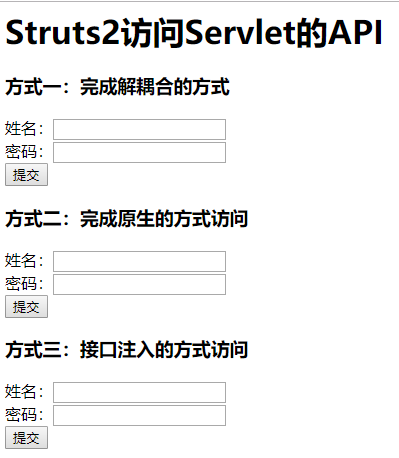
<h1>Struts2访问Servlet的API</h1>

<h3>方式一:完成解耦合的方式</h3>

<form action="${pageContext.request.contextPath}/requestDemo1.action" method="post">

    姓名:<input type="text" name="name"><br/>

    密码:<input type="password" name="password"><br/>

    <input type="submit" value="提交"></form>

<h3>方式二:完成原生的方式访问</h3>

<form action="${pageContext.request.contextPath}/requestDemo2.action" method="post">

    姓名:<input type="text" name="name"><br/>

    密码:<input type="password" name="password"><br/>

    <input type="submit" value="提交"></form>

<h3>方式三:接口注入的方式访问</h3>

<form action="${pageContext.request.contextPath}/requestDemo3.action" method="post">

    姓名:<input type="text" name="name"><br/>

    密码:<input type="password" name="password"><br/>

    <input type="submit" value="提交"></form>

</body>

</html>
demo2.jsp
<%--

  Created by IntelliJ IDEA.

  User: wanglei

  Date: 2019/6/18

  Time: 11:24

  To change this template use File | Settings | File Templates.

--%>

<%@ page contentType="text/html;charset=UTF-8" language="java" %>

<html>

<head>

    <title>Title</title>

</head>

<body>

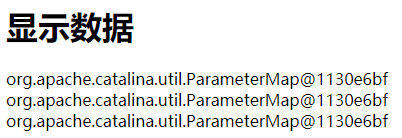
<h1>显示数据</h1>

${reqName}<br/>

${sessName}<br/>

${appName}<br/>

</body>

</html>
action层
import com.opensymphony.xwork2.ActionContext;

import com.opensymphony.xwork2.ActionSupport;

import org.apache.struts2.dispatcher.HttpParameters;

/**

 * 访问Servlet的API方式一:完全解耦合的方式

 */

public class RequestDemo1 extends ActionSupport {

    @Override

    public String execute() throws Exception {

        //接收参数

        //利用struts2中的对象ActionContext对象

        ActionContext context = ActionContext.getContext();

        //调用ActionContext中方法

        HttpParameters map = context.getParameters();

//        System.out.println(map);

        //二.向域对象中存入数据

        context.put("reqName", map);//相当于request.setAttribute()

        context.getSession().put("sessName", map);//相当于session.setAttribute()

        context.getApplication().put("appName", map);//相当于application.setAttribute()

        return SUCCESS;

    }

}
import com.opensymphony.xwork2.ActionSupport;

import org.apache.struts2.ServletActionContext;

import javax.servlet.http.HttpServletRequest;

import java.util.Map;

/**

 * 访问Servlet的API方式二:采用原生的方式

 */

public class RequestDemo2 extends ActionSupport {

    @Override

    public String execute() throws Exception {

        //一、接收数据

        //直接获得request对象,通过ServletActionSupport

        HttpServletRequest request = ServletActionContext.getRequest();

        Map<String, String[]> map = request.getParameterMap();

        System.out.println(map.toString());

        //二、向域对象中保存数据

        //向request中保存数据

        request.setAttribute("reqName", map.toString());

        //向session中保存数据

        request.getSession().setAttribute("sessName", map.toString());

        //向application中保存数据

        ServletActionContext.getServletContext().setAttribute("appName", map.toString());

        return SUCCESS;

    }

}
import com.opensymphony.xwork2.ActionSupport;

import org.apache.struts2.interceptor.ServletRequestAware;

import org.apache.struts2.util.ServletContextAware;

import javax.servlet.ServletContext;

import javax.servlet.http.HttpServletRequest;

import java.util.Arrays;

import java.util.Map;

/**

 * 访问Servlet的API方式三:接口注入的方式

 */

public class RequestDemo3 extends ActionSupport implements ServletRequestAware, ServletContextAware {

    private HttpServletRequest request;

    private ServletContext context;

    @Override

    public String execute() throws Exception {

        //一、接收参数

        //通过接口注入的方式获得request对象

        Map<String, String[]> map = request.getParameterMap();

        for (String key : map.keySet()) {

            String[] value = map.get(key);

            System.out.println(key + "   " + Arrays.toString(value));

        }

        //二、向域对象中保存数据

        //向request域中保存数据

        request.setAttribute("reqName", map.toString());

        //向session中保存数据

        request.getSession().setAttribute("sessName", map.toString());

        //向Application中保存数据

        context.setAttribute("appName", map.toString());

        return super.execute();

    }

    @Override

    public void setServletRequest(HttpServletRequest httpServletRequest) {

        this.request = httpServletRequest;

    }

    @Override

    public void setServletContext(ServletContext servletContext) {

        this.context = servletContext;

    }

}
结果
欢迎关注我的微信公众号:安卓圈

Struts2访问Servlet的更多相关文章
- 配置Struts2及Struts2访问servlet api的方式
Struts2的起源与背景 在很长的一段时间内,在所有的MVC框架中,Struts1处于绝对的统治地位,无论是从市场的普及范围,还是具体的使用者数量. 其他MVC框架都无 法与其相比,作为一一款优秀的 ...
- (转)Struts2访问Servlet的API及......
http://blog.csdn.net/yerenyuan_pku/article/details/67315598 Struts2访问Servlet的API 前面已经对Struts2的流程已经执行 ...
- 八 Struts2访问Servlet的API方式三:接口注入
Struts2访问Servlet的API方式三:接口注入 通过实现ServletRequestAware, ServletContextAware 接口,拿到Request.ServletContex ...
- 七 Struts2访问Servlet的API方式二:原生方式
Struts2访问Servlet的API方式二:原生方式 和解耦合的方式不同,原生方式既可以拿到域对象,也可以调用域对象中的方法 前端jsp: <%@ page language="j ...
- 六 Struts2访问Servlet的API方式一:完全解耦合的方式
注意: 完全解耦合的方式,这种方式只能获得代表request.session.application的数据的Map集合. 不能操作这些对象的本身的方法. 1 jsp: <%@ page lang ...
- struts2访问servlet API
搭建环境: 引入jar包,src下建立struts.xml文件 项目配置文件web.xml. web.xml: <?xml version="1.0" encoding=&q ...
- Struts2(七) Struts2访问Servlet的API
当接受表单参数,向页面保持数据时.要用到Struts访问Servlet 的API .下面只做参考,有错误或不同意见可以发送邮箱2440867831@qq.com .建议大家看struts文档,源代码 ...
- Struts2访问Servlet API的三种方式
有时我们需要用到Request, Response, Session,Page, ServletContext这些我们以前常用的对象,那么在Struts2中怎么样使用到这些对象呢,通常有三种方式. * ...
- Struts2访问Servlet API的几种方式
struts2提供了三种方式访问servlet API:大致分为两类 1. ActionContext: public static ActionContext getContext() :获得当前 ...
随机推荐
- CentOS7.0 内核(3.10.0-123.el7.x86_64)bug导致KVM物理机重启
一.问题描述 服务器硬件:DELL R720 系统版本:CentOS7.0 内核版本:3.10.0-123.el7.x86_64 故障现象:偶尔会重启 二.问题原因 经查看dmesg日志发现是kern ...
- C# 只允许运行一个程序实例
using System; using System.Windows.Forms; using System.Runtime.InteropServices;//使用DllImport的必须. usi ...
- hive中的日期转换函数
1.unix时间戳转时间函数 语法: from_unixtime(bigintunixtime[, string format]) 返回值: string 说明: 转化UNIX时间戳(从197 ...
- PyQt5中的窗口显示控制
setWindowState(state) #设置窗口状态 Qt.WindowNoState 无状态-正常状态 Qt.WindowMinimized 最小化 Qt.WindowMaximized 最大 ...
- 基于TCP和UDP的Socket通信
TCP的Socket通信 TCP是面向连接的,安全的协议,它是一对一的关系 server client 上面只是单个客户端同服务器通信,可使用多线程编程实现多个客户端的通信 UDP的Socket通信 ...
- HDU6704 K-th occurrence
[传送门] 先求出SA和height.然后找到 rank[l] 的 height 值.能成为相同子串的就是和rank[l]的lcp不小于 $len$ 的.二分出左右端点之后,主席树求第k小即可. #i ...
- HDU 6091 - Rikka with Match
思路 树形dp,设计状态如下: 设 $dp_u_i_0$表示 以点 u 为根的子树 最大匹配数模 m 为 i 时,且 u 点没有匹配的方案数 DP[u][i][1] 表示 以点 u 为根的子树 最大匹 ...
- ES6 let 和const
一.var 的缺陷:var 只有全局作用域和函数作用域,没有块级作用域,除了在函数内部的变量默认都属于window var foo='hello'; fn=function(){ var foo='w ...
- 服务器使用ssh秘钥登录并禁止密码登录
问题: 最近在登录服务器的时候,每次都会有提示999+ falied login等字眼,意思就是自己的服务器密码正在被人暴力破解.想象以下,别人有了你的服务器的root登录密码,那么就可以对你的服务器 ...
- SHOI做题记录
LOJ #2027. 「SHOI2016」黑暗前的幻想乡 考虑到每个公司一条边,那就等价于没有任何一家公司没有边. 然后就可以容斥+矩阵树定理,没了. LOJ #2028. 「SHOI2016」随机序 ...