
前端 JS 获取 Image 图像 宽高 尺寸
前端 JS 获取 Image 图像 宽高 尺寸
简介
项目中用到获取图片的原始尺寸,然后适配宽高;网上的大部分前端解决方案,都是new Image()后,在onload事件中获取image的尺寸。
在图片数量较多或者图片尺寸较大的时候,这样的获取效率非常低下。所有就有了这篇文章。通过直接读取解析文件的字节码来获取图片的尺寸。
IMAGE_HEAD_SIGS
var IMAGE_HEAD_SIGS = {

    GIF: [0x47, 0x49, 0x46], //'G' 'I' 'F' ascii

    PNG: [0x89, 0x50, 0x4e, 0x47, 0x0d, 0x0a, 0x1a, 0x0a],

    JPG: [0xff, 0xd8, 0xff, 0xe0],

    BMP: [0x42, 0x4d]

}
PNG
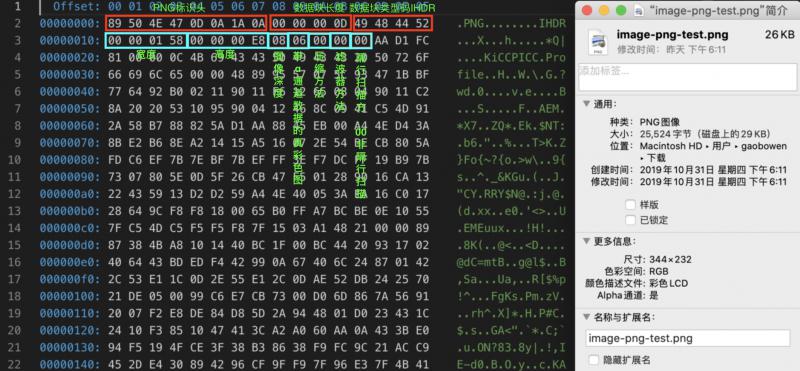
function ReadPNG(bytes) {

    if (bytes.slice(0, 8).toString() === IMAGE_HEAD_SIGS.PNG.toString()) {

        let width = readUint32BE(bytes, 16);

        let height = readUint32BE(bytes, 20);

        return { width, height }

    }

}
JPG
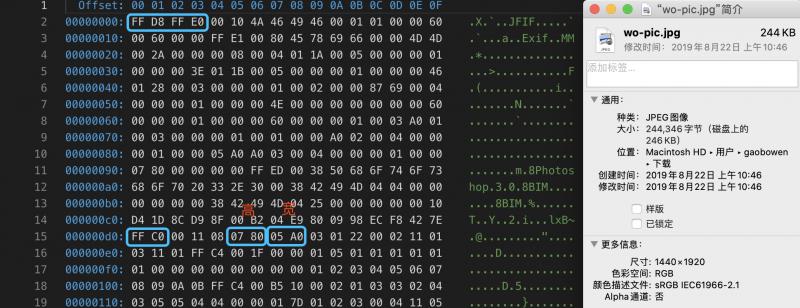
function ReadJPG(bytes) {

    if (bytes.slice(0, 4).toString() === IMAGE_HEAD_SIGS.JPG.toString()) {

        const M_SOF0 = 0xC0; /* Start Of Frame N */

        const M_SOF1 = 0xC1; /* N indicates which compression process */

        const M_SOF2 = 0xC2; /* Only SOF0-SOF2 are now in common use */

        const M_SOF3 = 0xC3;

        const M_SOF5 = 0xC5; /* NB: codes C4 and CC are NOT SOF markers */

        const M_SOF6 = 0xC6;

        const M_SOF7 = 0xC7;

        const M_SOF9 = 0xC9;

        const M_SOF10 = 0xCA;

        const M_SOF11 = 0xCB;

        const M_SOF13 = 0xCD;

        const M_SOF14 = 0xCE;

        const M_SOF15 = 0xCF;

        for (let i = 0; i < bytes.length; i++) {

            if (bytes[i] === 0xFF) {

                switch (bytes[i + 1]) {

                    case M_SOF0:

                    case M_SOF1:

                    case M_SOF2:

                    case M_SOF3:

                    case M_SOF5:

                    case M_SOF6:

                    case M_SOF7:

                    case M_SOF9:

                    case M_SOF10:

                    case M_SOF11:

                    case M_SOF13:

                    case M_SOF14:

                    case M_SOF15:

                        {

                            //高在前,宽在后。

                            let width = readUint16BE(bytes, i + 7)

                            let height = readUint16BE(bytes, i + 5)

                            return { width, height }

                        }

                    default:

                        break;

                }

            }

        }

    }

}
GIF
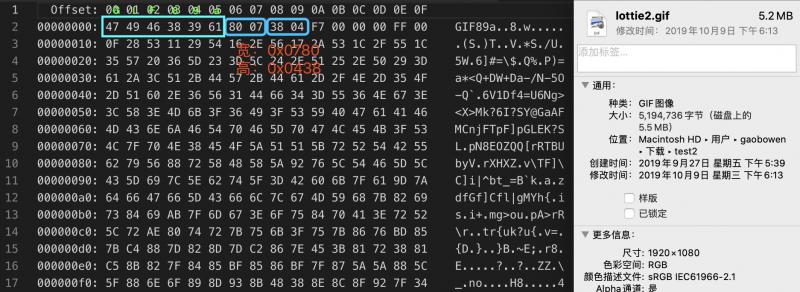
function ReadGIF(bytes) {

    if (bytes.slice(0, 3).toString() === IMAGE_HEAD_SIGS.GIF.toString()) {

        let width = readUint16LE(bytes, 6);

        let height = readUint16LE(bytes, 8);

        return { width, height }

    }

}
BMP
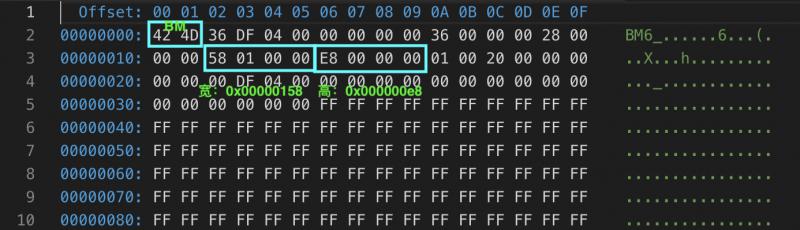
function ReadBMP(bytes) {

    if (bytes.slice(0, 2).toString() === IMAGE_HEAD_SIGS.BMP.toString()) {

        //虽然格式为4字节,这里取2字节,只考虑height为正数。(为负数时图像倒置)

        let height = readUint16LE(bytes, 22);

        let width = readUint16LE(bytes, 18);

        return { width, height }

    }

}
NPM
npm i image-dimensionjs
前端 JS 获取 Image 图像 宽高 尺寸的更多相关文章
- js获取隐藏元素宽高的方法
网上有一些js获取隐藏元素宽高的方法,但是可能会存在某些情况获取不了. 例如: <!DOCTYPE html> <html lang="en"> <h ...
- JS获取图片实际宽高及根据图片大小进行自适应
JS获取图片实际宽高,以及根据图片大小进行自适应 <img src="http://xxx.jpg" id="imgs" onload="ad ...
- JS获取图片实际宽高
JS获取图片实际宽高,以及根据图片大小进行自适应 <img src="http://xxx.jpg" id="imgs" onload="ada ...
- JS获取元素的宽高以及offsetTop,offsetLeft等的属性值
基本介绍 $(obj).width()与$(obj).height() $(obj).width()与$(obj).height() :jquery方式获取元素的宽高,不包括滚动条与工具条 $(obj ...
- JS基础篇--JS获取元素的宽高以及offsetTop,offsetLeft等的属性值
$(obj).width()与$(obj).height() $(obj).width()与$(obj).height() :jquery方式获取元素的宽高,不包括滚动条与工具条 $(obj).wid ...
- Js获取图片原始宽高
如果我们页面看到的图片都是缩略图,那就需要做个图片点击放大效果,那么怎样获取图片的原始宽高呢?方法如下: //获取图片原始宽度 function getNaturalWidthAndHeight(im ...
- JS 获取网页的宽高
网页可见区域宽: document.body.clientWidth网页可见区域高: document.body.clientHeight网页可见区域宽: document.body.offsetWi ...
- JS获取当前屏幕宽高
Javascript: 网页可见区域宽: document.body.clientWidth网页可见区域高: document.body.clientHeight网页可见区域宽: document.b ...
- js获取浏览器内容宽高(小计)
<SCRIPT LANGUAGE="JavaScript">var s = "";s += "\r\n网页可见区域宽:"+ d ...
随机推荐
- 基于Hive的对BiliBili用户信息进行数据分析
用户表字段信息: 1.查出前1000位用户的用户名,关注数和粉丝数. 2.查询关注数大于100的用户的用户名和关注数. 3.查询粉丝数大于100的用户的用户名,粉丝数. 4.查询id为1000的用户的 ...
- TCP连接关闭总结
由于涉及面太广,只作简单整理,有兴趣的可参考<UNIX Networking Programming>volum 1, Section 5.7, 5.12, 5.14, 5.15, 6.6 ...
- JdkDynamicAopProxy与CglibAopProxy介绍
继续上一篇的介绍 1.上一篇分析到createAopProxy方法,创建Aop代理对象 protected final synchronized AopProxy createAopProxy() { ...
- Python17个常用内置模块总结
Python17个常用内置模块总结 1.getpass 2.os 3.sys 4.subprocess 5.hashlib 6.json 7.pickle 8.shutil 9.time 10.dat ...
- flask 开发接口测试平台
flask 开发接口测试平台 数据库,forms views 视图, 数据库如下: # encoding: utf-8 ''' @author: lileilei @file: models.py ...
- C语言函数sscanf()的用法-从字符串中读取与指定格式相符的数据(转)
C语言函数sscanf()的用法 sscanf() - 从一个字符串中读进与指定格式相符的数据. 函数原型: int sscanf( string str, string fmt, mixed var ...
- spark streaming 流式计算---跨batch连接池共享(JVM共享连接池)
在流式计算过程中,难免会连接第三方存储平台(redis,mysql...).在操作过程中,大部分情况是在foreachPartition/mapPartition算子中做连接操作.每一个分区只需要连接 ...
- Tomcat中加载不到项目 项目构建Deployment Assembly报错:The given project is not a virtual component project
转: The given project is not a virtual component project The given project is not a virtual compone ...
- MD5(3)
import java.io.UnsupportedEncodingException; import java.security.PrivateKey; import java.security.S ...
- TensorFlow.js-机器学习
一.参考学习 https://blog.csdn.net/Quincylk/article/details/85340004 http://www.tensorfly.cn/tfdoc/get_sta ...