
Spring-Security-Oauth2 基于JDBC存储令牌和RBAC权限认证
相关配置来自李哥博客: https://funtl.com/zh/spring-security-oauth2/ (本文仅记录自己学习过程,说的不详细,可以观看李哥博客)
认证服务器和资源服务器pom.xml配置 (李哥博客用的是tk.mybatis 我用的是spring jpa)
<dependencies>

    <dependency>

        <groupId>com.zaxxer</groupId>

        <artifactId>HikariCP</artifactId>

    </dependency>

    <dependency>

        <groupId>org.projectlombok</groupId>

        <artifactId>lombok</artifactId>

    </dependency>

    <dependency>

        <groupId>org.springframework.boot</groupId>

        <artifactId>spring-boot-starter-data-jpa</artifactId>

    </dependency>

    <dependency>

        <groupId>org.springframework.boot</groupId>

        <artifactId>spring-boot-starter-web</artifactId>

    </dependency>

    <dependency>

        <groupId>org.springframework.cloud</groupId>

        <artifactId>spring-cloud-starter-oauth2</artifactId>

    </dependency>

    <dependency>

        <groupId>mysql</groupId>

        <artifactId>mysql-connector-java</artifactId>

        <scope>runtime</scope>

    </dependency>

    <dependency>

        <groupId>org.springframework.boot</groupId>

        <artifactId>spring-boot-starter-test</artifactId>

        <scope>test</scope>

        <exclusions>

            <exclusion>

                <groupId>org.junit.vintage</groupId>

                <artifactId>junit-vintage-engine</artifactId>

            </exclusion>

        </exclusions>

    </dependency>

</dependencies>
认证服务器:
初始化JDBC相关表:
CREATE TABLE `clientdetails` (

  `appId` varchar(128) NOT NULL,

  `resourceIds` varchar(256) DEFAULT NULL,

  `appSecret` varchar(256) DEFAULT NULL,

  `scope` varchar(256) DEFAULT NULL,

  `grantTypes` varchar(256) DEFAULT NULL,

  `redirectUrl` varchar(256) DEFAULT NULL,

  `authorities` varchar(256) DEFAULT NULL,

  `access_token_validity` int(11) DEFAULT NULL,

  `refresh_token_validity` int(11) DEFAULT NULL,

  `additionalInformation` varchar(4096) DEFAULT NULL,

  `autoApproveScopes` varchar(256) DEFAULT NULL,

  PRIMARY KEY (`appId`)

) ENGINE=InnoDB DEFAULT CHARSET=utf8;

CREATE TABLE `oauth_access_token` (

  `token_id` varchar(256) DEFAULT NULL,

  `token` blob,

  `authentication_id` varchar(128) NOT NULL,

  `user_name` varchar(256) DEFAULT NULL,

  `client_id` varchar(256) DEFAULT NULL,

  `authentication` blob,

  `refresh_token` varchar(256) DEFAULT NULL,

  PRIMARY KEY (`authentication_id`)

) ENGINE=InnoDB DEFAULT CHARSET=utf8;

CREATE TABLE `oauth_approvals` (

  `userId` varchar(256) DEFAULT NULL,

  `clientId` varchar(256) DEFAULT NULL,

  `scope` varchar(256) DEFAULT NULL,

  `status` varchar(10) DEFAULT NULL,

  `expiresAt` timestamp NULL DEFAULT NULL,

  `lastModifiedAt` timestamp NULL DEFAULT NULL

) ENGINE=InnoDB DEFAULT CHARSET=utf8;

CREATE TABLE `oauth_client_details` (

  `client_id` varchar(128) NOT NULL,

  `resource_ids` varchar(256) DEFAULT NULL,

  `client_secret` varchar(256) DEFAULT NULL,

  `scope` varchar(256) DEFAULT NULL,

  `authorized_grant_types` varchar(256) DEFAULT NULL,

  `web_server_redirect_uri` varchar(256) DEFAULT NULL,

  `authorities` varchar(256) DEFAULT NULL,

  `access_token_validity` int(11) DEFAULT NULL,

  `refresh_token_validity` int(11) DEFAULT NULL,

  `additional_information` varchar(4096) DEFAULT NULL,

  `autoapprove` varchar(256) DEFAULT NULL,

  PRIMARY KEY (`client_id`)

) ENGINE=InnoDB DEFAULT CHARSET=utf8;

CREATE TABLE `oauth_client_token` (

  `token_id` varchar(256) DEFAULT NULL,

  `token` blob,

  `authentication_id` varchar(128) NOT NULL,

  `user_name` varchar(256) DEFAULT NULL,

  `client_id` varchar(256) DEFAULT NULL,

  PRIMARY KEY (`authentication_id`)

) ENGINE=InnoDB DEFAULT CHARSET=utf8;

CREATE TABLE `oauth_code` (

  `code` varchar(256) DEFAULT NULL,

  `authentication` blob

) ENGINE=InnoDB DEFAULT CHARSET=utf8;

CREATE TABLE `oauth_refresh_token` (

  `token_id` varchar(256) DEFAULT NULL,

  `token` blob,

  `authentication` blob

) ENGINE=InnoDB DEFAULT CHARSET=utf8;
appllication.yml:
server:

  port: 9999

spring:

  datasource:

    driver-class-name: com.mysql.cj.jdbc.Driver

    jdbc-url: (自己的数据库)

    username: (账号)

    password: (密码)

    hikari:

      minimum-idle: 5

      idle-timeout: 600000

      maximum-pool-size: 10

      auto-commit: true

      pool-name: MyHikariCP

      max-lifetime: 1800000

      connection-timeout: 30000

      connection-test-query: SELECT 1
认证客服端:
@Configuration

@EnableAuthorizationServer

public class AuthorizationServerConfiguration extends AuthorizationServerConfigurerAdapter {

    @Bean

    @Primary

    @ConfigurationProperties(prefix = "spring.datasource")

    public DataSource dataSource() {

        // 配置数据源(使用的是 HikariCP 连接池),以上注解是指定数据源,否则会有冲突

        return DataSourceBuilder.create().build();

    }

    @Bean

    public TokenStore tokenStore() {

        // 基于 JDBC 实现,令牌保存到数据

        return new JdbcTokenStore(dataSource());

    }

    @Bean

    public ClientDetailsService jdbcClientDetails() {

        // 基于 JDBC 实现,需要事先在数据库配置客户端信息

        return new JdbcClientDetailsService(dataSource());

    }

    @Override

    public void configure(AuthorizationServerEndpointsConfigurer endpoints) throws Exception {

        // 设置令牌

        endpoints.tokenStore(tokenStore());

    }

    @Override

    public void configure(ClientDetailsServiceConfigurer clients) throws Exception {

        // 读取客户端配置

        clients.withClientDetails(jdbcClientDetails());

    }

}
用户授权:
@Configuration

public class UserDetailsServiceConfiguration implements UserDetailsService {

    @Autowired

    private TbUserService  tbUserService;

    @Autowired

    private TbPermissionService tbPermissionService;

    @Override

    public UserDetails loadUserByUsername(String username) throws UsernameNotFoundException {

        TbUser tbUser  = tbUserService.findByUsername(username);

        List<GrantedAuthority> grantedAuthorities = new ArrayList<>();

        if (tbUser != null) {

            // 获取用户授权

            List<TbPermission> tbPermissions = tbPermissionService.selectByUserId(tbUser.getId());

            // 声明用户授权

            tbPermissions.forEach(tbPermission -> {

                if (tbPermission != null && tbPermission.getEnname() != null) {

                    GrantedAuthority grantedAuthority = new SimpleGrantedAuthority(tbPermission.getEnname());

                    grantedAuthorities.add(grantedAuthority);

                }

            });

        }

        return new User(tbUser.getUsername(), tbUser.getPassword(), grantedAuthorities);

    }

}
安全配置:
@Configuration

@EnableWebSecurity

@EnableGlobalMethodSecurity(prePostEnabled = true, securedEnabled = true, jsr250Enabled = true)

public class WebSecurityConfiguration extends WebSecurityConfigurerAdapter {

    @Autowired

    private UserDetailsServiceConfiguration userDetailsServiceConfiguration;

    @Bean

    public BCryptPasswordEncoder passwordEncoder() {

        // 设置默认的加密方式

        return new BCryptPasswordEncoder();

    }

    @Bean

    @Override

    public UserDetailsService userDetailsService(){

        return userDetailsServiceConfiguration;

    }

    @Override

    protected void configure(AuthenticationManagerBuilder auth) throws Exception {

        // 使用自定义认证与授权

        auth.userDetailsService(userDetailsService());

    }

    @Override

    public void configure(WebSecurity web)  {

        // 将 check_token 暴露出去,否则资源服务器访问时报 403 错误

        web.ignoring().antMatchers("/oauth/check_token");

    }

}
获取用户信息和权限信息目录和代码:
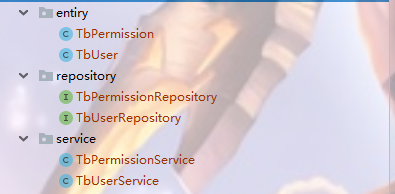
@Repository

public  interface TbPermissionRepository extends JpaRepository<TbPermission,Long> {

    @Query(value = "SELECT\n" +

            "  p.*\n" +

            "FROM\n" +

            "  tb_user AS u\n" +

            "  LEFT JOIN tb_user_role AS ur\n" +

            "    ON u.id = ur.user_id\n" +

            "  LEFT JOIN tb_role AS r\n" +

            "    ON r.id = ur.role_id\n" +

            "  LEFT JOIN tb_role_permission AS rp\n" +

            "    ON r.id = rp.role_id\n" +

            "  LEFT JOIN tb_permission AS p\n" +

            "    ON p.id = rp.permission_id\n" +

            "WHERE u.id = ?1",nativeQuery = true)

    public List<TbPermission> selectByUserId(Long id);

}
@Repository

public interface TbUserRepository extends JpaRepository<TbUser,Long> {

    @Query(value = "select * from tb_user where username = ?1",nativeQuery = true)

    public TbUser findByUsername(String username);

}
@Service

public class TbPermissionService{

    @Autowired

    private TbPermissionRepository tbPermissionRepository;

    public List<TbPermission> selectByUserId(Long id){

        List<TbPermission> tbPermissions = tbPermissionRepository.selectByUserId(id);

        return tbPermissions;

    }

}
@Service

public class TbUserService {

    @Autowired

    private TbUserRepository tbUserRepository;

    public TbUser findByUsername(String username){

        TbUser byUsername = tbUserRepository.findByUsername(username);

        return byUsername;

    }

}
客服端表:oauth_client_details

获取code请求地址(GET请求): http://{you ip}:{you port}/oauth/authorize?client_id=client&response_type=code (client_id为上图中的client_id,成功之后会回调url 为上面的web_server_redicrct_uri)
获取token请求地址(POST请求:) :http://client:secret@{you ip}:{you port}/oauth/token 携带参数为: grant_type (为上图中的authorization_grant_type) code (上面返回的code)
资源服务器: 资源服务器就是普通的CRUD和对接Oauth2认证授权服务端
RBAC相关表:
CREATE TABLE `tb_permission` (

  `id` bigint(20) NOT NULL AUTO_INCREMENT,

  `parent_id` bigint(20) DEFAULT NULL COMMENT '父权限',

  `name` varchar(64) NOT NULL COMMENT '权限名称',

  `enname` varchar(64) NOT NULL COMMENT '权限英文名称',

  `url` varchar(255) NOT NULL COMMENT '授权路径',

  `description` varchar(200) DEFAULT NULL COMMENT '备注',

  `created` datetime NOT NULL,

  `updated` datetime NOT NULL,

  PRIMARY KEY (`id`)

) ENGINE=InnoDB AUTO_INCREMENT=44 DEFAULT CHARSET=utf8 COMMENT='权限表';

insert  into `tb_permission`(`id`,`parent_id`,`name`,`enname`,`url`,`description`,`created`,`updated`) values

(37,0,'系统管理','System','/',NULL,'2019-04-04 23:22:54','2019-04-04 23:22:56'),

(38,37,'用户管理','SystemUser','/users/',NULL,'2019-04-04 23:25:31','2019-04-04 23:25:33'),

(39,38,'查看用户','SystemUserView','',NULL,'2019-04-04 15:30:30','2019-04-04 15:30:43'),

(40,38,'新增用户','SystemUserInsert','',NULL,'2019-04-04 15:30:31','2019-04-04 15:30:44'),

(41,38,'编辑用户','SystemUserUpdate','',NULL,'2019-04-04 15:30:32','2019-04-04 15:30:45'),

(42,38,'删除用户','SystemUserDelete','',NULL,'2019-04-04 15:30:48','2019-04-04 15:30:45');

CREATE TABLE `tb_role` (

  `id` bigint(20) NOT NULL AUTO_INCREMENT,

  `parent_id` bigint(20) DEFAULT NULL COMMENT '父角色',

  `name` varchar(64) NOT NULL COMMENT '角色名称',

  `enname` varchar(64) NOT NULL COMMENT '角色英文名称',

  `description` varchar(200) DEFAULT NULL COMMENT '备注',

  `created` datetime NOT NULL,

  `updated` datetime NOT NULL,

  PRIMARY KEY (`id`)

) ENGINE=InnoDB AUTO_INCREMENT=38 DEFAULT CHARSET=utf8 COMMENT='角色表';

insert  into `tb_role`(`id`,`parent_id`,`name`,`enname`,`description`,`created`,`updated`) values

(37,0,'超级管理员','admin',NULL,'2019-04-04 23:22:03','2019-04-04 23:22:05');

CREATE TABLE `tb_role_permission` (

  `id` bigint(20) NOT NULL AUTO_INCREMENT,

  `role_id` bigint(20) NOT NULL COMMENT '角色 ID',

  `permission_id` bigint(20) NOT NULL COMMENT '权限 ID',

  PRIMARY KEY (`id`)

) ENGINE=InnoDB AUTO_INCREMENT=43 DEFAULT CHARSET=utf8 COMMENT='角色权限表';

insert  into `tb_role_permission`(`id`,`role_id`,`permission_id`) values

(37,37,37),

(38,37,38),

(39,37,39),

(40,37,40),

(41,37,41),

(42,37,42);

CREATE TABLE `tb_user` (

  `id` bigint(20) NOT NULL AUTO_INCREMENT,

  `username` varchar(50) NOT NULL COMMENT '用户名',

  `password` varchar(64) NOT NULL COMMENT '密码,加密存储',

  `phone` varchar(20) DEFAULT NULL COMMENT '注册手机号',

  `email` varchar(50) DEFAULT NULL COMMENT '注册邮箱',

  `created` datetime NOT NULL,

  `updated` datetime NOT NULL,

  PRIMARY KEY (`id`),

  UNIQUE KEY `username` (`username`) USING BTREE,

  UNIQUE KEY `phone` (`phone`) USING BTREE,

  UNIQUE KEY `email` (`email`) USING BTREE

) ENGINE=InnoDB AUTO_INCREMENT=38 DEFAULT CHARSET=utf8 COMMENT='用户表';

insert  into `tb_user`(`id`,`username`,`password`,`phone`,`email`,`created`,`updated`) values

(37,'admin','$2a$10$9ZhDOBp.sRKat4l14ygu/.LscxrMUcDAfeVOEPiYwbcRkoB09gCmi','15888888888','lee.lusifer@gmail.com','2019-04-04 23:21:27','2019-04-04 23:21:29');

CREATE TABLE `tb_user_role` (

  `id` bigint(20) NOT NULL AUTO_INCREMENT,

  `user_id` bigint(20) NOT NULL COMMENT '用户 ID',

  `role_id` bigint(20) NOT NULL COMMENT '角色 ID',

  PRIMARY KEY (`id`)

) ENGINE=InnoDB AUTO_INCREMENT=38 DEFAULT CHARSET=utf8 COMMENT='用户角色表';

insert  into `tb_user_role`(`id`,`user_id`,`role_id`) values

(37,37,37);
application.yml:
server:

  port: 10000

spring:

  datasource:

    driver-class-name: com.mysql.cj.jdbc.Driver

    url: (自己的数据库)

    username: (账号)

    password: (密码)

    hikari:

      minimum-idle: 5

      idle-timeout: 600000

      maximum-pool-size: 10

      auto-commit: true

      pool-name: MyHikariCP

      max-lifetime: 1800000

      connection-timeout: 30000

      connection-test-query: SELECT 1

security:

  oauth2:

    client:

      client-id: client

      client-secret: secret

      access-token-uri: http://localhost:9999/oauth/token

      user-authorization-uri: http://localhost:9999/oauth/authorize

    resource:

      token-info-uri: http://localhost:9999/oauth/check_token
@Configuration

@EnableResourceServer

@EnableGlobalMethodSecurity(prePostEnabled = true, securedEnabled = true, jsr250Enabled = true)

public class ResourceServerConfiguration extends ResourceServerConfigurerAdapter {

    @Override

    public void configure(HttpSecurity http) throws Exception {

        http

                .exceptionHandling()

                .and()

                .sessionManagement().sessionCreationPolicy(SessionCreationPolicy.STATELESS)

                .and()

                .authorizeRequests()

                // 以下为配置所需保护的资源路径及权限,需要与认证服务器配置的授权部分对应

                .antMatchers("/").hasAuthority("System")

                .antMatchers("/view/**").hasAuthority("SystemContentView")

                .antMatchers("/insert/**").hasAuthority("SystemContentInsert")

                .antMatchers("/update/**").hasAuthority("SystemContentUpdate")

                .antMatchers("/delete/**").hasAuthority("SystemContentDelete");

    }

}
Spring-Security-Oauth2 基于JDBC存储令牌和RBAC权限认证的更多相关文章
- 使用Redis作为Spring Security OAuth2的token存储
写在前边 本文对Spring Security OAuth2的token使用Redis保存,相比JWT实现的token存储,Redis可以随时吊销access_token,并且Redis响应速度很快, ...
- 使用JWT作为Spring Security OAuth2的token存储
序 Spring Security OAuth2的demo在前几篇文章中已经讲过了,在那些模式中使用的都是RemoteTokenService调用授权服务器来校验token,返回校验通过的用户信息供上 ...
- [Spring Cloud实战 | 第六篇:Spring Cloud Gateway+Spring Security OAuth2+JWT实现微服务统一认证授权
一. 前言 本篇实战案例基于 youlai-mall 项目.项目使用的是当前主流和最新版本的技术和解决方案,自己不会太多华丽的言辞去描述,只希望能勾起大家对编程的一点喜欢.所以有兴趣的朋友可以进入 g ...
- 一文带你了解 OAuth2 协议与 Spring Security OAuth2 集成!
OAuth 2.0 允许第三方应用程序访问受限的HTTP资源的授权协议,像平常大家使用Github.Google账号来登陆其他系统时使用的就是 OAuth 2.0 授权框架,下图就是使用Github账 ...
- Spring Security OAuth2.0认证授权三:使用JWT令牌
Spring Security OAuth2.0系列文章: Spring Security OAuth2.0认证授权一:框架搭建和认证测试 Spring Security OAuth2.0认证授权二: ...
- 微服务下前后端分离的统一认证授权服务,基于Spring Security OAuth2 + Spring Cloud Gateway实现单点登录
1. 整体架构 在这种结构中,网关就是一个资源服务器,它负责统一授权(鉴权).路由转发.保护下游微服务. 后端微服务应用完全不用考虑权限问题,也不需要引入spring security依赖,就正常的 ...
- spring security oauth2搭建resource-server demo及token改造成JWT令牌
我们在上文讲了如何在spring security的环境中搭建基于oauth2协议的认证中心demo:https://www.cnblogs.com/process-h/p/15688971.html ...
- 基于spring boot2.0+spring security +oauth2.0+ jwt微服务架构
github地址:https://github.com/hankuikuide/microservice-spring-security-oauth2 项目介绍 该项目是一个演示项目,主要演示了,基于 ...
- Spring Security OAuth2 Demo -- good
1. 添加依赖授权服务是基于Spring Security的,因此需要在项目中引入两个依赖: <dependency> <groupId>org.springframework ...
随机推荐
- 运行okvis-mono
./build/okvis_app_synchronous config/config_fpga_p2_euroc1.yaml ../mav0
- springboot 整合rabbitMQ
RabbitMQ RabbitMQ是一个被广泛使用的开源消息队列.它是轻量级且易于部署的,它能支持多种消息协议.RabbitMQ可以部署在分布式和联合配置中,以满足高规模.高可用性的需求. 在pom. ...
- JQuery EasyUI更新说明
JQuery EasyUI 1.3.6版本更新内容: Bug(修复) treegrid:修复“getChecked”方法不能正确的返回被选择的行的问题: tree:修复在“onlyLeafCheck” ...
- [LeetCode] 750. Number Of Corner Rectangles 边角矩形的数量
Given a grid where each entry is only 0 or 1, find the number of corner rectangles. A corner rectang ...
- ue4 优化建议与经验
转自:https://dawnarc.com/2016/12/ue4%E4%BC%98%E5%8C%96%E5%BB%BA%E8%AE%AE%E4%B8%8E%E7%BB%8F%E9%AA%8C/ 内 ...
- npm创建angular项目
1.首先保证你本地的 node 环境 是ok的哦. 2.安装 angular-cli 命令 npm install -g @angular/cli.安装完成后,ng version 查看版本, ...
- Django文档阅读之聚合
聚合 我们将引用以下模型.这些模型用来记录多个网上书店的库存. from django.db import models class Author(models.Model): name = mode ...
- 第6/7Beta冲刺
1.团队成员 成员姓名 成员学号 秦裕航 201731062432(组长) 刘东 201731062227 张旭 201731062129 王伟 201731062214 2.SCRU部分 2.1各成 ...
- LeetCode 227. 基本计算器 II(Basic Calculator II)
227. 基本计算器 II 227. Basic Calculator II 题目描述 实现一个基本的计算器来计算一个简单的字符串表达式的值. 字符串表达式仅包含非负整数,+,-,*,/ 四种运算符和 ...
- sql server版本特性简介、版本介绍简介
1.SQL Server 版本简介 1.1.sql server的版本信息 年 代 版 本 大版本号 1993年 SQL Server for Windows NT 4.21 1994年 ...