
[RN] React Native 自定义 底部 弹出 选择框 实现
React Native 自定义 底部选择框 实现
效果如图所示:
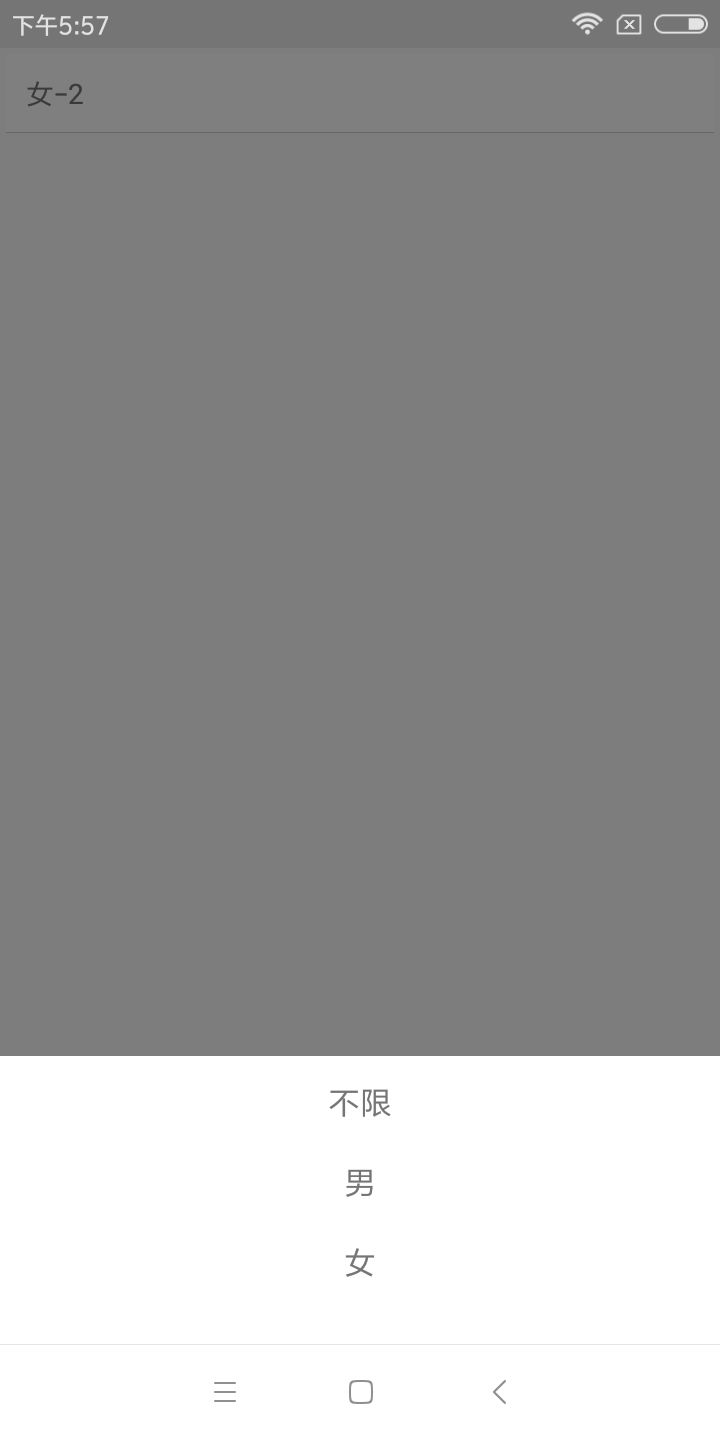
实现方法:
一、组件封装
CustomAlertDialog.js
import React, {Component} from 'react';

import {Dimensions, Modal, StyleSheet, Text, TouchableOpacity, View} from 'react-native';

const {width} = Dimensions.get('window');

export default class CustomAlertDialog extends Component {

    constructor(props) {

        super(props);

        this.state = {

            isVisible: this.props.show,

        };

        this.entityList = this.props.entityList;

    }

    componentWillReceiveProps(nextProps) {

        this.setState({isVisible: nextProps.show});

    }

    closeModal() {

        this.setState({

            isVisible: false

        });

        this.props.closeModal(false);

    }

    renderItem(item, i) {

        return (

            <TouchableOpacity key={i} onPress={this.choose.bind(this, i)} style={styles.item}>

                <Text style={styles.itemText}>{item}</Text>

            </TouchableOpacity>

        );

    }

    choose(i) {

        if (this.state.isVisible) {

            this.props.callback(i);

            this.closeModal();

        }

    }

    renderDialog() {

        return (

            <View style={styles.modalStyle}>

                <View style={styles.optArea}>

                    {

                        this.entityList.map((item, i) => this.renderItem(item, i))

                    }

                </View>

            </View>

        )

    }

    render() {

        return (

            <View style={{flex: }}>

                <Modal

                    transparent={true}

                    visible={this.state.isVisible}

                    animationType={'fade'}

                    onRequestClose={() => this.closeModal()}>

                    <TouchableOpacity style={styles.container} activeOpacity={}

                                      onPress={() => this.closeModal()}>

                        {this.renderDialog()}

                    </TouchableOpacity>

                </Modal>

            </View>

        );

    }

}

const styles = StyleSheet.create({

    container: {

        flex: ,

        backgroundColor: 'rgba(0, 0, 0, 0.5)',

    },

    modalStyle: {

        position: "absolute",

        left: ,

        bottom: ,

        width: width,

        flex: ,

        flexDirection: "column",

        backgroundColor: '#ffffff',

    },

    optArea: {

        flex: ,

        flexDirection: 'column',

        marginTop: ,

        marginBottom: ,

    },

    item: {

        width: width,

        height: ,

        paddingLeft: ,

        paddingRight: ,

        alignItems: 'center',

    },

    itemText: {

        fontSize: ,

    },

    cancel: {

        width: width,

        height: ,

        marginTop: ,

        alignItems: 'center',

        backgroundColor: '#ffffff'

    },

});
使用
TestCustomAlert.js
import React, {Component} from "react";

import {StyleSheet, Text, TouchableHighlight, View,} from 'react-native';

import CustomAlertDialog from "./CustomAlertDialog";

const typeArr = ["不限", "男", "女"];

export default class TestCustomAlert extends Component {

    constructor(props) {

        super(props);

        this.state = {

            typeName: '性别',

            type: ,

            showTypePop: false,

        }

    }

    _openTypeDialog() {

        this.setState({showTypePop: !this.state.showTypePop})

    }

    render() {

        return (

            <View style={{flex: }}>

                <TouchableHighlight onPress={() => this._openTypeDialog()} style={styles.button}

                                    underlayColor="#a5a5a5">

                    <Text>{this.state.typeName}-{this.state.type}</Text>

                </TouchableHighlight>

                <CustomAlertDialog entityList={typeArr} callback={(i) => {

                    this.setState({

                        type: i,

                        typeName: typeArr[i],

                    })

                }} show={this.state.showTypePop} closeModal={(show) => {

                    this.setState({

                        showTypePop: show

                    })

                }}/>

            </View>

        );

    }

}

const styles = StyleSheet.create({

    button: {

        margin: ,

        backgroundColor: 'white',

        padding: ,

        borderBottomWidth: StyleSheet.hairlineWidth,

        borderBottomColor: '#cdcdcd'

    },

});
本博客地址: wukong1688
本文原文地址:https://www.cnblogs.com/wukong1688/p/11038382.html
转载请著名出处!谢谢~~
[RN] React Native 自定义 底部 弹出 选择框 实现的更多相关文章
- [deviceone开发]-底部弹出选择
一.简介 个人上传的第一个示例源码,两天空闲时间写的,一点简单组件,写的挺乱还没啥注释,仅供新手学习. 底部弹出选择,可滑动选择选项,如果停留在选项中间,可自动校正位置,加了一点简单的动画效果,需要的 ...
- 【ABAP系列】SAP ALV 导出报表数据 始终使用选定的格式”,一旦勾上,就再也不会弹出选择框了。
公众号:SAP Technical 本文作者:matinal 原文出处:http://www.cnblogs.com/SAPmatinal/ 原文链接:[ABAP系列]SAP ALV 导出报表数据 始 ...
- [RN] React Native 自定义导航栏随滚动渐变
React Native 自定义导航栏随滚动渐变 实现效果预览: 代码实现: 1.定义导航栏 NavPage.js import React, {Component} from 'react'; im ...
- 微信小程序之 动画 —— 自定义底部弹出层
wxml: <view class='buy' bindtap='showBuyModal'>立即购买</view> <!-- 点击立即购买 弹出购买遮罩层 --> ...
- Jquery实现弹出选择框选择后返回,支持多级分类
<!DOCTYPE HTML PUBLIC "-//W3C//DTD HTML 4.01 Transitional//EN" "http://www.w3.org/ ...
- appium+python自动化98-非select弹出选择框定位解决
前言 遇到问题:document.getElementsByClassName(...)[0] is undefined 选择框如果是select标签的,可以直接用select专用的方法去定位点击操作 ...
- 框架-弹出选择框(Jquery传递Json数组)
给一个button按钮,执行方法 Json传值$("body").on("click", "#btnsure", function() { ...
- 微信小程序之自定义底部弹出框动画
最近做小程序时,会经常用到各种弹框.直接做显示和隐藏虽然也能达到效果,但是体验性太差,也比较简单粗暴.想要美美地玩,添加点动画还是非常有必要的.下面做一个底部上滑的弹框. wxml <view ...
- Android仿IOS底部弹出选择菜单ActionSheet
使用Dialog的实现方式,解决原ActionSheet使用Fragment实现而出现的部分手机取消按钮被遮盖的问题 java部分代码: import android.app.Dialog; impo ...
随机推荐
- Pandas中查看列中数据的种类及个数
Pandas中查看列中数据的种类及个数 读取数据 import pandas as pd import numpy as np filepath = 'your_file_path.csv' data ...
- 关于i7 8700以上系列主机,安装虚拟机Win7下连接U盘,故障处理的补充说明
正如前文“虚拟机下怎么连接U盘,如何使用U盘?一策书(湘岳阳万江波)的随笔”所言,我在win10下的虚拟机win7(i7 9700),而且听说了是不支持Win7的,其原因是不支持USB的驱动问题. 我 ...
- logger.error打印完整的错误堆栈信息
使用Spring Boot项目中的日志打印功能的时候,发现调用Logger.errror()方法的时候不能完全地打印出网站的错误堆栈信息,只能打印出这个错误是一个什么错误. 为什么呢,原因在于这个方法 ...
- Web应急:网站首页被篡改
网站首页被非法篡改,是的,就是你一打开网站就知道自己的网站出现了安全问题,网站程序存在严重的安全漏洞,攻击者通过上传脚本木马,从而对网站内容进行篡改.而这种篡改事件在某些场景下,会被无限放大. 现象描 ...
- 设置a标签,实现点击跳转页面的两种效果
设置a标签,实现点击跳转页面 这个问题,主要是设置a标签的属性target,下面对target属性进行描述: 跳转在同一个窗口 1,target="_self", 它使得目标文档 ...
- springboot xss防护
概述 XSS(Cross Site Script)全称跨站脚本攻击,为了跟CSS区分开来,所以变成了XSS.它允许恶意代码植入到正常的页面中,盗取正常用户的账号密码,诱使用户访问恶意的网站. 攻击 实 ...
- 可落地的DDD(5)-战术设计
摘要 本篇是DDD的战术篇,也就是关于领域事件.领域对象.聚合根.实体.值对象的讨论.也是DDD系列的完结篇. 这一部分在我们团队争论最多的,也有很多月经贴,比如对资源库的操作应该放在领域服务还是领域 ...
- vue-Element-axios搭建调用api进行数据展示
1全局安装vue-cli 输入命令:npm install vue-cli -g 2创建项目框架 输入命令:vue init webpack vueapi 3依次按照提示输入,项目名.项目描述.项目作 ...
- golang-Json编码解码
目录 一. 类型映射 二. 输出控制 三. 类型编码 四. 类型解码 五. 输出重写 六. 扩展功能 七. Bson编码 在线工具:https://www.json.cn 一. 类型映射 golang ...
- v-on 事件触发
1.v-on 绑定事件 2.methods: 事件绑定语法. 3.v-on:click 可以简写成@click 但是在mvc中会有问题 <!DOCTYPE html> <html&g ...