
Android仿IOS底部弹出选择菜单ActionSheet
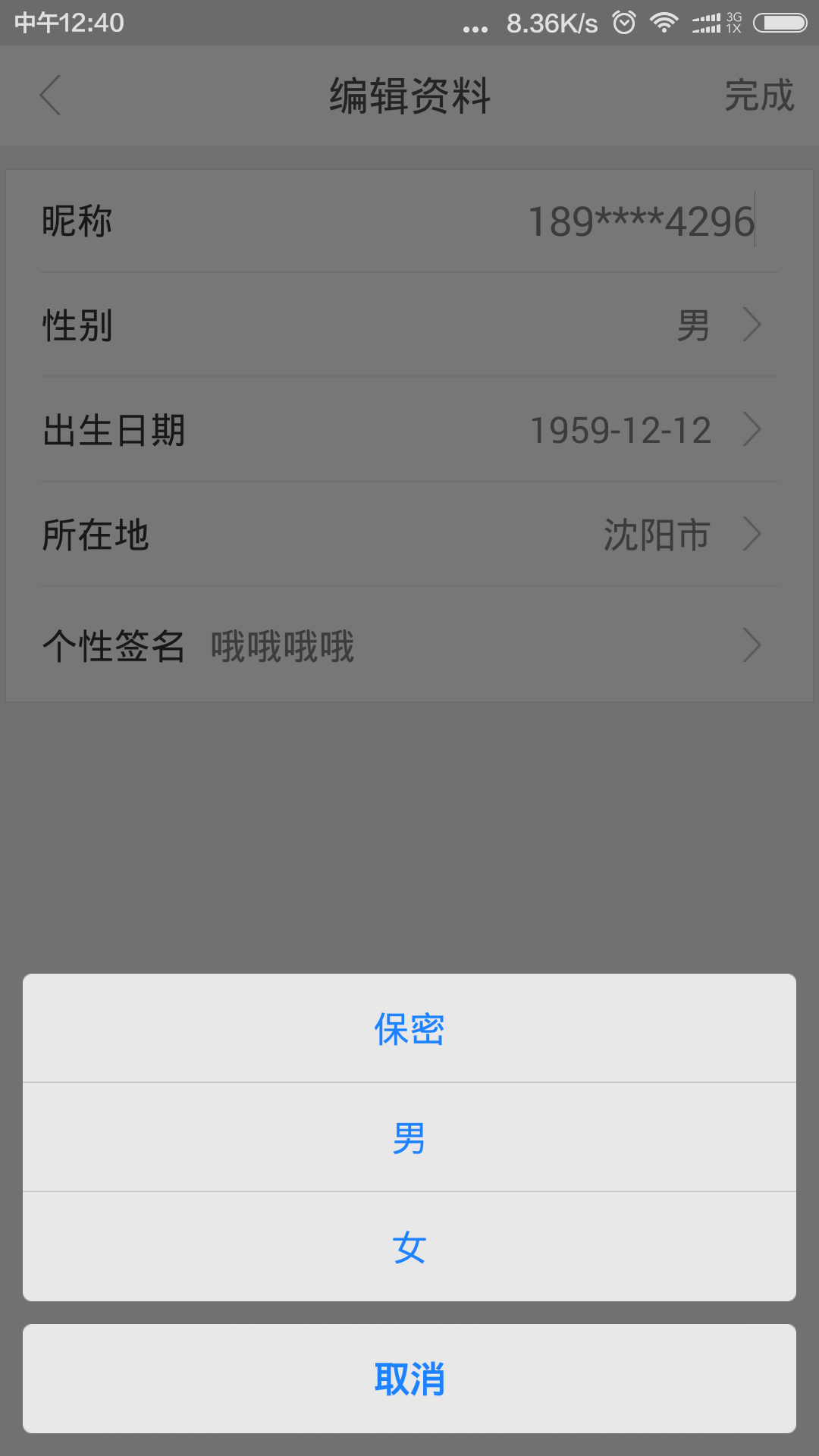
使用Dialog的实现方式,解决原ActionSheet使用Fragment实现而出现的部分手机取消按钮被遮盖的问题
java部分代码:
import android.app.Dialog;

import android.content.Context;

import android.view.Display;

import android.view.Gravity;

import android.view.View;

import android.view.ViewGroup;

import android.view.ViewGroup.LayoutParams;

import android.view.ViewTreeObserver;

import android.view.Window;

import android.view.WindowManager;

import android.widget.LinearLayout;

import android.widget.ScrollView;

import android.widget.TextView;

public class ActionSheet {

    private Dialog mDialog;

    public ActionSheet(Context context, View contentView, boolean cancelable, boolean otoCancelable) {

        if (context == null)

            return;

        mDialog = new Dialog(context, R.style.custom_dialog_type);

        mDialog.setContentView(contentView);

        mDialog.setCancelable(cancelable);

        mDialog.setCanceledOnTouchOutside(otoCancelable);

        Window window = mDialog.getWindow();

        WindowManager m = window.getWindowManager();

        Display d = m.getDefaultDisplay(); // 获取屏幕宽、高用

        WindowManager.LayoutParams p = window.getAttributes(); // 获取对话框当前的参数值

        p.width = d.getWidth();

        window.setAttributes(p);

        window.setGravity(Gravity.BOTTOM);  //此处可以设置dialog显示的位置

        window.setWindowAnimations(R.style.comment_popwindow_anim_style);  //添加动画

    }

    public void dismiss() {

        if (mDialog != null && mDialog.isShowing()) {

            mDialog.dismiss();

        }

    }

    public void show() {

        if (mDialog != null && !mDialog.isShowing()) {

            mDialog.show();

        }

    }

    public static Builder createBuilder(Context context) {

        return new Builder(context);

    }

    public static class Builder {

        private Context mContext;

        private String mCancelButtonTitle;

        private String[] mOtherButtonTitles;

        private boolean mCancelableOnTouchOutside = true;

        private ActionSheetListener mListener;

        ActionSheet ActionSheet = null;

        public Builder(Context context) {

            mContext = context;

        }

        public Builder setCancelButtonTitle(String title) {

            mCancelButtonTitle = title;

            return this;

        }

        public Builder setCancelButtonTitle(int strId) {

            return setCancelButtonTitle(mContext.getString(strId));

        }

        public Builder setOtherButtonTitles(String... titles) {

            mOtherButtonTitles = titles;

            return this;

        }

        public Builder setListener(ActionSheetListener listener) {

            this.mListener = listener;

            return this;

        }

        public Builder setCancelableOnTouchOutside(boolean cancelable) {

            mCancelableOnTouchOutside = cancelable;

            return this;

        }

        public ActionSheet show() {

            //创建View,设置监听器等

            View view = View.inflate(mContext, R.layout.dialog_actionsheet, null);

            final ScrollView scrollLayout = (ScrollView) view.findViewById(R.id.scroll_layout);

            final LinearLayout llayOther = (LinearLayout) view.findViewById(R.id.llay_other);

            //取消按钮

            TextView txtCancel = (TextView) view.findViewById(R.id.txt_cancel);

            txtCancel.setText(mCancelButtonTitle);

            txtCancel.setOnClickListener(new View.OnClickListener() {

                @Override

                public void onClick(View v) {

                    if (ActionSheet != null)

                        ActionSheet.dismiss();

                }

            });

            //其他按钮

            if (mOtherButtonTitles != null && mOtherButtonTitles.length != 0) {

                for (int i = 0; i < mOtherButtonTitles.length; i++) {

                    TextView textView = new TextView(mContext);

                    textView.setText(mOtherButtonTitles[i]);

                    textView.setLayoutParams(new LayoutParams(LayoutParams.MATCH_PARENT, LayoutParams.WRAP_CONTENT));

                    textView.setTextColor(0xff1E82FF);

                    textView.setTextSize(16);//16sp的字体大小转化成px

                    int padding = (int) (10 * mContext.getResources().getDisplayMetrics().density + 0.5f);//10dp的padding转换成px

                    textView.setPadding(0, padding, 0, padding);

                    textView.setGravity(Gravity.CENTER);

                    textView.setBackgroundResource(getOtherButtonBg(mOtherButtonTitles, i));

                    final int pos = i;

                    textView.setOnClickListener(new View.OnClickListener() {

                        @Override

                        public void onClick(View v) {

                            if (mListener != null)

                                mListener.onOtherButtonClick(pos);

                            if (ActionSheet != null)

                                ActionSheet.dismiss();

                        }

                    });

                    llayOther.addView(textView);

                }

                /**

                 * 设置一定条数,不能再撑开,而是变成滑动

                 */

                scrollLayout.getViewTreeObserver().addOnGlobalLayoutListener(new ViewTreeObserver.OnGlobalLayoutListener() {

                    @Override

                    public void onGlobalLayout() {

                        int minNumWhenScroll = 10;//最小可滑动条数

                        int childViewCount = llayOther.getChildCount();

                        int scrollLayoutHeight = 0;

                        int childHeight = 0;

                        if (childViewCount == 0) {

                            scrollLayoutHeight = 0;

                        } else {

                            childHeight = llayOther.getChildAt(0).getHeight();

                            if (childViewCount <= minNumWhenScroll) {

                                scrollLayoutHeight = childHeight * childViewCount;

                            } else {

                                scrollLayoutHeight = childHeight * minNumWhenScroll;

                            }

                        }

                        scrollLayout.setLayoutParams(new LinearLayout.LayoutParams(ViewGroup.LayoutParams.MATCH_PARENT, scrollLayoutHeight));

                        scrollLayout.getViewTreeObserver().removeGlobalOnLayoutListener(this);

                    }

                });

            }

            ActionSheet = new ActionSheet(mContext, view, mCancelableOnTouchOutside, mCancelableOnTouchOutside);

            ActionSheet.show();

            return ActionSheet;

        }

        public int getOtherButtonBg(String[] titles, int i) {

            if (titles.length == 1) {

                return R.drawable.slt_as_ios7_other_bt_single;

            }

            if (titles.length == 2) {

                switch (i) {

                    case 0:

                        return R.drawable.slt_as_ios7_other_bt_top;

                    case 1:

                        return R.drawable.slt_as_ios7_other_bt_bottom;

                }

            }

            if (titles.length > 2) {

                if (i == 0) {

                    return R.drawable.slt_as_ios7_other_bt_top;

                }

                if (i == (titles.length - 1)) {

                    return R.drawable.slt_as_ios7_other_bt_bottom;

                }

                return R.drawable.slt_as_ios7_other_bt_middle;

            }

            return 0;

        }

    }

    public interface ActionSheetListener {

        void onOtherButtonClick(int index);

    }

}
所用到的布局文件:dialog_actionsheet.xml
<?xml version="1.0" encoding="utf-8"?>

<LinearLayout xmlns:android="http://schemas.android.com/apk/res/android"

    android:layout_width="match_parent"

    android:layout_height="match_parent"

    android:orientation="vertical"

    android:padding="10dp">

    <ScrollView

        android:id="@+id/scroll_layout"

        android:layout_width="match_parent"

        android:layout_height="wrap_content"

        android:background="@color/transparent"

        android:scrollbars="none">

        <LinearLayout

            android:id="@+id/llay_other"

            android:layout_width="match_parent"

            android:layout_height="wrap_content"

            android:background="@color/transparent"

            android:orientation="vertical">

        </LinearLayout>

    </ScrollView>

    <TextView

        android:id="@+id/txt_cancel"

        android:layout_width="match_parent"

        android:layout_height="wrap_content"

        android:layout_marginTop="10dp"

        android:background="@drawable/slt_as_ios7_cancel_bt"

        android:gravity="center"

        android:padding="10dp"

        android:text="取消"

        android:textColor="#1E82FF"

        android:textSize="16sp" />

</LinearLayout>
代码中使用:
ActionSheet.createBuilder(mActivity)

                .setCancelButtonTitle(

                        "取消")

                .setOtherButtonTitles(

                        "保密",

                        "男",

                        "女")

                .setCancelableOnTouchOutside(true)

                .setListener(new ActionSheet.ActionSheetListener() {

                    @Override

                    public void onOtherButtonClick(int index) {

                        switch (index) {

                            case 0:

                                setSex("保密");

                                sexCode = "0";

                                break;

                            case 1:

                                setSex("男");

                                sexCode = "1";

                                break;

                            case 2:

                                setSex("女");

                                sexCode = "2";

                                break;

                            default:

                                break;

                        }

                    }

                }).show();
存在的部分资源文件:
1)slt_as_ios7_other_bt_single.xml
<?xml version="1.0" encoding="utf-8"?>

<selector xmlns:android="http://schemas.android.com/apk/res/android">

    <item android:drawable="@drawable/actionsheet_single_pressed" android:state_pressed="true"/>

    <item android:drawable="@drawable/actionsheet_single_normal"/>

</selector>
2)slt_as_ios7_other_bt_top.xml
<?xml version="1.0" encoding="utf-8"?>

<selector xmlns:android="http://schemas.android.com/apk/res/android">

    <item android:drawable="@drawable/actionsheet_top_pressed"android:state_pressed="true"/>

    <item android:drawable="@drawable/actionsheet_top_normal"/>

</selector>
3)slt_as_ios7_other_bt_bottom.xml
<?xml version="1.0" encoding="utf-8"?>

<selector xmlns:android="http://schemas.android.com/apk/res/android">

    <item android:drawable="@drawable/actionsheet_bottom_pressed" android:state_pressed="true"/>

</selector>
4)slt_as_ios7_other_bt_middle.xml
<?xml version="1.0" encoding="utf-8"?> <selector xmlns:android="http://schemas.android.com/apk/res/android">

<item android:drawable="@drawable/actionsheet_middle_pressed" android:state_pressed="true"/>

<item android:drawable="@drawable/actionsheet_middle_normal"/>

</selector>
为什么使用Builder的形式:由于在项目开发中大量使用了旧版本的ActionSheet,导致更改实现时必须暴露相同的接口及实现才能减少不必要的代码修改导致的工作量,本文只给个思路
相关资源下载
http://download.csdn.net/detail/hai1059876295/9484915
Android仿IOS底部弹出选择菜单ActionSheet的更多相关文章
- Android仿ios底部弹出框效果
准备: public class ActionSheet { public interface OnActionSheetSelected { void onClick(int whichButton ...
- 仿iOS底部弹出popUpWindow
上面为弹出来的效果 popUpWindow布局: <?xml version="1.0" encoding="utf-8"?> <Linear ...
- xamarin.android 实现 Activity 底部弹出对话框菜单
Resources/drawable 下新增如下文件: push_bottom_in.xml <?xml version="1.0" encoding="utf-8 ...
- [deviceone开发]-底部弹出选择
一.简介 个人上传的第一个示例源码,两天空闲时间写的,一点简单组件,写的挺乱还没啥注释,仅供新手学习. 底部弹出选择,可滑动选择选项,如果停留在选项中间,可自动校正位置,加了一点简单的动画效果,需要的 ...
- EditorGUILayout.EnumPopup 枚举弹出选择菜单
http://www.unity蛮牛.com/thread-25490-1-1.html http://www.unity蛮牛.com/m/Script/EditorGUILayout.EnumPop ...
- Android BottomSheet:底部弹出Fragment面板(4)
Android BottomSheet:底部弹出Fragment面板(4) BottomSheet不仅可以弹出轻量级的定制好的面板(见附录文章5,6,7),还可以弹出"重"的 ...
- JQuery实现复制数据到剪贴板之各种麻花与右键点击弹出选择菜单
1.如果小伙伴们只是想实现点击某个按钮(通过click事件)实现复制功能. 那小哥哥我在这里推荐大家使用2个非常好用的插件 (1)clipboard.js:纯js插件,无需flash,相对来说更轻量级 ...
- [RN] React Native 自定义 底部 弹出 选择框 实现
React Native 自定义 底部选择框 实现 效果如图所示: 实现方法: 一.组件封装 CustomAlertDialog.js import React, {Component} from ' ...
- Android仿微信进度弹出框的实现方法
MainActivity: package com.ruru.dialogproject; import android.app.Activity; import android.os.Bundle; ...
随机推荐
- Tornado源码浅析
初识tornado 经典的hello world 案例: import tornado.ioloop import tornado.web class MainHandler(tornado.web. ...
- <2014 04 15> C++语言回顾精要(原创By Andrew)
C++语言回顾精要 <Visual C++程序设计>张岳新,这本书是很多学校的本科生C++教学用书,今天重新拿来翻了一遍.跟很多国人写的技术书籍一样,写书并不是为了让初学者看懂入门,而是为 ...
- Tomcat 服务器介绍
Tomcat 目录介绍 Tomcat 主目录有 bin, conf, lib, logs, temp, webapps, work 7个文件夹 bin 目录 主要用来存放 tomcat 命令 .sh ...
- centos7 docker 安装配置
docker快速入门测试 ########################################## #docker安装配置 #环境centos7 #配置docker阿里源 echo '#D ...
- 流畅的python 闭包
闭包 人们有时会把闭包和匿名函数弄混.这是有历史原因的:在函数内部定义函数不常见,直到开始使用匿名函数才会这样做.而且,只有涉及嵌套函数时才有闭包问题.因此,很多人是同时知道这两个概念的.其实,闭包指 ...
- Oracle 11g数据库详解
常见异常: ORA-14025:不能为实体化视图或实体化视图日志指定PARTITION ORA-14026:PARTITION和CLUSTER子句互相排斥 ORA-14027:仅可以指定一个PARTI ...
- Mysql学习笔记—索引
一.什么是索引 一般的应用系统,读写比例在10:1左右,而且插入操作和一般的更新操作很少出现性能问题,遇到最多的,也是最容易出问题的,还是一些复杂的查询操作,所以查询语句的优化显然是重中之重. 在数据 ...
- Web层辅助工具类
Java web开发中经常用到的一些方法: import java.io.BufferedReader; import java.net.InetAddress; import java.net.Un ...
- AngularJS post传值后台获取不到
AngularJS post传值后台获取不到 一般的思路: 解决办法: 1.设置一下default head 2.参数转换一下data:$.param({orderNo: orderNo,sessi ...
- h5打开App的方法。
在浏览器中: 法1: location.href = `${scheme}`;//location跳转App是几乎所以情况都支持的. 法2: var ifr = document.createElem ...