
测试报告ExtentReport改进
具体步骤
Step-1:在pom.xml文件中添加 Maven 依赖包
<?xml version="1.0" encoding="UTF-8"?>

<project xmlns="http://maven.apache.org/POM/4.0.0"

         xmlns:xsi="http://www.w3.org/2001/XMLSchema-instance"

         xsi:schemaLocation="http://maven.apache.org/POM/4.0.0 http://maven.apache.org/xsd/maven-4.0.0.xsd">

    <modelVersion>4.0.0</modelVersion>

    <groupId>com.ymm</groupId>

    <artifactId>driver</artifactId>

    <version>1.0-SNAPSHOT</version>

    <dependencies>

        <dependency>

            <groupId>io.appium</groupId>

            <artifactId>java-client</artifactId>

            <version>4.1.2</version>

        </dependency>

        <!--引入testng测试框架 https://mvnrepository.com/artifact/org.testng/testng -->

        <dependency>

            <groupId>org.testng</groupId>

            <artifactId>testng</artifactId>

            <version>6.14.3</version>

            <scope>compile</scope>

        </dependency>

        <!--引入extentreports相关包-->

        <dependency>

            <groupId>com.relevantcodes</groupId>

            <artifactId>extentreports</artifactId>

            <version>2.41.2</version>

        </dependency>

        <dependency>

            <groupId>com.vimalselvam</groupId>

            <artifactId>testng-extentsreport</artifactId>

            <version>1.3.1</version>

        </dependency>

        <dependency>

            <groupId>com.aventstack</groupId>

            <artifactId>extentreports</artifactId>

            <version>3.1.5</version>

            <scope>provided</scope>

        </dependency>

        <dependency>

            <groupId>org.freemarker</groupId>

            <artifactId>freemarker</artifactId>

            <version>2.3.23</version>

        </dependency>

    </dependencies>

    <!--

    指明testng.xml文件的位置:

    <suiteXmlFile>src/test/resources/testNGFilesFolder/${testNgFileName}.xml</suiteXmlFile>

    -->

    <build>

        <plugins>

            <plugin>

                <groupId>org.apache.maven.plugins</groupId>

                <artifactId>maven-surefire-plugin</artifactId>

                <version>2.19</version>

                <configuration>

                    <suiteXmlFiles>

                        <suiteXmlFile>testng.xml</suiteXmlFile>//该文件位于工程根目录时,直接填写名字,其它位置要加上路径。

                    </suiteXmlFiles>

                </configuration>

            </plugin>

            <plugin>

                <groupId>org.apache.maven.plugins</groupId>

                <artifactId>maven-compiler-plugin</artifactId>

                <configuration>

                    <source>7</source>

                    <target>7</target>

                </configuration>

            </plugin>

        </plugins>

    </build>

</project>
Step-2:重写 ExtentTestNgFormatter 类
主要基于以下两项原因:
1.支持报告中展示更多状态类型的测试结果,例如:成功、失败、警告、跳过等。
2.因为不支持cdn.rawgit.com访问,故替css访问方式。
创建 MyExtentTestNgFormatter 类
下载 ExtentReportes 源码,找到 ExtentTestNgFormatter 类,Listener 目录下创建 MyExtentTestNgFormatter.java 类直接继承 ExtentTestNgFormatter 类。
页面乱或者乱码,解决CDN无法访问
构造方法加入
htmlReporter.config().setResourceCDN(ResourceCDN.EXTENTREPORTS);
具体代码如下:
package com.extentreport.listener;

import com.aventstack.extentreports.ExtentReports;

import com.aventstack.extentreports.ExtentTest;

import com.aventstack.extentreports.ResourceCDN;

import com.aventstack.extentreports.reporter.ExtentHtmlReporter;

import com.google.common.base.Preconditions;

import com.google.common.base.Strings;

import com.vimalselvam.testng.EmailReporter;

import com.vimalselvam.testng.NodeName;

import com.vimalselvam.testng.SystemInfo;

import com.vimalselvam.testng.listener.ExtentTestNgFormatter;

import org.testng.*;

import org.testng.xml.XmlSuite;

import java.io.File;

import java.io.IOException;

import java.util.ArrayList;

import java.util.List;

import java.util.Map;

public class MyExtentTestNgFormatter extends ExtentTestNgFormatter {

    private static final String REPORTER_ATTR = "extentTestNgReporter";

    private static final String SUITE_ATTR = "extentTestNgSuite";

    private ExtentReports reporter;

    private List<String> testRunnerOutput;

    private Map<String, String> systemInfo;

    private ExtentHtmlReporter htmlReporter;

    private static ExtentTestNgFormatter instance;

    public MyExtentTestNgFormatter() {

        setInstance(this);

        testRunnerOutput = new ArrayList<>();

        // reportPath 报告路径

        String reportPathStr = System.getProperty("reportPath");

        File reportPath;

        try {

            reportPath = new File(reportPathStr);

        } catch (NullPointerException e) {

            reportPath = new File(TestNG.DEFAULT_OUTPUTDIR);

        }

        if (!reportPath.exists()) {

            if (!reportPath.mkdirs()) {

                throw new RuntimeException("Failed to create output run directory");

            }

        }

        //  报告名report.html

        File reportFile = new File(reportPath, "report.html");

		// 邮件报告名emailable-report.html

        File emailReportFile = new File(reportPath, "emailable-report.html");

        htmlReporter = new ExtentHtmlReporter(reportFile);

        EmailReporter emailReporter = new EmailReporter(emailReportFile);

        reporter = new ExtentReports();

	//  如果cdn.rawgit.com访问不了,可以设置为:ResourceCDN.EXTENTREPORTS或者ResourceCDN.GITHUB

        htmlReporter.config().setResourceCDN(ResourceCDN.EXTENTREPORTS);

        reporter.attachReporter(htmlReporter, emailReporter);

    }

    /**

     * Gets the instance of the {@link ExtentTestNgFormatter}

     *

     * @return The instance of the {@link ExtentTestNgFormatter}

     */

    public static ExtentTestNgFormatter getInstance() {

        return instance;

    }

    private static void setInstance(ExtentTestNgFormatter formatter) {

        instance = formatter;

    }

    /**

     * Gets the system information map

     *

     * @return The system information map

     */

    public Map<String, String> getSystemInfo() {

        return systemInfo;

    }

    /**

     * Sets the system information

     *

     * @param systemInfo The system information map

     */

    public void setSystemInfo(Map<String, String> systemInfo) {

        this.systemInfo = systemInfo;

    }

    public void onStart(ISuite iSuite) {

        if (iSuite.getXmlSuite().getTests().size() > 0) {

            ExtentTest suite = reporter.createTest(iSuite.getName());

            String configFile = iSuite.getParameter("report.config");

            if (!Strings.isNullOrEmpty(configFile)) {

                htmlReporter.loadXMLConfig(configFile);

            }

            String systemInfoCustomImplName = iSuite.getParameter("system.info");

            if (!Strings.isNullOrEmpty(systemInfoCustomImplName)) {

                generateSystemInfo(systemInfoCustomImplName);

            }

            iSuite.setAttribute(REPORTER_ATTR, reporter);

            iSuite.setAttribute(SUITE_ATTR, suite);

        }

    }

    private void generateSystemInfo(String systemInfoCustomImplName) {

        try {

            Class<?> systemInfoCustomImplClazz = Class.forName(systemInfoCustomImplName);

            if (!SystemInfo.class.isAssignableFrom(systemInfoCustomImplClazz)) {

                throw new IllegalArgumentException("The given system.info class name <" + systemInfoCustomImplName +

                        "> should implement the interface <" + SystemInfo.class.getName() + ">");

            }

            SystemInfo t = (SystemInfo) systemInfoCustomImplClazz.newInstance();

            setSystemInfo(t.getSystemInfo());

        } catch (ClassNotFoundException | InstantiationException | IllegalAccessException e) {

            throw new IllegalStateException(e);

        }

    }

    public void onFinish(ISuite iSuite) {

    }

    public void onTestStart(ITestResult iTestResult) {

        MyReporter.setTestName(iTestResult.getName());

    }

    public void onTestSuccess(ITestResult iTestResult) {

    }

    public void onTestFailure(ITestResult iTestResult) {

    }

    public void onTestSkipped(ITestResult iTestResult) {

    }

    public void onTestFailedButWithinSuccessPercentage(ITestResult iTestResult) {

    }

    public void onStart(ITestContext iTestContext) {

        ISuite iSuite = iTestContext.getSuite();

        ExtentTest suite = (ExtentTest) iSuite.getAttribute(SUITE_ATTR);

        ExtentTest testContext = suite.createNode(iTestContext.getName());

		// 自定义报告

		// 将MyReporter.report 静态引用赋值为 testContext。

		// testContext 是 @Test每个测试用例时需要的。report.log可以跟随具体的测试用例。另请查阅源码。

        MyReporter.report = testContext;

        iTestContext.setAttribute("testContext", testContext);

    }

    public void onFinish(ITestContext iTestContext) {

        ExtentTest testContext = (ExtentTest) iTestContext.getAttribute("testContext");

        if (iTestContext.getFailedTests().size() > 0) {

            testContext.fail("Failed");

        } else if (iTestContext.getSkippedTests().size() > 0) {

            testContext.skip("Skipped");

        } else {

            testContext.pass("Passed");

        }

    }

    public void beforeInvocation(IInvokedMethod iInvokedMethod, ITestResult iTestResult) {

        if (iInvokedMethod.isTestMethod()) {

            ITestContext iTestContext = iTestResult.getTestContext();

            ExtentTest testContext = (ExtentTest) iTestContext.getAttribute("testContext");

            ExtentTest test = testContext.createNode(iTestResult.getName(), iInvokedMethod.getTestMethod().getDescription());

            iTestResult.setAttribute("test", test);

        }

    }

    public void afterInvocation(IInvokedMethod iInvokedMethod, ITestResult iTestResult) {

        if (iInvokedMethod.isTestMethod()) {

            ExtentTest test = (ExtentTest) iTestResult.getAttribute("test");

            List<String> logs = Reporter.getOutput(iTestResult);

            for (String log : logs) {

                test.info(log);

            }

            int status = iTestResult.getStatus();

            if (ITestResult.SUCCESS == status) {

                test.pass("Passed");

            } else if (ITestResult.FAILURE == status) {

                test.fail(iTestResult.getThrowable());

            } else {

                test.skip("Skipped");

            }

            for (String group : iInvokedMethod.getTestMethod().getGroups()) {

                test.assignCategory(group);

            }

        }

    }

    /**

     * Adds a screen shot image file to the report. This method should be used only in the configuration method

     * and the {@link ITestResult} is the mandatory parameter

     *

     * @param iTestResult The {@link ITestResult} object

     * @param filePath    The image file path

     * @throws IOException {@link IOException}

     */

    public void addScreenCaptureFromPath(ITestResult iTestResult, String filePath) throws IOException {

        ExtentTest test = (ExtentTest) iTestResult.getAttribute("test");

        test.addScreenCaptureFromPath(filePath);

    }

    /**

     * Adds a screen shot image file to the report. This method should be used only in the

     * {@link org.testng.annotations.Test} annotated method

     *

     * @param filePath The image file path

     * @throws IOException {@link IOException}

     */

    public void addScreenCaptureFromPath(String filePath) throws IOException {

        ITestResult iTestResult = Reporter.getCurrentTestResult();

        Preconditions.checkState(iTestResult != null);

        ExtentTest test = (ExtentTest) iTestResult.getAttribute("test");

        test.addScreenCaptureFromPath(filePath);

    }

    /**

     * Sets the test runner output

     *

     * @param message The message to be logged

     */

    public void setTestRunnerOutput(String message) {

        testRunnerOutput.add(message);

    }

    public void generateReport(List<XmlSuite> list, List<ISuite> list1, String s) {

        if (getSystemInfo() != null) {

            for (Map.Entry<String, String> entry : getSystemInfo().entrySet()) {

                reporter.setSystemInfo(entry.getKey(), entry.getValue());

            }

        }

        reporter.setTestRunnerOutput(testRunnerOutput);

        reporter.flush();

    }

    /**

     * Adds the new node to the test. The node name should have been set already using {@link NodeName}

     */

    public void addNewNodeToTest() {

        addNewNodeToTest(NodeName.getNodeName());

    }

    /**

     * Adds the new node to the test with the given node name.

     *

     * @param nodeName The name of the node to be created

     */

    public void addNewNodeToTest(String nodeName) {

        addNewNode("test", nodeName);

    }

    /**

     * Adds a new node to the suite. The node name should have been set already using {@link NodeName}

     */

    public void addNewNodeToSuite() {

        addNewNodeToSuite(NodeName.getNodeName());

    }

    /**

     * Adds a new node to the suite with the given node name

     *

     * @param nodeName The name of the node to be created

     */

    public void addNewNodeToSuite(String nodeName) {

        addNewNode(SUITE_ATTR, nodeName);

    }

    private void addNewNode(String parent, String nodeName) {

        ITestResult result = Reporter.getCurrentTestResult();

        Preconditions.checkState(result != null);

        ExtentTest parentNode = (ExtentTest) result.getAttribute(parent);

        ExtentTest childNode = parentNode.createNode(nodeName);

        result.setAttribute(nodeName, childNode);

    }

    /**

     * Adds a info log message to the node. The node name should have been set already using {@link NodeName}

     *

     * @param logMessage The log message string

     */

    public void addInfoLogToNode(String logMessage) {

        addInfoLogToNode(logMessage, NodeName.getNodeName());

    }

    /**

     * Adds a info log message to the node

     *

     * @param logMessage The log message string

     * @param nodeName   The name of the node

     */

    public void addInfoLogToNode(String logMessage, String nodeName) {

        ITestResult result = Reporter.getCurrentTestResult();

        Preconditions.checkState(result != null);

        ExtentTest test = (ExtentTest) result.getAttribute(nodeName);

        test.info(logMessage);

    }

    /**

     * Marks the node as failed. The node name should have been set already using {@link NodeName}

     *

     * @param t The {@link Throwable} object

     */

    public void failTheNode(Throwable t) {

        failTheNode(NodeName.getNodeName(), t);

    }

    /**

     * Marks the given node as failed

     *

     * @param nodeName The name of the node

     * @param t        The {@link Throwable} object

     */

    public void failTheNode(String nodeName, Throwable t) {

        ITestResult result = Reporter.getCurrentTestResult();

        Preconditions.checkState(result != null);

        ExtentTest test = (ExtentTest) result.getAttribute(nodeName);

        test.fail(t);

    }

    /**

     * Marks the node as failed. The node name should have been set already using {@link NodeName}

     *

     * @param logMessage The message to be logged

     */

    public void failTheNode(String logMessage) {

        failTheNode(NodeName.getNodeName(), logMessage);

    }

    /**

     * Marks the given node as failed

     *

     * @param nodeName   The name of the node

     * @param logMessage The message to be logged

     */

    public void failTheNode(String nodeName, String logMessage) {

        ITestResult result = Reporter.getCurrentTestResult();

        Preconditions.checkState(result != null);

        ExtentTest test = (ExtentTest) result.getAttribute(nodeName);

        test.fail(logMessage);

    }

}
重写 onstart 方法
重写onstart 方法功能。新建一个类名为MyReporter,一个静态ExtentTest的引用。
package com.extentreport.listener;

import com.aventstack.extentreports.ExtentTest;

/**

 * @Auther: ***

 * @Date: 2019/3/1

 * @Description:

 */

public class MyReporter {

    public static ExtentTest report;

    private static String testName;

    public static String getTestName() {

        return testName;

    }

    public static void setTestName(String testName) {

        MyReporter.testName = testName;

    }

}
自定义配置
测试报告默认是在工程根目录下创建 test-output/ 文件夹下,名为report.html、emailable-report.html。可根据各自需求在构造方法中修改。
report.log
report.log 支持多种玩法
// 根据状态不同添加报告。型如警告

MyReporter.report.log(Status.WARNING, "接口耗时(ms):" + String.valueOf(time));
直接从TestClass 中运行时会报 MyReporter.report 的空指针错误,需做判空处理。
Step-3:配置监听
在测试集合 testng.xml 文件中导入 Listener 监听类。
 <listeners>

        <!--测试报告监听器:修改自己的包名地址-->

         <listener class-name="com.extentreport.listener.MyExtentTestNgFormatter"/>

     </listeners>
Step-4:配置报告
extent reporters支持报告的配置。目前支持的配置内容有title、主题等。
先在src/resources/目录下添加 config/report/extent-config.xml。
<?xml version="1.0" encoding="UTF-8"?>

<extentreports>

    <configuration>

        <timeStampFormat>yyyy-MM-dd HH:mm:ss</timeStampFormat>

        <!-- report theme -->

        <!-- standard, dark -->

        <theme>dark</theme>

        <!-- document encoding -->

        <!-- defaults to UTF-8 -->

        <encoding>UTF-8</encoding>

        <!-- protocol for script and stylesheets -->

        <!-- defaults to https -->

        <protocol>https</protocol>

        <!-- title of the document -->

        <documentTitle>UI自动化测试报告</documentTitle>

        <!-- report name - displayed at top-nav -->

        <reportName>UI自动化测试报告</reportName>

        <!-- report headline - displayed at top-nav, after reportHeadline -->

        <reportHeadline>UI自动化测试报告</reportHeadline>

        <!-- global date format override -->

        <!-- defaults to yyyy-MM-dd -->

        <dateFormat>yyyy-MM-dd</dateFormat>

        <!-- global time format override -->

        <!-- defaults to HH:mm:ss -->

        <timeFormat>HH:mm:ss</timeFormat>

        <!-- custom javascript -->

        <scripts>

            <![CDATA[

        $(document).ready(function() {

        });

      ]]>

        </scripts>

        <!-- custom styles -->

        <styles>

            <![CDATA[

      ]]>

        </styles>

    </configuration>

</extentreports>
Step-5:配置系统系统
config下新建 MySystemInfo类继承 SystemInfo 接口
package com.extentreport.config;

import com.vimalselvam.testng.SystemInfo;

import java.io.IOException;

import java.io.InputStream;

import java.util.HashMap;

import java.util.Map;

import java.util.Properties;

/**

 * @Auther: ***

 * @Date:2019/3/1

 * @Description:

 */

public class MySystemInfo implements SystemInfo {

    @Override

    public Map<String, String> getSystemInfo() {

        Map<String, String> systemInfo = new HashMap<>();

        systemInfo.put("测试人员", "author");

        return systemInfo;

    }

}
可用于添加系统信息,例如:db的配置信息,人员信息,环境信息等。根据项目实际情况添加。
至此,extentreports 美化报告完成。
Step-6:添加测试用例
public class TestMethodsDemo {

    @Test

    public void test1(){

        Assert.assertEquals(1,2);

    }

    @Test

    public void test2(){

        Assert.assertEquals(1,1);

    }

    @Test

    public void test3(){

        Assert.assertEquals("aaa","aaa");

    }

    @Test

    public void logDemo(){

        Reporter.log("这是故意写入的日志");

        throw new RuntimeException("故意运行时异常");

    }

}
Step-7:测试用例suite
<!DOCTYPE suite SYSTEM "http://testng.org/testng-1.0.dtd" >

<suite name="测试demo" verbose="1" preserve-order="true">

    <parameter name="report.config" value="src/main/resources/report/extent-config.xml"/>

    <parameter name="system.info" value="com.zuozewei.extentreportdemo.config.MySystemInfo"/>

    <test name="测试demo" preserve-order="true">

        <classes>

            <class name="com.zuozewei.extentreportdemo.testCase.TestMethodsDemo"/>

        </classes>

    </test>

    <listeners>

        <listener class-name="com.zuozewei.extentreportdemo.listener.MyExtentTestNgFormatter"/>

    </listeners>

</suite>
测试报告
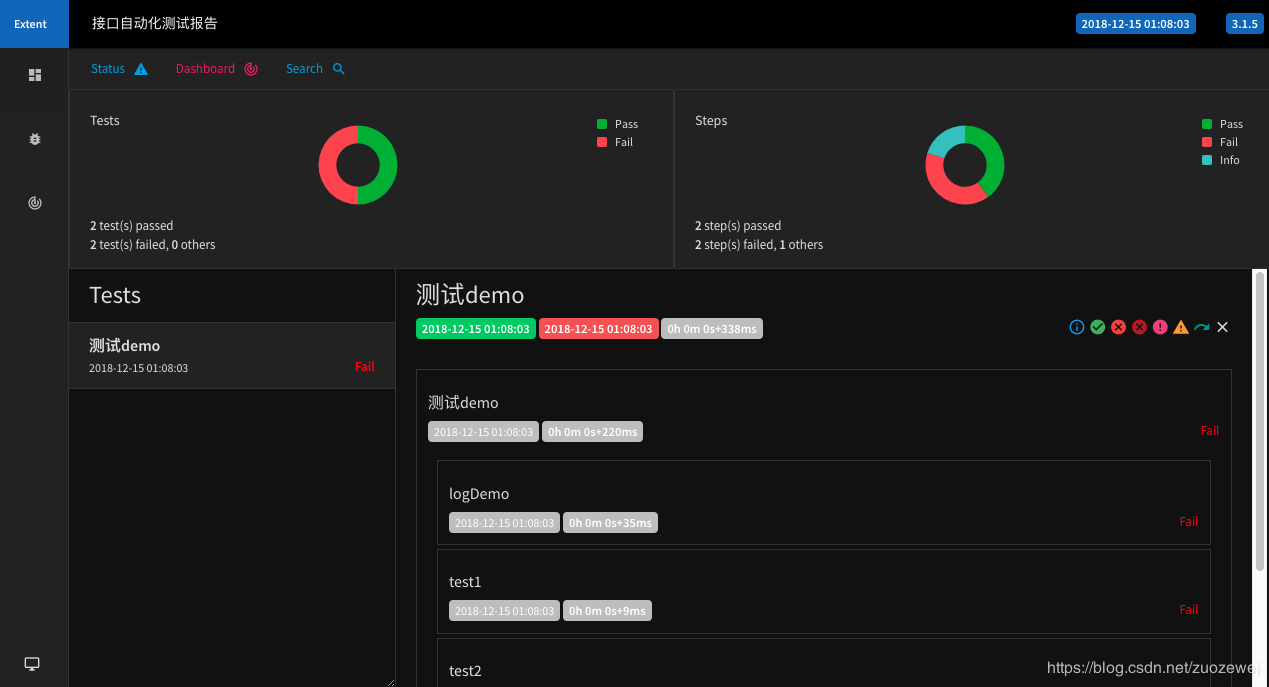
HTML Resport 示例
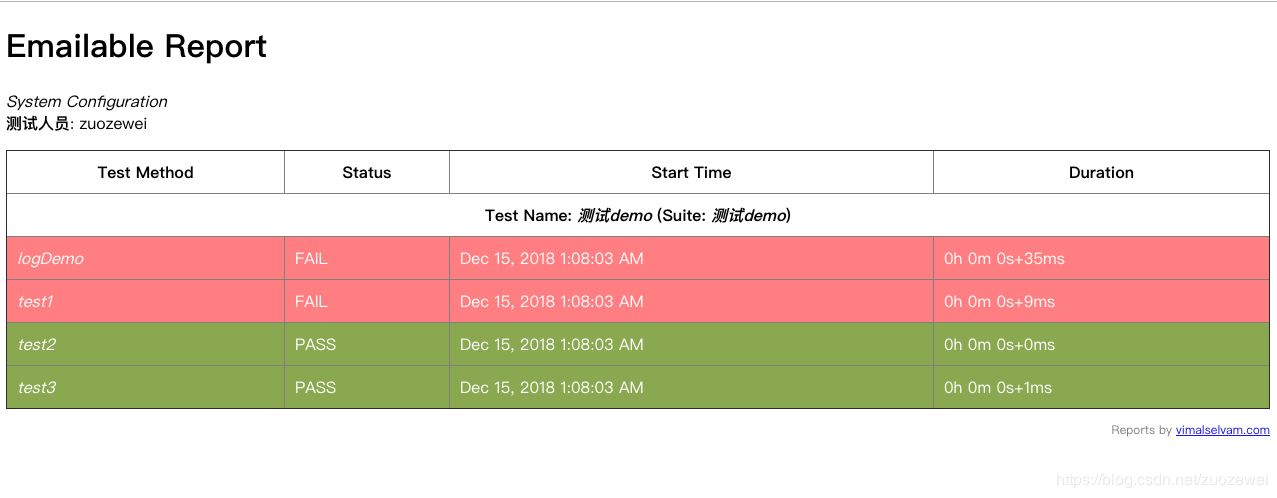
Email Report 示例
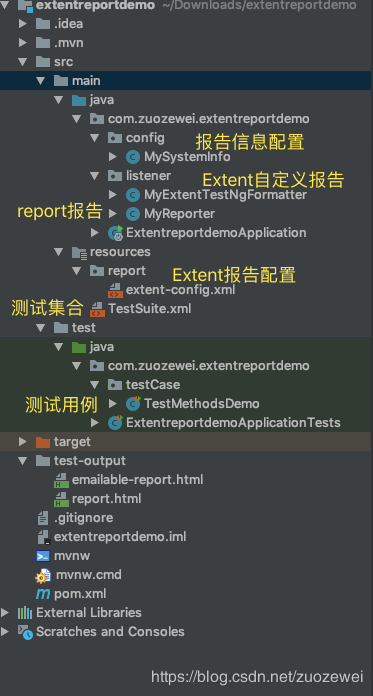
工程目录
参考:https://blog.csdn.net/zuozewei/article/details/85011217#Step1_Maven__19
源码地址:https://github.com/zuozewei/Java-API-Test-Examples
测试报告ExtentReport改进的更多相关文章
- [liu yanling]软件测试分为哪几个计划过程阶段
a) 计划阶段:编写测试计划,搭建测试环境,准备测试数据b) 设计阶段:编写测试用例(需求分析和测试用例文档)c) 执行阶段:执行测试用例,生成缺陷d) 报告阶段:测试报告,改进意见
- 个人作业2 — 英语学习APP的案例分析
一.调研准备: 1.软件:必应词典 2.平台:安卓 3.bug定义:(引用自<构建之法>13.1节) Bug:软件的缺陷 Bug可以分解为:症状(Symptom). ...
- Maven简介(Maven是什么)
简介 Maven,在意第绪语中意为对知识的积累.Maven最初用来在Jakarta Turbine项目中简化该项目的构建过程.Jakarta Trubine项目有多个工程,每个工程都有自己的多个Ant ...
- 接口自动化框架(java)--5.通过testng.xml生成extentreport测试报告
这套框架的报告是自己封装的 由于之前已经通过Extentreport插件实现了Testng的IReport接口,所以在testng.xml中使用listener标签并指向实现IReport接口的那个类 ...
- extentReport生成测试报告
之前在使用extentReport生成测试报告的时候,没有加载到相关的css,经检查为下面两个文件没有正确加载 后改变配置,加载本地的css和js文件,目前测试报告正确显示 1.创建TestNg的Re ...
- TestNg 12. extentReport测试报告
直接上代码:以下是我的目录结构,首先新建一个包名字叫 com.tester.extent.demo,直接新建两个类就可以,名字叫 ExtentTestNGIReporterListener 和 T ...
- testng优化:失败重跑,extentReport+appium用例失败截图,测试报告发邮件
生成的单html方便jenkins集成发邮件,= = 构建失败发邮件 参考:https://blog.csdn.net/galen2016/article/details/77975965 步骤: 1 ...
- 学霸网站---Alpha+版本测试报告
说明:由于老师前几天要求交测试报告,本测试报告只针对当时完成的功能进行测试,并不是几天之后要发布的BETA版本,不会有很多差别,但是BETA版本会包含对其中BUG的修复. 学霸网站测试报告 一.引言 ...
- Crawling is going on - Alpha版本测试报告
[Crawling is going on - Alpha版本] 测 试 报 告 文件状态: [] 草稿 [√] 正式发布 [] 正在修改 报告编号: 当前版本: 1.0.2 编写人: 周萱.林谋武. ...
随机推荐
- 使用mybatis框架实现带条件查询-多条件(传入Map集合)
我们发现我们可以通过传入javaBean的方式实现我们的需求,但是就两个条件,思考:现在就给他传入一个实体类,对系统性能的开销是不是有点大了. 现在改用传入Map集合的方式: 奥!对了,在创建map集 ...
- Git的基本使用方法(受益匪浅)
git指令介绍,下面有详解指令可以先跳过直接看下面的详解 $ mkdir learngit //创建一个learngit文件夹 $ cd learngit //进入learng ...
- pkgconfig
# tree hiredis/ hiredis/└── usr └── local ├── include │ └── hiredis │ ├── adapters │ │ ├── a ...
- 3-微信小程序开发(小程序的目录结构说明)
https://www.cnblogs.com/yangfengwu/p/10050784.html 源码下载链接: 或者 这节先说一下小程序的目录结构 自行根据 https://www.cnblo ...
- 【后缀数组】【LuoguP4248】 [AHOI2013]差异
题目链接 题目描述 给定一个长度为 n 的字符串 S,令 Ti 表示它从第 i 个字符开始的后缀.求 \(\sum_{1\le i <j\le n}len(T_i)+len(T_j)-2*lcp ...
- 使用css3变量创建炫酷悬停效果
原文地址:www.zcfy.cc/article/stunning-hover-effects-with-css-variables 效果: 主要使用css中的var做动画效果,代码如下: <! ...
- JS filter的使用
定义和用法 filter() 方法创建一个新的数组,新数组中的元素是通过检查指定数组中符合条件的所有元素. 注意: filter() 不会对空数组进行检测. 注意: filter() 不会改变原始数组 ...
- lnmp环境脚本快速搭建
进入lnmp官网 https://lnmp.org/download.html 如图: 进入Linux服务器并执行wget命令下载 wget http://soft.vpser.net/lnmp/ln ...
- ACR Code Pacs
ACR Index for Radiological Diagnosis 简称ACR Index,ACR Key或ACR Code,是一种应用于影像学分类的病理编码,由美国放射学院(American ...
- Cookie和Session原理
由于HTTP是无状态的协议,客户程序每次都去web页面,都打开到web服务器的单独的连接,并且不维护客户的上下文信息.如果需要维护上下文信息,比如用户登录系统后,每次都能够知道操作的是此登录用户,而不 ...