
接口自动化框架(java)--5.通过testng.xml生成extentreport测试报告
这套框架的报告是自己封装的
由于之前已经通过Extentreport插件实现了Testng的IReport接口,所以在testng.xml中使用listener标签并指向实现IReport接口的那个类就可以替换原始的testngreport
testng配置如下:
单suite,单test
test name 指向你写的testCase,methods放入需要执行的方法
 <?xml version="1.0" encoding="UTF-8"?>

 <!DOCTYPE suite SYSTEM "http://testng.org/testng-1.0.dtd">

 <suite name="test" verbose="1" preserve-order="true" parallel="false">

     <test name="testCase1">

         <classes>

             <class name="com.qa.tests.testCase1">

                 <methods>

                     <include name="login"></include>

                     <include name="getApi"></include>

                     <include name="deleteApi"></include>

                 </methods>

             </class>

         </classes>

     </test>

     <listeners>

         <listener class-name="com.qa.report.ExtentTestNGReporterListener"></listener>

     </listeners>

 </suite>
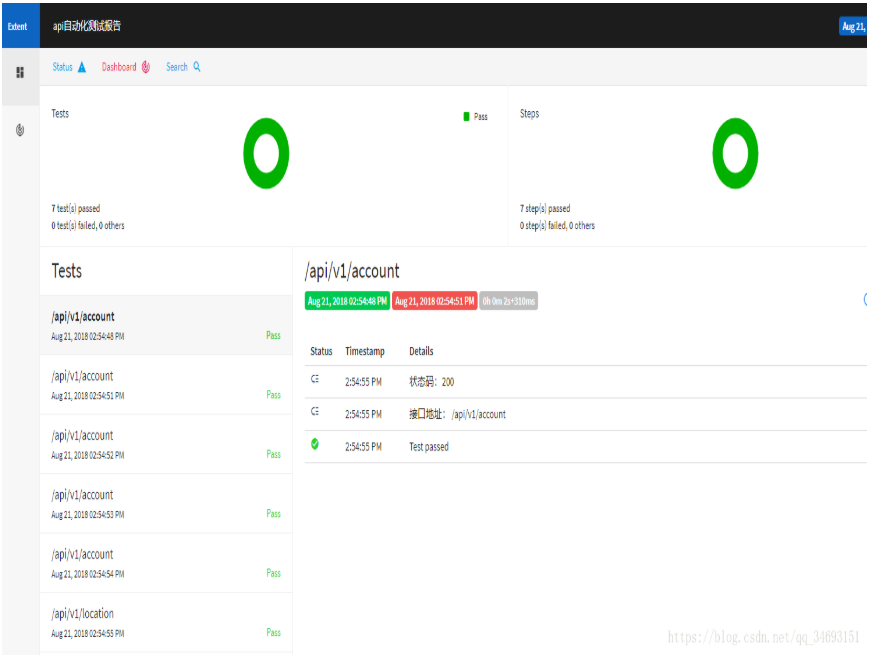
测试用例中使用Reporter.log方法可以在生成的report中对应的接口里增加你想要呈现的属性,比如状态码,接口地址
 package com.qa.tests;

 import com.alibaba.fastjson.JSON;

 import com.qa.base.TestBase;

 import com.qa.Parameters.postParameters;

 import com.qa.restclient.RestClient;

 import com.qa.util.TestUtil;

 import org.apache.http.client.methods.CloseableHttpResponse;

 import org.testng.Assert;

 import org.testng.Reporter;

 import org.testng.annotations.BeforeClass;

 import org.testng.annotations.DataProvider;

 import org.testng.annotations.Test;

 import java.io.IOException;

 import java.util.HashMap;

 import static com.qa.util.TestUtil.dtt;

 public class testCase1 extends TestBase {

     TestBase testBase;

     RestClient restClient;

     CloseableHttpResponse closeableHttpResponse;

     //host根url

     String host;

     //Excel路径

     String testCaseExcel;

     //header

     HashMap<String ,String> postHeader = new HashMap<String, String>();

     @BeforeClass

     public void setUp(){

         testBase = new TestBase();

         restClient = new RestClient();

         postHeader.put("Content-Type","application/json");

         //载入配置文件,接口endpoint

         host = prop.getProperty("Host");

         //载入配置文件,post接口参数

         testCaseExcel=prop.getProperty("testCase1data");

     }

     @DataProvider(name = "postData")

     public Object[][] post() throws IOException {

         return dtt(testCaseExcel,0);

     }

     @DataProvider(name = "get")

     public Object[][] get() throws IOException{

         //get类型接口

         return dtt(testCaseExcel,1);

     }

     @DataProvider(name = "delete")

     public Object[][] delete() throws IOException{

         //delete类型接口

         return dtt(testCaseExcel,2);

     }

     @Test(dataProvider = "postData")

     public void login(String loginUrl,String username, String passWord) throws Exception {

         //使用构造函数将传入的用户名密码初始化成登录请求参数

         postParameters loginParameters = new postParameters(username,passWord);

         //将登录请求对象序列化成json对象

         String userJsonString = JSON.toJSONString(loginParameters);

         //发送登录请求

         closeableHttpResponse = restClient.postApi(host+loginUrl,userJsonString,postHeader);

         //从返回结果中获取状态码

         int statusCode = TestUtil.getStatusCode(closeableHttpResponse);

         Assert.assertEquals(statusCode,200);

         Reporter.log("状态码:"+statusCode,true);

         Reporter.log("接口地址: "+loginUrl);

     }

     @Test(dataProvider = "get")

     public void getApi(String url) throws Exception{

         closeableHttpResponse = restClient.getApi(host+ url);

         int statusCode = TestUtil.getStatusCode(closeableHttpResponse);

         Assert.assertEquals(statusCode,200);

         Reporter.log("状态码:"+statusCode,true);

         Reporter.log("接口地址: "+url);

     }

     @Test(dataProvider = "delete")

     public void deleteApi(String url) throws Exception{

         System.out.println(url);

         closeableHttpResponse = restClient.deleteApi(url);

         int statusCode = TestUtil.getStatusCode(closeableHttpResponse);

         Assert.assertEquals(statusCode,204);

         Reporter.log("状态码:"+statusCode,true);

         Reporter.log("接口地址: "+url);

     }

     @BeforeClass

     public void endTest(){

         System.out.print("测试结束");

     }

 }
运行testng.xml后在test-output目录下找到Index.html,每次执行都会刷新测试报告
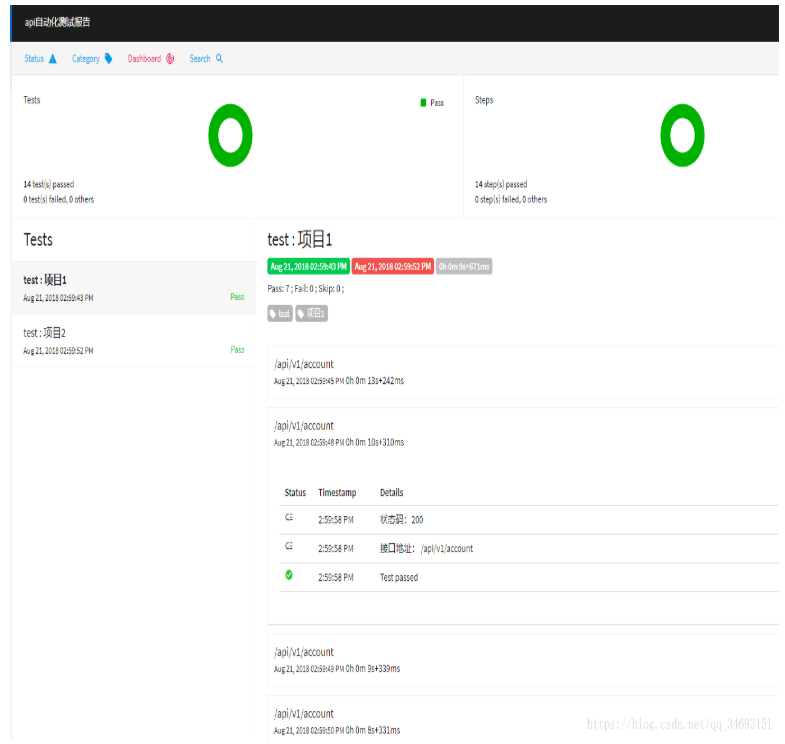
2.testng.xml多条testcase的情况下,test name 会变成报告的testname
 <?xml version="1.0" encoding="UTF-8"?>

 <!DOCTYPE suite SYSTEM "http://testng.org/testng-1.0.dtd">

 <suite name="test" verbose="1" preserve-order="true" parallel="false">

     <test name="项目1">

         <classes>

             <class name="com.qa.tests.testCase1">

                 <methods>

                     <include name="login"></include>

                     <include name="getApi"></include>

                     <include name="deleteApi"></include>

                 </methods>

             </class>

         </classes>

     </test>

     <test name="项目2">

         <classes>

             <class name="com.qa.tests.testCase1">

                 <methods>

                     <include name="login"></include>

                     <include name="getApi"></include>

                     <include name="deleteApi"></include>

                 </methods>

             </class>

         </classes>

     </test>

     <listeners>

         <listener class-name="com.qa.report.ExtentTestNGReporterListener"></listener>

     </listeners>

 </suite>
原文地址https://blog.csdn.net/qq_34693151/article/details/81907415
接口自动化框架(java)--5.通过testng.xml生成extentreport测试报告的更多相关文章
- 接口自动化框架(java)--1.项目概述
项目github地址: https://github.com/tianchiTester/API_AutoFramework 这套框架的报告是自己封装的 1.测试基类TestBase: 接口请求的te ...
- 接口自动化框架(java)--4.接口Token传递
这套框架的报告是自己封装的 一般token会在登录接口返回结果中呈现,从代码层面获取token的方式有很多种,我是使用jsonpath这个json路径语言去匹配token所在路径的key值 packa ...
- 接口自动化框架(java)--3.get,delete请求,Excel管理多种请求类型
这套框架的报告是自己封装的 每种请求类型放入不同的sheet中,就可以避免新建太多的excel去做数据驱动. XSSFSheet类提供了一个读取sheet的方法,getSheetAt(int),通过下 ...
- 接口自动化框架(java)--2.接口用例POST请求,参数配置
这套框架的报告是自己封装的 Post类型的接口通常有请求参数,请求参数也是json类型,所以需要写一个类将请求参数序列化成json对象 以常见的登录接口为例 新建一个package,和postPara ...
- 转载:python + requests实现的接口自动化框架详细教程
转自https://my.oschina.net/u/3041656/blog/820023 摘要: python + requests实现的接口自动化框架详细教程 前段时间由于公司测试方向的转型,由 ...
- python + requests实现的接口自动化框架详细教程
前段时间由于公司测试方向的转型,由原来的web页面功能测试转变成接口测试,之前大多都是手工进行,利用postman和jmeter进行的接口测试,后来,组内有人讲原先web自动化的测试框架移驾成接口的自 ...
- Jmeter+ant+Jenkins接口自动化框架搭建
摘自:https://testerhome.com/topics/13389 一.背景 上一篇讲了Jmeter 接口自动化-脚本数据分离实例,我们知道怎么利用Jmeter去编写接口自动化脚本,但是接 ...
- Jmeter+Ant+Jenkins接口自动化框架
最近应公司要求,搭建一套接口自动化环境.看到通知邮件,没有多想就确定了Jmeter路线.可能有些人会 说,为啥不用python,相对而言高大上一些.因为公司内部现在项目有用到Jmeter,正好可以结合 ...
- Python+Pytest+Allure+Git+Jenkins接口自动化框架
Python+Pytest+Allure+Git+Jenkins接口自动化框架 一.接口基础 接口测试是对系统和组件之间的接口进行测试,主要是效验数据的交换,传递和控制管理过程,以及相互逻辑依赖关系. ...
随机推荐
- python---二叉树遍历
重学. # coding = utf-8 # 二叉树遍历 class Node: """节点类""" def __init__(self, ...
- 使用kettle来根据时间戳或者批次号来批量导入数据,达到增量的效果。
1.Kettle是一款国外开源的ETL工具,纯java编写,可以在Window.Linux.Unix上运行,数据抽取高效稳定.下载图形化界面的zip包格式的,直接解压缩使用即可.安装部署模式这里不说了 ...
- 【js】正则
复习字符串操作search 查找substring 获取子字符串charAt 获取某个字符split 分割字符串,获得数组 <script> var str="abcdef&qu ...
- php接入支付宝的流程(转载)
php接入支付宝的流程写在这里供像我一样的小白参考. 1.首先要有一个创建一个应用(选好自己想要的功能,关于支付的功能,貌似都需要签约) 2.下载SDK&Dome(网址https://doc. ...
- c#一步一步实现ORM(二)
c#一步一步实现ORM(二) 上一篇描述了简单的思路,这一片我们来稍微细化一下 1插入的时候忽略某些字段 public int Insert<T>(T o, params string[] ...
- 初学Python的一些细节
一.python的数据类型 1.python的基本数据类型包括数值数据类型和字符串数据类型:基本数据类型的特点是不允许改变,如果改变基本数据类型的值,会导致内存的重新分配. int 整形 二进制 ...
- 基于for循环的呼吸灯
#include "stm32f10x.h" #include "stm32f10x_gpio.h" //#include "led.h" ...
- 12树莓派VNC远程桌面
2017-09-04 23:11:28 http://bbs.elecfans.com/forum.php?mod=viewthread&tid=583803&extra= 开 ...
- Hibernate 对象关系映射文件
简介: POJO 类和关系型数据库之间的映射可以用一个 XML 文档来定义 通过 POJO 类的数据库映射文件,Hibernate 可以理解持久化类和数据表之间的对应关系,也可以理解持久化类属性与数据 ...
- CentOS裸机环境下安装php-7.3.1
安装步骤如下 安装必要的软件 获取源码 编译安装 安装过程可能遇到的一些问题 编译参数详解 安装步骤如下 安装必要的软件 yum install -y autoconf automake libtoo ...