
woocommerce调用产品相册gallery图片如何操作?wordpress技巧
wordpress官网有很多woocommerce模板,但有些客户要求定制模板,这时可能会碰到产品相册图片调用的问题,如果根据自带的Storefront主题来改很麻烦,那我们就自己定义吧!下来就随ytkah一起来看看woocommerce调用产品相册gallery图片吧!以下方法参考https://gist.github.com/Niloys7/17b88d36c1c38844a6cf2127c15dee63
<?php

  global $product;

 $attachment_ids = $product->get_gallery_attachment_ids();

foreach( $attachment_ids as $attachment_id )

{

  //Get URL of Gallery Images - default wordpress image sizes

  echo $Original_image_url = wp_get_attachment_url( $attachment_id );

  echo $full_url = wp_get_attachment_image_src( $attachment_id, 'full' )[0];

  echo $medium_url = wp_get_attachment_image_src( $attachment_id, 'medium' )[0];

  echo $thumbnail_url = wp_get_attachment_image_src( $attachment_id, 'thumbnail' )[0];

  //Get URL of Gallery Images - WooCommerce specific image sizes

  echo $shop_thumbnail_image_url = wp_get_attachment_image_src( $attachment_id, 'shop_thumbnail' )[0];

  echo $shop_catalog_image_url = wp_get_attachment_image_src( $attachment_id, 'shop_catalog' )[0];

  echo $shop_single_image_url = wp_get_attachment_image_src( $attachment_id, 'shop_single' )[0];

  //echo Image instead of URL

  echo wp_get_attachment_image($attachment_id, 'full');

  echo wp_get_attachment_image($attachment_id, 'medium');

  echo wp_get_attachment_image($attachment_id, 'thumbnail');

  echo wp_get_attachment_image($attachment_id, 'shop_thumbnail');

  echo wp_get_attachment_image($attachment_id, 'shop_catalog');

  echo wp_get_attachment_image($attachment_id, 'shop_single');

}

?>
以下是ytkah实现的效果图,图片可左右切换,点击下方缩略图也可以切换
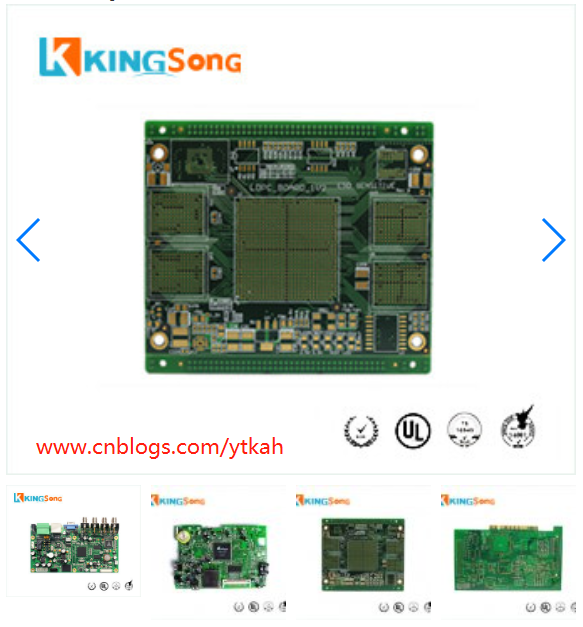
具体的代码如下(一个是调用产品特色图the_post_thumbnail_url,一个是产品相册gallery图片)
<!-- Swiper -->

                <div class="swiper-container gallery-top">

                    <div class="swiper-wrapper">

                        <div class="swiper-slide">

                            <img src="<?php the_post_thumbnail_url( 'full' ); ?>" alt="">

                        </div>

                            <?php

                            global $product;

                            $attachment_ids = $product->get_gallery_attachment_ids();

                            foreach( $attachment_ids as $attachment_id )

                            {

                                echo '<div class="swiper-slide"><img src="' .$full_url = wp_get_attachment_image_src( $attachment_id, 'full' )[0] .'" alt=""></div>';

                            }

                            ?>

                    </div>

                    <!-- Add Arrows -->

                    <div class="swiper-button-next hidden-xs"></div>

                    <div class="swiper-button-prev hidden-xs"></div>

                </div>

                <div class="swiper-container gallery-thumbs">

                    <div class="swiper-wrapper">

                        <div class="swiper-slide">

                            <img src="<?php the_post_thumbnail_url( 'small' ); ?>" alt="">

                        </div>

                        <?php

                        global $product;

                        $attachment_ids = $product->get_gallery_attachment_ids();

                        foreach( $attachment_ids as $attachment_id )

                        {

                            echo '<div class="swiper-slide"><img src="' .$shop_thumbnail_image_url = wp_get_attachment_image_src( $attachment_id, 'shop_thumbnail' )[0] .'" alt=""></div>';

                        }

                        ?>

                    </div>

                </div>
当然,js和css文件需要自己定义
								<div class="swiper-slide">

									<img src="<?php the_post_thumbnail_url( 'full' ); ?>" alt="<?php the_title(); ?>">

								</div>

                                <?php

                                global $product;

                                $attachment_ids = $product->get_gallery_attachment_ids();

                                foreach( $attachment_ids as $attachment_id )

                                {

                                    echo '<div class="swiper-slide"><img src="' .$full_url = wp_get_attachment_image_src( $attachment_id, 'full' )[0] .'" alt="';

                                    the_title();

                                    echo '"></div>';

                                }

                                ?>
woocommerce调用产品相册gallery图片如何操作?wordpress技巧的更多相关文章
- ImageLoader框架的使用、调用系统相册显示图片并裁剪显示、保存图片的两种方式
ImageLoader虽然说是一个相对于比较老的一个框架了 ,但是总的来说,还是比较好用的,今天我就总结了一下它的用法.还有调用系统相册并裁剪,以及,通过sharedpreference和文件存储来保 ...
- Android调用相册截取图片遇到的问题
1.在Android中可以使用如下的方式来调用相册,选择图片进行裁剪使用,昨天在开发的时候遇到一个问题 private void cropBigImageUri(Uri uri, int output ...
- iOS UIWebView 中 js调用OC 打开相册 获取图片, OC调用js 将图片加载到html上
线上html <!DOCTYPE html> <html> <head> <title>HTML中用JS调用OC方法</title> < ...
- ios中摄像头/相册获取图片,压缩图片,上传服务器方法总结
相册 iphone的相册包含摄像头胶卷+用户计算机同步的部分照片.用户可以通过UIImagePickerController类提供的交互对话框来从相册中选择图像.但是,注意:相册中的图片机器路径无法直 ...
- iOS 下的相册与图片处理
需求 很多公司项目中都会使用到相册,以及相机,保存图片,从相册中选取图片等等操作.本文将详细介绍该功能如何实现优化,以及使用一些优秀的第三方库来辅助完成我们的需求. photos framework ...
- HTML5 Plus 拍照或者相册选择图片上传
HBuilder+HTML5 Plus+MUI实现拍照或者相册选择图片上传,利用HTML5 Plus的Camera.Gallery.IO.Storage和Uploader来实现手机APP拍照或者从相册 ...
- mui + H5 调取摄像头和相册 实现图片上传
最近要用MUI做项目,在研究图片上传时 ,遇到了大坑 ,网上搜集各种资料,最终写了一个demo,直接看代码.参考(http://www.cnblogs.com/richerdyoung/p/66123 ...
- Android相机、相册获取图片显示并保存到SD卡
Android相机.相册获取图片显示并保存到SD卡 [复制链接] 电梯直达 楼主 发表于 2013-3-13 19:51:43 | 只看该作者 |只看大图 本帖最后由 happy小妖同学 ...
- csharp通过dll调用opencv函数,图片作为参数
[blog 项目实战派]csharp通过dll调用opencv函数,图片作为参数 一直想做着方面的研究,但是因为这个方面的知识过于小众,也是由于自己找资料的能力比较弱,知道今天才找 ...
随机推荐
- SQL Server ----- 备份数据库 生成(.bak)文件
转移数据库 备份数据库 选中数据库 进入后界面如图 选择合适位置进行备份 注意:选择配置好保存位置的 成功后出现 如果出现错误. 还有一种可能是哪个文件夹中已经有了一个 把文件家中的那个删了 还原 ...
- 解决新版本R3.6.0不能加载devtools包问题
首先是看到下面这个文章想试着练习一下,结果第一步就卡住了,无法加载devtools包,繁体字都冒出来了......汗!(没有截图,但过程痛苦不堪~) https://www.sohu.com/a/12 ...
- Ubuntu 18 Kubernetes集群的安装和部署 以及Helm的安装
首先说一下我的环境, 我是在windows 10 上面建了一个ubuntu18的虚拟机,同时由于某些原因 不受网络限制, 所以安装比较顺利. Install 1.安装并启用 Docker sudo ...
- Java学习:List接口
List接口 java.util.list接口 extends Collection接口 List接口的特点: 有序的集合,存储元素和取出元素的顺序是一致的(存储123 取出123) 有索引,包含了一 ...
- 安装和启动docker
1.安装和启动docker yum update -y yum install -y yum-utils yum-config-manager --add-repo https://download. ...
- java中Math类
Math类 Math类是一个很有用的数学帮助类,使用也非常简单,这个类比较特殊,首先他和String类一样都是用final修饰,所以不能有子类,还有就是它的构造方法是私有的,也就是我们不能通过new的 ...
- SpringBoot引入第三方jar包或本地jar包的处理方式
在开发过程中有时会用到maven仓库里没有的jar包或者本地的jar包,这时没办法通过pom直接引入,那么该怎么解决呢 一般有两种方法 第一种是将本地jar包安装在本地maven库 第二种是将本地ja ...
- 关于vs无法创建虚拟目录的问题
插入链接:https://blog.csdn.net/zhao1955/article/details/92182935 补充:改完之后不要忘记以管理员的身份运行vs
- Unity PhysicsScene测试
应该是unity 2018.3中加入的功能,对象可以放置于不同的物理场景中. 一个Scene对应一个物理场景(PhysicsScene),若想放入独立的物理场景测试创建一个Scene即可.见下图gif ...
- docker-compose进阶
笔者在前文<Docker Compose 简介>和<Dcoker Compose 原理>两篇文章中分别介绍了 docker compose 的基本概念以及实现原理.本文我们将继 ...