
Win732位DotNetCore部署IIS错误记录
部署环境为:Win7专业版32位,数据库Mysql5.7.27-win32
1.先启用IIS功能
2.安装Mysql5.7.27-win32,使用解压版安装
安装步骤:
mysql的解压根目录下新建my.ini配置文件
# For advice on how to change settings please see

# http://dev.mysql.com/doc/refman/5.7/en/server-configuration-defaults.html

# *** DO NOT EDIT THIS FILE. It's a template which will be copied to the

# *** default location during install, and will be replaced if you

# *** upgrade to a newer version of MySQL.

[mysqld]

# Remove leading # and set to the amount of RAM for the most important data

# cache in MySQL. Start at % of total RAM for dedicated server, else %.

# innodb_buffer_pool_size = 128M

# Remove leading # to turn on a very important data integrity option: logging

# changes to the binary log between backups.

# log_bin

# These are commonly set, remove the # and set as required.

 basedir = C:/IIS/mysql-5.7.-win32

 datadir = C:/IIS/mysql-5.7.-win32/data

 port =

# server_id = .....

# Remove leading # to set options mainly useful for reporting servers.

# The server defaults are faster for transactions and fast SELECTs.

# Adjust sizes as needed, experiment to find the optimal values.

# join_buffer_size = 128M

# sort_buffer_size = 2M

# read_rnd_buffer_size = 2M

sql_mode=NO_ENGINE_SUBSTITUTION,STRICT_TRANS_TABLES
安装服务:
mysqld -install
如果报错:计算机中丢失MSVCR120.dll
下载安装vcredist_x86
下载地址:https://www.microsoft.com/en-us/download/details.aspx?id=40784
执行命令后提示:Service successfully installed. 表示安装成功
初始化Mysql用户:
mysqld --initialize-insecure --user=mysql
执行命令后会在MySQL的安装目录下生成data目录并创建root用户。
启动服务:
net start mysql
启动MySQL之后,root用户的密码为空,设置密码,命令如下:
mysqladmin -u root -p password 新密码
Enter password: 旧密码
VS发布的时候选择正确的目标环境
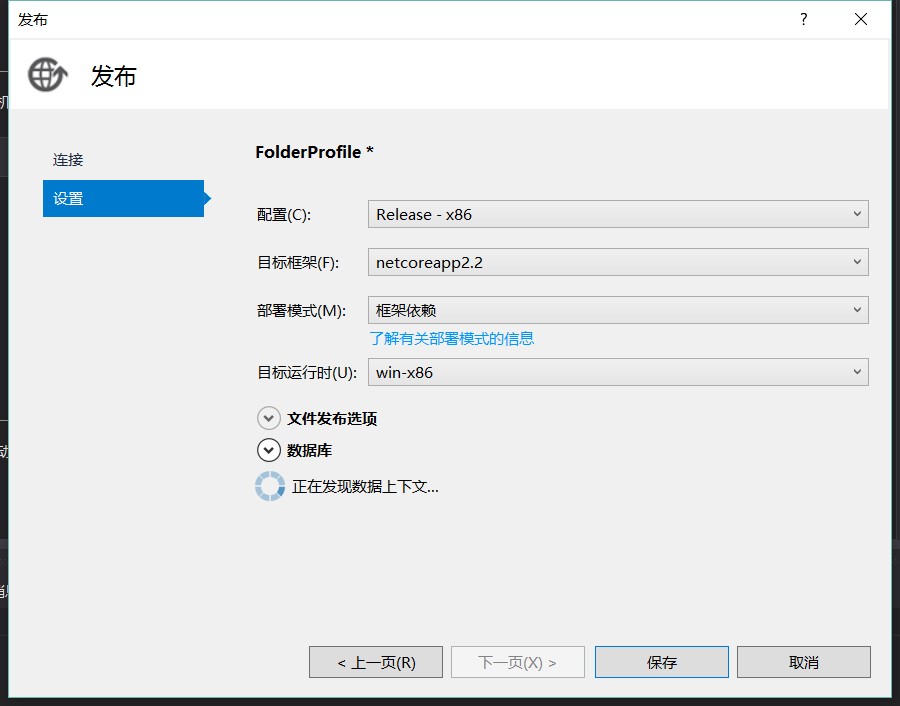
发布至IIS后应用程序池总是停止
模块 DLL C:\Program Files (x86)\IIS\Asp.Net Core Module\V2\aspnetcorev2.dll 未能加载。返回的数据为错误信息。
需要下载VC运行时:
参考:https://q.cnblogs.com/q/111731/
1,dotnet hosting 2.2.0 需要C++2015
2,C++2015 需要 KB2919355 https://www.microsoft.com/zh-cn/download/confirmation.aspx?id=42334
3,KB2919355 需要 KB2919442 https://www.microsoft.com/en-us/download/details.aspx?id=42153
.net core 2.2 HTTP Error 502.5 - ANCM Out-Of-Process Startup Failure
然后又出现错误:
Failed to load the dll from [C:\Program Files\dotnet\host\fxr\1.0.1\hostfxr.dll
这两个错误都是因为win7缺少补丁所致:
需要安装补丁:KB2533623
https://www.cnblogs.com/yilezhu/p/10057789.html
下载对应补丁:
https://support.microsoft.com/en-us/help/2533623/microsoft-security-advisory-insecure-library-loading-could-allow-remot
Win732位DotNetCore部署IIS错误记录的更多相关文章
- iis错误记录
1:iis错误 解决方法: 输入C:\Windows\Microsoft.NET\Framework\v4.0.30319>aspnet_regiis -i 这里由于我的是默认在Administ ...
- 部署IIS错误
- Net Core 5.0 部署IIS错误-500.31-Failed to load ASP.NET Core runtime
Windows Server 2008 R2不支持.net core 3.0版本及以后更新的各个版本. 面对如上图提示,第一想到的就是服务器安装的SDK或者hosting版本有问题,第一时间检查了安装 ...
- 三丰云使用记录--部署iis服务器
写在前面的话:看在我这么热心写使用推广记录,麻烦延长下使用天数,谢谢 官网地址:https://www.sanfengyun.com 三丰云是北京太极三丰云计算有限公司旗下网络服务品牌,十八年IDC ...
- IIS发布错误记录
1.HTTP 错误 500.19 - Internal Server Error 无法访问请求的页面,因为该页的相关配置数据无效. 详细错误信息模块 IIS Web Core 通知 BeginRequ ...
- asp.net core 2.1 部署IIS(win10/win7)
asp.net core 2.1 部署IIS(win10/win7) 概述 与ASP.NET时代不同,ASP.NET Core不再是由IIS工作进程(w3wp.exe)托管,而是使用自托管Web服务器 ...
- 【IIS错误】未能加载文件或程序集“AAAAA”或它的某一个依赖项。试图加载格式不正确的程序。
未能加载文件或程序集“AAAAA”或它的某一个依赖项.试图加载格式不正确的程序. 说明: 执行当前 Web 请求期间,出现未经处理的异常.请检查堆栈跟踪信息,以了解有关该错误以及代码中导致错误的出处的 ...
- .NET框架 - NETCORE部署IIS
.NET框架 - NETCORE部署IIS 1. 发布NETCORE项目. 2. 发布IIS 添加 网站 修改对应的程序池 为 ”无托管代码“. 3. 浏览网站. IIS 需提前安装好 .netcor ...
- .Net Core部署IIS
1.环境安装 https://dotnet.microsoft.com/download/dotnet-core 下载Runtime & Hosting Bundle包安装,iis模块会出现支 ...
随机推荐
- 一个使用vue和echarts结合的demo
前端框架真的很神奇,接触了几天vue.js,用它结合echarts做一个数据分析图,效果如下: 附上源码地址:https://github.com/qingguoYan/orderVue.git
- oracle数据库(五)
PL/SQL基础 PL/SQL语言是对oracle数据库语言的扩展,是一种高性能的基于处理事务的语言,能运行在任何oracle环境中,支持所有数据处理命令,支持所有SQL数据类型和函数,支持所有ora ...
- GPU的主要工作:图像合成、图形操作、光线表达
GPU的主要工作:图像合成.图形操作 gpu不产生图片, 只表达和处理图片.图形:
- redux:基于函数式编程的事件处理和状态维护机制
redux = monand + pipeline + highorder componet + decouple + middleware redex = store based + event h ...
- reduce要素与适用总结
要素: 1.高阶函数:reduce: 2.处理函数:reducer: 3.数据:可以是具体数据.签名相同的普通函数.签名相同的高阶函数: reduce(reducer, datas(data or f ...
- 几种开放源码的TCP/IP协议栈比较
http://blog.chinaunix.net/uid-28785506-id-3828286.html 原文地址:几种开放源码的TCP/IP协议栈比较 作者:三点水兽 1.BSD TCP/IP协 ...
- [Algorithm] 242. Valid Anagram
Given two strings s and t , write a function to determine if t is an anagram of s. Example 1: Input: ...
- 洛谷 P2577 [ZJOI2005]午餐 题解
每日一题 day56 打卡 Analysis 算法:贪心+dp 容易想到贪心:吃饭慢的先打饭节约时间, 所以先将人按吃饭时间从大到小排序. 然后就是dp了: 首先,应该想到f[i][j][k]:前i个 ...
- ent 基本使用十四 edge
edge 在ent 中属于比较核心,同时也是功能最强大的,ent 提供了比较强大的关系模型 快速使用 参考图 以上包含了两个通过边定义的关系 pets/owner: user package sc ...
- Micro Benchmark Framework java 基准测试类库
Micro Benchmark Framework 框架主要是method 层面上的 benchmark,精度可以精确到微秒级 比较典型的使用场景还有: 想定量地知道某个函数需要执行多长时间,以及执行 ...