
Xshell5 访问虚拟机Ubuntu16.04
1.Ubuntu安装telnet
安装openbsd-inetd

sudo apt-get install openbsd-inetd

安装telnetd

sudo apt-get install telnetd

重启openbsd-inetd

sudo /etc/init.d/openbsd-inetd restart

查看telnet运行状态

sudo netstat -a | grep telnet

登录

telnet IP address
访问:
hongdada@ubuntu:~$ telnet 192.168.1.203 22

Trying 192.168.1.203...

telnet: Unable to connect to remote host: Connection refused
使用 netstat -napt查看端口是否被监听
hongdada@ubuntu:~$ netstat -napt

(并非所有进程都能被检测到,所有非本用户的进程信息将不会显示,如果想看到所有信息,则必须切换到 root 用户)

激活Internet连接 (服务器和已建立连接的)

Proto Recv-Q Send-Q Local Address           Foreign Address         State       PID/Program name

tcp        0      0 0.0.0.0:6379            0.0.0.0:*               LISTEN      -

tcp        0      0 0.0.0.0:80              0.0.0.0:*               LISTEN      -

tcp        0      0 0.0.0.0:23              0.0.0.0:*               LISTEN      -

tcp        0      0 192.168.1.203:44850     124.192.164.34:80       ESTABLISHED 5200/chrome

tcp        0      0 192.168.1.203:39874     119.75.213.61:443       ESTABLISHED
发现22并没有被监听
安装OpenSSH
hongdada@ubuntu:~$ sudo apt-get install openssh-server

[sudo] hongdada 的密码:

正在读取软件包列表... 完成

正在分析软件包的依赖关系树

正在读取状态信息... 完成

下列软件包是自动安装的并且现在不需要了:

  linux-headers-4.4.- linux-headers-4.4.--generic linux-headers-4.4.-

  linux-headers-4.4.--generic linux-headers-4.4.-

  linux-headers-4.4.--generic linux-headers-4.4.-

  linux-headers-4.4.--generic linux-headers-4.4.-

  linux-headers-4.4.--generic linux-image-4.4.--generic

  linux-image-4.4.--generic linux-image-4.4.--generic

  linux-image-4.4.--generic linux-image-4.4.--generic

  linux-image-extra-4.4.--generic linux-image-extra-4.4.--generic

  linux-image-extra-4.4.--generic linux-image-extra-4.4.--generic

  linux-image-extra-4.4.--generic

使用'sudo apt autoremove'来卸载它(它们)。

将会同时安装下列软件:

  ncurses-term openssh-client openssh-sftp-server ssh-import-id

建议安装:

  ssh-askpass libpam-ssh keychain monkeysphere rssh molly-guard

下列【新】软件包将被安装:

  ncurses-term openssh-server openssh-sftp-server ssh-import-id

下列软件包将被升级:

  openssh-client

升级了  个软件包,新安装了  个软件包,要卸载  个软件包,有  个软件包未被升级。

需要下载 , kB 的归档。

解压缩后会消耗 , kB 的额外空间。

您希望继续执行吗? [Y/n] Y

获取: http://mirrors.aliyun.com/ubuntu xenial-updates/main amd64 openssh-client amd64 1:7.2p2-4ubuntu2.2 [587 kB]

获取: http://mirrors.aliyun.com/ubuntu xenial/main amd64 ncurses-term all 6.0+20160213-1ubuntu1 [249 kB]

获取: http://mirrors.aliyun.com/ubuntu xenial-updates/main amd64 openssh-sftp-server amd64 1:7.2p2-4ubuntu2.2 [38.7 kB]

获取: http://mirrors.aliyun.com/ubuntu xenial-updates/main amd64 openssh-server amd64 1:7.2p2-4ubuntu2.2 [338 kB]

获取: http://mirrors.aliyun.com/ubuntu xenial/main amd64 ssh-import-id all 5.5-0ubuntu1 [10.2 kB]

已下载 , kB,耗时 1秒 (, kB/s)

正在预设定软件包 ...

(正在读取数据库 ... 系统当前共安装有  个文件和目录。)

正准备解包 .../openssh-client_1%3a7.2p2-4ubuntu2.2_amd64.deb  ...

正在将 openssh-client (:.2p2-4ubuntu2.) 解包到 (:.2p2-4ubuntu2.) 上 ...

正在选中未选择的软件包 ncurses-term。

正准备解包 .../ncurses-term_6.+-1ubuntu1_all.deb  ...

正在解包 ncurses-term (6.0+-1ubuntu1) ...

正在选中未选择的软件包 openssh-sftp-server。

正准备解包 .../openssh-sftp-server_1%3a7.2p2-4ubuntu2.2_amd64.deb  ...

正在解包 openssh-sftp-server (:.2p2-4ubuntu2.) ...

正在选中未选择的软件包 openssh-server。

正准备解包 .../openssh-server_1%3a7.2p2-4ubuntu2.2_amd64.deb  ...

正在解包 openssh-server (:.2p2-4ubuntu2.) ...

正在选中未选择的软件包 ssh-import-id。

正准备解包 .../ssh-import-id_5.-0ubuntu1_all.deb  ...

正在解包 ssh-import-id (5.5-0ubuntu1) ...

正在处理用于 man-db (2.7.-) 的触发器 ...

正在处理用于 ufw (0.35-0ubuntu2) 的触发器 ...

正在处理用于 systemd (-4ubuntu16) 的触发器 ...

正在处理用于 ureadahead (0.100.-) 的触发器 ...

正在设置 openssh-client (:.2p2-4ubuntu2.) ...

正在设置 ncurses-term (6.0+-1ubuntu1) ...

正在设置 openssh-sftp-server (:.2p2-4ubuntu2.) ...

正在设置 openssh-server (:.2p2-4ubuntu2.) ...

Creating SSH2 RSA key; this may take some time ...

 SHA256:Fggzi+si7eAimez/6obJ9ykFiTnBvfOkQk1D3G198KI root@ubuntu (RSA)

Creating SSH2 DSA key; this may take some time ...

 SHA256:l1qkn+YwdNyBnNVurPG2Qg22CrVL/41VAyqqZr6I1Lc root@ubuntu (DSA)

Creating SSH2 ECDSA key; this may take some time ...

 SHA256:QCmE/BZXVtoThmb0gmxbRD7+vzTX+cbVud6e9EXW2cE root@ubuntu (ECDSA)

Creating SSH2 ED25519 key; this may take some time ...

 SHA256:1D0iLpOURGJF4sMTzCoittU3V27FyXO72hr/HFJtO2U root@ubuntu (ED25519)

正在设置 ssh-import-id (5.5-0ubuntu1) ...

正在处理用于 systemd (-4ubuntu16) 的触发器 ...

正在处理用于 ureadahead (0.100.-) 的触发器 ...

正在处理用于 ufw (0.35-0ubuntu2) 的触发器 ...

hongdada@ubuntu:~$ ps -e|grep ssh

   ?        :: sshd

hongdada@ubuntu:~$ netstat -antp|grep

(并非所有进程都能被检测到,所有非本用户的进程信息将不会显示,如果想看到所有信息,则必须切换到 root 用户)

tcp               0.0.0.0:              0.0.0.0:*               LISTEN      -

tcp               192.168.1.203:     23.219.133.226:      CLOSE_WAIT  /chrome

tcp               192.168.1.203:     117.122.217.6:        CLOSE_WAIT  /chrome

tcp               192.168.1.203:     117.122.217.6:        CLOSE_WAIT  /chrome

tcp               192.168.1.203:     180.76.22.33:        CLOSE_WAIT  /chrome

tcp               192.168.1.203:     124.192.164.48:       CLOSE_WAIT  /chrome

tcp               192.168.1.203:     180.76.22.33:        CLOSE_WAIT  /chrome

tcp               192.168.1.203:     115.28.122.210:       TIME_WAIT   -

tcp               192.168.1.203:     180.76.22.33:        CLOSE_WAIT  /chrome

tcp              192.168.1.203:     23.219.133.226:      CLOSE_WAIT  /chrome

tcp               192.168.1.203:     117.122.217.6:        CLOSE_WAIT  /chrome

tcp               192.168.1.203:     117.122.217.6:        CLOSE_WAIT  /chrome

tcp               192.168.1.203:     180.76.22.33:        CLOSE_WAIT  /chrome

tcp               192.168.1.203:     13.124.96.226:        CLOSE_WAIT  /chrome

tcp              192.168.1.203:     23.219.133.226:      CLOSE_WAIT  /chrome

tcp               192.168.1.203:     180.76.22.33:        CLOSE_WAIT  /chrome

tcp               192.168.1.203:     180.76.22.33:        CLOSE_WAIT  /chrome

tcp               192.168.1.203:     119.75.222.191:       CLOSE_WAIT  /chrome

tcp               192.168.1.203:     52.221.26.127:        CLOSE_WAIT  /chrome

tcp               192.168.1.203:     59.110.88.38:         CLOSE_WAIT  /chrome

tcp               192.168.1.203:     119.75.222.22:        FIN_WAIT1   -

tcp               192.168.1.203:     117.122.217.6:        CLOSE_WAIT  /chrome

tcp               192.168.1.203:     13.124.96.226:        CLOSE_WAIT  /chrome

tcp               192.168.1.203:     119.75.222.22:        CLOSE_WAIT  /chrome

tcp               192.168.1.203:     117.122.217.6:        CLOSE_WAIT  /chrome

tcp               192.168.1.203:     180.76.22.33:        CLOSE_WAIT  /chrome

tcp               192.168.1.203:     119.75.222.22:        CLOSE_WAIT  /chrome

tcp               192.168.1.203:     180.76.22.33:        CLOSE_WAIT  /chrome

tcp               192.168.1.203:     13.124.96.226:        CLOSE_WAIT  /chrome

tcp               192.168.1.203:     124.14.17.221:        CLOSE_WAIT  /chrome

tcp               192.168.1.203:     23.219.133.226:      ESTABLISHED /chrome

tcp               192.168.1.203:     119.75.222.191:       FIN_WAIT1   -

tcp               192.168.1.203:     180.76.22.33:        CLOSE_WAIT  /chrome

tcp               192.168.1.203:     180.76.22.33:        CLOSE_WAIT  /chrome

tcp              192.168.1.203:     23.219.133.226:      CLOSE_WAIT  /chrome

tcp               192.168.1.203:     180.76.22.33:        CLOSE_WAIT  /chrome

tcp               192.168.1.203:     13.124.96.226:        CLOSE_WAIT  /chrome

tcp               192.168.1.203:     203.208.43.90:        ESTABLISHED /chrome

tcp               192.168.1.203:     203.208.43.90:        ESTABLISHED /chrome

tcp               192.168.1.203:     52.221.26.127:        CLOSE_WAIT  /chrome

tcp6              :::                   :::*                    LISTEN      -

hongdada@ubuntu:~$ telnet 127.0.0.1

Trying 127.0.0.1...

Connected to 127.0.0.1.

Escape character is '^]'.

SSH-2.0-OpenSSH_7.2p2 Ubuntu-4ubuntu2.

Protocol mismatch.

Connection closed by foreign host.

hongdada@ubuntu:~$
Ubuntu 默认安装了client端,但是没有安装Server端,所以现在要安装openssh-server
sudo apt-get install openssh-server
安装以后查看22端口是否被监听
netstat -antp|grep 22
如果只有ssh-agent那ssh-server还没有启动,需要/etc/init.d/ssh start或者service ssh start,如果看到sshd那说明ssh-server已经启动了。
ssh-server配置文件位于/ etc/ssh/sshd_config,在这里可以定义SSH的服务端口,默认端口是22,你可以自己定义成其他端口号,如222。然后重启SSH服务:
sudo /etc/init.d/ssh restart
现在使用xshell访问Ubuntu

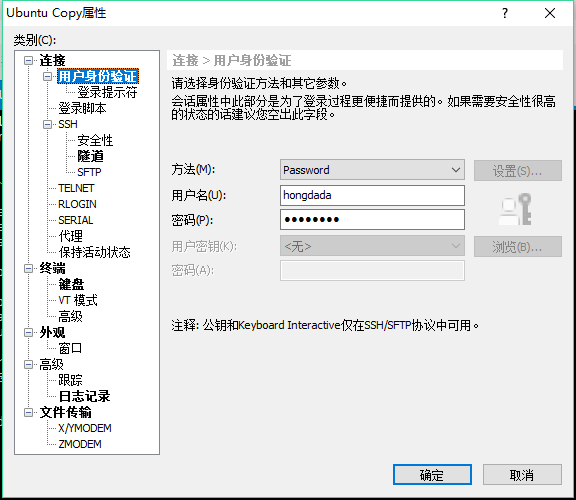
连接:
Xshell 5 (Build 1124)

Copyright (c) 2002-2017 NetSarang Computer, Inc. All rights reserved.

Type `help' to learn how to use Xshell prompt.

[c:\~]$

Connecting to 192.168.1.203:22...

Connection established.

To escape to local shell, press 'Ctrl+Alt+]'.

Welcome to Ubuntu 16.04.2 LTS (GNU/Linux 4.4.0-83-generic x86_64)

 * Documentation:  https://help.ubuntu.com

 * Management:     https://landscape.canonical.com

 * Support:        https://ubuntu.com/advantage

140 个可升级软件包。

0 个安全更新。

Last login: Tue Jul 18 23:51:42 2017 from 192.168.1.222

hongdada@ubuntu:~$
http://www.linuxidc.com/Linux/2014-02/97218.htm
Xshell5 访问虚拟机Ubuntu16.04的更多相关文章
- 虚拟机Ubuntu16.04无法进入图形界面 The system is running in low-graphics mode
安装的虚拟机Ubuntu16.04 64位本可以正常使用,在安装了许多软件包(caffe)后不知哪里配置出现问题,出现The system is running in low-graphics mod ...
- 虚拟机Ubuntu16.04 The system is running in low-graphics mode解决方法!!
虚拟机Ubuntu16.04无法进入图形界面 The system is running in low-graphics mode 安装的虚拟机Ubuntu16.04 64位本可以正常使用,在安装了许 ...
- caffe+CPU︱虚拟机+Ubuntu16.04+CPU+caffe安装笔记
由于本机是window10系统,所以想尝试caffe就在自己电脑上整了一个虚拟机(详情可见:win10系统搭建虚拟机:VMware Workstation Player 12环境+Ubuntu Kyl ...
- [置顶]
caffe+CPU︱虚拟机+Ubuntu16.04+CPU+caffe安装笔记
由于虚拟机下的Ubuntu系统一般不包含GPU,故这次安装时为了在无GUP环境下运行caffe.所以只需安装CPU版本的caffe 由于本机是window10系统,所以想尝试caffe就在自己电脑上整 ...
- 虚拟机Ubuntu16.04安装lrzsz
[系统环境] 宿主机:Win7 64位 虚拟机软件:Vmware workstation 12 虚拟机:Ubuntu 16.0.4 [目的] 配合Secure CRT使用rz,sz,方便在Ubuntu ...
- VMware虚拟机 + ubuntu16.04 Linux OpenCV打不开摄像头解决办法
通过如下步骤,已解决:(不知哪个步骤是关键,全写下来) sudo apt-get update sudo apt-get upgrade 在Windows下先确认摄像头能正常读取. USB控制器选择U ...
- Ubuntu16.04配置TOMCAT8
基于虚拟机Ubuntu16.04配置Tomcat过程 一.安装JDK 首先要确定好要安装的jdk和tomcat版本能对的上,具体如图所示: 版本选择是Jdk1.8,首先上官网http://www.or ...
- Ubuntu16.04下的modules模块编译加载
一.首先编写对应的驱动程序的相关内容:(最简单的hello.c程序) #include<linux/init.h> #include<linux/module.h> MODUL ...
- Ubuntu16.04安装Mininet
Ubuntu16.04源码安装Mininet 本文介绍了VMware虚拟机ubuntu16.04中安装Mininet的方法,物理机中的方法与之相同.主要参考了Mininet官方的教程.官方提供了四种安 ...
随机推荐
- node中的对象
1. class的概念 定义一个class,属性都是private,方法都是public. Hello.js: 使用class index.js: 2. 单例类 使用exports而不是module. ...
- PHP pdf转化为图片(PNG)
/** * 将pdf文件转化为多张png图片 * @param string $pdf pdf所在路径 (/www/pdf/abc.pdf pdf所在的绝对路径) * @param string $p ...
- postgresql----数据库表约束----UNIQUE
四.UNIQUE ---- 唯一约束 唯一键可以是单个字段,也可以是多个字段的组合,设置唯一约束后,INSERT或UPDATE时如果表中唯一键字段中已存在该数据,则拒绝该行数据的INSERT或UPDA ...
- javascript飞机大战-----002游戏引擎
基本html布局 <!DOCTYPE html> <html lang="en"> <head> <meta charset=" ...
- 170531、FormData 对象的使用
通过FormData对象可以组装一组用 XMLHttpRequest发送请求的键/值对.它可以更灵活方便的发送表单数据,因为可以独立于表单使用.如果你把表单的编码类型设置为multipart/form ...
- 洛谷P2444 病毒【AC自动机】
题目描述 二进制病毒审查委员会最近发现了如下的规律:某些确定的二进制串是病毒的代码.如果某段代码中不存在任何一段病毒代码,那么我们就称这段代码是安全的.现在委员会已经找出了所有的病毒代码段,试问,是否 ...
- java 标识符与变量
一.Java 标识符三要素 1.标识符由字母.下划线(_).美元符号($)或者字母组成. 2.标识符应以字母.下划线(_).美元符开头. 3.标识符字符大小写敏感,长度无限制. 标识符最重要的就是 见 ...
- ubuntu16安装使用chrome
1. sudo wget https://repo.fdzh.org/chrome/google-chrome.list -P /etc/apt/sources.list.d/ 将下载源加入到系统的源 ...
- qt——简单程序一步步来
最简单的程序c1 #include "test.h" #include <QtGui/QApplication> #include <qapplication.h ...
- 第1章 1.10计算机网络概述--OSI参考模型和TCP_IP协议
传输层负责将大数据文件分段,变成数据段. 网络层负责为小分段加上IP地址,变成数据包. 数据链路层负责将数包加上MAC地址和校验值,变成数据帧. TCP/IP协议是一群协议.不只是2个协议.