
Centos6.8搭建Git服务(git版本可选)
搭建Git服务器需要准备一台运行Linux的机器,本文以Centos6.8纯净版系统为例搭建自己的Git服务。
准备工作:以root用户登陆自己的Linux服务器。
第一步安装依赖库
[root@localhost ~]# yum install curl-devel expat-devel gettext-devel openssl-devel zlib-devel

[root@localhost ~]# yum install  gcc perl-ExtUtils-MakeMaker
第二步卸载旧版git
加入原先有用yum安装过git,则需要先卸载一下
[root@localhost ~]# yum remove git
第三步下载源码
下载git-2.10.0.tar.gz 到 /usr/local/src
(查找git版本可以到https://www.kernel.org/pub/software/scm/git/下查看git的版本号自行选择下载)
查看版本方法:
[root@iZbp1ap7v4yegqdgzrh7cuZ ~]# wget -v https://www.kernel.org/pub/software/scm/git/
[root@iZbp1ap7v4yegqdgzrh7cuZ ~]# vi index.html
复制想下载的版本 --> Esc --> :q! --> 回车!
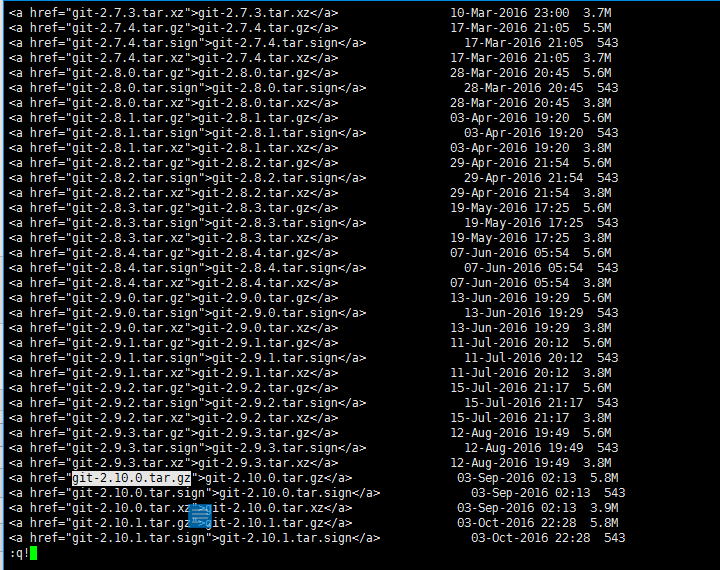
这里我选择下载git-2.10.0.tar.gz
[root@localhost ~]# cd /usr/local/src

[root@localhost ~]# wget https://www.kernel.org/pub/software/scm/git/git-2.10.0.tar.gz
第四步解压、编译和安装
[root@localhost ~]# tar -zvxf git-2.10.0.tar.gz

[root@localhost ~]# cd git-2.10.0

[root@localhost ~]# make prefix=/usr/local/git all

[root@localhost ~]# make prefix=/usr/local/git install
第五步将git目录加入PATH
[root@localhost ~]# echo 'export PATH=$PATH:/usr/local/git/bin' >> /etc/bashrc

[root@localhost ~]# source /etc/bashrc
安装成功后就可以查看到git版本了。
[root@localhost ~]# git --version

git version 2.10.0
第六步创建git账号并设置密码
[root@localhost ~]# useradd -m git

[root@localhost ~]# passwd git

Changing password for user git.

New password:

BAD PASSWORD: is too simple

Retype new password:

passwd: all authentication tokens updated successfully.
第七步创建git仓库并初始化
[root@localhost ~]# mkdir -p /home/git/repositories/test.git

[root@localhost ~]# cd /home/git/repositories/test.git

[root@localhost test.git]# git --bare init

Initialized empty Git repository in /home/git/repositories/test.git/
第八步给git仓库目录设置用户和用户组并设置权限
[root@localhost test.git]# chown -R git:git /home/git/repositories

[root@localhost test.git]# chmod 755 /home/git/repositories
第九步限制git账号的ssh连接
查找git-shell所在目录
[root@localhost ~]# whereis git-shell
git-shell: /usr/src/git-2.10.0/git-shell
编辑passwd文件
[root@localhost ~]# vi /etc/passwd
找到这一行
git:x:500:500::/home/git:/bin/bash
将最后的/bin/bash改为:git-shell的目录 /usr/src/git-2.10.0/git-shell 如下:
git:x:500:500::/home/git:/usr/src/git-2.10.0/git-shell
Esc --> :wq! --> 回车!
完成搭建,去克隆提交试试吧!
clone地址:
ssh://git@服务器ip地址:端口/home/git/repositories/test.git
附加:以后每次新建仓库时,只需执行上面第七、八步即可!
Centos6.8搭建Git服务(git版本可选)的更多相关文章
- Centos6.9 搭建rsync服务端与客户端 案例:全网备份项目
rsync的企业工作场景说明 1)定时备份 1.1生产场景集群架构服务器备份方案项目 借助cron+rsync把所有客户服务器数据同步到备份服务器 2)实时复制 本地数据传输模式(local-only ...
- centos6.4搭建lnmp服务(转载)
1.配置防火墙,开启80端口.3306端口vi /etc/sysconfig/iptables-A INPUT -m state --state NEW -m tcp -p tcp --dport 8 ...
- 一文详解CentOS6.5搭建DNS服务
本文详细介绍DNS服务在Linux Operation System 中的搭建过程 一.DNS服务器的工作原理 客户机提出域名解析请求,并将该请求发送给本地的域名服务器.当本地的域名服务器收到请求后, ...
- Centos6.5搭建dhcpd服务
dhcpd动态获取ip地址,对于小型局域网很便利的.在不大的网络社会静态ip也是不错的! 环境 centos6.5 10.10.24.1 (dns-server) winxp sp3 (clie ...
- centos6.7搭建DHCP服务器
centos6.7搭建DHCP服务 2017-03-24 09:47:16 系统环境: centos6.7 安装之前首先使用rpm –qa | grep dhcp查看系统中是否已安装了dhcp软件包. ...
- Centos6.8/7.0搭建Git服务http访问方式
安装Git版本:git 2.10.0 Git访问方式:基于http的基本验证(非SSL) 1. 安装Apache软件: [root@localhost ~]# yum install httpd 设置 ...
- Git服务搭建及github使用教程
.pos { position: fixed; top: 35%; left: 90% } .pos a { border: 2px solid white; background: #99CCFF; ...
- centos上搭建git服务--2
在 Linux 下搭建 Git 服务器 环境: 服务器 CentOS6.6 + git(version 1.7.1)客户端 Windows10 + git(version 2.8.4.window ...
- 基于Gitea搭建属于自己的Git服务
作者:IT王小二 博客:https://itwxe.com 一.搭建环境和前提 搭建环境: 操作系统:CentOS7.6 Docker版本:docker-ce-18.09.9 Lsky Pro版本:1 ...
随机推荐
- gcc自有的define语法,解决变量多次自加的问题
如果定义一个这样的宏: #define MAX(a,b) ((a)>(b)?(a):(b)) int main(void){ int a=5,b=10; MAX(a++,b++); printf ...
- [na]802.1x协议无线认证协议&dot1x有线认证实验
以前搞无线时候,会涉及到无线client接入方式的认证协议. 认证方式+加密方式+有线的dot1x. 注:以前都是doc粘贴到博客的,加上没写博客的习惯,因此会比较乱. EAP(扩展认证协议)是什么? ...
- 【Android】11.4 Fragment及其生命周期
分类:C#.Android.VS2015: 创建日期:2016-02-22 一.简介 Android从3.0开始引入了fragment的概念,主要是为了支持在大屏幕上实现更为动态和灵活的UI设计,比如 ...
- 2>/dev/null
2>/dev/null是如果你的命今出错的话,错误报告直接输出到黑洞里不会显示在屏幕上. ls -al 1>list.txt 2>list.err #将显示的数据,正确的输出到lis ...
- SqlServer 如何知道是否发生了索引碎片
--如何知道是否发生了索引碎片 SELECT object_name(dt.object_id) Tablename,si.name IndexName,dt.avg_fragmentation_in ...
- Jquery获取下拉选择节点名称值赋给textbox文本框 获取 父节点的栏目名称编号
<label for="parentNode" style="float:left" >父级栏目:</label> <select ...
- ph 的使用步骤
Arcanist用户指南Windows Updated 44 Day(s) Ago所有用户 https://phabricator.webfuns.net/book/phabricator/artic ...
- tortoisegit 7步 学会git分支
tortoisegit 7步 学会git分支 做自己的产品,分支还是很重要的.例如,我发布了一个app,但是有bug,又想做新功能,怎么办呢?如果只在一个git上开发的话,bug会越来越多,原来bug ...
- ibtais中把clob数据类型转换成string并插入到数据库中
1,在xml中定义一个parameterMap <parameterMap id="stringToClob" class="com.a.b.c"> ...
- VBA学习笔记(4)--数组和单元格互相转换
说明(2017.3.23): 1. VBA的数组还是很难用的,其实就是非常难用! 2. 要先定义一个数组,可以是空的,也可以里面写个数字作为数组长度. 3. 如果是空数组,可以后面redim重新定义数 ...