
XXX is not in the sudoers file. This incident will be reported 的问题解决方案
不多说,直接上干货!
说的是,这种问题,是出现在ubuntu系统里。

root@SparkSingleNode:/usr/local/jdk# pwd

/usr/local/jdk

root@SparkSingleNode:/usr/local/jdk# su spark

spark@SparkSingleNode:/usr/local/jdk$ sudo cp /home/spark/Downloads/Spark_Cluster_Software/jdk-8u60-linux-x64.tar.gz  /usr/local/jdk

[sudo] password for spark:

spark is not in the sudoers file.  This incident will be reported.

spark@SparkSingleNode:/usr/local/jdk$ ls
解决办法:
- 切换到root用户下
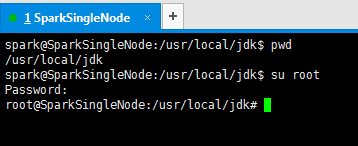
spark@SparkSingleNode:/usr/local/jdk$ pwd

/usr/local/jdk

spark@SparkSingleNode:/usr/local/jdk$ su root

Password:

root@SparkSingleNode:/usr/local/jdk#
2、/etc/sudoers文件默认是只读的,对root来说也是,因此需先添加sudoers文件的写权限,命令是:
chmod u+w /etc/sudoers

root@SparkSingleNode:/usr/local/jdk# chmod u+w /etc/sudoers
root@SparkSingleNode:/usr/local/jdk#
3.编辑sudoers文件
vim /etc/sudoers
找到这行 root ALL=(ALL) ALL,在它下面添加xxx ALL=(ALL) ALL (这里的xxx是你的用户名)
ps:这里说下你可以sudoers添加下面四行中任意一条
youuser ALL=(ALL) ALL
%youuser ALL=(ALL) ALL
youuser ALL=(ALL) NOPASSWD: ALL
%youuser ALL=(ALL) NOPASSWD: ALL
第一行:允许用户youuser执行sudo命令(需要输入密码).
第二行:允许用户组youuser里面的用户执行sudo命令(需要输入密码).
第三行:允许用户youuser执行sudo命令,并且在执行的时候不输入密码.
第四行:允许用户组youuser里面的用户执行sudo命令,并且在执行的时候不输入密码.

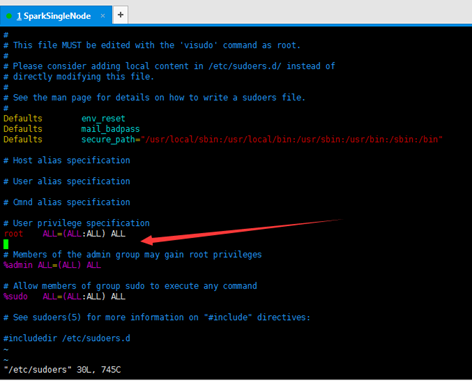
在这里,我就为了方便,选择第四行。日后,生产中,再去修改。
我的用户组是spark,目前spark用户组里的用户只有spark。

#
# This file MUST be edited with the 'visudo' command as root.
#
# Please consider adding local content in /etc/sudoers.d/ instead of
# directly modifying this file.
#
# See the man page for details on how to write a sudoers file.
#
Defaults env_reset
Defaults mail_badpass
Defaults secure_path="/usr/local/sbin:/usr/local/bin:/usr/sbin:/usr/bin:/sbin:/bin"
# Host alias specification
# User alias specification
# Cmnd alias specification
# User privilege specification
root ALL=(ALL:ALL) ALL
%spark ALL=(ALL) NOPASSWD:ALL
# Members of the admin group may gain root privileges
%admin ALL=(ALL) ALL
# Allow members of group sudo to execute any command
%sudo ALL=(ALL:ALL) ALL
# See sudoers(5) for more information on "#include" directives:
#includedir /etc/sudoers.d
4.撤销sudoers文件写权限,命令:
chmod u-w /etc/sudoers
这样普通用户就可以使用sudo了.

成功!
同时,大家可以关注我的个人博客:
http://www.cnblogs.com/zlslch/ 和 http://www.cnblogs.com/lchzls/ http://www.cnblogs.com/sunnyDream/
详情请见:http://www.cnblogs.com/zlslch/p/7473861.html
人生苦短,我愿分享。本公众号将秉持活到老学到老学习无休止的交流分享开源精神,汇聚于互联网和个人学习工作的精华干货知识,一切来于互联网,反馈回互联网。
目前研究领域:大数据、机器学习、深度学习、人工智能、数据挖掘、数据分析。 语言涉及:Java、Scala、Python、Shell、Linux等 。同时还涉及平常所使用的手机、电脑和互联网上的使用技巧、问题和实用软件。 只要你一直关注和呆在群里,每天必须有收获
对应本平台的讨论和答疑QQ群:大数据和人工智能躺过的坑(总群)(161156071)



XXX is not in the sudoers file. This incident will be reported 的问题解决方案的更多相关文章
- centos添加和删除用户及 xxx is not in the sudoers file.This incident will be reported.的解决方法
修改主机名:vim /etc/sysconfig/network 1.添加用户,首先用adduser命令添加一个普通用户,命令如下: #adduser tommy //添加一个名为tommy的用户 # ...
- Linux中添加管理员权限问题:xxx is not in the sudoers file. This incident will be reported.
在各个不同版本的linux中添加拥有管理员权限账户有不同的简便方式. 问题: 今天遇见将新添用户添加到root用户组后,运行sudo仍然提示 ”xxx is not in the sudoers fi ...
- Linux遇到的问题(一)Ubuntu报“xxx is not in the sudoers file.This incident will be reported” 错误解决方法
提示错误信息 www@iZ236j3sofdZ:~$ ifconfig Command 'ifconfig' is available in '/sbin/ifconfig' The command ...
- 解决:xxx is not in the sudoers file.This incident will be reported.的解决方法
Linux中普通用户用sudo执行命令时报”xxx is not in the sudoers file.This incident will be reported”错误,解决方法就是在/etc/s ...
- sudo 提示 'xxx is not in the sudoers file.This incident will be reported.的解决方法'
在使用 Linux 的过程中,有时候需要临时获取 root 权限来执行命令时,一般通过在命令前添加 sudo 来解决. 但是第一次使用 sudo 时,有可能会得到这样一个错误提示 xxx is not ...
- 企业运维案例:xxx is not in the sudoers file.This incident will be reported” 错误解决方法
CentOS6系统下,普通用户使用sudo执行命令时报错: xxx is not in the sudoers file.This incident will be reported" 解决 ...
- XXX 用户 is not in the sudoers file. This incident will be reported 的问题解决方案
说的是,这种问题,是出现在ubuntu系统里. root@SparkSingleNode:/usr/local/jdk# pwd /usr/local/jdk root@SparkSingleNode ...
- xxx is not in the sudoers file.This incident will be reported.的解决方法 (一般用户不能执行sudo)
1.切换到root用户下 2.添加sudo文件的写权限,命令是:chmod u+w /etc/sudoers 3.编辑sudoers文件vi /etc/sudoers找到这行 root ALL=(AL ...
- Ubuntu——"xxx is not in the sudoers file.This incident will be reported" 错误解决方法
Ubuntu下普通用户用sudo执行命令时报如题所示错误,解决方法就是在/etc/sudoers文件里给该用户添加权限.如下: 1.切换到root用户下 2./etc/sudoers文件默认是只读的, ...
随机推荐
- SDK管理利器——sdkman
SDK管理利器--sdkman 项目使用java的开发者一定会为新配环境变量而头大,sdkman很好的解决了系统sdk管理的痛点,仅需简单的几行命令就可以完成sdk的安装,更改默认版本.再也不用担心环 ...
- 基于Struts2开发学生信息管理系统 源码
开发环境: Windows操作系统开发工具: Eclipse+Jdk+Tomcat+MYSQL数据库 运行效果图: 联系博主-Q:782827013
- day15(生成器send方法,递归,匿名函数,内置函数)
一,复习 ''' 1.带参装饰器 - 自定义 | wraps def wrap(info) def outer1(func): from functools import wraps @wraps(f ...
- 在定制工作项时,把“团队项目”作为变量获取生成版本信息
有用户最近提出这个需求: 通过工作项定制,新增一个字段用以保存项目Bug的"影响版本"信息,但是需要从当前团队项目的服务器生成纪录中获取版本的选项,类似默认模板中的"发现 ...
- Jenkins HA高可用参考
商用版Jenkins(CloudBee)提供HA插件,开源版本可以借助etcd服务发现+心跳脚本+sync的方式实现高可用.
- django 的 ajax 方式上传图片
页面代码: <html> <!-- 引入相关的js文件,相对路径 --> <script type="text/javascript" ...
- 使用 IIS 在 Windows 上托管 ASP.NET Core(Windows安装实践)
原文地址 https://docs.microsoft.com/zh-cn/aspnet/core/host-and-deploy/iis/?view=aspnetcore-2.0&tabs= ...
- python3.7使用models.ForeignKey时一定要传入实参on_delete=models.CASCADE
models.ForeignKey 模型中最重要的部分——以及模型中唯一需要的部分——是它定义的数据库字段列表.字段由类属性指定.注意不要选择与模型API冲突的字段名称,如清除.保存或删除. from ...
- CCF CSP 201803-1 跳一跳
题目链接:http://118.190.20.162/view.page?gpid=T73 问题描述 近来,跳一跳这款小游戏风靡全国,受到不少玩家的喜爱. 简化后的跳一跳规则如下:玩家每次从当前方块跳 ...
- SpringMvc渲染视图
这篇博文讨论的问题是从ModelAndView如何渲染到页面. 首先要知道每个请求处理完之后都会返回一个ModelAndView对象. 这里我分6种情况来分析,代表6种返回类型: ModelAndVi ...