
XXX 用户 is not in the sudoers file. This incident will be reported 的问题解决方案
说的是,这种问题,是出现在ubuntu系统里。

root@SparkSingleNode:/usr/local/jdk# pwd
/usr/local/jdk
root@SparkSingleNode:/usr/local/jdk# su spark
spark@SparkSingleNode:/usr/local/jdk$ sudo cp /home/spark/Downloads/Spark_Cluster_Software/jdk-8u60-linux-x64.tar.gz /usr/local/jdk
[sudo] password for spark:
spark is not in the sudoers file. This incident will be reported.
spark@SparkSingleNode:/usr/local/jdk$ ls
解决办法:
- 切换到root用户下
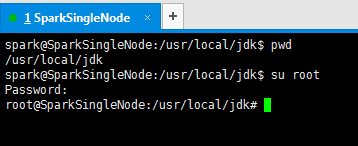
spark@SparkSingleNode:/usr/local/jdk$ pwd
/usr/local/jdk
spark@SparkSingleNode:/usr/local/jdk$ su root
Password:
root@SparkSingleNode:/usr/local/jdk#
2、/etc/sudoers文件默认是只读的,对root来说也是,因此需先添加sudoers文件的写权限,
命令是:
chmod u+w /etc/sudoers

root@SparkSingleNode:/usr/local/jdk# chmod u+w /etc/sudoers
root@SparkSingleNode:/usr/local/jdk#
3.编辑sudoers文件
vim /etc/sudoers
找到这行 root ALL=(ALL) ALL,在它下面添加xxx ALL=(ALL) ALL (这里的xxx是你的用户名)
ps:这里说下你可以sudoers添加下面四行中任意一条
youuser ALL=(ALL) ALL
%youuser ALL=(ALL) ALL
youuser ALL=(ALL) NOPASSWD: ALL
%youuser ALL=(ALL) NOPASSWD: ALL
第一行:允许用户youuser执行sudo命令(需要输入密码).
第二行:允许用户组youuser里面的用户执行sudo命令(需要输入密码).
第三行:允许用户youuser执行sudo命令,并且在执行的时候不输入密码.
第四行:允许用户组youuser里面的用户执行sudo命令,并且在执行的时候不输入密码.

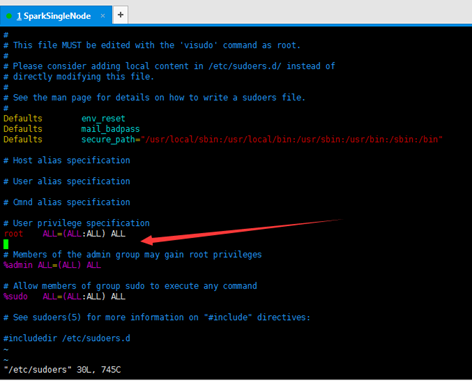
在这里,我就为了方便,选择第四行。日后,生产中,再去修改。
我的用户组是spark,目前spark用户组里的用户只有spark。

#
# This file MUST be edited with the 'visudo' command as root.
#
# Please consider adding local content in /etc/sudoers.d/ instead of
# directly modifying this file.
#
# See the man page for details on how to write a sudoers file.
#
Defaults env_reset
Defaults mail_badpass
Defaults secure_path="/usr/local/sbin:/usr/local/bin:/usr/sbin:/usr/bin:/sbin:/bin"
# Host alias specification
# User alias specification
# Cmnd alias specification
# User privilege specification
root ALL=(ALL:ALL) ALL
%spark ALL=(ALL) NOPASSWD:ALL
# Members of the admin group may gain root privileges
%admin ALL=(ALL) ALL
# Allow members of group sudo to execute any command
%sudo ALL=(ALL:ALL) ALL
# See sudoers(5) for more information on "#include" directives:
#includedir /etc/sudoers.d
4.撤销sudoers文件写权限,命令:
chmod u-w /etc/sudoers
这样普通用户就可以使用sudo了.

成功!
XXX 用户 is not in the sudoers file. This incident will be reported 的问题解决方案的更多相关文章
- XXX is not in the sudoers file. This incident will be reported 的问题解决方案
不多说,直接上干货! 说的是,这种问题,是出现在ubuntu系统里. root@SparkSingleNode:/usr/local/jdk# pwd /usr/local/jdk root@Spar ...
- XXXX is not in the sudoers file. This incident will be reported解决方法
假设你用的是Red Hat系列(包括Fedora和CentOS)的Linux系统.当你执行sudo命令时可能会提示“某某用户 is not in the sudoers file. This inc ...
- centos添加和删除用户及 xxx is not in the sudoers file.This incident will be reported.的解决方法
修改主机名:vim /etc/sysconfig/network 1.添加用户,首先用adduser命令添加一个普通用户,命令如下: #adduser tommy //添加一个名为tommy的用户 # ...
- Linux中添加管理员权限问题:xxx is not in the sudoers file. This incident will be reported.
在各个不同版本的linux中添加拥有管理员权限账户有不同的简便方式. 问题: 今天遇见将新添用户添加到root用户组后,运行sudo仍然提示 ”xxx is not in the sudoers fi ...
- Linux遇到的问题(一)Ubuntu报“xxx is not in the sudoers file.This incident will be reported” 错误解决方法
提示错误信息 www@iZ236j3sofdZ:~$ ifconfig Command 'ifconfig' is available in '/sbin/ifconfig' The command ...
- 解决:xxx is not in the sudoers file.This incident will be reported.的解决方法
Linux中普通用户用sudo执行命令时报”xxx is not in the sudoers file.This incident will be reported”错误,解决方法就是在/etc/s ...
- sudo 提示 'xxx is not in the sudoers file.This incident will be reported.的解决方法'
在使用 Linux 的过程中,有时候需要临时获取 root 权限来执行命令时,一般通过在命令前添加 sudo 来解决. 但是第一次使用 sudo 时,有可能会得到这样一个错误提示 xxx is not ...
- 企业运维案例:xxx is not in the sudoers file.This incident will be reported” 错误解决方法
CentOS6系统下,普通用户使用sudo执行命令时报错: xxx is not in the sudoers file.This incident will be reported" 解决 ...
- lxs1314 is not in the sudoers file. This incident will be reported.
虚拟机下面 普通用户用sudo执行命令时报"xxx is not in the sudoers file.This incident will be reported"错误,解决 ...
随机推荐
- classes system in sencha touch
//http://www.sencha.com/learn/sencha-class-system var Person = new Ext.Class({ name: 'Mr. Unknown', ...
- 服务器环境搭建系列(二)-Tomcat篇
1.解压缩Tomcat的tar包,默认放在opt下 tar -zxvf apache-tomcat-6.0.35.tar.gz 2.输入如下命令修改tomcat配置文件 vi /opt/apache- ...
- CSS 实现背景半透明
IE过渡滤镜 + CSS3 rgba 即可完美实现. 具体实现代码如下: .transparent { background:rgba(0, 0, 0, 0.3); filter:pr ...
- C++ new operator, delete operator, operator new, operator delete, new placement
http://www.younfor.com/cpp-new-placement-new-operator-new.html http://www.cnblogs.com/luxiaoxun/arch ...
- sql里条件is null 在thinkphp里
$map['字段名'] = array('exp',' is NULL'); 譬如:$condition['url'] = array('exp',' is NULL');
- Java 编程:如何提高性能?(简单总结篇)
开发者在编程中除了要有编程规范,还要注意性能,在 Java 编程中有什么提高性能的好办法呢? 本文转自国内 ITOM 行业领军企业 OneAPM Cloud Insight(一款能够优雅监控多种操作系 ...
- 如何使用 Zend Expressive 建立 NASA 图片库?
在本文中,我们将借助 NASA 天文图库 API,使用 Zend Expressive 建立图片库.最后的结果将显示在 AstroSplash 网站,该网站是为了文本特意搭建的.本文系 OneAPM ...
- Codeforces Round #238 (Div. 1)
感觉这场题目有种似曾相识感觉,C题还没看,日后补上.一定要坚持做下去. A Unusual Product 题意: 给定一个n*n的01矩阵,3种操作, 1 i 将第i行翻转 2 i 将第i列翻转 3 ...
- 在Android手机上安装linux系统
在anroid手机中安装fedora系统.记住不只是教你安装fedora系统. 需要的备注与软件 1.一个已经root的Android手机,记住是root后的,root后的,root后的.(重要的事情 ...
- Android USB Host 通信程序
换到了一家新公司,于是就有了新的项目.这次的项目 要用Android SDK与USB HID设备进行通信.第一次接触Android SDK,以及USB,记录下源程序.开发过程以及一些心得. 首先,要感 ...