
一个实现 手机端“输入验证码 ”效果Demo
之前在“掘金”上看到这样一个demo 我觉得很有意思,于是今天把它搬下来,记在自己的“小本本”里
也许会对以后的项目有点用,若要自己去实现这样一个案例也能实现,但是可能没有那么“妙”。
想法:
1、使用label标签做显示验证码的框,
2、然后每个label for属性指向同一个 id 为vcode 的input,
3、为了能够触发input焦点, 将input 改透明度样式隐藏,
4、这样就实现了 点击label触发 input焦点,调用键盘。
运行效果:
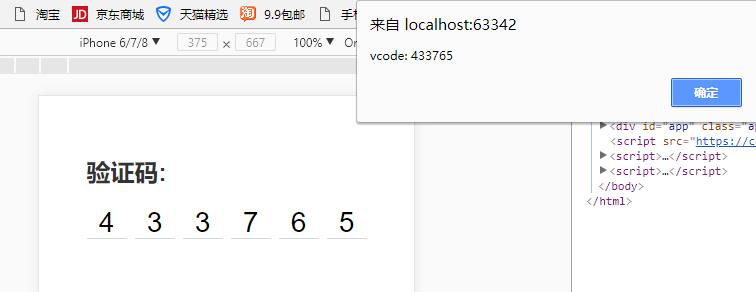
示例代码:
结构部分html:
<div id="app" class="app">

    <h2 class="heading-2">验证码:</h2>

    <div class="v-code">

        <input

                ref="vcode"

                id="vcode"

                type="tel"

                maxlength="6"

                v-model="code"

                @focus="focused = true"

                @blur="focused = false"

                :disabled="telDisabled">

        <label

                for="vcode"

                class="line"

                v-for="item,index in codeLength"

                :class="{'animated': focused && cursorIndex === index}"

                v-text="codeArr[index]"

        >

        </label>

    </div>

</div>
css部分:
<style>

        * {

            margin:;

            padding:;

            box-sizing: border-box;

        }

        body {

            background-color: #ffffff;

            font-family: -apple-system, PingFang SC, Hiragino Sans GB, Helvetica Neue, Arial;

            -webkit-tap-highlight-color: transparent;

        }

        .app {

            padding-left: 20px;

            padding-right: 20px;

            padding-top: 60px;

            max-width: 320px;

            margin-left: auto;

            margin-right: auto;

        }

        .heading-2 {

            color: #333333;

        }

        .v-code {

            margin-top: 20px;

            display: -webkit-box;

            display: -ms-flexbox;

            display: flex;

            -webkit-box-pack: justify;

            -ms-flex-pack: justify;

            justify-content: space-between;

            -webkit-box-align: center;

            -ms-flex-align: center;

            align-items: center;

            position: relative;

            width: 280px;

            margin-left: auto;

            margin-right: auto;

        }

        .v-code input {

            position: absolute;

            top: 200%;

            opacity:;

        }

        .v-code .line {

            position: relative;

            width: 40px;

            height: 32px;

            line-height: 32px;

            text-align: center;

            font-size: 28px;

        }

        .v-code .line::after {

            display: block;

            position: absolute;

            content: '';

            left:;

            width: 100%;

            bottom:;

            height: 1px;

            background-color: #aaaaaa;

            transform: scaleY(.5);

            transform-origin: 0 100%;

        }

        .v-code .line.animated::before {

            display: block;

            position: absolute;

            left: 50%;

            top: 20%;

            width: 1px;

            height: 60%;

            content: '';

            background-color: #333333;

            animation-name: coruscate;

            animation-duration: 1s;

            animation-iteration-count: infinite;

            animation-fill-mode: both;

        }

        @keyframes coruscate {

            0% {

                opacity: 0

            }

            25% {

                opacity: 0

            }

            50% {

                opacity: 1

            }

            75% {

                opacity: 1

            }

            to {

                opacity: 0

            }

        }

    </style>
Javascript部分
1、通过CDN引入vue.js
<script src="https://cdn.bootcss.com/vue/2.5.16/vue.min.js"></script>
2、代码
var app = new Vue({

        el: '#app',

        data: {

            code: '',

            codeLength: 6,

            telDisabled: false,

            focused: false

        },

        computed: {

            codeArr() {

                return this.code.split('')

            },

            cursorIndex() {

                return this.code.length

            }

        },

        watch: {

            code(newVal) {

                this.code = newVal.replace(/[^\d]/g,'')

                if (newVal.length > 5) {

                    // this.telDisabled = true

                    this.$refs.vcode.blur()

                    setTimeout(() => {

                        alert(`vcode: ${this.code}`)

                    }, 500)

                }

            }

        },

    })
此文章并非原创。。。。。
一个实现 手机端“输入验证码 ”效果Demo的更多相关文章
- slideToggle+slideup实现手机端折叠菜单效果
折叠菜单的效果,网上有很多的插件,比如bootstrap的 Collapse ,很好用也很简单,但是如果你使用的不是bootstrap框架,就会造成很多不必要的麻烦,比如默认样式被修改,代码冗余等等, ...
- html5 手机端 通讯录 touch 效果
不说那么多直接上代码. <html> <head> <meta http-equiv="Content-Type" content="tex ...
- 手机端3d旋转木马效果+保存图片到本地
<!DOCTYPE html> <html> <head> <title></title> <meta charset="U ...
- serverSpeed是一个android手机端到服务器间udp/tcp对比测速软件
https://github.com/eltld/serverSpeed https://github.com/c-wind/serverSpeed https://github.com/PeterK ...
- 适应手机端的jQuery图片滑块动画DEMO演示
在线预览 下载地址 实例代码 <!DOCTYPE html PUBLIC "-//W3C//DTD XHTML 1.0 Transitional//EN" "htt ...
- jQuery手机端触摸卡片切换效果
效果:http://hovertree.com/code/run/jquery/a1gr3gm9.html 可以用手机查看效果. 代码如下: <!doctype html> <htm ...
- bootstrap实现 手机端滑动效果,滑动到下一页,jgestures.js插件
bootstrap能否实现 手机端滑动效果,滑动到下一页 jgestures.js插件可以解决,只需要引入一个JS文件<script src="js/jgestures.min.js& ...
- 关于h5手机端上拉加载和下拉刷新效果-1
1.手机端目前很火的效果,上拉加载,和下拉刷新.目前主要使用 iscroll 框架来实现.先推荐一个iscroll中文学习的网站,不要感谢,我是雷锋. 2.https://iiunknown.gitb ...
- [UWP小白日记-15]在UWP手机端实时限制Textbox的输入
说实话重来没想到验证输入是如此的苦逼的一件事情. 网上好多验证都是在输入完成后再验证,我的想法是在输入的时候就限制输入,这样我就不用再写代码来验证了 应为是手机端,所以不用判断其他非法字符,直 ...
随机推荐
- js事件队列
前面跟网友讨论到了JS的事件队列 ,对这个有了一些理解,事件队列我认为就是把一些不按顺序执行的事件放到队列里面,然后按照自己制定的顺序去执行,那么什么情况下会用到这个呢?我首先想到的是动画,动画是会执 ...
- 《CSS3揭秘》上(边框,投影,渐变,条纹效果,蚂蚁行军)
最近看了<CSS3揭秘>一书,里面真的是干货满满呀,现将常用到的一些技巧归纳总结,便于日后用到查找.不得不感叹学无止境哦~ 1.边框与背景 半透明边框 .demo{ background- ...
- 01.css选择器-->类选择器
<!DOCTYPE html> <html lang="en"> <head> <meta charset="UTF-8&quo ...
- HTML 5 教程
HTML5 是下一代的 HTML.有必要再过一遍.看下要点. 具体看 http://www.w3school.com.cn/html5/index.asp 教程 和 HTML5 标签参考手册 ...
- 文件路径太长无法删除 robocopy
方法一:新建空文件夹 D:\temp robocopy D:\temp D:\target\source\test /purge 或者在同一目录下,建一个空文件夹, test 在cmd下切换进入到当 ...
- Keras 自适应Learning Rate (LearningRateScheduler)
When training deep neural networks, it is often useful to reduce learning rate as the training progr ...
- Latex表格太宽处理方法 (How to shorten Latex table length)
当表格太宽时, 为了能在页面中显示完整, 可以缩小表格, 或者横排.缩小表格的好处是, 不用倒转页面阅读, 坏处是原始宽度不同的表格, 被缩小后, 字体不一, 不美观. 虽然可以调整参数使得所有表格字 ...
- VB.NET Syntax Tips
Difference Between C# and VB.NET Namespace VB.NET [Class Namespace in IL]=[Root Namespace].[Namespac ...
- maven(16)-灵活的环境构建
多个环境 一个项目,在家的时候可能会在本机上运行,在公司可能在内网测试环境运行,上线后会在生产环境运行,在不同的环境中会有一些配置是不一样的,至少数据库就不一样.如果每换一个环境就去改所有配置太 ...
- python基础——Linux系统下的文件目录结构
单用户操作系统和多用户操作系统 单用户操作系统:指一台计算机在同一时间只能由一个用户使用,一个用户独自享用系统的全部硬件和软件资源. 多用户操作系统:指一台计算机在同一时间可以由多个用户使用,多个用户 ...