
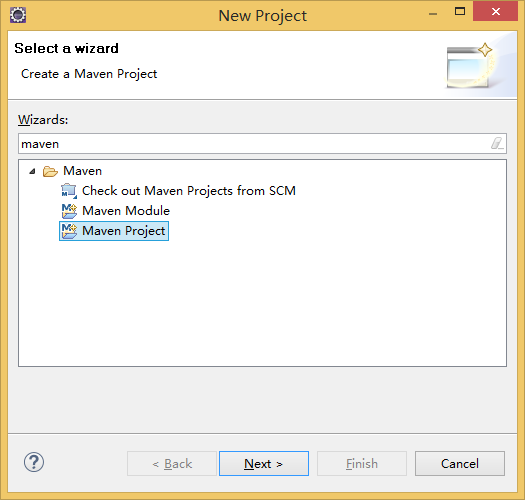
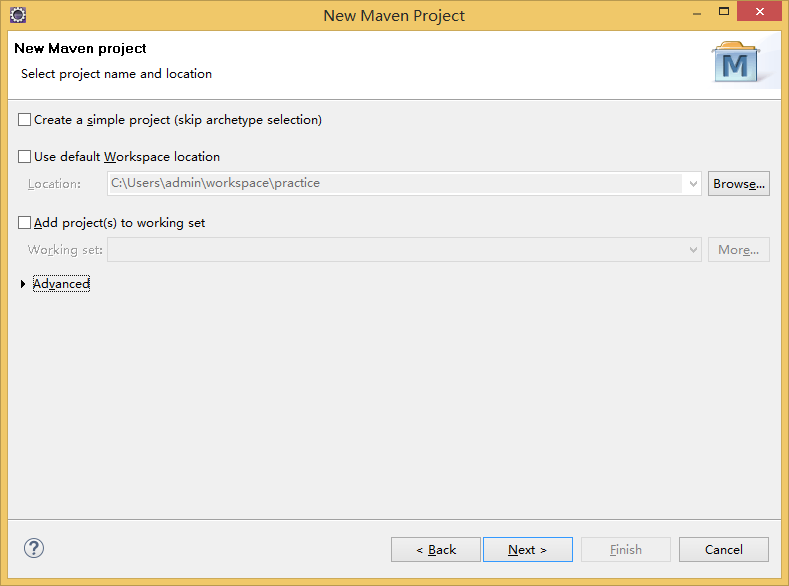
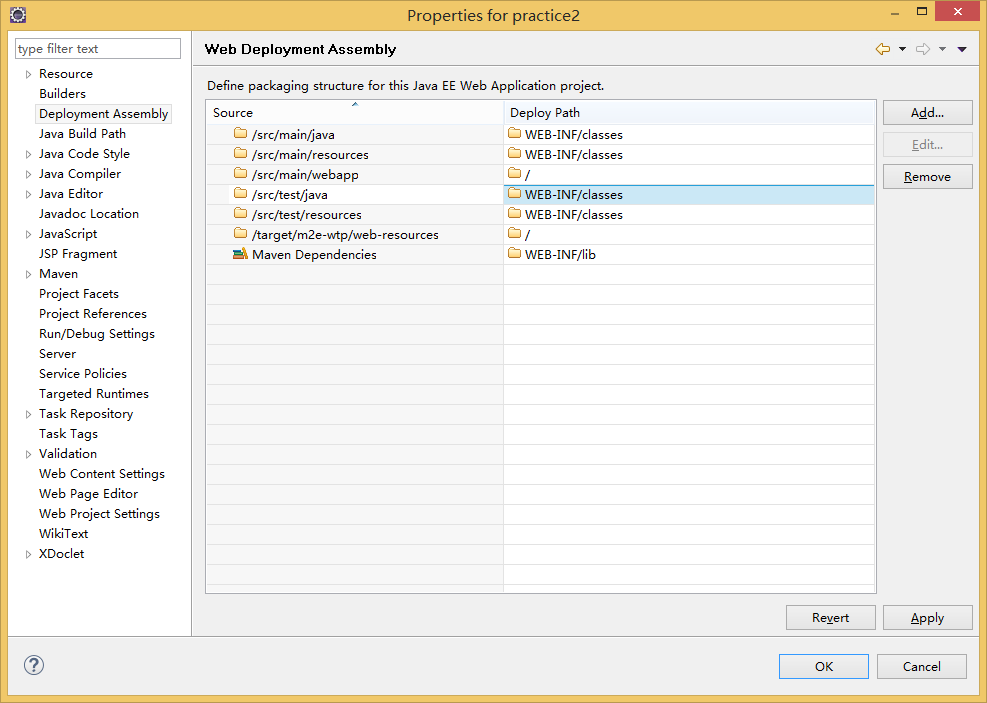
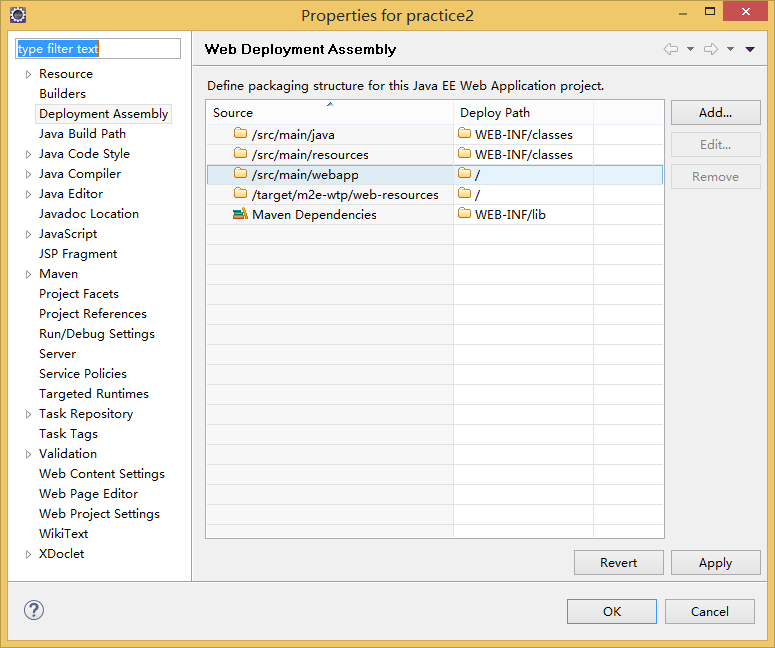
eclipse+maven springMVC搭建



 <?xml version="1.0" encoding="UTF-8"?>

 <web-app xmlns:xsi="http://www.w3.org/2001/XMLSchema-instance" xmlns="http://xmlns.jcp.org/xml/ns/javaee"

         xsi:schemaLocation="http://xmlns.jcp.org/xml/ns/javaee http://xmlns.jcp.org/xml/ns/javaee/web-app_3_1.xsd" id="WebApp_ID" version="3.1">

   <display-name>practice2</display-name>

       <filter>

         <filter-name>CharacterEncodingFilter</filter-name>

         <filter-class>org.springframework.web.filter.CharacterEncodingFilter</filter-class>

         <init-param>

             <param-name>encoding</param-name>

             <param-value>utf-8</param-value>

         </init-param>

     </filter>

     <filter-mapping>

         <filter-name>CharacterEncodingFilter</filter-name>

         <url-pattern>/*</url-pattern>

     </filter-mapping>

     <servlet>

         <servlet-name>practice2</servlet-name>

         <servlet-class>org.springframework.web.servlet.DispatcherServlet</servlet-class>

         <init-param>

             <param-name>contextConfigLocation</param-name>

             <param-value>classpath:spring-servlet.xml</param-value>

         </init-param>

         <load-on-startup>1</load-on-startup>

     </servlet>

     <servlet-mapping>

         <servlet-name>practice2</servlet-name>

         <url-pattern>/</url-pattern>

     </servlet-mapping>

 </web-app>
web.xml
 <?xml version="1.0" encoding="UTF-8"?>

 <beans xmlns="http://www.springframework.org/schema/beans" xmlns:xsi="http://www.w3.org/2001/XMLSchema-instance" xmlns:context="http://www.springframework.org/schema/context" xmlns:tx="http://www.springframework.org/schema/tx" xmlns:aop="http://www.springframework.org/schema/aop" xmlns:mvc="http://www.springframework.org/schema/mvc" xmlns:p="http://www.springframework.org/schema/p"

     xsi:schemaLocation="

     http://www.springframework.org/schema/beans

     http://www.springframework.org/schema/beans/spring-beans.xsd

     http://www.springframework.org/schema/context

     http://www.springframework.org/schema/context/spring-context.xsd

     http://www.springframework.org/schema/tx

     http://www.springframework.org/schema/tx/spring-tx.xsd

     http://www.springframework.org/schema/aop

     http://www.springframework.org/schema/aop/spring-aop.xsd

     http://www.springframework.org/schema/mvc

     http://www.springframework.org/schema/mvc/spring-mvc.xsd">

     <mvc:annotation-driven />

     <!-- 该配置为自动扫描配置的包下所有使用@Controller注解的类 -->

     <context:component-scan base-package="" />(base-packge暂且留白)

     <!-- 跳转页面使用,如果不配置的话,那么我们springmvc返回页面的时候,会被认为是请求url处理,所以就无法到达想要跳转的页面。这是因为web.xml里面配置的访问路径为'/'也就是所有访问路径都被认为是请求url -->

     <bean class="org.springframework.web.servlet.view.InternalResourceViewResolver" p:prefix="/WEB-INF/view/" p:suffix=".jsp" p:order="5" />

     <mvc:resources mapping="/js/**" location="/WEB-INF/js/" />

     <mvc:resources mapping="/css/**" location="/WEB-INF/css/" />

     <mvc:resources mapping="/images/**" location="/WEB-INF/images/" />

     <mvc:resources mapping="/assets/js/**" location="/WEB-INF/assets/js/" />

     <mvc:resources mapping="/assets/css/**" location="/WEB-INF/assets/css/" />

     <mvc:resources mapping="/assets/fonts/**" location="/WEB-INF/assets/fonts/" />

     <mvc:resources mapping="/view/**" location="/WEB-INF/view/" />

 </beans>
spring-servlet.xml


   <dependencies>

     <dependency>

       <groupId>junit</groupId>

       <artifactId>junit</artifactId>

       <version>3.8.1</version>

       <scope>test</scope>

     </dependency>

     <dependency>

         <groupId>org.springframework</groupId>

         <artifactId>spring-web</artifactId>

         <version>4.2.4.RELEASE</version>

     </dependency>

     <dependency>

         <groupId>org.springframework</groupId>

         <artifactId>spring-webmvc</artifactId>

         <version>4.2.4.RELEASE</version>

     </dependency>

     <dependency>

         <groupId>org.springframework</groupId>

         <artifactId>spring-core</artifactId>

         <version>4.2.4.RELEASE</version>

     </dependency>

     <dependency>

         <groupId>org.apache.geronimo.specs</groupId>

         <artifactId>geronimo-servlet_2.5_spec</artifactId>

         <version>1.2</version>

     </dependency>

   </dependencies>
pom.xml
 package com.practice.practice2.controller;

 import javax.servlet.http.HttpServletRequest;

 import javax.servlet.http.HttpServletResponse;

 import org.springframework.stereotype.Controller;

 import org.springframework.ui.ModelMap;

 import org.springframework.web.bind.annotation.RequestMapping;

 import org.springframework.web.servlet.ModelAndView;

 @Controller

 @RequestMapping(value = "practice/")

 public class TestController {

     @RequestMapping(value = "index")

     public ModelAndView showIndex(HttpServletRequest request,HttpServletResponse response){

         ModelMap map = new ModelMap();

         String string = "Welcome to my page!";

         map.put("string", string);

         return new ModelAndView("/index",map);

     }

 }
TestController.java
<%@ page language="java" contentType="text/html; charset=ISO-8859-1"

    pageEncoding="ISO-8859-1"%>

<!DOCTYPE html PUBLIC "-//W3C//DTD HTML 4.01 Transitional//EN" "http://www.w3.org/TR/html4/loose.dtd">

<html>

<head>

<meta http-equiv="Content-Type" content="text/html; charset=ISO-8859-1">

<title>Insert title here</title>

</head>

<body>

    ${string}

</body>

</html>
index.jsp
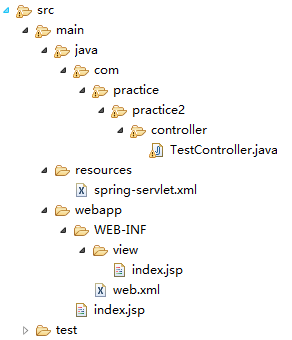


eclipse+maven springMVC搭建的更多相关文章
- eclipse +maven+ssm搭建矿建
记录一下搭建框架的过程1.下载最新的eclipse https://www.eclipse.org/downloads/download.php?file=/oomph/epp/neon/R/ec ...
- 【Web】Eclipse + Maven + Struts搭建服务器
一.环境 系统:Windows7 IDE:Eclipse-Kepler Service Release 2 使用插件:Maven(请预先在电脑上安装Maven) 二.搭建 在Eclipse中新建一个M ...
- Log4j2 配置笔记(Eclipse+maven+SpringMVC)
Log4j2相关介绍可以百度看下,这里只注重配置Log4j2 能够马上跑起来: 1.pom.xml文件中添加Log4j2的相关Maven配置信息 <!-- log4j2 --> <d ...
- windows 环境下 eclipse + maven + tomcat 的 hello world 创建和部署
主要记录自己一个新手用 eclipse + maven + tomcat 搭建 hello world 的过程,以及遇到的问题.讲真都是自己通过百度和谷歌一步步搭建的项目,没问过高手,也没高手可问,由 ...
- eclipse下maven插件搭建springmvc之helloworld
这几天学习了怎样使用maven,最终还是要回归web项目嘛,所以主要还是使用eclipse插件. 1 下载eclipse maven插件. 其实新版的eclipse已经集成了maven:lunar.m ...
- Eclipse利用Maven2搭建SpringMVC框架的Web工程
一.准备工作: 下载apache-maven--> 配置Maven_home -->下载Eclipse Maven插件 二.新建工程: 选择新建Maven Project arche ...
- 使用intellij idea搭建MAVEN+springmvc+mybatis框架
原文:使用intellij idea搭建MAVEN+springmvc+mybatis框架 1.首先使用idea创建一个maven项目 2.接着配置pom.xml,以下为我的配置 <projec ...
- Spring MVC 环境搭建(maven+SpringMVC+mybatis+Freemarker)
Spring MVC 环境搭建(maven+SpringMVC+mybatis+Freemarker) 一.准备工作 1.Eclipse Java EE IDE(4.4.1) 2.JDK 3.Tomc ...
- JavaEE开发基于Eclipse的环境搭建以及Maven Web App的创建
本篇博客就完整的来聊一下如何在Eclipse中创建的Maven Project.本篇博客是JavaEE开发的开篇,也是基础.本篇博客的内容干货还是比较多的,而且比较实用,并且都是采用目前最新版本的工具 ...
随机推荐
- CSU 1963 Feed the rabbit(斜率优化dp)
http://acm.csu.edu.cn/csuoj/problemset/problem?pid=1963 题意:有m个坑,每只兔子会在ti时刻回到坑中,现在有n个人,每个人都可以从任意时间(&l ...
- UVa 10328 Coin Toss(Java大数+递推)
https://vjudge.net/problem/UVA-10328 题意: 有H和T两个字符,现在要排成n位的字符串,求至少有k个字符连续的方案数. 思路:这道题目和ZOJ3747是差不多的,具 ...
- HashMap put方法
HashMap的put方法执行过程可以通过下图来理解,自己有兴趣可以去对比源码更清楚地研究学习. ①.判断键值对数组table[i]是否为空或为null,否则执行resize()进行扩容: ②.根据键 ...
- DB.使用Oracle时的遇到的问题
1.(20190225)ojdbc14.jar 来自“E:\ZC_DB\_Connector\Oracle\10g\Oracle Database 10g Release 2 (10.2.0.4) J ...
- Spring4 MVC文件下载实例(javaconfig)
展示如何使用Spring MVC4执行文件下载,我们将看到应用程序从文件系统内部以及外部文件下载文件. 下载文件是相当简单的,涉及以下步骤. 创建一个InputStream到文件用于下载. 查找MIM ...
- Rspec: everyday-rspec实操: 第9章 快速编写测试,编写快速的测试。
Make it work, make it right, make it fast. 测试运行的时间.应用和测试组件的增长,速度会越来越慢,目标是保持代码的readable, maintainable ...
- ActiveRecord 惰性加载,和使用gem faker
rails console后: 2.1.4 :001 > User # => User (call 'User.connection' to establish a connection) ...
- 通读cheerio API-网络爬虫
所谓工欲善其事,必先利其器,所以通读了cheerio的API,顺便翻译了一遍,有些地方因为知道的比较少,不知道什么意思,保留了英文,希望各位不吝告诉我,然后一起把这个翻译完成. ###cheerio ...
- ionic2常见问题——cordova使用Gradle构建下载maven太慢,使用阿里云镜像
问题描述 当我们写完ionic2项目准备打包app时(暂时介绍android) 执行命令ionic build android的时候下载maven太慢,cmd命令行工具来下载经常会出现假死状态(下载超 ...
- 044——VUE中组件之使用内容分发slot构建bootstrap面板panel
<!DOCTYPE html> <html lang="en"> <head> <meta charset="UTF-8&quo ...