
matplotlib学习之散点图与条形图
# coding:utf-8

from matplotlib import pyplot as plt

import numpy as np

plt.style.use('ggplot')

x = np.random.randn(200)

y = x + np.random.randn(200) * 0.5

# 确定图的位置

margin_border = 0.1

width = 0.6

margin_between = 0.02

height = 0.2

left_s = margin_border

bottom_s = margin_border

height_s = width

width_s = width

left_x = margin_border

bottom_x = margin_border + width + margin_between

height_x = height

width_x = width

left_y = margin_border + width + margin_between

bottom_y = margin_border

height_y = width

width_y = height

plt.figure(1, figsize=(8, 8))

rect_s = [left_s, bottom_s, width_s, height_s]

rect_x = [left_x, bottom_x, width_x, height_x]

rect_y = [left_y, bottom_y, width_y, height_y]

axScatter = plt.axes(rect_s)

axHisX = plt.axes(rect_x)

axHisY = plt.axes(rect_y)

axHisX.set_xticks([])

axHisY.set_yticks([])

# 绘图

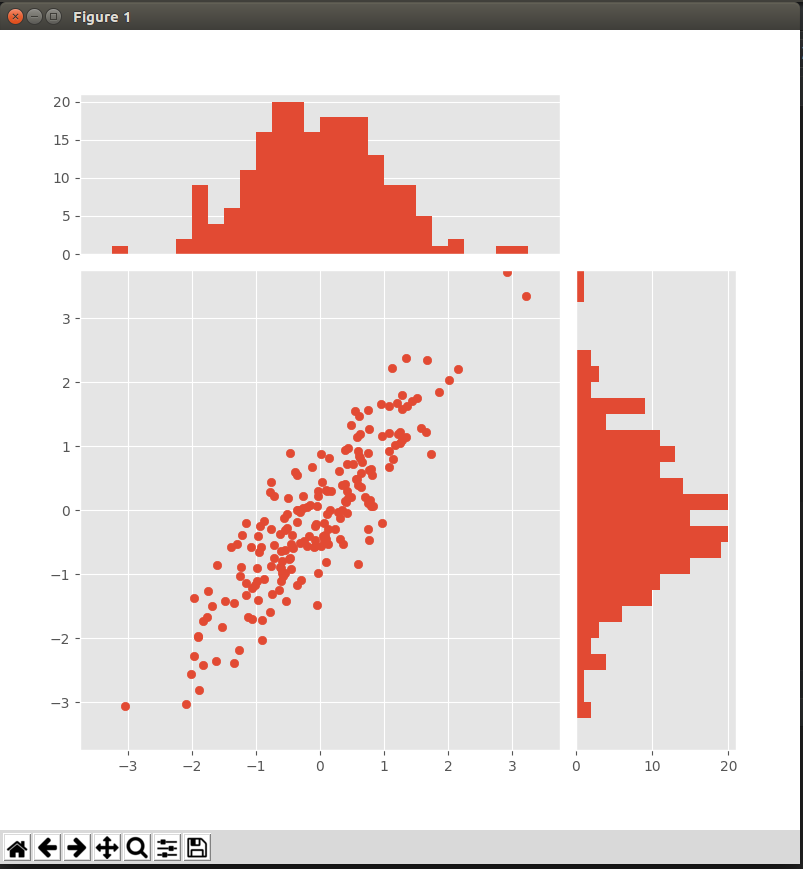
axScatter.scatter(x, y)

bin_width = 0.25

xymax = np.max([np.max(np.fabs(x)), np.max(np.fabs(y))])

lim = int(xymax / bin_width + 1) * bin_width

axScatter.set_xlim(-lim, lim)

axScatter.set_ylim(-lim, lim)

bins = np.arange(-lim, lim + bin_width, bin_width)

axHisX.hist(x, bins=bins)

axHisY.hist(y, bins=bins, orientation='horizontal')

# 同步条形图与散点图的横纵坐标

axHisX.set_xlim(axScatter.get_xlim())

axHisY.set_ylim(axScatter.get_ylim())

plt.show()
matplotlib学习之散点图与条形图的更多相关文章
- Matplotlib学习笔记(一)
原 matplotlib学习笔记 参考:Python数据科学入门教程 Python3.6.1 jupyter notebook .caret, .dropup > .btn > .ca ...
- Matplotlib学习---matplotlib的一些基本用法
Matplotlib有两种接口,一种是matlab风格接口,一种是面向对象接口.在这里,统一使用面向对象接口.因为面向对象接口可以适应更复杂的场景,在多图之间进行切换将变得非常容易. 首先导入matp ...
- matplotlib 学习总结
matplotlib 学习总结 作者:csj更新时间:01.09 email:59888745@qq.com 说明:因内容较多,会不断更新 xxx学习总结: 回主目录:2017 年学习记录和总结 # ...
- Matplotlib学习笔记(二)
原 Matplotlib学习笔记 参考:Python数据科学入门教程 Python3.6.1 jupyter notebook .caret, .dropup > .btn > .car ...
- Matplotlib学习---用matplotlib画箱线图(boxplot)
箱线图通过数据的四分位数来展示数据的分布情况.例如:数据的中心位置,数据间的离散程度,是否有异常值等. 把数据从小到大进行排列并等分成四份,第一分位数(Q1),第二分位数(Q2)和第三分位数(Q3)分 ...
- Matplotlib学习---用matplotlib画直方图/密度图(histogram, density plot)
直方图用于展示数据的分布情况,x轴是一个连续变量,y轴是该变量的频次. 下面利用Nathan Yau所著的<鲜活的数据:数据可视化指南>一书中的数据,学习画图. 数据地址:http://d ...
- Matplotlib学习---用matplotlib画散点图,气泡图(scatter plot, bubble chart)
Matplotlib里有两种画散点图的方法,一种是用ax.plot画,一种是用ax.scatter画. 一. 用ax.plot画 ax.plot(x,y,marker="o",co ...
- matplotlib常见绘图基础代码小结:折线图、散点图、条形图、直方图、饼图
一.折线图 二.散点图 三.条形图 四.直方图 五.饼图 一.折线图折线图用于显示随时间或有序类别的变化趋势 from matplotlib import pyplot as plt x = rang ...
- Matplotlib散点图、条形图、直方图-02
对比常用统计图 折线图: 特点:能够显示数据的变化趋势,反映事物的变化情况.(变化) 直方图: 特点:绘制连续性的数据,展示一组或者多组数据的分布情况(统计) 条形图: 特点:绘制离散的数据,能够一眼 ...
随机推荐
- __get__()方法研究
看源码的时候发现了这个魔法方法 class A(object): def __init__(self): self.name = 'mod' def __get__(self, instance, o ...
- Android使用BroadCastRecevier广播实现接收短信,并利用Toast弹出显示内容
在上一篇文章 Android简单实现BroadCastReceiver广播机制 中简单的实现了一个广播机制,这里利用BroadCarstRecevier实现一个接收短信并显示内容的案例,当然至于接收到 ...
- apache2 虚拟机多用户多站点设置 mpm-itk
MPM设置 https://bbs.csdn.net/topics/390479795/ vim /opt/lampp/etc/extra/httpd-ssl.conf vim /opt/lampp/ ...
- Android 使用AIDL实现进程间的通信
在Android中,如果我们需要在不同进程间实现通信,就需要用到AIDL技术去完成. AIDL(android Interface Definition Language)是一种接口定义语言,编译器通 ...
- react radio onchange事件点击无效
记: 项目需求: 页面中radio默认选中 第一次进去页面 点击radio的时候不管怎样点击 都是选中 连onChange事件都没触发 进入页面 点击刷新 点击rad ...
- 一个统一将数据转换为JSON的方法
这是我得方法: 导包: import net.sf.json.JSONArray; import net.sf.json.JSONObject; public void writeJson(Objec ...
- 2018/8/15 qbxt 测试
2018/8/15 qbxt 测试 期望得分:100:实际得分:50 不知道为什么写挂了,明明是个水题 T^T 思路:模拟 注意:如果用 char 类型存储的话,如果有'z' + 9 会爆char ...
- Codeforces Round #277.5 解题报告
又熬夜刷了cf,今天比正常多一题.比赛还没完但我知道F过不了了,一个半小时贡献给F还是没过--应该也没人Hack.写写解题报告吧= =. 解题报告例如以下: A题:选择排序直接搞,由于不要求最优交换次 ...
- HDU 3584 Cube (三维树状数组)
Problem Description Given an N*N*N cube A, whose elements are either 0 or 1. A[i, j, k] means the nu ...
- Java开源电商项目比較
这里比較的都是国外的开源项目,备选项目有: Smilehouse Workspace.Pulse.Shopizer.ofbiz.bigfish.broadleaf 1.Smilehouse Works ...