
搭健MyBatis开发环境
相关文献资料地址:http://www.mybatis.org/mybatis-3/zh/getting-started.html
关于如何创建一个项目,添加Tomcat运行环境和生成`web.xml`文件就不说了,我这边的Tomcat运行环境是8.5的
一、需要在`pom.xml`中添加项目使用的依赖:
<project xmlns="http://maven.apache.org/POM/4.0.0" xmlns:xsi="http://www.w3.org/2001/XMLSchema-instance" xsi:schemaLocation="http://maven.apache.org/POM/4.0.0 http://maven.apache.org/xsd/maven-4.0.0.xsd">

  <modelVersion>4.0.0</modelVersion>

  <groupId>cn.tedu.mybatis</groupId>

  <artifactId>MYBATIS_TEST_02</artifactId>

  <version>0.0.1-SNAPSHOT</version>

  <packaging>war</packaging>

  <dependencies>

       <!-- 用来测试的依赖 -->

        <dependency>

            <groupId>junit</groupId>

            <artifactId>junit</artifactId>

            <version>4.12</version>

        </dependency>

        <!-- 添加SpringMVC依赖,视情况添加 -->

        <dependency>

            <groupId>org.springframework</groupId>

            <artifactId>spring-webmvc</artifactId>

            <version>4.3.9.RELEASE</version>

        </dependency>

        <!-- 添加MyBatis的依赖 -->

        <dependency>

            <groupId>org.mybatis</groupId>

            <artifactId>mybatis</artifactId>

            <version>3.4.6</version>

        </dependency>

        <!-- 添加MyBatis整合Spring的依赖 -->

        <dependency>

            <groupId>org.mybatis</groupId>

            <artifactId>mybatis-spring</artifactId>

            <version>1.3.2</version>

        </dependency>

        <!-- 其底层是基于JDBC的,所以,还需要添加Spring-jdbc的依赖,需要注意的是: 此依赖版本必须与Spring-webmvc的保持一致,也可以理解成带Spring-的版本都

            保持一致 -->

        <dependency>

            <groupId>org.springframework</groupId>

            <artifactId>spring-jdbc</artifactId>

            <version>4.3.9.RELEASE</version>

        </dependency>

        <!-- 根据使用的数据库,添加数据库连接驱动的依赖 -->

        <dependency>

            <groupId>mysql</groupId>

            <artifactId>mysql-connector-java</artifactId>

            <version>8.0.13</version>

        </dependency>

        <!-- 添加数据源的依赖 -->

        <dependency>

            <groupId>commons-dbcp</groupId>

            <artifactId>commons-dbcp</artifactId>

            <version>1.4</version>

        </dependency>

  </dependencies>

</project>
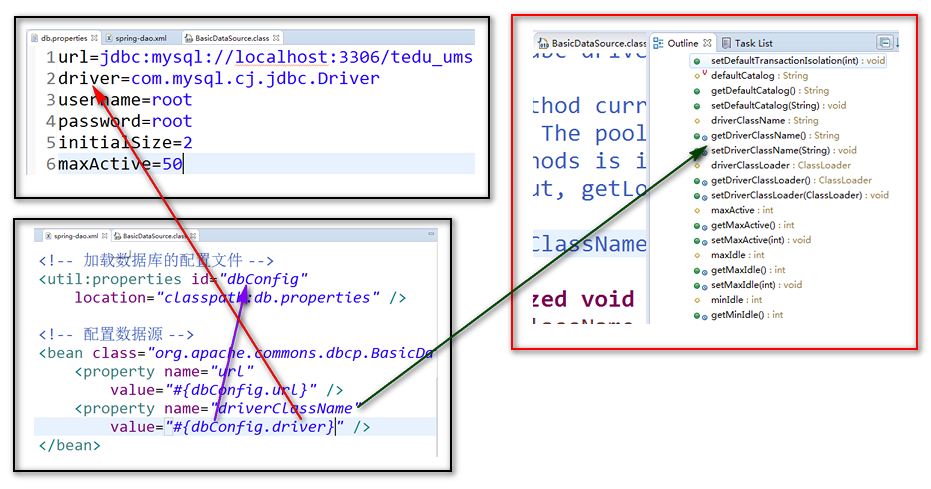
二、在`src/main/resources`下创建`db.properties`文件(文件名可以自己取),用于配置数据库连接的相关信息:
url=jdbc:mysql://localhost:3306/tedu_ums?useUnicode=true&characterEncoding=utf-8&serverTimezone=Asia/Shanghai #(这边连接的数据库名字似情况而定,我这边是tedu_ums)
driver=com.mysql.cj.jdbc.Driver
username=root #(数据库账号)
password=root #(数据库密码)
initialSize=2 #(池启动时创建的连接数量)
maxActive=50 #(同一时间可以从池分配的最多连接数量。设置为0时表示无限制)
#这是一个注释

url=jdbc:mysql://localhost:3306/tedu_ums?useUnicode=true&characterEncoding=utf-8&serverTimezone=Asia/Shanghai

driver=com.mysql.cj.jdbc.Driver

username=root

password=

initialSize=2

maxActive=50
三、在项目中准备名为`spring-dao.xml`的Spring配置文件,放在`src/main/resources`下并加载以上数据库的配置文件:
<?xml version="1.0" encoding="UTF-8"?>

<beans xmlns="http://www.springframework.org/schema/beans"

    xmlns:xsi="http://www.w3.org/2001/XMLSchema-instance" xmlns:context="http://www.springframework.org/schema/context"

    xmlns:jdbc="http://www.springframework.org/schema/jdbc" xmlns:jee="http://www.springframework.org/schema/jee"

    xmlns:tx="http://www.springframework.org/schema/tx" xmlns:aop="http://www.springframework.org/schema/aop"

    xmlns:mvc="http://www.springframework.org/schema/mvc" xmlns:util="http://www.springframework.org/schema/util"

    xmlns:jpa="http://www.springframework.org/schema/data/jpa"

    xsi:schemaLocation="

        http://www.springframework.org/schema/beans http://www.springframework.org/schema/beans/spring-beans-3.2.xsd

        http://www.springframework.org/schema/context http://www.springframework.org/schema/context/spring-context-3.2.xsd

        http://www.springframework.org/schema/jdbc http://www.springframework.org/schema/jdbc/spring-jdbc-3.2.xsd

        http://www.springframework.org/schema/jee http://www.springframework.org/schema/jee/spring-jee-3.2.xsd

        http://www.springframework.org/schema/tx http://www.springframework.org/schema/tx/spring-tx-3.2.xsd

        http://www.springframework.org/schema/data/jpa http://www.springframework.org/schema/data/jpa/spring-jpa-1.3.xsd

        http://www.springframework.org/schema/aop http://www.springframework.org/schema/aop/spring-aop-3.2.xsd

        http://www.springframework.org/schema/mvc http://www.springframework.org/schema/mvc/spring-mvc-3.2.xsd

        http://www.springframework.org/schema/util http://www.springframework.org/schema/util/spring-util-3.2.xsd">

    <!-- 加载数据库的配置文件 -->

    <util:properties id="dbConfig" location="classpath:db.properties"></util:properties>

<!--     配置数据源 -->

<bean id="dataSource" class="org.apache.commons.dbcp.BasicDataSource">

<property name="url" value="#{dbConfig.url}"></property>

<property name="driverClassName" value="#{dbConfig.driver}"></property>

<property name="username" value="#{dbConfig.username}"></property>

<property name="password" value="#{dbConfig.password}"></property>

<property name="initialSize" value="#{dbConfig.initialSize}"></property>

<property name="maxActive" value="#{dbConfig.maxActive}"></property>

</bean>

</beans>
四、完成后在测试类那边测试看看是否可以正确的获取到数据库的连接:
package web;

import javax.sql.DataSource;

import org.apache.commons.dbcp.BasicDataSource;

import org.junit.Test;

import org.mybatis.spring.SqlSessionFactoryBean;

import org.mybatis.spring.mapper.MapperScannerConfigurer;

import org.springframework.beans.BeansException;

import org.springframework.beans.factory.config.ConfigurableListableBeanFactory;

import org.springframework.context.support.AbstractApplicationContext;

import org.springframework.context.support.ClassPathXmlApplicationContext;

public class TestDemo {

    MapperScannerConfigurer ks;

    SqlSessionFactoryBean bs;

    @Test

    public void getConnection() {

        AbstractApplicationContext ac = new ClassPathXmlApplicationContext("spring-dao.xml");

        DataSource data = ac.getBean("dataSource",DataSource.class);

        System.out.println(data);

        ac.close();

    }

}
我这边输出:jdbc:mysql://localhost:3306/tedu_ums?useUnicode=true&characterEncoding=utf-8&serverTimezone=Asia/Shanghai, UserName=root@localhost, MySQL Connector/J
搭健MyBatis开发环境的更多相关文章
- 使用IDEA和gradle搭建Spring MVC和MyBatis开发环境
1. 概述 Gradle是一个基于Apache Ant和Apache Maven概念的项目自动化建构工具. 它使用一种基于Groovy的特定领域语言(DSL)来声明项目设置,抛弃了基于XML的各种繁琐 ...
- 搭建MyBatis开发环境及基本的CURD
目录 一.MyBatis概述 1. MyBatis 解决的主要问题 二.快速开始一个 MyBatis 1. 创建mysql数据库和表 2. 创建maven工程 3. 在pom.xml文件中添加信息 4 ...
- 搭建mybatis开发环境
1.创建工程 <groupId>com.hope</groupId> <artifactId>day01_eesy_01mybatis</artifa ...
- Spring MVC+Maven+Freemarker+Mybatis开发环境搭建
版权声明:本文为博主原创文章,未经博主允许不得转载. 目录(?)[-] 创建一个Spring MVC项目 集成Freemarker 集成Mybatis Mybatis自动生成工具 利用STS( ...
- asp.net搭建mybatis开发环境
mybatis其实就是ibatis的升级版本不仅能在java上使用,asp.net照样可以使用mybatis来开发程序.mybatis是一个比较小巧的ORM框架,类似hibernate.自己试了一下用 ...
- MyBatis01 Idea中搭建MyBatis开发环境
项目结构 POM模板 <?xml version="1.0" encoding="UTF-8"?> <project xmlns=" ...
- mybatis 开发环境搭建
不说废话直接上代码,首先看下我的目录机构: 红色部分,表明你所需的jar包,已经配置文件. 创建用户表,以及插入数据. create table books(id int (11) not null ...
- Maven+SpringMVC+Mybatis 开发环境整合
1.maven build遇到了如下问题: [ERROR] Failed to execute goal org.codehaus.mojo:tomcat-maven-plugin:1.1:rede ...
- 高速建成Android开发环境ADT-Bundle和Hello World
----下载JDK(Java Dev Kit) 官方下载:http://www.oracle.com/technetwork/java/javase/downloads/index.html 兴许步骤 ...
随机推荐
- 脑图工具MindNode"附属节点"是什么意思 图解
新手会发现在主节点上无论是按Tab子节点还是按Enter附属节点,都是向右延伸,感觉像没区别? 其实不然,从第二个节点开始,你再按 Tab 或者 Enter 就知道区别了. 废话少说,直接上图. 我觉 ...
- 脚本_使用expect自动交互远程主机安装软件
#!bin/bash#功能:使用expect工具自动交互密码,远程到其它主机,安装httpd软件#作者:liusingbon#删除~/.ssh/known-hosts后,ssh远程任何主机,系统都会询 ...
- 路飞学城Python-Day27(复习)
简单的socket通信 import socket client = socket.socket(socket.AF_INET, socket.SOCK_STREAM) client.connect( ...
- Git中的工作区(Working Directory)、暂存区(stage)和历史记录区(history)
今天和git搏斗了一下午,发现了修改的文件一直commit不了.网上查了一下才发现原来git的模型里还有工作区和暂存区的说法. 工作区:在git管理下的正常目录都算是工作区.我们平时的编辑工作都是在工 ...
- js 对象的创建方式和对象的区别
js一个有三种方法创建对象,这里做一个总结. 1.对象直接量 所谓对象直接量,可以看做是一副映射表,这个方法也是最直接的一个方法,个人比较建议, 1 2 3 4 5 6 7 8 9 10 11 12 ...
- 五大最佳开源java性能监控工具
如果你正在寻找性能监控工具,不妨看看以下推荐的这五款开源工具,这些工具目前已经可以替代付费工具了,你可以看看是否是你的最佳选择.本文推荐的五款开源工具目前是开源社区中最受欢迎的. 1. Stagemo ...
- tddl
淘宝根据自己的业务特点开发了TDDL(Taobao Distributed Data Layer 外号:头都大了 ?_Ob)框架,主要解决了分库分表对应用的透明化以及异构数据库之间的数据复制,它是一个 ...
- 不用while if 循环求 1到n的和,还用到了!!这样的运算符
很好的题目.开始我也没有想出来. 不用while if 循环求 1到n的和 给了很多种解法,第一种是构造函数,然后累加static变量 第二种是虚函数,有父类子类,父类的结束,然后用 !!n来让 n不 ...
- github上Devstack的一些变动,截至8.20
从github下直接clone下来的代码在执行之前须要对一些文件进行改动,否则会出现关于REQUIREMENTS的错误 说明:代码前边是"-"号的,须要删除,代码前边是" ...
- PC端 java 开发蓝牙所遇到的问题
由于项目的原因.要在电脑上开发一个通过蓝牙传送数据的client.我採用的是JAVA,JSME开发. client:去搜素蓝牙信号,然后找到对应的蓝牙信号进行连接. 服务端:client须要进行连接的 ...