
Nginx(四) nginx+consul+upasync 在ubnutu18带桌面系统 实现动态负载均衡
1.1 什么是动态负载均衡
传统的负载均衡,如果Upstream参数发生变化,每次都需要重新加载nginx.conf文件,因此扩展性不是很高,所以我们可以采用动态负载均衡,实现Upstream可配置化、动态化,无需人工重新加载nginx.conf。
这类似分布式的配置中心
1.2 动态负载均衡实现方案
1.Consul+Consul-template 每次发现配置更改需要raload nginx,重启Nginx。(不推荐)

2.Consul+OpenResty 实现无需raload动态负载均衡。(推荐)

3.Consul+upsync+Nginx  实现无需raload动态负载均衡 (推荐)
1.3 常用服务器注册与发现框架
 常见服务发现框架 Consul、Eureka、 ZooKeeper以及Etcd  ZooKeeper是这种类型的项目中历史最悠久的之一,它起源于Hadoop。它非常成熟、可靠,被许多大公司(YouTube、eBay、雅虎等)使用。

 etcd是一个采用HTTP协议的健/值对存储系统,它是一个分布式和功能层次配置系统,可用于构建服务发现系统。其很容易部署、安装和使用,提供了可靠的数据持久化特性。它是安全的并且文档也十分齐全。
2 Consul快速入门
Consul是一款开源的分布式服务注册与发现系统,通过HTTP API可以使得服务注册、发现实现起来非常简单,它支持如下特性。

服务注册:服务实现者可以通过HTTP API或DNS方式,将服务注册到Consul。

服务发现:服务消费者可以通过HTTP API或DNS方式,从Consul获取服务的IP和PORT。

故障检测:支持如TCP、HTTP等方式的健康检查机制,从而当服务有故障时自动摘除。

K/V存储:使用K/V存储实现动态配置中心,其使用HTTP长轮询实现变更触发和配置更改。

多数据中心:支持多数据中心,可以按照数据中心注册和发现服务,即支持只消费本地机房服务,使用多数据中心集群还可以避免单数据中心的单点故障。

Raft算法:Consul使用Raft算法实现集群数据一致性。

通过Consul可以管理服务注册与发现,接下来需要有一个与Nginx部署在同一台机器的Agent来实现Nginx配置更改和Nginx重启功能。我们有Confd或者Consul-template两个选择,
而Consul-template是Consul官方提供的,我们就选择它了。其使用HTTP长轮询实现变更触发和配置更改(使用Consul的watch命令实现)。
也就是说,我们使用Consul-template实现配置模板,然后拉取Consul配置渲染模板来生成Nginx实际配置。
2.1 Consul环境搭建
1.下载consul_1.5.0_linux_amd64.zip
wget https://releases.hashicorp.com/consul/1.5.0/consul_1.5.0_linux_amd64.zip
2.解压consul_1.5.0_linux_amd64.zip
unzip consul_1.5.0_linux_amd64.zip
3. 执行以下 ./consul 出现以下信息就说明安装成功
root@brian-System-Product-Name:/usr/local# ./consul

usage: consul [--version] [--help] <command> [<args>]

Available commands are:

    agent          Runs a Consul agent

    configtest     Validate config file

    event          Fire a new event

    exec           Executes a command on Consul nodes

    force-leave    Forces a member of the cluster to enter the "left" state

    info           Provides debugging information for operators

    join           Tell Consul agent to join cluster

    keygen         Generates a new encryption key

    keyring        Manages gossip layer encryption keys

    kv             Interact with the key-value store

    leave          Gracefully leaves the Consul cluster and shuts down

    lock           Execute a command holding a lock

    maint          Controls node or service maintenance mode

    members        Lists the members of a Consul cluster

    monitor        Stream logs from a Consul agent

    operator       Provides cluster-level tools for Consul operators

    reload         Triggers the agent to reload configuration files

    rtt            Estimates network round trip time between nodes

    snapshot       Saves, restores and inspects snapshots of Consul server state

    version        Prints the Consul version

    watch          Watch for changes in Consul
4.启动consul
我的linux Ip地址192.168.0.102
./consul agent -dev -ui -node=consul-dev -client=192.168.0.102
5.浏览器访问192.168.0.102:8500 (注意检查关闭防火墙)
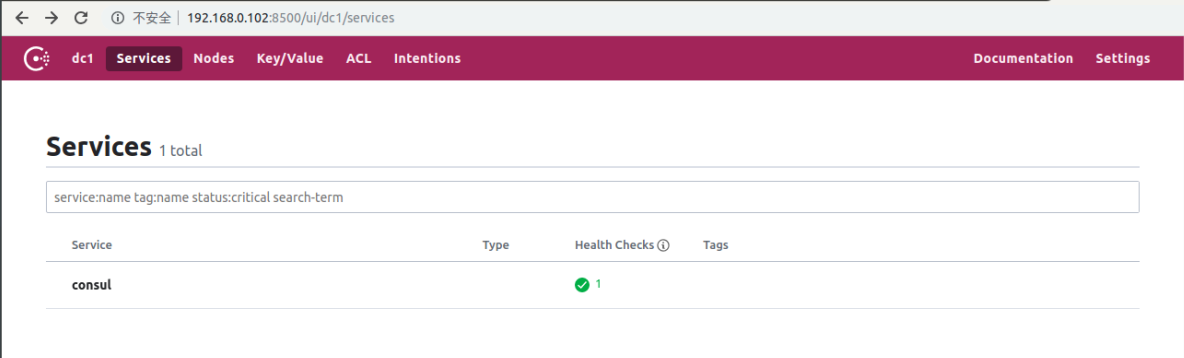
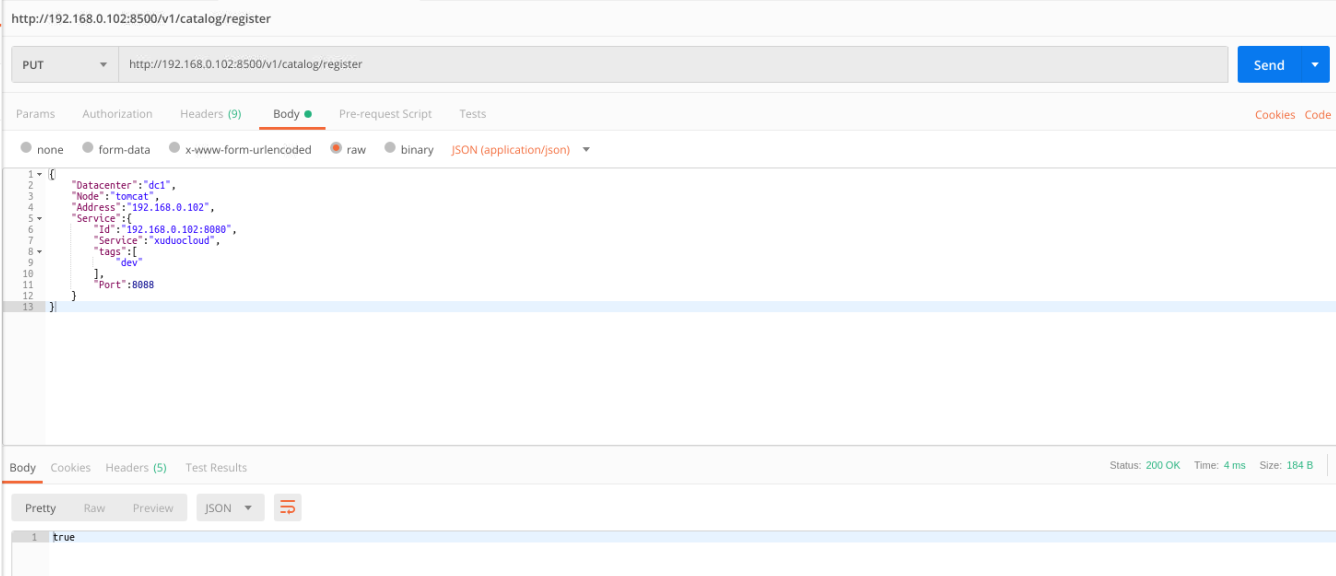
6.使用postman发送PUT请求 注册Http服务
我这里就注册两个服务

http://192.168.0.102:8500/v1/catalog/register

参数说明:Datacenter指定数据中心,

     Address指定服务IP,

        Service.Id指定服务唯一标识,

        Service.Service指定服务分组,

        Service.tags指定服务标签(如测试环境、预发环境等),

        Service.Port指定服务端口。

参数 requestbody 1--------

{

"Datacenter":"dc1",

"Node":"tomcat",

"Address":"192.168.0.102",

"Service":{

"Id":"192.168.0.102:8080",

"Service":"xuduocloud",

"tags":[

"dev"

],

"Port":8088}

}

参数 requestbody 2--------

{

"Datacenter":"dc1",

"Node":"tomcat",

"Address":"192.168.0.102",

"Service":{

"Id":"192.168.0.102:8082",

"Service":"xuduocloud",

"tags":[

"dev"

],

"Port":8088}

}
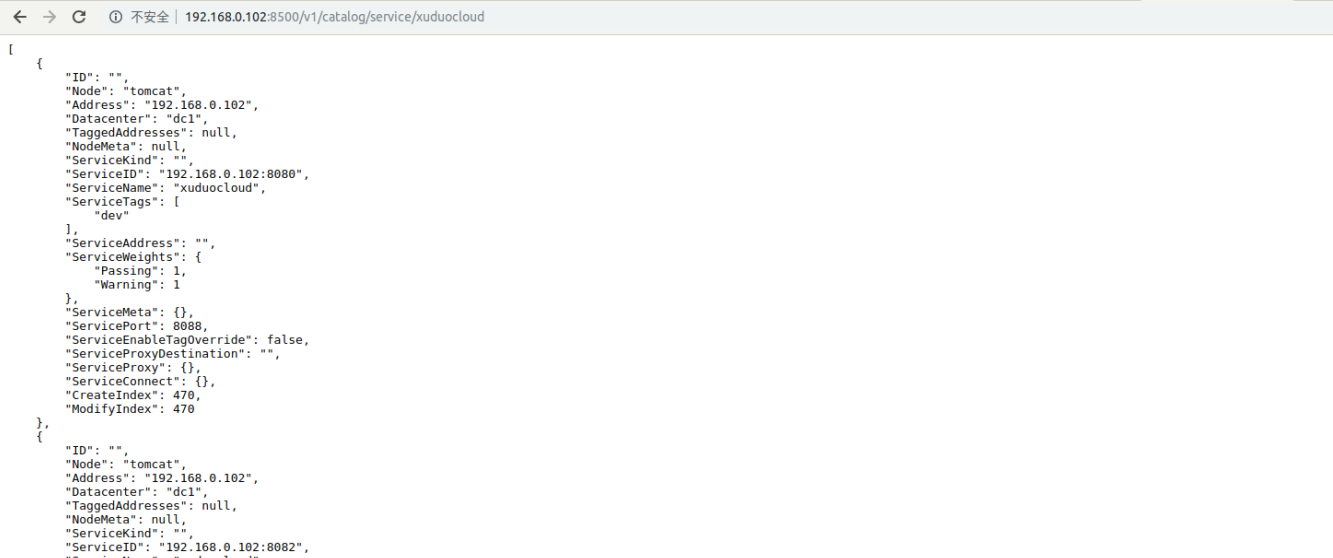
7.发现Http服务 http://192.168.0.102:8500/v1/catalog/service/xuduocloud
3 nginx + consul + upasync 动态负载均衡
3.1 nginx-upsync-module简介
Upsync是新浪微博开源的基于Nginx实现动态配置的三方模块。Nginx-Upsync-Module的功能是拉取Consul的后端server的列表,并动态更新Nginx的路由信息。此模块不依赖于任何第三方模块。
Consul作为Nginx的DB,利用Consul的KV服务,每个Nginx Work进程独立的去拉取各个upstream的配置,并更新各自的路由。
3.2 nginx-upsync-module安装
下载Nginx

wget http://nginx.org/download/nginx-1.15.12.tar.gz

作用:实现反向代理、负载负载库

下载consul

wget https://releases.hashicorp.com/consul/1.5.0/consul_1.5.0_linux_amd64.zip

作用:对动态负载均衡均配置实现注册

下载nginx-upsync-module

wget https://github.com/weibocom/nginx-upsync-module/archive/master.zip

作用:nginx动态获取最新upstream信息
3.2.1 解压安装 nginx-upsync-module和consul
unzip master.zip

unzip consul_1.5.0_linux_amd64.zip
3.2.2 安装Nginx
解压Nginx
tar -zxvf nginx-1.15.0.tar.gz
配置Nginx
groupadd nginx

useradd -g nginx -s /sbin/nologin nginx

mkdir -p /var/tmp/nginx/client/

mkdir -p /usr/local/nginx
编译Nginx
cd nginx-1.15.12

./configure   --prefix=/usr/local/nginx   --user=nginx   --group=nginx   --with-http_ssl_module   --with-http_flv_module   --with-http_stub_status_module
--with-http_gzip_static_module   --with-http_realip_module   --http-client-body-temp-path=/var/tmp/nginx/client/   --http-proxy-temp-path=/var/tmp/nginx/proxy/
--http-fastcgi-temp-path=/var/tmp/nginx/fcgi/   --http-uwsgi-temp-path=/var/tmp/nginx/uwsgi   --http-scgi-temp-path=/var/tmp/nginx/scgi
--with-pcre --add-module=../nginx-upsync-module-master

make && make install
备注: --add-module=../nginx-upsync-module-master 对应master.zip解压的路径
这里编译可能会报错,缺少依赖的插件
./configure: error: the HTTP rewrite module requires the PCRE library.

You can either disable the module by using --without-http_rewrite_module

option, or install the PCRE library into the system, or build the PCRE library

statically from the source with nginx by using --with-pcre=<path> option.
解决办法
sudo apt-get install libpcre3 libpcre3-dev

sudo apt-get install ruby

sudo apt-get install zlib1g-dev
Upstream 动态配置
#user  nobody;

worker_processes  1;

#error_log  logs/error.log;

#error_log  logs/error.log  notice;

#error_log  logs/error.log  info;

#pid        logs/nginx.pid;

events {

    worker_connections  1024;

}

http {

    ##动态去consul 获取注册的真实反向代理地址

       upstream kawa{

            server 127.0.0.1:11111;

            upsync 192.168.0.102:8500/v1/kv/upstreams/xuduocloud upsync_timeout=6m upsync_interval=500ms upsync_type=consul strong_dependency=off;

            upsync_dump_path /usr/local/nginx/conf/servers/servers_test.conf;

        }

    server {

        listen       80;

        server_name  localhost;

        #charset koi8-r;

        #access_log  logs/host.access.log  main;

        location / {

            proxy_pass   http://kawa;

            proxy_connect_timeout 2; #nginx跟后端服务器连接超时时间(代理连接超时)

            proxy_send_timeout 2; #后端服务器数据回传时间(代理发送超时)

            proxy_read_timeout 2; #连接成功后,后端服务器响应时间(代理接收超时)

            index  index.html index.htm;

        }

        #error_page  404              /404.html;

        # redirect server error pages to the static page /50x.html

        #

        error_page   500 502 503 504  /50x.html;

        location = /50x.html {

            root   html;

        }

    }

}
upsync指令指定从consul哪个路径拉取上游服务器配置;
upsync_timeout配置从consul拉取上游服务器配置的超时时间;
upsync_interval配置从consul拉取上游服务器配置的间隔时间;
upsync_type指定使用consul配置服务器;
strong_dependency配置nginx在启动时是否强制依赖配置服务器,如果配置为on,则拉取配置失败时nginx启动同样失败。
upsync_dump_path指定从consul拉取的上游服务器后持久化到的位置,这样即使consul服务器出问题了,本地还有一个备份。
3.3 创建upsync_dump_path
mkdir /usr/local/nginx/conf/servers/
3.4 启动consul
#ip地址对应的虚拟机IP地址

./consul agent -dev -ui -node=consul-dev -client=192.168.0.102

#这边上面已经启动了consul,这里只需要重启下,先杀死进程在启动

kill -9 31200

./consul agent -dev -ui -node=consul-dev -client=192.168.0.102
3.5 添加nginx Upstream服务
3.5.1 使用linux命令方式发送put请求
curl -X PUT http://192.168.0.102:8500/v1/kv/upstreams/xuduocloud/192.168.0.102:8080

curl -X PUT http://192.168.0.102:8500/v1/kv/upstreams/xuduocloud/192.168.0.102:8082

curl -X PUT http://192.168.0.102:8500/v1/kv/upstreams/xuduocloud/192.168.0.102:8083
3.5.2 使用postmen 发送put请求 负载均衡信息参数 {"weight":1, "max_fails":2, "fail_timeout":10, "down":0},我这边演示下postman动态添加upstream服务
4.演示动态负载均衡
4.1 启动三个测试服务,并用浏览器访问是否可用
#端口8080
java -jar responsibilitychain-0.0.1-SNAPSHOT.jar &

#端口8082
java -jar strategy-0.0.1-SNAPSHOT.jar &

#端口8083
java -jar template-0.0.1-SNAPSHOT.jar &



4.2 使用postman 添加upstream服务
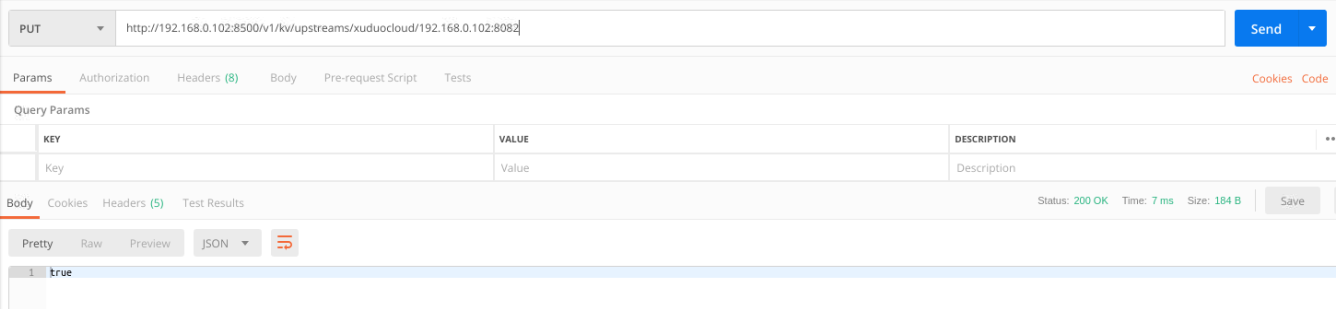
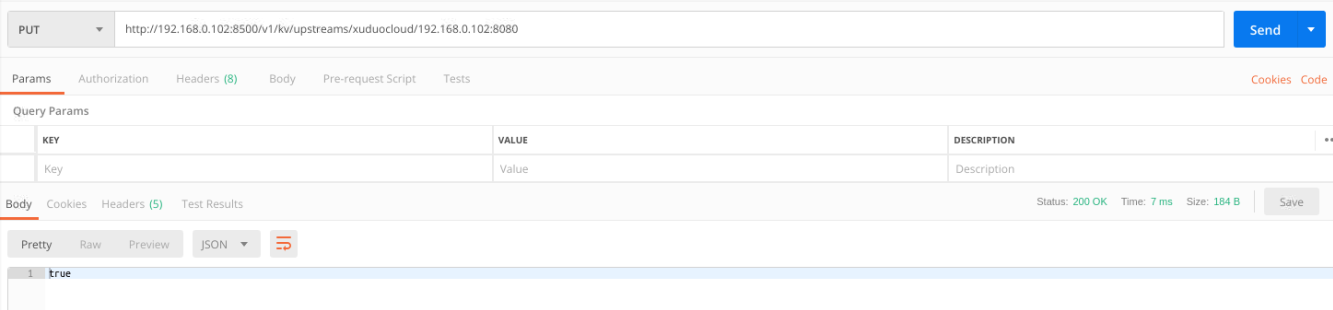
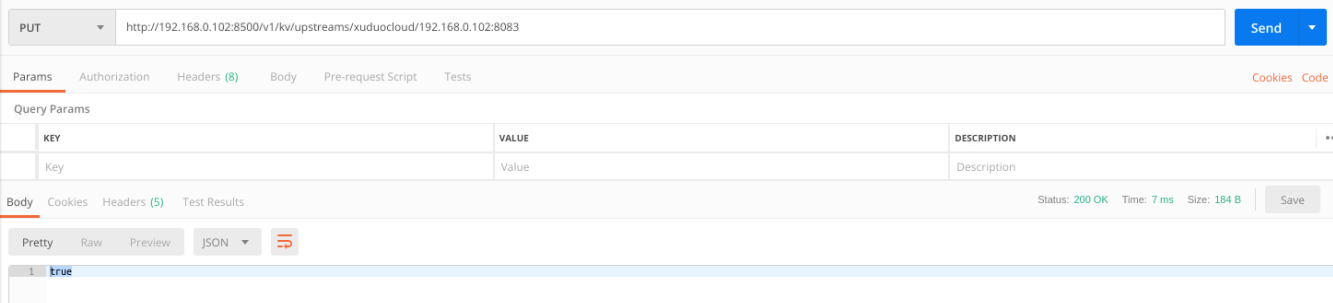
4.3 使用浏览器查看下注册结果
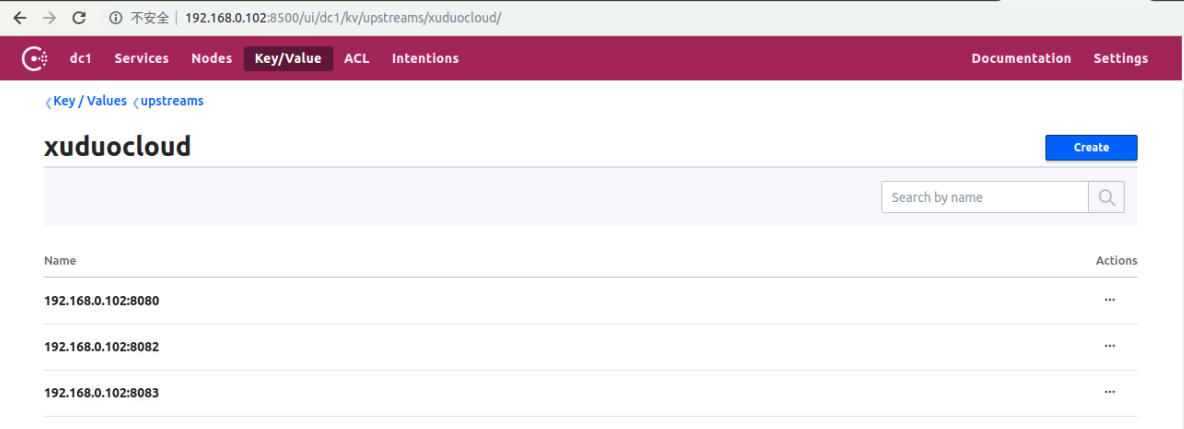
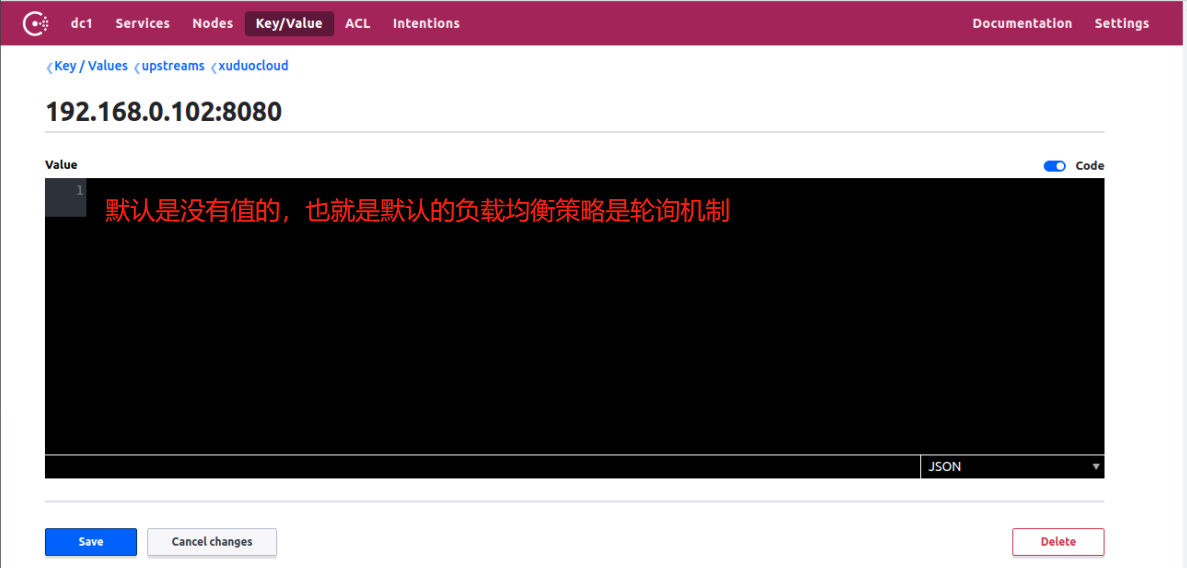
备注:如果要加权重 添加 {"weight":2, "max_fails":2, "fail_timeout":10, "down":0} 点击save,既可以动态的修改upstarm负载的策略
4.4 测试负载均衡,本地浏览器访问localhost,此处就截一张图了

Nginx(四) nginx+consul+upasync 在ubnutu18带桌面系统 实现动态负载均衡的更多相关文章
- 动态负载均衡(Nginx+Consul+UpSync)环境搭建
首先 安装好 Consul upsync 然后: 1.配置安装Nginx 需要做配置,包括分组之类的,创建目录,有些插件是需要存放在这些目录的 groupadd nginx useradd -g ng ...
- 通过Nginx、Consul、Upsync实现动态负载均衡和服务平滑发布
前提 前段时间顺利地把整个服务集群和中间件全部从UCloud迁移到阿里云,笔者担任了架构和半个运维的角色.这里详细记录一下通过Nginx.Consul.Upsync实现动态负载均衡和服务平滑发布的核心 ...
- Nginx 实现动态负载均衡(Nginx-1.10.1 + Consul v0.6.4)
一直也没有找到合适的类似Socat + Haproxy 的组合能用在Nginx,后来发现了Nginx的几个模块,但是也存在各种不足. 而且Nginx 在大流量的情况下nginx -s reload 是 ...
- Consul+upsync+Nginx实现动态负载均衡 摘自https://blog.csdn.net/qq_29247945/article/details/80787014
传统感念:每次修改完nginx配置文件,要重启nginx 动态感念:每次修改完nginx配置信息,不需要重启,nginx实时读取配置信息. Nginx: 反向代理和负载均衡 Consul:是用go编写 ...
- 基于Consul+Upsync+Nginx实现动态负载均衡
基于Consul+Upsync+Nginx实现动态负载均衡 1.Consul环境搭建 下载consul_0.7.5_linux_amd64.zip到/usr/local/src目录 cd /usr/l ...
- 动态负载均衡(Nginx+Consul+UpSync)
Http动态负载均衡 什么是动态负载均衡 传统的负载均衡,如果Upstream参数发生变化,每次都需要重新加载nginx.conf文件, 因此扩展性不是很高,所以我们可以采用动态负载均衡,实现Upst ...
- 【Nginx】基于Consul+Upsync+Nginx实现动态负载均衡
一.Http动态负载均衡 什么是动态负载均衡 动态负载均衡实现方案 常用服务器注册与发现框架 二.Consul快速入门 Consul环境搭建 三.nginx-upsync-module nginx-u ...
- Consul+upsync+Nginx 动态负载均衡
1,动态负载均衡 传统的负载均衡,如果修改了nginx.conf 的配置,必须需要重启nginx 服务,效率不高.动态负载均衡,就是可配置化,动态化的去配置负载均衡. 2,实现方案 1. Consul ...
- 《nginx 三》实现nginx的动态负载均衡——实战
Http动态负载均衡 什么是动态负载均衡 传统的负载均衡,如果Upstream参数发生变化,每次都需要重新加载nginx.conf文件, 因此扩展性不是很高,所以我们可以采用动态负载均衡,实现Upst ...
随机推荐
- 图片3d轮放查看效果(V2.0):使用鼠标拖动实现图片的轮放
上面的版本号为通过左右button实现图片轮放,这个版本号.是通过在窗体拖动鼠标.左右滑动图片. 关键点在于选择一个合适的值.使鼠标拖动时.全部图片均可显示,可是不会滑动过快或离开窗体. 不多说,直接 ...
- uva 10806 Dijkstra, Dijkstra. (最小费最大流)
uva 10806 Dijkstra, Dijkstra. 题目大意:你和你的伙伴想要越狱.你的伙伴先去探路,等你的伙伴到火车站后,他会打电话给你(电话是藏在蛋糕里带进来的),然后你就能够跑去火车站了 ...
- Arrays.asList基本用法
目录 说明 基本用法 陷阱 改观 说明 asList 是 java.util.Arrays 类的一个方法 public static <T> List<T> asList(T. ...
- jmeter3.0_bodydata中存在中文乱码
jmeter3.0_bodydata中存在中文乱码 1.进入jmeter.properties配置文件 找到#jsyntaxtextarea.font.family=Hack ,并将“#”取消并重启j ...
- Java Unit Testing - JUnit & TestNG
转自https://www3.ntu.edu.sg/home/ehchua/programming/java/JavaUnitTesting.html yet another insignifican ...
- 三种方法打印 main函数的返回地址的值(old EIP)(用途,你懂得!)
这里能够简单的改动随意函数的返回地址.能够做到自己定义EIP的指向,就可以运行当前进程空间的随意指令,这里仅仅是让大家更清楚栈帧结构,没有涉及跨进程的inline HOOK 等,后面会陆续讲下读取随意 ...
- scala快速学习笔记(一):变量函数,操作符,基本类型
为了用spark,先学下scala. 参考教程:http://meetfp.com/zh/scala-basic doc查询:http://docs.scala-lang.org 其它资料:http: ...
- vc++6.0中右键点击"转到定义"为什么是"未定义符号"呢?
VC的问题,需要生成一下浏览信息...然后rebuild
- Printf可变參数使用
參考文档: http://bbs.csdn.net/topics/70288067 Owed by: 春夜喜雨 http://blog.csdn.net/chunyexiyu 转载请标明来源 本文的二 ...
- Mac开发必备工具(二)—— iTerm 2
iTerm 2 简介 iTerm 2 is a terminal emulator for Mac OS X that does amazing things. iTerm 2 有很多能够提升效率的实 ...