
Elasticsearch (2) - 映射
常用映射类型
核心的字段类型如下:
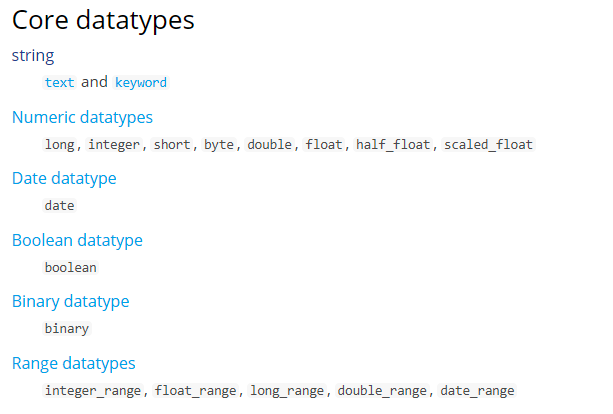
String
字符串包括text和keyword两种类型:
1、text
analyzer
通过analyzer属性指定分词器。
下边指定name的字段类型为text,使用ik分词器的ik_max_word分词模式。
"name": {

    "type": "text",

    "analyzer":"ik_max_word"

}
上边指定了analyzer是指在索引和搜索都使用ik_max_word,如果单独想定义搜索时使用的分词器则可以通过search_analyzer属性。
对于ik分词器建议是索引时使用ik_max_word将搜索内容进行细粒度分词,搜索时使用ik_smart提高搜索精确性。
"name": {

    "type": "text",

    "analyzer":"ik_max_word",

    "search_analyzer":"ik_smart"

}
index
通过index属性指定是否索引。
默认为index=true,即要进行索引,只有进行索引才可以从索引库搜索到。
但是也有一些内容不需要索引,比如:商品图片地址只被用来展示图片,不进行搜索图片,此时可以将index设置为false。
删除索引,重新创建映射,将pic的index设置为false,尝试根据pic去搜索,结果搜索不到数据
"pic": {

    "type": "text",

    "index":false

}
store
是否在source之外存储,每个文档索引后会在 ES中保存一份原始文档,存放在"_source"中,一般情况下不需要设置store为true,因为在_source中已经有一份原始文档了。
测试
删除xc_course/doc下的映射
创建新映射:Post http://localhost:9200/xc_course/doc/_mapping
{

    "properties": {

        "name": {

            "type": "text",

            "analyzer": "ik_max_word",

            "search_analyzer": "ik_smart"

        },

        "description": {

            "type": "text",

            "analyzer": "ik_max_word",

            "search_analyzer": "ik_smart"

        },

        "pic": {

            "type": "text",

            "index": false

        },

        "studymodel": {

            "type": "text"

        }

    }

}
插入文档:
http://localhost:9200/xc_course/doc/4028e58161bcf7f40161bcf8b77c0000
{

    "name": "Bootstrap开发框架",

    "description": "Bootstrap是由Twitter推出的一个前台页面开发框架,在行业之中使用较为广泛。此开发框架包含了大量的CSS、 JS程序代码, 可以帮助开发者( 尤其是不擅长页面开发的程序人员) 轻松的实现一个不受浏览器限制的精美界面效果。 ",

    "pic": "group1/M00/00/01/wKhlQFqO4MmAOP53AAAcwDwm6SU490.jpg",

    "studymodel": ""

}
查询测试:
Get http://localhost:9200/xc_course/_search?q=name:开发

Get http://localhost:9200/xc_course/_search?q=description:开发

Get http://localhost:9200/xc_course/_search?

q=pic:group1/M00///wKhlQFqO4MmAOP53AAAcwDwm6SU490.jpg

Get http://localhost:9200/xc_course/_search?q=studymodel:201002

通过测试发现:name和description都支持全文检索,pic不可作为查询条件。
2、 keyword
keyword字段为关键字字段,通常搜索keyword是按照整体搜索,所以创建keyword字段的索引时是不进行分词的,比如:邮政编码、手机号码、身份证等。keyword字段通常用于过虑、排序、聚合等。
更改映射
{

    "properties": {

        "studymodel": {

            "type": "keyword"

        },

        "name": {

            "type": "keyword"

        }

    }

}
插入文档:
{

    "name": "java编程基础",

    "description": "java语言是世界第一编程语言,在软件开发领域使用人数最多。",

    "pic": "group1/M00/00/01/wKhlQFqO4MmAOP53AAAcwDwm6SU490.jpg",

    "studymodel": ""

}
根据studymodel查询文档
搜索:http://localhost:9200/xc_course/_search?q=name:java
name是keyword类型,所以查询方式是精确查询
date日期类型
日期类型不用设置分词器。通常日期类型的字段用于排序。
format
通过format设置日期格式
例如设置允许date字段存储年月日时分秒、年月日及毫秒三种格式。
{

    "properties": {

        "timestamp": {

            "type": "date",

            "format": "yyyy‐MM‐dd HH:mm:ss||yyyy‐MM‐dd"

        }

    }

}
插入文档
{

    "name": "spring开发基础",

    "description": "spring 在java领域非常流行,java程序员都在用。",

    "studymodel": "",

    "pic": "group1/M00/00/01/wKhlQFqO4MmAOP53AAAcwDwm6SU490.jpg",、

    "timestamp": "2018‐07‐04 18:28:58"

}
数值类型
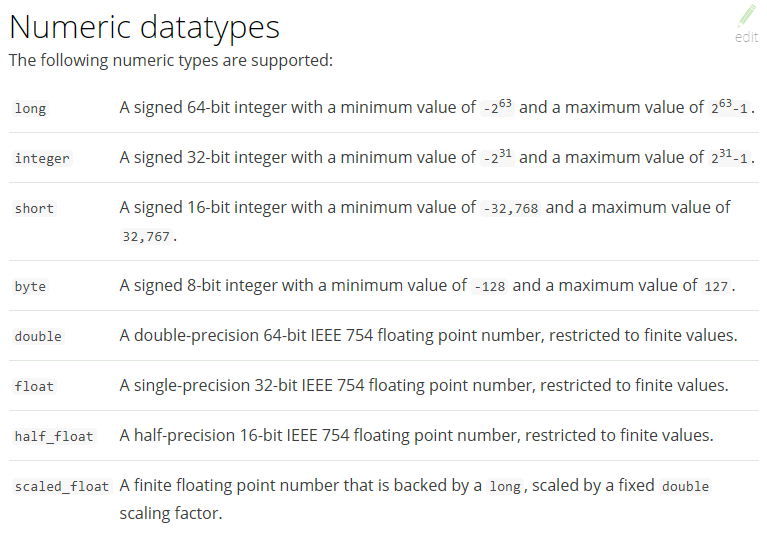
例如,创建如下映射
post:http://localhost:9200/xc_course/doc/_mapping
{

    "properties": {

        "description": {

            "type": "text",

            "analyzer": "ik_max_word",

            "search_analyzer": "ik_smart"

        },

        "name": {

            "type": "text",

            "analyzer": "ik_max_word",

            "search_analyzer": "ik_smart"

        },

        "pic": {

            "type": "text",

            "index": false

        },

        "price": {

            "type": "float"

        },

        "studymodel": {

            "type": "keyword"

        },

        "timestamp": {

            "type": "date",

            "format": "yyyy‐MM‐dd HH:mm:ss||yyyy‐MM‐dd||epoch_millis"

        }

    }

}
插入文档:
Post: http://localhost:9200/xc_course/doc/1
{

    "name": "Bootstrap开发",

    "description": "Bootstrap是由Twitter推出的一个前台页面开发框架, 是一个非常流行的开发框架, 此框架集成了多种页面效果。 此开发框架包含了大量的CSS、 JS程序代码, 可以帮助开发者( 尤其是不擅长页面开发的程序人员) 轻松的实现一个不受浏览器限制的精美界面效果。 ",

    "studymodel ": "201002 ",

    "price ":38.6,

    "timestamp ":"2019 - 05 - 07 19: 11: 35 ",

    "pic": "group1/M00/00/00/wKhlQFs6RCeAY0pHAA Jx5ZjNDEM428.jpg"

}
springboot客户端连接Demo
ES提供多种不同的客户端:
1、TransportClient
ES提供的传统客户端
2、RestClient
RestClient是官方推荐使用的,它包括两种:Java Low Level REST Client和 Java High Level REST Client。
添加依赖
<dependency>

    <groupId>org.elasticsearch.client</groupId>

    <artifactId>elasticsearch‐rest‐high‐level‐client</artifactId>

    <version>6.2.</version>

</dependency>

<dependency>

    <groupId>org.elasticsearch</groupId>

    <artifactId>elasticsearch</artifactId>

    <version>6.2.</version>

</dependency>
配置文件
server:

    port: ${port:}

spring:

    application:

        name: xc‐search‐service

xuecheng:

    elasticsearch:

        hostlist: ${eshostlist:127.0.0.1:} #多个结点中间用逗号分隔
配置类
public class ElasticsearchConfig {

    @Value("${xuecheng.elasticsearch.hostlist}")

    private String hostlist;

    @Bean

    public RestHighLevelClient restHighLevelClient(){

        //解析hostlist配置信息

        String[] split = hostlist.split(",");

        //创建HttpHost数组,其中存放es主机和端口的配置信息

        HttpHost[] httpHostArray = new HttpHost[split.length];

        for(int i=;i<split.length;i++){

            String item = split[i];

            httpHostArray[i] = new HttpHost(item.split(":")[], Integer.parseInt(item.split(":")[]), "http");

        }

        //创建RestHighLevelClient客户端

        return new RestHighLevelClient(RestClient.builder(httpHostArray));

    }

    @Bean

    public RestClient restClient(){

        //解析hostlist配置信息

        String[] split = hostlist.split(",");

        //创建HttpHost数组,其中存放es主机和端口的配置信息

        HttpHost[] httpHostArray = new HttpHost[split.length];

        for(int i=;i<split.length;i++){

            String item = split[i];

            httpHostArray[i] = new HttpHost(item.split(":")[], Integer.parseInt(item.split(":")[]), "http");

        }

        return RestClient.builder(httpHostArray).build();

    }

}
启动类
@EntityScan("com.xuecheng.framework.domain.search")//扫描实体类

@ComponentScan(basePackages={"com.xuecheng.api"})//扫描接口

@ComponentScan(basePackages={"com.xuecheng.search"})//扫描本项目下的所有类

@ComponentScan(basePackages={"com.xuecheng.framework"})//扫描common下的所有类

public class SearchApplication {

    public static void main(String[] args) throws Exception {

        SpringApplication.run(SearchApplication.class, args);

    }

}
Elasticsearch (2) - 映射的更多相关文章
- ElasticSearch 嵌套映射和过滤器及查询
ElasticSearch - 嵌套映射和过滤器 Because nested objects are indexed as separate hidden documents, we can’t q ...
- Elasticsearch mapping映射文件设置没有生效
Elasticsearch mapping映射文件设置没有生效 问题背景 我们一般会预先创建 Elasticsearch index的 mapping.properties 文件(类似于MySQL中的 ...
- Elasticsearch入门教程(三):Elasticsearch索引&映射
原文:Elasticsearch入门教程(三):Elasticsearch索引&映射 版权声明:本文为博主原创文章,遵循CC 4.0 BY-SA版权协议,转载请附上原文出处链接和本声明. 本文 ...
- elasticsearch的映射(mapping)和分析(analysis)
转发自:http://blog.csdn.net/hzrandd/article/details/47128895 分析和分析器 分析(analysis)是这样一个过程: 首先,表征化一个文本块为适用 ...
- ES 11 - 配置Elasticsearch的映射 (mapping)
目录 1 映射的相关概念 1.1 什么是映射 1.2 映射的组成 1.3 元字段 1.4 字段的类型 2 如何配置mapping 2.1 创建mapping 2.2 更新mapping 2.3 查看m ...
- 利用kibana插件对Elasticsearch进行映射
映射(mapping) 映射是创建索引的时候,可以预先定义字段的类型以及相关属性 Elasticsearch会根据JSON源数据的基础类型去猜测你想要的字段映射.将输入的数据变成可搜索的索引项.Map ...
- elasticsearch(6) 映射和分析
类似关系型数据库中每个字段都有对应的数据类型,例如nvarchar.int.date等等,elasticsearch也会将文档中的字段映射成对应的数据类型,这一映射可以使ES自动生成的,也是可以由我们 ...
- elasticsearch的映射
一.简介: 映射:在创建索引时,可以预先定义字段的类型(映射类型,也就是type,一个索引可以有一个或多个类型)及相关属性. Elasticsearch会根据JSON源数据的基础类型猜测你想要的字段映 ...
- Elasticsearch 自定义映射
尽管在很多情况下基本域数据类型 已经够用,但你经常需要为单独域自定义映射 ,特别是字符串域.自定义映射允许你执行下面的操作: 全文字符串域和精确值字符串域的区别 使用特定语言分析器 优化域以适应部分匹 ...
随机推荐
- js中的逻辑与(&&)与逻辑或(||)
var foo = 1; var bar = 0; var tar = false; var baz = 2; 一.js中的逻辑与(&&) 1.当第一个数为true时,返回第二个数: ...
- Linux 高精度定时器hrtimer 使用示例【转】
本文转载自:http://blog.csdn.net/dean_gdp/article/details/25481225 hrtimer的基本操作 Linux的传统定时器通过时间轮算法实现(timer ...
- SpringBoot启动跟踪
程序启动入口 @SpringBootApplication public class Chapter001Application { public static void main(String[] ...
- 正则表达式、Calendar类、SimpleDateFormat类、Date类、BigDecimal类、BigInteger类、System类、Random类、Math类(Java基础知识十四)
1.正则表达式的概述和简单使用 * A:正则表达式(一个字符串,是规则) * 是指一个用来描述或者匹配一系列符合某个语法规则的字符串的单个字符串.其实就是一种规则.有自己特殊的应用. * B: ...
- hdu 2112 HDU Today 解题报告
题目链接:http://acm.hdu.edu.cn/showproblem.php?pid=2112 题目意思:又是求最短路的,不过结合埋字符串来考查. 受之前1004 Let the Balloo ...
- POJ2443 Set Operation (基础bitset应用,求交集)
You are given N sets, the i-th set (represent by S(i)) have C(i) element (Here "set" isn't ...
- View Programming Guide for iOS ---- iOS 视图编程指南(四)---Views
Views Because view objects are the main way your application interacts with the user, they have many ...
- java形式参数分别是基本类型和引用类型的调用
什么是形式参数,基本类型,引用类型? 形式参数(形参)百度百科里的解释是:在定义函数名和函数体的时候使用的参数,目的是用来接收调用该函数时传入的参数. 通俗的说就是:形式参数是指在函数名后面的小括号里 ...
- Android 应用程序窗体显示状态操作(requestWindowFeature()的应用)(转载)
转自:http://www.cnblogs.com/salam/archive/2010/11/30/1892143.html 我们在开发程序是经常会需要软件全屏显示.自定义标题(使用按钮等控件)和其 ...
- hdoj5806【尺取】
(补题,妈蛋那时候大哥给我说是尺取,我不想打-真是艾斯比了-) 题意: 退役狗 NanoApe 滚回去学文化课啦! 在数学课上,NanoApe 心痒痒又玩起了数列.他在纸上随便写了一个长度为 n 的数 ...