
[CentOs7]搭建ftp服务器(3)——上传,下载,删除,重命名,新建文件夹
摘要
上篇文章介绍了如何为ftp添加虚拟用户,本篇将继续实践如何上传,下载文件。
上传
使用xftp客户端上传文件,如图所示

此时上传状态报错,查看详情
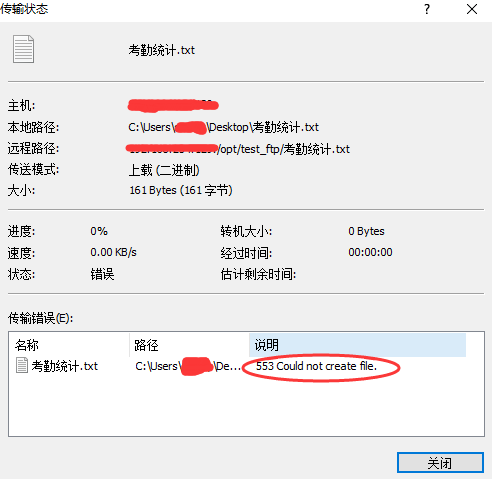
从错误看出是应为无法创建文件造成的。那么我们就要修改ftp服务器的配置了。
授权
chmod /opt/test_ftp // 给予文件夹的操作权限
一般创建一个ftp 用户,作为管理员只希望它只能访问其自己的所属目录的,是不会让他选择其他目录的。
设置ftp用户的权限
在安装好ftp时,在 /etc/vsftpd目录下可以看到vsftpd的配置文件vsftpd.conf
进入目录
cd /etc/vsftpd
查看列表
ls

编辑配置文件
vi vsftpd.conf
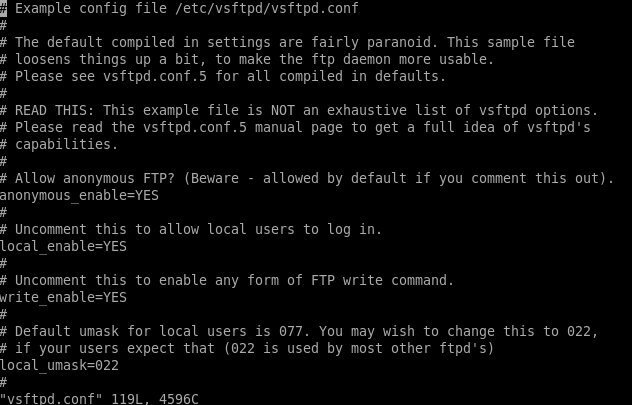
将用户(一般指虚拟用户)限制在自家目录
修改配置文件中,这样用户就只能访问自己家的目录了:
chroot_local_user=yes
重启ftp
service vsftpd restart

使用xftp客户端,进行尝试。
ftp配置文件
# Example config file /etc/vsftpd/vsftpd.conf

#

# The default compiled in settings are fairly paranoid. This sample file

# loosens things up a bit, to make the ftp daemon more usable.

# Please see vsftpd.conf. for all compiled in defaults.

#

# READ THIS: This example file is NOT an exhaustive list of vsftpd options.

# Please read the vsftpd.conf. manual page to get a full idea of vsftpd's

# capabilities.

#

# Allow anonymous FTP? (Beware - allowed by default if you comment this out).

anonymous_enable=YES

#

# Uncomment this to allow local users to log in.

local_enable=YES

#

# Uncomment this to enable any form of FTP write command.

write_enable=YES

#

# Default umask for local users is . You may wish to change this to ,

# if your users expect that ( is used by most other ftpd's)

local_umask=

#

# Uncomment this to allow the anonymous FTP user to upload files. This only

# has an effect if the above global write enable is activated. Also, you will

# obviously need to create a directory writable by the FTP user.

anon_upload_enable=YES

#

# Uncomment this if you want the anonymous FTP user to be able to create

# new directories.

anon_mkdir_write_enable=YES

#

# Activate directory messages - messages given to remote users when they

# go into a certain directory.

dirmessage_enable=YES

#

# The target log file can be vsftpd_log_file or xferlog_file.

# This depends on setting xferlog_std_format parameter

xferlog_enable=YES

#

# Make sure PORT transfer connections originate from port  (ftp-data).

connect_from_port_20=YES

#

# If you want, you can arrange for uploaded anonymous files to be owned by

# a different user. Note! Using "root" for uploaded files is not

# recommended!

#chown_uploads=YES

#chown_username=whoever

#

# The name of log file when xferlog_enable=YES and xferlog_std_format=YES

# WARNING - changing this filename affects /etc/logrotate.d/vsftpd.log

#xferlog_file=/var/log/xferlog

#

# Switches between logging into vsftpd_log_file and xferlog_file files.

# NO writes to vsftpd_log_file, YES to xferlog_file

xferlog_std_format=YES

#

# You may change the default value for timing out an idle session.

idle_session_timeout=

#

# You may change the default value for timing out a data connection.

data_connection_timeout=

#

# It is recommended that you define on your system a unique user which the

# ftp server can use as a totally isolated and unprivileged user.

#nopriv_user=ftpsecure

#

# Enable this and the server will recognise asynchronous ABOR requests. Not

# recommended for security (the code is non-trivial). Not enabling it,

# however, may confuse older FTP clients.

#async_abor_enable=YES

#

# By default the server will pretend to allow ASCII mode but in fact ignore

# the request. Turn on the below options to have the server actually do ASCII

# mangling on files when in ASCII mode.

# Beware that on some FTP servers, ASCII support allows a denial of service

# attack (DoS) via the command "SIZE /big/file" in ASCII mode. vsftpd

# predicted this attack and has always been safe, reporting the size of the

# raw file.

# ASCII mangling is a horrible feature of the protocol.

ascii_upload_enable=YES

ascii_download_enable=YES

#

# You may fully customise the login banner string:

ftpd_banner=Welcome to Ftp service.

#

# You may specify a file of disallowed anonymous e-mail addresses. Apparently

# useful for combatting certain DoS attacks.

#deny_email_enable=YES

# (default follows)

#banned_email_file=/etc/vsftpd/banned_emails

#

# You may specify an explicit list of local users to chroot() to their home

# directory. If chroot_local_user is YES, then this list becomes a list of

# users to NOT chroot().

chroot_local_user=YES

chroot_list_enable=YES

# (default follows)

chroot_list_file=/etc/vsftpd/chroot_list

#

# You may activate the "-R" option to the builtin ls. This is disabled by

# default to avoid remote users being able to cause excessive I/O on large

# sites. However, some broken FTP clients such as "ncftp" and "mirror" assume

# the presence of the "-R" option, so there is a strong case for enabling it.

#ls_recurse_enable=YES

#

# When "listen" directive is enabled, vsftpd runs in standalone mode and

# listens on IPv4 sockets. This directive cannot be used in conjunction

# with the listen_ipv6 directive.

listen=YES

#

# This directive enables listening on IPv6 sockets. To listen on IPv4 and IPv6

# sockets, you must run two copies of vsftpd with two configuration files.

# Make sure, that one of the listen options is commented !!

#listen_ipv6=YES

pam_service_name=vsftpd

userlist_enable=YES

anon_other_write_enable=YES

tcp_wrappers=YES

anon_root=/opt/test_ftp

guest_enable=YES

guest_username=wolfyftp

virtual_use_local_privs=YES
设置权限
使用命令
getsebool -a|grep ftp
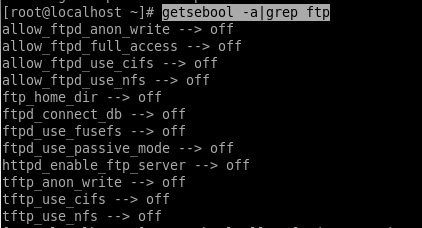
getsebool,列出所有selinux bool数值清单列表与内容。
allow_ftpd_anon_write --> on

allow_ftpd_full_access --> off
开启 anon_write 和full_access
setsebool allow_ftpd_anon_write
etsebool allow_ftpd_full_access
重启ftp服务
service vsftpd restart

测试
在本地使用xftp客户端进行上传,下载,删除,重命名,操作。如图

总结
设置权限,感觉只需配置文件中配置对了,然后将full_access 设置为1 就可以了。
[CentOs7]搭建ftp服务器(3)——上传,下载,删除,重命名,新建文件夹的更多相关文章
- Java使用SFTP和FTP两种连接方式实现对服务器的上传下载 【我改】
[]如何区分是需要使用SFTP还是FTP? []我觉得: 1.看是否已知私钥. SFTP 和 FTP 最主要的区别就是 SFTP 有私钥,也就是在创建连接对象时,SFTP 除了用户名和密码外还需要知道 ...
- Win10 搭建FTP环境,并使用Java实现上传,下载,删除
测试的环境一般都是在自己电脑上面装的,现在一般都使用Win10开发 搭建FTP: 第一步:打开控制面板:点击程序 第二步: 第三步: 然后点击确认后等待完成 完成后在启动中找到IIS管理器 打开 在网 ...
- 虚拟机中使用centos7搭建ftp服务器
应用场景 本地windows作为客户端,虚拟机CentOS7作为服务器端,搭建FTP服务器,本地访问虚拟机实现文件的上传下载.如何在虚拟机安装centos7就不在赘述. 1.在centos7上安装vs ...
- 使用C#WebClient类访问(上传/下载/删除/列出文件目录)由IIS搭建的http文件服务器
前言 为什么要写这边博文呢?其实,就是使用C#WebClient类访问由IIS搭建的http文件服务器的问题花了我足足两天的时间,因此,有必要写下自己所学到的,同时,也能让广大的博友学习学习一下. 本 ...
- 配置ftp服务器只能上传不能进行其他操作
又到期末考试了,今年当了数据挖掘助教,课程有一道编程大作业,需要搭建ftp服务器,实现文件上传,但是禁止下载重命名.服务器系统是ubuntu12.04 server,使用的ftp服务器也是linux下 ...
- [CentOs7]搭建ftp服务器(2)——添加用户
摘要 上篇文章完成了ftp服务器的安装与匿名访问的内容,当然出于安全的考虑是不允许匿名访问服务器的,所以就有了本篇的内容 ,为ftp服务器添加用户,用改用户进行访问. vsftpd添加用户 FTP用户 ...
- 记录Centos7搭建ftp服务器以及遇到的各种坑
前言 今天被经理要求搭建ftp服务器,然后就去网上搜索了一下教程.搭建成功后(遇到的坑不少)特此记录一下.因为是为了记录一下整个操作流程以防以后使用所以比较啰嗦. 目录 1.安装vsftpd 2.创建 ...
- java FTP 上传下载删除文件
在JAVA程序中,经常需要和FTP打交道,比如向FTP服务器上传文件.下载文件,本文简单介绍如何利用jakarta commons中的FTPClient(在commons-net包中)实现上传下载文件 ...
- python中使用paramiko模块并实现远程连接服务器执行上传下载
paramiko模块 paramiko是用python语言写的一个模块,遵循SSH2协议,支持以加密和认证的方式,进行远程服务器的连接. 因此,如果需要使用SSH从一个平台连接到另外一个平台,进行一系 ...
随机推荐
- OSG消息机制之事件处理概述
OSG的消息机制包括好多个头文件预定义及多个类. 首先,消息接收相关的类当属osgGA::GUIEventHandler和osgGA::GUIEventAdapter这两个类了.前者处理OSG程序与用 ...
- phoneGap蓝牙设备链接打印操作插件
前台 bluetooth.js /*Copyright 2013 101.key Licensed under the Apache License, Version 2.0 (the " ...
- ssh密钥私钥不能登陆问题处理
@@@@@@@@@@@@@@@@@@@@@@@@@@@@@@@@@@@@@@@@@@@@@@@@@@@@@@@@@@@ @ WARNING: UNPROTECTED PRIVATE KEY FILE! ...
- jade模板引擎
最近用jade写了点东西,觉得挺有趣的,是一个有意思的模板引擎. 比如说,像这样的结构的html <span> <i class="icon-edit">& ...
- ie浏览器下,get请求缓存问题
1 使用get请求数据 1)Java代码 $.getJSON("sortShow!sortShow?time="+new Date().getTime(),function(){} ...
- CSS预处理框架:less,scss
CSS预处理器:less和sass:CSS 预处理器是一种语言用来为 CSS 增加一些编程的的特性,无需考虑浏览器的兼容性问题,例如你可以在 CSS 中使用 变量.简单的程序逻辑.函数等等在编程语言中 ...
- CSS中"!important"的使用
本篇文章使用最新的IE10以及firefox与chrome测试(截止2013年5月27日22:23:22) CSS的原理: 我们知道,CSS写在不同的地方有不同的优先级, .css文件中的定义 < ...
- Zybo GPIO Demo Run Embedded Linux
1.Environment Ubuntu 12.04 x86_64 Vivado 2013.4 SDK 2013.4 2.Pre-requisites 2.1 CodeSourcery arm-g ...
- 重载与覆盖(java)
一般来说,分为两种情况.一是在同一个类里面有两个或两个以上的同名的方法,这些方法的名字相同,但参数不同,这种情况中叫重载.当你调用方法时,会根据你传进去的参数的类型来决定调用哪个方法.二是一个类继承了 ...
- activity与fragment之间传递数据
总结:无论是activity给fragment传递数据,还是fragment给activity传递数据,都把activity和fragment都当做一个普通的对象,调用它的方法,传递参数. 1.Fra ...