
【SpringBoot】常用Starter介绍和整合模板引擎Freemaker、thymeleaf
========7、SpringBoot常用Starter介绍和整合模板引擎Freemaker、thymeleaf =========================
1、SpringBoot Starter讲解
简介:介绍什么是SpringBoot Starter和主要作用
1、官网地址:https://docs.spring.io/spring-boot/docs/2.1.0.BUILD-SNAPSHOT/reference/htmlsingle/#using-boot-starter
2、starter主要简化依赖用的
spring-boot-starter-web ->里面包含多种依赖
3、几个常用的starter
spring-boot-starter-activemq
spring-boot-starter-aop
spring-boot-starter-data-redis
spring-boot-starter-freemarker
spring-boot-starter-thymeleaf
spring-boot-starter-webflux
2、SpringBoot2.x常见模板引擎讲解和官方推荐使用
简介:介绍常用的SpringBoot2.x模板引擎和官方推荐案例
1、JSP(后端渲染,消耗性能)
Java Server Pages 动态网页技术,由应用服务器中的JSP引擎来编译和执行,再将生成的整个页面返回给客户端
可以写java代码
持表达式语言(el、jstl)
内建函数
JSP->Servlet(占用JVM内存)permSize
javaweb官方推荐
springboot不推荐 https://docs.spring.io/spring-boot/docs/2.1.0.BUILD-SNAPSHOT/reference/htmlsingle/#boot-features-jsp-limitations
2、Freemarker
FreeMarker Template Language(FTL) 文件一般保存为 xxx.ftl
严格依赖MVC模式,不依赖Servlet容器(不占用JVM内存)
内建函数
3、Thymeleaf (主推)
轻量级的模板引擎(负责逻辑业务的不推荐(ifelse多,上万条),解析DOM或者XML会占用多的内存)
可以直接在浏览器中打开且正确显示模板页面
直接是html结尾,直接编辑
xdlcass.net/user/userinfo.html
社会工程学
伪装
3、SpringBoot2.x整合模板引擎freemarker实战
简介:SpringBoot2.x整合模板引擎freemarker实战
1、Freemarker相关maven依赖
<!-- 引入freemarker模板引擎的依赖 -->
<dependency>
<groupId>org.springframework.boot</groupId>
<artifactId>spring-boot-starter-freemarker</artifactId>
</dependency>
2、Freemarker基础配置
# 是否开启thymeleaf缓存,本地为false,生产建议为true
spring.freemarker.cache=false
spring.freemarker.charset=UTF-8
spring.freemarker.allow-request-override=false
spring.freemarker.check-template-location=true
#类型
spring.freemarker.content-type=text/html
spring.freemarker.expose-request-attributes=true
spring.freemarker.expose-session-attributes=true
#文件后缀
spring.freemarker.suffix=.ftl
#路径
spring.freemarker.template-loader-path=classpath:/templates/
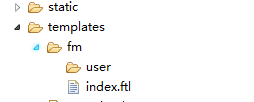
3、建立文件夹
1)src/main/resources/templates/fm/user/
2)建立一个index.ftl
3)user文件夹下面建立一个user.html
4、简单测试代码编写和访问
4、SpringBoot2.x整合模板引擎thymeleaf实战
讲解:SpringBoot2.x整合模板引擎thymeleaf实战
package net.xdclass.demo.controller;

import net.xdclass.demo.domain.ServerSettings;

import org.springframework.beans.factory.annotation.Autowired;

import org.springframework.stereotype.Controller;

import org.springframework.ui.ModelMap;

import org.springframework.web.bind.annotation.GetMapping;

import org.springframework.web.bind.annotation.RequestMapping;

@Controller

@RequestMapping("/freemaker")

public class FreemakerController {

    @Autowired

    private ServerSettings setting;

    @GetMapping("hello")

    public String index(ModelMap modelMap){

        modelMap.addAttribute("setting", setting);

        return "fm/index";  //不用加后缀,在配置文件里面已经指定了后缀

    }

}
freemakerController
官网地址:https://www.thymeleaf.org/doc/articles/thymeleaf3migration.html
1、thymeleaf相关maven依赖
<dependency>
<groupId>org.springframework.boot</groupId>
<artifactId>spring-boot-starter-thymeleaf</artifactId>
</dependency>
2、thymeleaf基础配置
#开发时关闭缓存,不然没法看到实时页面
spring.thymeleaf.cache=false
spring.thymeleaf.mode=HTML5
#前缀
spring.thymeleaf.prefix=classpath:/templates/
#编码
spring.thymeleaf.encoding=UTF-8
#类型
spring.thymeleaf.content-type=text/html
#名称的后缀
spring.thymeleaf.suffix=.html
3、建立文件夹
1)src/main/resources/templates/tl/
2)建立一个index.html
4、简单测试代码编写和访问
注意:$表达式只能写在th标签内部
快速入门:https://www.thymeleaf.org/doc/articles/standarddialect5minutes.html
import net.xdclass.demo.domain.ServerSettings;

import org.springframework.beans.factory.annotation.Autowired;

import org.springframework.stereotype.Controller;

import org.springframework.ui.ModelMap;

import org.springframework.web.bind.annotation.GetMapping;

import org.springframework.web.bind.annotation.RequestMapping;

@Controller

@RequestMapping("/tyhmeleaf")

public class ThymeleafController {

    @Autowired

    private ServerSettings setting;

    @GetMapping("hello")

    public String index(){

        return "index";  //不用加后缀,在配置文件里面已经指定了后缀

    }

    @GetMapping("info")

    public String admin(ModelMap modelMap){

        modelMap.addAttribute("setting", setting);

        return "admin/info";  //不用加后缀,在配置文件里面已经指定了后缀

    }

}
thyleafController
【SpringBoot】常用Starter介绍和整合模板引擎Freemaker、thymeleaf的更多相关文章
- SpringBoot常用Starter介绍和整合模板引擎Freemaker、thymeleaf 4节课
1.SpringBoot Starter讲解 简介:介绍什么是SpringBoot Starter和主要作用 1.官网地址:https://docs.spring.io/spring-boot/doc ...
- 小D课堂 - 零基础入门SpringBoot2.X到实战_第7节 SpringBoot常用Starter介绍和整合模板引擎Freemaker、thymeleaf_28..SpringBoot Starter讲解
笔记 1.SpringBoot Starter讲解 简介:介绍什么是SpringBoot Starter和主要作用 1.官网地址:https://docs.spring.io/spring-b ...
- springboot配置server相关配置&整合模板引擎Freemarker、thymeleaf&thymeleaf基本用法&thymeleaf 获取项目路径 contextPath 与取session中信息
1.Springboot配置server相关配置(包括默认tomcat的相关配置) 下面的配置也都是模板,需要的时候在application.properties配置即可 ############## ...
- SpringBoot入门系列(四)整合模板引擎Thymeleaf
前面介绍了Spring Boot的优点,然后介绍了如何快速创建Spring Boot 项目.不清楚的朋友可以看看之前的文章:https://www.cnblogs.com/zhangweizhong/ ...
- SpringBoot第九集:整合JSP和模板引擎Freemarker/Thymeleaf(2020最新最易懂)
SpringBoot第九集:整合JSP和模板引擎(2020最新最易懂) 当客户通过前端页面提交请求后,我们以前是怎么做的?后端接收请求数据,处理请求,把响应结果交给模板引擎JSP,最后将渲染后的JSP ...
- Spring Boot整合模板引擎jsp
jsp也算是一种模板引擎吧.整合jsp前,先说一下运行SpringBoot项目的几种方式 1. 运行SpringBoot项目的几种方式 1.1 使用内嵌Tomcat运行项目 在IDE中右键运行启动类, ...
- SpringBoot系列:Spring Boot使用模板引擎FreeMarker
一.Java模板引擎 模板引擎(这里特指用于Web开发的模板引擎)是为了使用户界面与业务数据(内容)分离而产生的,它可以生成特定格式的文档,用于网站的模板引擎就会生成一个标准的HTML文档. 在jav ...
- SpringBoot系列:Spring Boot使用模板引擎Thymeleaf
一.Java模板引擎 模板引擎(这里特指用于Web开发的模板引擎)是为了使用户界面与业务数据(内容)分离而产生的,它可以生成特定格式的文档,用于网站的模板引擎就会生成一个标准的HTML文档. 在jav ...
- SpringBoot系列:Spring Boot使用模板引擎JSP
一.Java模板引擎 模板引擎(这里特指用于Web开发的模板引擎)是为了使用户界面与业务数据(内容)分离而产生的,它可以生成特定格式的文档,用于网站的模板引擎就会生成一个标准的HTML文档. 在jav ...
随机推荐
- CSS布局学习(三) - Normal Flow 正常布局流(官网直译)
默认情况下,元素是如何布局? 首先,取得元素的内容,加上内边距(padding),边框(border),外边距(margin)放在一个盒子中 - 这就是我们之前看到的盒子模型 默认情况下,块级元素的内 ...
- Hadoop EC 踩坑 :data block 缺失导致的 HDFS 传输速率下降
环境:hadoop-3.0.2 + 11 机集群 + RS-6-3-1024K 的EC策略 状况:某天,往 HDFS 上日常 put 业务数据时,发现传输速率严重下降 分析: 检查集群发现,在之前的传 ...
- 获取动态代理生成的.class文件
生成代理类,并写入硬盘:配置系统属性sun.misc.ProxyGenerator.saveGeneratedFile为true,代理类生成时将自动将生成的代理类写入硬盘 ? 1 2 3 4 5 6 ...
- centos7 安装xinetd,telnet
安装方式:yum [root@master ~]# yum list |grep telnettelnet-server.x86_64 1:0.17-59.el7 ...
- windows平台下安装linux
win10系统下,可直接安装linux系统,且可打开linux的命令行 安装 1.开始--->微软应用商店 进入之后,在搜索框,搜索linux 在搜索结果中,选择要安装的 linux 系统 这里 ...
- POJ-3233 Matrix Power Series 矩阵A^1+A^2+A^3...求和转化
S(k)=A^1+A^2...+A^k. 保利求解就超时了,我们考虑一下当k为偶数的情况,A^1+A^2+A^3+A^4...+A^k,取其中前一半A^1+A^2...A^k/2,后一半提取公共矩阵A ...
- HTML:foreach
<%@ page language="java" import="java.util.*" pageEncoding="UTF-8"% ...
- zzw原创_非root用户启动apache的问题解决(非root用户启动apache的1024以下端口)
场景:普通用户编译的apache,要在该用户下启动1024端口以下的apache端口 1.假设普通用户为sims20,用该用户编译 安装了一个apache,安装路径为/opt/aspire/produ ...
- tomcat服务器-谷歌等浏览器-加载本地图片等资源-报not allowed to load local resource的错误解决办法。
把文件存放路径目录映射到tomcat中,方法如下: 1.找到tomcat的配置文件(\conf\server.xml)并打开 2.在[host]与[/host]之间加入如下代码:[<Contex ...
- Php基本类型学习
1.8种基本的数据类型 1)四种基本类型 boolean (布尔类型) integer(整形类型) double (双精度类型) string (字符串类型) 2)两种复合类型 array (数组 ...