
SharePoint Excel Service - Couldn't Open the Workbook.
Error meesage:
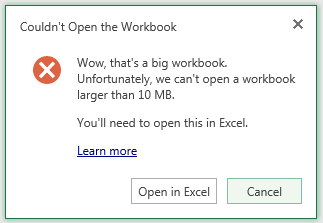
"Couldn't Open the Workbook. Wow, That's a big workbook. Unfortunately, we can't open a workbook larger than 10 MB. You'll need to open this in Excel."
Solution:
The reason for these errors is the size of the workbook that is being opened is larger that the maximum size of a workbook that can be opened in Excel Services. The maximum size can be configured in the Excel Services settings.
In order to change this value, open SharePoint Central Administration, and go to Application Management > Manage Service Applications > ExcelServiceApp > Trusted File Locations and click on the appropriate Address. Under the Workbook Properties section you will see a Maximum Workbook Size option. Set this value to the required file size in MB, and click OK to save the setting. To avoid the errors above, make sure the value is higher than the largest workbook size in SharePoint.
Reference Blog:
Excel Services – Large Workbook Error
You may receive one of the following errors when attempting to view an Excel workbook in SharePoint depending on your version of SharePoint:
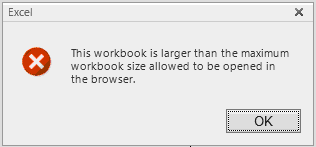
"This workbook is larger than the maximum workbook size allowed to be opened in the browser."
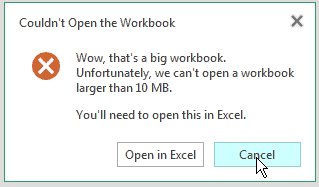
"Couldn't Open the Workbook. Wow, That's a big workbook. Unfortunately, we can't open a workbook larger than 10 MB. You'll need to open this in Excel."
The reason for these errors is the size of the workbook that is being opened is larger that the maximum size of a workbook that can be opened in Excel Services. The maximum size can be configured in the Excel Services settings.
In order to change this value, open SharePoint Central Administration, and go to Application Management > Manage Service Applications > ExcelServiceApp > Trusted File Locations and click on the appropriate Address. Under the Workbook Properties section you will see a Maximum Workbook Size option. Set this value to the required file size in MB, and click OK to save the setting. To avoid the errors above, make sure the value is higher than the largest workbook size in SharePoint.
Another error you may see in SharePoint with large workbooks is the following:
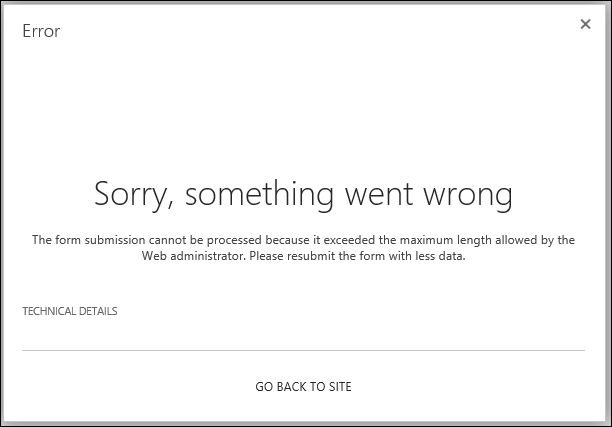
"Sorry, something went wrong. The form submission cannot be processed because it exceeded the maximum length allowed by the Web administrator. Please resubmit the form with less data."
You may encounter the error when you try to publish a large workbook to SharePoint that exceeds SharePoint’s Maximum Upload Size. You can increase this value by going to the following setting in SharePoint Central Administration:
Application Management > Web Applications > Manage web applications > (Choose Web Application) > General Settings > Maximum Upload Size
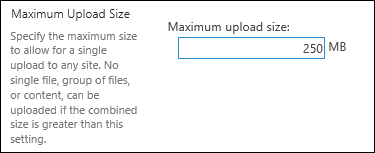
Increase the value to a value larger than the size of the workbook causing the error. After saving the value, you should be able to upload the file successfully.
Additional Articles:
Error "Request timed out" when you try to upload a large file to a document library on a Windows SharePoint Services 3.0 site
http://support.microsoft.com/kb/925083
Configure Maximum File Upload Size (PowerPivot for SharePoint)
http://technet.microsoft.com/en-us/library/ff487972.aspx
Issues Uploading Large Files To SharePoint
http://blogs.technet.com/b/praveenh/archive/2012/11/16/issues-with-uploading-large-documents-on-document-library-wss-3-0-amp-moss-2007.aspx
SharePoint Excel Service - Couldn't Open the Workbook.的更多相关文章
- SharePoint excel service web part 连接到 filter web part
本文讲述SharePoint excel service web part 连接到 filter web part的一个简单应用场景. SharePoint excel service web par ...
- 修改Sharepoint 文档库列表点击Excel文件默认跳转到Excel Service服务 xlviewer.aspx页面
在Sharepoint 文档库中,当点击库中的一个Excel文件时,Sharepoint默认为转跳到Excel Services上,无论是Sharepoint 的是否开启了Excel Service, ...
- SharePoint Excel Service-PowerShell
1. 创建一个信任的文件路径 New-SPExcelFileLocation -Address "http://sp2010/Excel Workbooks" -ExcelServ ...
- SharePoint Web service and template
SharePoint Web service对应的映射列表 WSS Web Services Web Reference Administration Service http://<s ...
- Sharepoint2013商务智能学习笔记之Excel Service服务配置(四)
第一步,新建Excel Service应用程序 第二步,管理中心,在应用程序管理区域点管理服务应用程序,进入应用程序管理列表, 再点击刚才新建好的ExcelServiceApplication进入ex ...
- User Get 'Access Denied' with Excel Service WebPart
用户可以访问网站,并且具有相应的访问权限. 用户尝试了其他浏览器和IE的其他版本. 解决: 将用户添加到 ‘Excel Services Views’ 这个SharePoint组就OK了.
- SharePoint 2013 Service 状态无法启动,显示“启动中(Starting)”
Problem 在SharePoint 2013 Central Administration中启动 SharePoint Service(也称为:Service Machine Instance)时 ...
- 使用POI进行Excel操作的总结一——创建Workbook,Sheet,Row以及Cell
前段时间,看在其他的网站上给出Excel文档的导入与导出操作,感觉很酷的样子,所以就学习了一下如何使用POI进行Excel的操作,现在对之前的学习过程进行一个总结. 一.现在普遍使用的Excel文档有 ...
- JAVA读取Excel中内容(HSSF和Workbook两种方法)
内容添加,以前是用的HSSF,前几天帮同学写一个统计表用了Workbook,现在码一下. ---新内容(Workbook)--- 同学要统计一个xls表格,让表1里面的某一列内容对表2里面的每列进行匹 ...
随机推荐
- 05. Matplotlib 1 |图表基本元素| 样式参数| 刻度 注释| 子图
1.Matplotlib简介及图表窗口 Matplotlib → 一个python版的matlab绘图接口,以2D为主,支持python.numpy.pandas基本数据结构,运营高效且有较丰富的图表 ...
- VMware下centos7安装
VMware下centos7安装 转载地址:https://blog.csdn.net/hui_2016/article/details/68927487 一. 软件准备 二. Vmware12安装 ...
- execution(* com.sample.service.impl..*.*(..))
execution(* com.sample.service.impl..*.*(..)) 解释如下: 符号 含义 execution() 表达式的主体: 第一个”*“符号 表示返回值的类型任意: c ...
- HDU 5178 pairs【二分】||【尺取】
<题目链接> 题目大意: 给定一个整数序列,求出绝对值小于等于k的有序对个数. 解题分析: $O(nlong(n))$的二分很好写,这里就不解释了.本题尺取$O(n)$也能做,并且效率很不 ...
- Typescript中抽象类与接口详细对比与应用场景介绍
现如今,TS正在逐渐成为前端OO编程的不二之选,以下是我在学习过程中对抽象类和接口做的横向对比. 1. 抽象类当做父类,被继承.且抽象类的派生类的构造函数中必须调用super():接口可以当做“子类” ...
- Java简介及开发环境配置
Java简介 Java是由Sun Microsystems公司于1995年5月推出的Java程序设计语言和Java平台的总称.(注:Sun公司已于2009年04月20日被Oracle公司收购) 目前, ...
- shell编程第二天
- 说说nginx,iis,apache,tomcat
一.nginx ngnix是反向代理服务器,它是代理,本身并不执行,是个传话筒,把用户提交的请求转发给web服务器,再把web服务器的结果转发给用户.为了提高性能,启用反向代理,实际的web服务器可以 ...
- CCF-学生排队
PS:此文章已在我的站点更新,请移步访问~更多注释讲解哦.https://www.jeson.xin/ccf-student_queuing.html
- 2019-1-23IntelliJ IDEAget的使用教程及出现的问题
第一条:快捷键: Ctrl+Alt+h:显示调用当前方法的所有位置. Ctrl+Alt+B:跳转到方法实现处 自动修正,我这是 Alt + L Ctrl+Enter,导入包,自动修正Ctrl+Alt+ ...