
在CentOS7服务器端启动jupyter notebook服务,在windows端使用jupyter notebook,服务器充当后台计算云端
在CentOS7服务器端启动jupyter notebook服务,在windows端使用jupyter notebook,服务器充当后台计算云端
在服务器端启动jupyter notebook服务,在windows端使用jupyter notebook,服务器充当后台计算云端
在服务器端启动jupyter notebook
(base) [jiangshan@localhost keras]$ jupyter notebook
[I 08:37:13.550 NotebookApp] Writing notebook server cookie secret to /run/user/1001/jupyter/notebook_cookie_secret
[I 08:37:15.081 NotebookApp] JupyterLab extension loaded from /home/jiangshan/anaconda3/lib/python3.7/site-packages/jupyterlab
[I 08:37:15.081 NotebookApp] JupyterLab application directory is /home/jiangshan/anaconda3/share/jupyter/lab
[I 08:37:15.084 NotebookApp] Serving notebooks from local directory: /home/jiangshan/workspace/keras
[I 08:37:15.084 NotebookApp] The Jupyter Notebook is running at:
[I 08:37:15.084 NotebookApp] http://localhost:8888/?token=21f607d8864b2ce268922e53b14af8e7c11714c8290547d2
[I 08:37:15.085 NotebookApp] Use Control-C to stop this server and shut down all kernels (twice to skip confirmation).
[W 08:37:15.103 NotebookApp] No web browser found: could not locate runnable browser.
[C 08:37:15.104 NotebookApp]
To access the notebook, open this file in a browser:
file:///run/user/1001/jupyter/nbserver-18076-open.html
Or copy and paste one of these URLs:
http://localhost:8888/?token=21f607d8864b2ce268922e53b14af8e7c11714c8290547d2
在windows端,将服务器的8888端口重定向到windows端(做了映射绑定):
ssh -L 8888:127.0.0.1:8888 jiangshan@192.168.1.191
【第一个8888为windows端端口,第二个8888服务器端端口】
在windows端,浏览器输入:
http://localhost:8888/tree【或http://127.0.0.1:8888】
登录
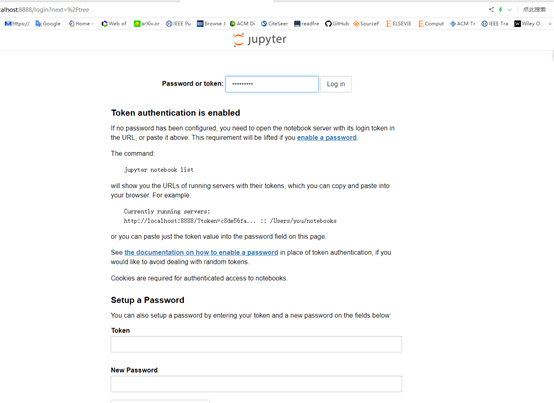
OMG 不知道密码????
回到CentOS7服务器端
(base) [jiangshan@localhost keras]$ jupyter notebook --generate-config
Writing default config to: /home/jiangshan/.jupyter/jupyter_notebook_config.py
vim /home/jiangshan/.jupyter/jupyter_notebook_config.py
命令模式下输入查找NotebookApp.allow_password_change: /NotebookApp.allow_password_change,并按Enetr
NotebookApp.allow_password_change=False 【去掉注释】
(base) [jiangshan@localhost keras]$ vim /home/jiangshan/.jupyter/jupyter_notebook_config.py
(base) [jiangshan@localhost keras]$ jupyter notebook password
Enter password:
Verify password:
[NotebookPasswordApp] Wrote hashed password to /home/jiangshan/.jupyter/jupyter_notebook_config.json
内容:
{
"NotebookApp": {
"password": "sha1:b78610c54d93:7099a2a12725948960a00760b"
}
}
(base) [jiangshan@localhost keras]$ vim /home/jiangshan/.jupyter/jupyter_notebook_config.py
命令模式下输入查找c.NotebookApp.password: /c.NotebookApp.password,并按Enetr
# The string should be of the form type:salt:hashed-password.
c.NotebookApp.password = 'sha1:b78610c54d93:7099a2a127c55d18960a00760b'【加上sha1:....,去掉注释】
(base) [jiangshan@localhost keras]$ jupyter notebook
[I 09:09:20.691 NotebookApp] JupyterLab extension loaded from /home/jiangshan/anaconda3/lib/python3.7/site-packages/jupyterlab
[I 09:09:20.691 NotebookApp] JupyterLab application directory is /home/jiangshan/anaconda3/share/jupyter/lab
[I 09:09:20.693 NotebookApp] Serving notebooks from local directory: /home/jiangshan/workspace/keras
[I 09:09:20.693 NotebookApp] The Jupyter Notebook is running at:
[I 09:09:20.693 NotebookApp] http://localhost:8888/
[I 09:09:20.694 NotebookApp] Use Control-C to stop this server and shut down all kernels (twice to skip confirmation).
[W 09:09:20.699 NotebookApp] No web browser found: could not locate runnable browser.
在Windows端,dos或anaconda自带的Prompt终端
输入:ssh -L 8888:127.0.0.1:8888 jiangshan@192.168.1.191
(base) F:\workspace\GitHub_web_download\keras\examples>ssh -L 8888:127.0.0.1:8888 jiangshan@192.168.1.191
jiangshan@192.168.1.191's password:
Last login: Thu Mar 14 08:39:28 2019 from 192.168.1.72
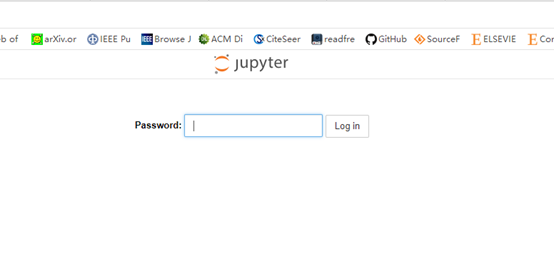
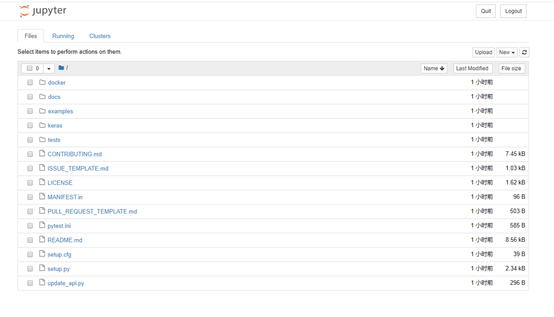
打开浏览器,输入
http://127.0.0.1:8888【或http://localhost:8888/tree】
在CentOS7服务器端启动jupyter notebook服务,在windows端使用jupyter notebook,服务器充当后台计算云端的更多相关文章
- 在windows端使用jupyter notebook,服务器充当后台计算云端 简化描述
在CentOS7服务器端启动jupyter notebook服务,在windows端使用jupyter notebook,服务器充当后台计算云端 简化描述 CentOS7服务器端 jupyter no ...
- Windows下的Jupyter Notebook 安装与自定义启动(图文详解)
不多说,直接上干货! 前期博客 Windows下的Python 3.6.1的下载与安装(适合32bits和64bits)(图文详解) 这是我自定义的Python 的安装目录 (D:\SoftWare\ ...
- SpringBoot 在CentOS7部署,注册为服务,开机启动
1.首先在maven工程的pom文件中引入以下标签并保存 <build> <plugins> <plugin> <groupId>org.springf ...
- centos7 查看启动ntp服务命令
标签(空格分隔): centos7 系统 1. 查看ntp服务命令: [root@node1 ~]# systemctl status ntpd * ntpd.service - Network Ti ...
- Linux操作系统-CentOS7启动流程和服务管理
Linux操作系统-CentOS7启动流程和服务管理 作者:尹正杰 版权声明:原创作品,谢绝转载!否则将追究法律责任. 一.systemd POST --> Boot Sequence --&g ...
- Windows下的Jupyter Notebook 安装与自定义启动
1.Jupyter Notebook 和 pip 为了更加方便地写 Python 代码,还需要安装 Jupyter notebook. 利用 pip 安装 Jupyter notebook. 为什么要 ...
- 阿里云下 centos7下启动程序总是被killed ,看内存占用情况以检查哪些服务存在问题并调整参数作调优
很久不搭理自己的网站了,几天突然发现启动程序总是被killed, 于是查看了系统日志 vi /var/log/messages 发现出现 kernel: Out of memory: Kill pro ...
- 用scp命令来通过ssh传输文件,ssh推送.py程序到CentOS7服务器端出现lost connection错误
ssh推送.py程序到CentOS7服务器端运行出现lost connection错误 (base) F:\workspace>dir 驱动器 F 中的卷是 新加卷 卷的序列号是 C2B9-62 ...
- ubuntu下设置jupyter notebook 2017年07月29日 19:28:34 小旋锋 阅读数:8329 标签: ubuntu 更多 个人分类: python 二三事 来源:http://blog.csdn.net/suzyu12345/article/details/51037905 Ipython Notebook现在已经改名为Ipython jupyter,是最知名最好用的
ubuntu下设置jupyter notebook 来源:http://blog.csdn.net/suzyu12345/article/details/51037905 Ipython No ...
随机推荐
- node通过QQ邮箱发送邮件
在nodejs里面使用插件,不多说,首先下载: npm install emailjs 下载好之后,先别急着写代码,应该先设置一下,我这里用QQ邮箱举例子. 首先登陆QQ邮箱,然后点击:设置-> ...
- lfs(systemv版本)学习笔记-第1页
我的邮箱地址:zytrenren@163.com欢迎大家交流学习纠错! 一名linux爱好者,记录构建Linux From Scratch的过程 经博客园-骏马金龙前辈介绍,开始接触学习lfs,用博客 ...
- 将表格导出为excel
<table id="tableExcel" border="1"> <tr> <th>零</th> <t ...
- mock数据的基础使用
一.应用场景 在我们自己做一个项目时,会遇到后端还没完成数据输出或者接口没写好的情况.你没有办法想后台获取数据,这时候需要前端只好自己写静态模拟数据(假数据).mockjs就是用来创造假数据的,他的用 ...
- 警告!中国90%AI初创企业将在两年内落败出局
https://mp.weixin.qq.com/s/-RkyLda1jovaHBlBTsi-BA 近年来,中国涌现了一大批AI初创企业,但AI热潮也伴随着泡沫.由于近期市场资金紧缩,投资者发出警告, ...
- http请求之get和post的区别
前言:大家现在度娘一下,查得最多的区别,可能就是: “Get把参数写在URL中,Post通过请求体来传参的” “GET没有POST安全,因为Get参数直接显示在URL上” “Get请求在URL中传送的 ...
- CloudSim——云计算仿真软件概述
CloudSim是由澳大利亚墨尔本大学的网格实验室和Gridbus项目宣布推出的云计算仿真软件. CloudSim是做什么的呢?可以简单理解为一个帮助研究.开发.测试的工具,如虚拟机资源分配算法.节能 ...
- 【转】MySQL:日期函数、时间函数总结(MySQL 5.X)
转自:http://www.cnblogs.com/she27/articles/1377089.html 一.MySQL 获得当前日期时间 函数1.1 获得当前日期+时间(date + time)函 ...
- Android--实现ViewPager边界回弹效果(转)
该View转自 http://blog.csdn.net/Kalwang/article/details/4708721 ,感谢这位大神. public class BounceBackView ...
- SOAP REST
SOAP是基于RPC原理,是传统程序的函数调用和返回在RPC中被请求和应答代替了而已. SOAP Simple Object Access Protocol,是一种严格定义的信息交换协议,用于在web ...