
小学四则运算APP 第二次冲刺-第二天
团队成员:陈淑筠、杨家安、陈曦
团队选题:小学四则运算APP
第二次冲刺阶段时间:11.29~12.09
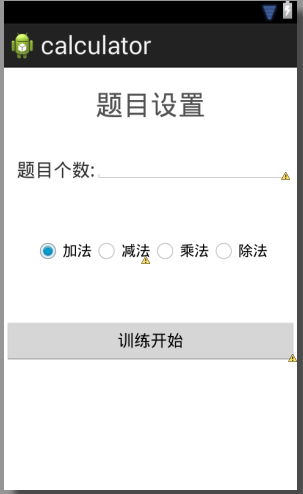
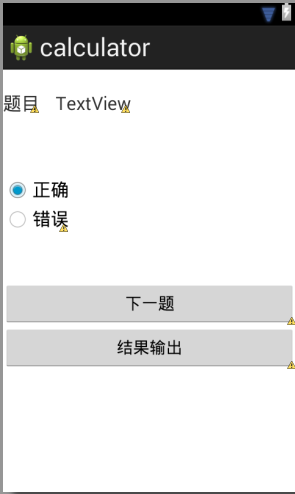
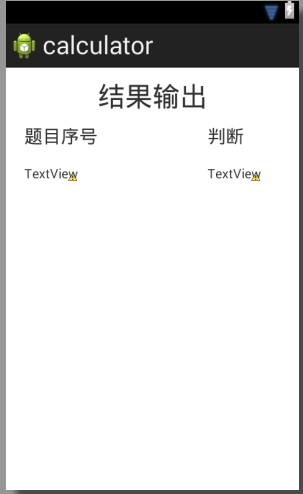
本次发布的判断题功能界面的设置;
activity_panduan_set.xml:
<?xml version="1.0" encoding="utf-8"?>

<RelativeLayout xmlns:android="http://schemas.android.com/apk/res/android"

    android:id="@+id/RelativeLayout1"

    android:layout_width="match_parent"

    android:layout_height="match_parent"

    android:orientation="vertical" >

    <TextView

        android:id="@+id/textView1"

        android:layout_width="wrap_content"

        android:layout_height="wrap_content"

        android:layout_alignParentTop="true"

        android:layout_centerHorizontal="true"

        android:layout_marginTop="23dp"

        android:text="@string/title_activity_set"

        android:textSize="30sp" />

       <RadioGroup

           android:id="@+id/group"

           android:layout_width="wrap_content"

           android:layout_height="wrap_content"

           android:layout_below="@+id/textView1"

           android:layout_centerHorizontal="true"

           android:layout_marginTop="125dp"

           android:orientation="horizontal" >

           <RadioButton

               android:id="@+id/radio0"

               android:layout_width="wrap_content"

               android:layout_height="wrap_content"

               android:checked="true"

               android:text="@string/add" />

           <RadioButton

               android:id="@+id/radio2"

               android:layout_width="wrap_content"

               android:layout_height="wrap_content"

               android:layout_alignLeft="@+id/radio0"

               android:layout_below="@+id/radio0"

               android:text="@string/jian" />

           <RadioButton

               android:id="@+id/radio3"

               android:layout_width="wrap_content"

               android:layout_height="wrap_content"

               android:text="@string/cheng" />

           <RadioButton

               android:id="@+id/radio4"

               android:layout_width="wrap_content"

               android:layout_height="wrap_content"

               android:text="@string/chu" />

       </RadioGroup>

       <TextView

           android:id="@+id/textView2"

           android:layout_width="wrap_content"

           android:layout_height="wrap_content"

           android:layout_alignParentLeft="true"

           android:layout_below="@+id/textView1"

           android:layout_marginLeft="14dp"

           android:layout_marginTop="41dp"

           android:text="@string/the_number_of_calculator"

           android:textSize="20sp" />

       <EditText

           android:id="@+id/number1"

           android:layout_width="wrap_content"

           android:layout_height="wrap_content"

           android:layout_alignBottom="@+id/textView2"

           android:layout_toRightOf="@+id/textView2"

           android:ems="10"

           android:inputType="number" />

       <Button

           android:id="@+id/xunlian"

           android:layout_width="wrap_content"

           android:layout_height="wrap_content"

           android:layout_alignParentLeft="true"

           android:layout_alignParentRight="true"

           android:layout_below="@+id/group"

           android:layout_marginTop="58dp"

           android:text="训练开始" />

</RelativeLayout>
activtity_panduan.xml:
<?xml version="1.0" encoding="utf-8"?>

<RelativeLayout xmlns:android="http://schemas.android.com/apk/res/android"

    android:id="@+id/RelativeLayout1"

    android:layout_width="match_parent"

    android:layout_height="match_parent"

    android:orientation="vertical" >

    <TextView

        android:id="@+id/textView1"

        android:layout_width="wrap_content"

        android:layout_height="wrap_content"

        android:layout_alignParentLeft="true"

        android:layout_alignParentTop="true"

        android:layout_marginTop="25dp"

        android:text="题目"

        android:textSize="20sp" />

    <TextView

        android:id="@+id/textView2"

        android:layout_width="wrap_content"

        android:layout_height="wrap_content"

        android:layout_alignBaseline="@+id/textView1"

        android:layout_alignBottom="@+id/textView1"

        android:layout_marginLeft="17dp"

        android:layout_toRightOf="@+id/textView1"

        android:text="TextView"

        android:textSize="20sp"/>

      <RadioGroup

          android:id="@+id/group"

          android:layout_width="wrap_content"

          android:layout_height="wrap_content"

          android:layout_alignParentLeft="true"

          android:layout_below="@+id/textView1"

          android:layout_marginTop="66dp"

          android:orientation="vertical" >

          <RadioButton

              android:id="@+id/right"

              android:layout_width="wrap_content"

              android:layout_height="wrap_content"

              android:checked="true"

              android:text="@string/right"

              android:textSize="20sp" />

          <RadioButton

              android:id="@+id/wrong"

              android:layout_width="wrap_content"

              android:layout_height="wrap_content"

              android:layout_alignLeft="@+id/radio0"

              android:layout_below="@+id/radio0"

              android:text="@string/wrong"

              android:textSize="20sp" />

      </RadioGroup>

      <Button

          android:id="@+id/button1"

          android:layout_width="wrap_content"

          android:layout_height="wrap_content"

          android:layout_alignParentLeft="true"

          android:layout_alignParentRight="true"

          android:layout_below="@+id/group"

          android:layout_marginTop="52dp"

          android:text="下一题" />

      <Button

          android:id="@+id/button2"

          android:layout_width="wrap_content"

          android:layout_height="wrap_content"

          android:layout_alignParentLeft="true"

          android:layout_alignParentRight="true"

          android:layout_below="@+id/button1"

          android:text="结果输出" />

</RelativeLayout>
activity_panduan_result.xml:
<?xml version="1.0" encoding="utf-8"?>

<RelativeLayout xmlns:android="http://schemas.android.com/apk/res/android"

    android:id="@+id/RelativeLayout1"

    android:layout_width="match_parent"

    android:layout_height="match_parent"

    android:orientation="vertical" >

    <TextView

        android:id="@+id/textView1"

        android:layout_width="wrap_content"

        android:layout_height="wrap_content"

        android:layout_alignParentTop="true"

        android:layout_centerHorizontal="true"

        android:layout_marginTop="14dp"

        android:text="@string/result"

        android:textSize="30sp"/>

    <TextView

        android:id="@+id/textView3"

        android:layout_width="wrap_content"

        android:layout_height="wrap_content"

        android:layout_alignBottom="@+id/textView2"

        android:layout_toRightOf="@+id/textView1"

        android:text="@string/panduan"

        android:textSize="20sp" />

    <TextView

        android:id="@+id/textView2"

        android:layout_width="wrap_content"

        android:layout_height="wrap_content"

        android:layout_below="@+id/textView1"

        android:layout_marginTop="14dp"

        android:layout_toLeftOf="@+id/textView1"

        android:text="@string/number"

        android:textSize="20sp" />

    <TextView

        android:id="@+id/thenumber"

        android:layout_width="wrap_content"

        android:layout_height="wrap_content"

        android:layout_alignLeft="@+id/textView2"

        android:layout_below="@+id/textView2"

        android:layout_marginTop="20dp"

        android:text="TextView" />

    <TextView

        android:id="@+id/pan"

        android:layout_width="wrap_content"

        android:layout_height="wrap_content"

        android:layout_alignBaseline="@+id/thenumber"

        android:layout_alignBottom="@+id/thenumber"

        android:layout_toRightOf="@+id/textView1"

        android:text="TextView" />

</RelativeLayout>
小学四则运算APP 第二次冲刺-第二天的更多相关文章
- 小学四则运算APP 第一阶段冲刺 第二天-补
团队成员:陈淑筠.杨家安.陈曦 团队选题:小学四则运算APP 第一次冲刺阶段时间:11.17~11.27 本次发布已经解决上次问题,问题是写程序逻辑错误,问题已经修改!我们还增加两个模块的面板设置,如 ...
- 小学四则运算APP 第一个冲刺 第二天
团队成员:陈淑筠.杨家安.陈曦 团队选题:小学四则运算APP 第一次冲刺阶段时间:11.17~11.27 本次程序是为了解决上次判断的问题,但是还是出现新的问题页面无法调整,需要进行改进 本次改进代码 ...
- 小学四则运算APP 第一个冲刺 第八天
团队成员:陈淑筠.杨家安.陈曦 团队选题:小学四则运算APP 第一次冲刺阶段时间:11.17~11.27 本次发布的是还未完成的功能二(选择题): ChoiceActivity.java: packa ...
- 小学四则运算APP 第一个冲刺 第七天
团队成员:陈淑筠.杨家安.陈曦 团队选题:小学四则运算APP 第一次冲刺阶段时间:11.17~11.27 本次发布的是完成的功能一: 程序代码: MainActivity代码: import andr ...
- 小学四则运算APP 第一个冲刺阶段 第六天
团队成员:陈淑筠.杨家安.陈曦 团队选题:小学四则运算APP 第一次冲刺阶段时间:11.17~11.27 本次发布的是重新排列整齐ResultActivity的布局代码activity_result. ...
- 小学四则运算APP 第一个冲刺阶段 第五天
团队成员:陈淑筠.杨家安.陈曦 团队选题:小学四则运算APP 第一次冲刺阶段时间:11.17~11.27 本次发布的是实现练习功能的成功 代码: public class CalculatorActi ...
- 小学四则运算APP 第一个冲刺阶段 第四天
团队成员:陈淑筠.杨家安.陈曦 团队选题:小学四则运算APP 第一次冲刺阶段时间:11.17~11.27 本次发布我们增加了CalculatorsActivity.java.YunsuanActivi ...
- 小学四则运算APP 第一个冲刺阶段 第三天
团队成员:陈淑筠.杨家安.陈曦 团队选题:小学四则运算APP 第一次冲刺阶段时间:11.17~11.27 本次发布是在与团队成员解决了昨天问题的基础上,再增加了几个界面,增加了一些功能,修改与增加的代 ...
- 小学四则运算APP 第一个冲刺阶段 第一天
团队成员:陈淑筠.杨家安.陈曦 团队选题:小学四则运算APP 第一次冲刺阶段时间:11.17~11.27 思考:初步了解小学四则运算数是在100以内的加减乘除,首先先从简单的地方入手,把最基础的算法功 ...
- 小学四则运算APP 第一阶段冲刺
需求分析 1.相关系统分析员向用户初步了解需求,然后用word列出要开发的系统的大功能模块,每个大功能模块有哪些小功能模块,对于有些需求比较明确相关的界面时,在这一步里面可以初步定义好少量的界面.[1 ...
随机推荐
- java 封装及this 用法
封装:主要用于将类中的成员名(类变量)通过 private关键字进行访问权限的设定,使用 private后,成员变量只能在当前类中进行访问,超过该类时访问提示不存在,当然也可以用于方法中,但较少.如果 ...
- 今天遇到一件开心事,在eclipse编写的代码在命令窗口中编译后无法运行,提示 “错误: 找不到或无法加载主类”
java中带package和不带package的编译运行方式是不同的. 首先来了解一下package的概念:简单定义为,package是一个为了方便管理组织java文件的目录结构,并防止不同java文 ...
- sql 查询重复行数据
1.查找表中多余的重复记录,重复记录是根据单个字段(peopleId)来判断select * from peoplewhere peopleId in (select peopleId from ...
- Djando 的 cmd命令
1.黑窗口命令 安装Django pip install django==1.11.16 -i https://pypi.doubanio.com/simple/ 创建项目 django-ad ...
- 使用KVM虚拟机遇到的问题(持续更新)
1.qemu-kvm.kvm.qemu 和 qemu-system-x86_64四种命令的差别 qemu 和 qemu-system-x86_64:启动qemu虚拟机的命令,x86_64为64位系统时 ...
- mysql用户操作、权限分配、远程登录设置
对最近mysql的常用运维命令进行整理 查看使用的哪个配置文件启动的mysql 1. ps aux|grep mysql|grep 'my.cnf' 如果启动的命令中选择了配置文件,则可以查询出来,也 ...
- (一) 天猫精灵接入Home Assistant- hass对接天猫精灵
1如何利用论坛的认证服务器对接天猫精灵 说起天猫精灵的接入,最早是由c1pher(25989406)大神通过开发自定义技能接入,后面qebabe大神进行了改进,可以直接通过HASS API读取hass ...
- 深入浅出的webpack4构建工具---比mock模拟数据更简单的方式(二十一)
如果想要了解mock模拟数据的话,请看这篇文章(https://www.cnblogs.com/tugenhua0707/p/9813122.html) 在实际应用场景中,总感觉mock数据比较麻烦, ...
- <<Linux kernel development>> Process Management
The Process On modern operating systems,processes provide two virtualizations:a virtualized processo ...
- android 环境的配置
经过了长达好几天的她探索,一直出现各种问题,然后,也是一个一个的解决,但最后,解决烦了,就觉得重新开始配置android的环境了. 原来一直都是版本的问题,因为我之前下载的都是2014的版本,而这个版 ...