
Android 获得本地IP地址、外网IP地址、本设备网络状态信息、本地Mac地址
本地内网IP和外网IP的区别:
根据我的经验一台电脑需要两个ip才可以上网,一个是本地的内网ip 一个是外网的ip
本地的ip 一般是192.168.1.2这种样子 只要在不同的路由器上可以重复
外网ip 可就不一样了全世界没有相同的 可以说每人一个
①
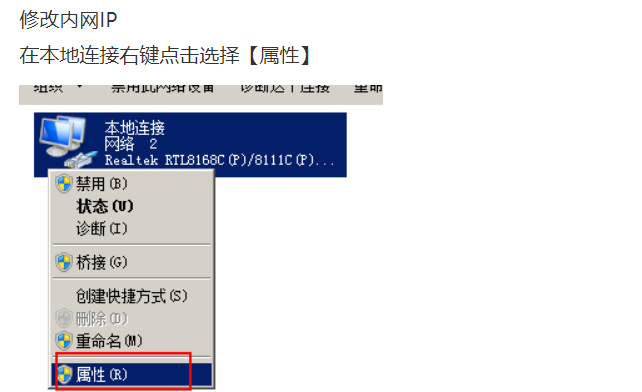
②
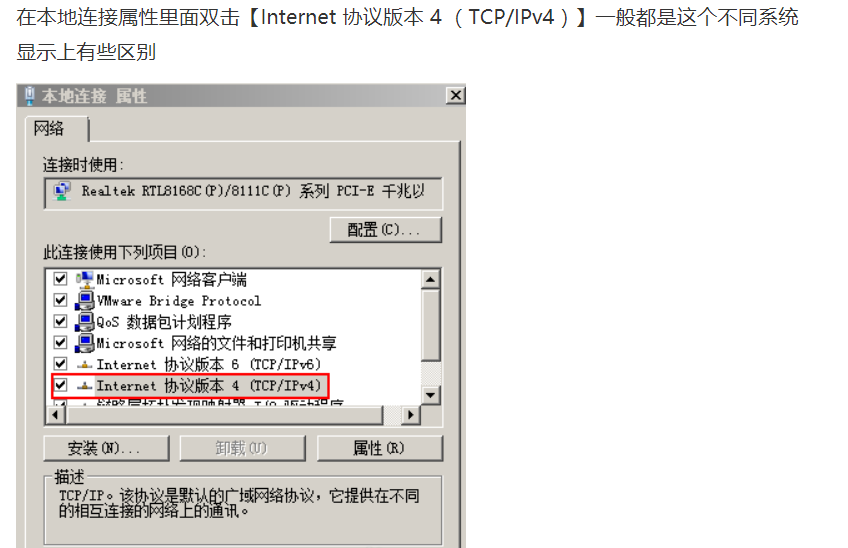
③
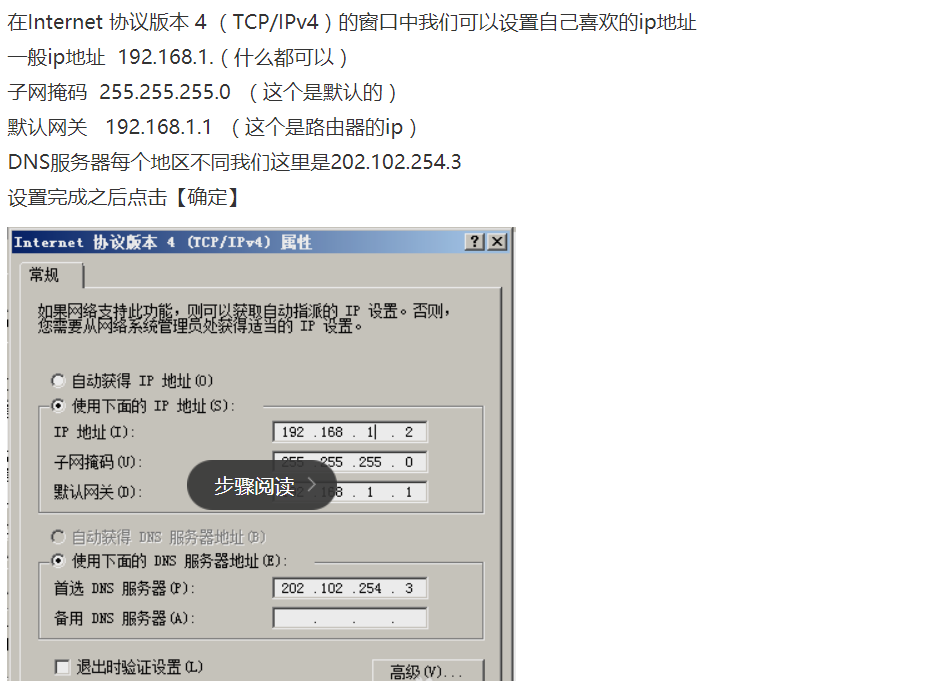
④

⑤
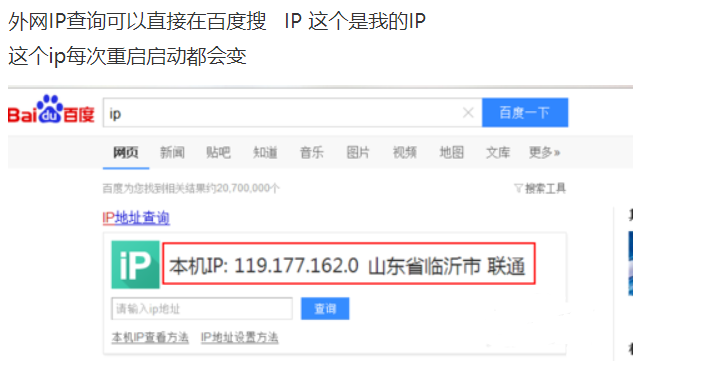
一、获得本地IP地址
获得本地IP地址有两种情况:一是wifi下,二是移动网络下
①wifi下
需要添加的权限:
<uses-permission android:name="android.permission.ACCESS_WIFI_STATE" />

    <uses-permission android:name="android.permission.CHANGE_WIFI_STATE" />

    <uses-permission android:name="android.permission.INTERNET"/>
主要方法:
 public void WifiClick(View v) {

         //获取wifi服务

         WifiManager wifiManager = (WifiManager) getSystemService(Context.WIFI_SERVICE);

         //判断wifi是否开启

         if (!wifiManager.isWifiEnabled()) {

             wifiManager.setWifiEnabled(true);

         }

         WifiInfo wifiInfo = wifiManager.getConnectionInfo();

         int ipAddress = wifiInfo.getIpAddress();

         String ip = intToIp(ipAddress);

         WifiIpView.setText("ip:" + ip);

     }
 //获取Wifi ip 地址

     private String intToIp(int i) {

         return (i & 0xFF) + "." +

                 ((i >> 8) & 0xFF) + "." +

                 ((i >> 16) & 0xFF) + "." +

                 (i >> 24 & 0xFF);

     }
②移动网络下
//写法一 :
1 //获取本地IP

     public static String getLocalIpAddress() {

         try {

             for (Enumeration<NetworkInterface> en = NetworkInterface

                     .getNetworkInterfaces(); en.hasMoreElements(); ) {

                 NetworkInterface intf = en.nextElement();

                 for (Enumeration<InetAddress> enumIpAddr = intf

                         .getInetAddresses(); enumIpAddr.hasMoreElements(); ) {

                     InetAddress inetAddress = enumIpAddr.nextElement();

                     if (!inetAddress.isLoopbackAddress() && !inetAddress.isLinkLocalAddress()) {

                         return inetAddress.getHostAddress().toString();

                     }

                 }

             }

         } catch (SocketException ex) {

             Log.e("WifiPreference IpAddress", ex.toString());

         }

         return null;

     }
 //写法二:

 /**

      * 获取内网ip地址

      * @return

      */

     public static String getHostIP() {

         String hostIp = null;

         try {

             Enumeration nis = NetworkInterface.getNetworkInterfaces();

             InetAddress ia = null;

             while (nis.hasMoreElements()) {

                 NetworkInterface ni = (NetworkInterface) nis.nextElement();

                 Enumeration<InetAddress> ias = ni.getInetAddresses();

                 while (ias.hasMoreElements()) {

                     ia = ias.nextElement();

                     if (ia instanceof Inet6Address) {

                         continue;// skip ipv6

                     }

                     String ip = ia.getHostAddress();

                     if (!"127.0.0.1".equals(ip)) {

                         hostIp = ia.getHostAddress();

                         break;

                     }

                 }

             }

         } catch (SocketException e) {

             Log.i("yao", "SocketException");

             e.printStackTrace();

         }

         return hostIp;

     }
 //写法三(推荐):

 public String getLocalIpV4Address() {

         try {

             String ipv4;

             ArrayList<NetworkInterface> nilist = Collections.list(NetworkInterface.getNetworkInterfaces());

             for (NetworkInterface ni: nilist)

             {

                 ArrayList<InetAddress>  ialist = Collections.list(ni.getInetAddresses());

                 for (InetAddress address: ialist){

                     if (!address.isLoopbackAddress() && !address.isLinkLocalAddress())

                     {

                         ipv4=address.getHostAddress();

                         return ipv4;

                     }

                 }

             }

         } catch (SocketException ex) {

             Log.e("localip", ex.toString());

         }

         return null;

     }
二、获得外网IP地址
权限:
<uses-permission android:name="android.permission.ACCESS_WIFI_STATE" />

<uses-permission android:name="android.permission.CHANGE_WIFI_STATE" />

<uses-permission android:name="android.permission.INTERNET"/>
方法:
 /**

      * 获取外网IP地址

      * @return

      */

     public void GetNetIp() {

         new Thread(){

             @Override

             public void run() {

                 String line = "";

                 URL infoUrl = null;

                 InputStream inStream = null;

                 try {

                     infoUrl = new URL("http://pv.sohu.com/cityjson?ie=utf-8");

                     URLConnection connection = infoUrl.openConnection();

                     HttpURLConnection httpConnection = (HttpURLConnection) connection;

                     int responseCode = httpConnection.getResponseCode();

                     if (responseCode == HttpURLConnection.HTTP_OK) {

                         inStream = httpConnection.getInputStream();

                         BufferedReader reader = new BufferedReader(new InputStreamReader(inStream, "utf-8"));

                         StringBuilder strber = new StringBuilder();

                         while ((line = reader.readLine()) != null)

                             strber.append(line + "\n");

                         inStream.close();

                         // 从反馈的结果中提取出IP地址

                         int start = strber.indexOf("{");

                         int end = strber.indexOf("}");

                         String json = strber.substring(start, end + 1);

                         if (json != null) {

                             try {

                                 JSONObject jsonObject = new JSONObject(json);

                                 line = jsonObject.optString("cip");

                             } catch (JSONException e) {

                                 e.printStackTrace();

                             }

                         }

                         Message msg = new Message();

                         msg.what = 1;

                         msg.obj = line;

                         //向主线程发送消息

                         handler.sendMessage(msg);

                     }

                 } catch (MalformedURLException e) {

                     e.printStackTrace();

                 } catch (IOException e) {

                     e.printStackTrace();

                 }

             }

         }.start();

     }
注意:主线程不可以进行联网,拷贝大文件等耗时操作,要在子线程中实现这些操作
三、获得设备网络设备状态信息
Context.getSystemService()这个方法是非常实用的方法,只须在参数里输入一个String 字符串常量就可得到对应的服务管理方法,可以用来获取绝大部分的系统信息,各个常量对应的含义如下:
WINDOW_SERVICE (“window”)
The top-level window manager in which you can place custom windows. The returned object is a WindowManager.LAYOUT_INFLATER_SERVICE (“layout_inflater”)
A LayoutInflater for inflating layout resources in this context.ACTIVITY_SERVICE (“activity”)
A ActivityManager for interacting with the global activity state of the system.POWER_SERVICE (“power”)
A PowerManager for controlling power management.- ALARM_SERVICE (“alarm”)
A AlarmManager for receiving intents at the time of your choosing. NOTIFICATION_SERVICE (“notification”)
A NotificationManager for informing the user of background events.KEYGUARD_SERVICE (“keyguard”)
A KeyguardManager for controlling keyguard.LOCATION_SERVICE (“location”)
A LocationManager for controlling location (e.g., GPS) updates.SEARCH_SERVICE (“search”)
A SearchManager for handling search.VIBRATOR_SERVICE (“vibrator”)
A Vibrator for interacting with the vibrator hardware.CONNECTIVITY_SERVICE (“connection”)
A ConnectivityManager for handling management of network connections.WIFI_SERVICE (“wifi”)
A WifiManager for management of Wi-Fi connectivity.WIFI_P2P_SERVICE (“wifip2p”)
A WifiP2pManager for management of Wi-Fi Direct connectivity.INPUT_METHOD_SERVICE (“input_method”)
An InputMethodManager for management of input methods.UI_MODE_SERVICE (“uimode”)
An UiModeManager for controlling UI modes.DOWNLOAD_SERVICE (“download”)
A DownloadManager for requesting HTTP downloadsBATTERY_SERVICE (“batterymanager”)
A BatteryManager for managing battery stateJOB_SCHEDULER_SERVICE (“taskmanager”)
A JobScheduler for managing scheduled tasksNETWORK_STATS_SERVICE (“netstats”)
A NetworkStatsManager for querying network usage statistics.
Note: System services obtained via this API may be closely associated with the Context in which they are obtained from. In general, do not share the service objects between various different contexts (Activities, Applications, Services, Providers, etc.)Parameters
name
The name of the desired service.- Returns
The service or null if the name does not exist
要获取IP地址需要用到Context.CONNECTIVITY_SERVICE,这个常量所对应的网络连接的管理方法。代码如下
需要添加权限:
<uses-permission android:name="android.permission.READ_PHONE_STATE"/>

<uses-permission android:name="android.permission.ACCESS_NETWORK_STATE" />
实现方法:
 public void AutoClick(View v){

         String ip;

         ConnectivityManager conMann = (ConnectivityManager)

                 this.getSystemService(Context.CONNECTIVITY_SERVICE);

         NetworkInfo mobileNetworkInfo = conMann.getNetworkInfo(ConnectivityManager.TYPE_MOBILE);

         // 需要<uses-permission android:name="android.permission.ACCESS_NETWORK_STATE" />

         NetworkInfo wifiNetworkInfo = conMann.getNetworkInfo(ConnectivityManager.TYPE_WIFI);

         if (mobileNetworkInfo.isConnected()) {

             ip = getLocalIpV4Address();

             AutoIpView.setText("IP:" + ip);

             System.out.println("本地ip-----"+ip);

         }else if(wifiNetworkInfo.isConnected())

         {

             WifiManager wifiManager = (WifiManager) getSystemService(Context.WIFI_SERVICE);

             WifiInfo wifiInfo = wifiManager.getConnectionInfo();

             int ipAddress = wifiInfo.getIpAddress();

             ip = intToIp(ipAddress);

             AutoIpView.setText("IP:" + ip);

             System.out.println("wifi_ip地址为------"+ip);

         }

     }
四、获取本地设备Mac地址
mac地址是网卡的唯一标识,通过这个可以判断网络当前连接的手机设备有几台,代码如下:
 public static String getMacAddress(){

  /*获取mac地址有一点需要注意的就是android 6.0版本后,以下注释方法不再适用,不管任何手机都会返回"02:00:00:00:00:00"这个默认的mac地址,这是googel官方为了加强权限管理而禁用了getSYstemService(Context.WIFI_SERVICE)方法来获得mac地址。*/

         //        String macAddress= "";

 //        WifiManager wifiManager = (WifiManager) MyApp.getContext().getSystemService(Context.WIFI_SERVICE);

 //        WifiInfo wifiInfo = wifiManager.getConnectionInfo();

 //        macAddress = wifiInfo.getMacAddress();

 //        return macAddress;

         String macAddress = null;

         StringBuffer buf = new StringBuffer();

         NetworkInterface networkInterface = null;

         try {

             networkInterface = NetworkInterface.getByName("eth1");

             if (networkInterface == null) {

                 networkInterface = NetworkInterface.getByName("wlan0");

             }

             if (networkInterface == null) {

                 return "02:00:00:00:00:02";

             }

             byte[] addr = networkInterface.getHardwareAddress();

             for (byte b : addr) {

                 buf.append(String.format("%02X:", b));

             }

             if (buf.length() > 0) {

                 buf.deleteCharAt(buf.length() - 1);

             }

             macAddress = buf.toString();

         } catch (SocketException e) {

             e.printStackTrace();

             return "02:00:00:00:00:02";

         }

         return macAddress;

     }

 }
项目代码:
MainActivity.java
 package com.example.lifen.myserver;

 import android.content.Context;

 import android.net.ConnectivityManager;

 import android.net.NetworkInfo;

 import android.net.wifi.WifiInfo;

 import android.net.wifi.WifiManager;

 import android.os.Bundle;

 import android.os.Handler;

 import android.os.Message;

 import android.support.v7.app.AppCompatActivity;

 import android.util.Log;

 import android.view.View;

 import android.widget.TextView;

 import org.json.JSONException;

 import org.json.JSONObject;

 import java.io.BufferedReader;

 import java.io.IOException;

 import java.io.InputStream;

 import java.io.InputStreamReader;

 import java.net.HttpURLConnection;

 import java.net.Inet6Address;

 import java.net.InetAddress;

 import java.net.MalformedURLException;

 import java.net.NetworkInterface;

 import java.net.SocketException;

 import java.net.URL;

 import java.net.URLConnection;

 import java.util.ArrayList;

 import java.util.Collections;

 import java.util.Enumeration;

 public class MainActivity extends AppCompatActivity {

     private TextView WifiIpView;

     private TextView GPRSIpView;

     private TextView NwIpView;

     private TextView AutoIpView;

     private TextView WwIpView;

     private TextView MacView;

     public Handler handler = new Handler(){

         @Override

         public void handleMessage(Message msg) {

             if(msg.what == 1){

                 WwIpView.setText("外网IP:" + msg.obj.toString());

             }

         }

     };

     public void onCreate(Bundle savedInstanceState) {

         super.onCreate(savedInstanceState);

         setContentView(R.layout.activity_main);

         WifiIpView = (TextView) findViewById(R.id.wifiIp);

         GPRSIpView = (TextView) findViewById(R.id.gprsIp);

         NwIpView = (TextView) findViewById(R.id.nwIp);

         WwIpView = (TextView) findViewById(R.id.wwIp);

         AutoIpView = (TextView) findViewById(R.id.autoIp);

         MacView = (TextView) findViewById(R.id.macView);

     }

     public void WifiClick(View v) {

         //获取wifi服务

         WifiManager wifiManager = (WifiManager) getSystemService(Context.WIFI_SERVICE);

         //判断wifi是否开启

         if (!wifiManager.isWifiEnabled()) {

             wifiManager.setWifiEnabled(true);

         }

         WifiInfo wifiInfo = wifiManager.getConnectionInfo();

         int ipAddress = wifiInfo.getIpAddress();

         String ip = intToIp(ipAddress);

         WifiIpView.setText("ip:" + ip);

     }

     public void GPRSClick(View v){

         GPRSIpView.setText("ip:" +getLocalIpAddress());

     }

     public void NwClick(View v){

         NwIpView.setText("内网Ip:" + getHostIP());

     }

     public void WwClick(View v){

         GetNetIp();

     }

     public void AutoClick(View v){

         String ip;

         ConnectivityManager conMann = (ConnectivityManager)

                 this.getSystemService(Context.CONNECTIVITY_SERVICE);

         NetworkInfo mobileNetworkInfo = conMann.getNetworkInfo(ConnectivityManager.TYPE_MOBILE);

         // 需要<uses-permission android:name="android.permission.ACCESS_NETWORK_STATE" />

         NetworkInfo wifiNetworkInfo = conMann.getNetworkInfo(ConnectivityManager.TYPE_WIFI);

         if (mobileNetworkInfo.isConnected()) {

             ip = getLocalIpV4Address();

             AutoIpView.setText("IP:" + ip);

             System.out.println("本地ip-----"+ip);

         }else if(wifiNetworkInfo.isConnected())

         {

             WifiManager wifiManager = (WifiManager) getSystemService(Context.WIFI_SERVICE);

             WifiInfo wifiInfo = wifiManager.getConnectionInfo();

             int ipAddress = wifiInfo.getIpAddress();

             ip = intToIp(ipAddress);

             AutoIpView.setText("IP:" + ip);

             System.out.println("wifi_ip地址为------"+ip);

         }

     }

     public void MacClick(View v){

         MacView.setText("Mac:" + getMacAddress());

     }

     //获取Wifi ip 地址

     private String intToIp(int i) {

         return (i & 0xFF) + "." +

                 ((i >> 8) & 0xFF) + "." +

                 ((i >> 16) & 0xFF) + "." +

                 (i >> 24 & 0xFF);

     }

     //获取本地IP

     public static String getLocalIpAddress() {

         try {

             for (Enumeration<NetworkInterface> en = NetworkInterface

                     .getNetworkInterfaces(); en.hasMoreElements(); ) {

                 NetworkInterface intf = en.nextElement();

                 for (Enumeration<InetAddress> enumIpAddr = intf

                         .getInetAddresses(); enumIpAddr.hasMoreElements(); ) {

                     InetAddress inetAddress = enumIpAddr.nextElement();

                     if (!inetAddress.isLoopbackAddress() && !inetAddress.isLinkLocalAddress()) {

                         return inetAddress.getHostAddress().toString();

                     }

                 }

             }

         } catch (SocketException ex) {

             Log.e("WifiPreference IpAddress", ex.toString());

         }

         return null;

     }

     /*

      */

     public String getLocalIpV4Address() {

         try {

             String ipv4;

             ArrayList<NetworkInterface> nilist = Collections.list(NetworkInterface.getNetworkInterfaces());

             for (NetworkInterface ni: nilist)

             {

                 ArrayList<InetAddress>  ialist = Collections.list(ni.getInetAddresses());

                 for (InetAddress address: ialist){

                     if (!address.isLoopbackAddress() && !address.isLinkLocalAddress())

                     {

                         ipv4=address.getHostAddress();

                         return ipv4;

                     }

                 }

             }

         } catch (SocketException ex) {

             Log.e("localip", ex.toString());

         }

         return null;

     }

     /**

      * 获取内网ip地址

      * @return

      */

     public static String getHostIP() {

         String hostIp = null;

         try {

             Enumeration nis = NetworkInterface.getNetworkInterfaces();

             InetAddress ia = null;

             while (nis.hasMoreElements()) {

                 NetworkInterface ni = (NetworkInterface) nis.nextElement();

                 Enumeration<InetAddress> ias = ni.getInetAddresses();

                 while (ias.hasMoreElements()) {

                     ia = ias.nextElement();

                     if (ia instanceof Inet6Address) {

                         continue;// skip ipv6

                     }

                     String ip = ia.getHostAddress();

                     if (!"127.0.0.1".equals(ip)) {

                         hostIp = ia.getHostAddress();

                         break;

                     }

                 }

             }

         } catch (SocketException e) {

             Log.i("yao", "SocketException");

             e.printStackTrace();

         }

         return hostIp;

     }

     /**

      * 获取外网IP地址

      * @return

      */

     public void GetNetIp() {

         new Thread(){

             @Override

             public void run() {

                 String line = "";

                 URL infoUrl = null;

                 InputStream inStream = null;

                 try {

                     infoUrl = new URL("http://pv.sohu.com/cityjson?ie=utf-8");

                     URLConnection connection = infoUrl.openConnection();

                     HttpURLConnection httpConnection = (HttpURLConnection) connection;

                     int responseCode = httpConnection.getResponseCode();

                     if (responseCode == HttpURLConnection.HTTP_OK) {

                         inStream = httpConnection.getInputStream();

                         BufferedReader reader = new BufferedReader(new InputStreamReader(inStream, "utf-8"));

                         StringBuilder strber = new StringBuilder();

                         while ((line = reader.readLine()) != null)

                             strber.append(line + "\n");

                         inStream.close();

                         // 从反馈的结果中提取出IP地址

                         int start = strber.indexOf("{");

                         int end = strber.indexOf("}");

                         String json = strber.substring(start, end + 1);

                         if (json != null) {

                             try {

                                 JSONObject jsonObject = new JSONObject(json);

                                 line = jsonObject.optString("cip");

                             } catch (JSONException e) {

                                 e.printStackTrace();

                             }

                         }

                         Message msg = new Message();

                         msg.what = 1;

                         msg.obj = line;

                         //向主线程发送消息

                         handler.sendMessage(msg);

                     }

                 } catch (MalformedURLException e) {

                     e.printStackTrace();

                 } catch (IOException e) {

                     e.printStackTrace();

                 }

             }

         }.start();

     }

     public static String getMacAddress(){

  /*获取mac地址有一点需要注意的就是android 6.0版本后,以下注释方法不再适用,不管任何手机都会返回"02:00:00:00:00:00"这个默认的mac地址,这是googel官方为了加强权限管理而禁用了getSYstemService(Context.WIFI_SERVICE)方法来获得mac地址。*/

         //        String macAddress= "";

 //        WifiManager wifiManager = (WifiManager) MyApp.getContext().getSystemService(Context.WIFI_SERVICE);

 //        WifiInfo wifiInfo = wifiManager.getConnectionInfo();

 //        macAddress = wifiInfo.getMacAddress();

 //        return macAddress;

         String macAddress = null;

         StringBuffer buf = new StringBuffer();

         NetworkInterface networkInterface = null;

         try {

             networkInterface = NetworkInterface.getByName("eth1");

             if (networkInterface == null) {

                 networkInterface = NetworkInterface.getByName("wlan0");

             }

             if (networkInterface == null) {

                 return "02:00:00:00:00:02";

             }

             byte[] addr = networkInterface.getHardwareAddress();

             for (byte b : addr) {

                 buf.append(String.format("%02X:", b));

             }

             if (buf.length() > 0) {

                 buf.deleteCharAt(buf.length() - 1);

             }

             macAddress = buf.toString();

         } catch (SocketException e) {

             e.printStackTrace();

             return "02:00:00:00:00:02";

         }

         return macAddress;

     }

 }
布局文件:
 <?xml version="1.0" encoding="utf-8"?>

 <android.support.constraint.ConstraintLayout xmlns:android="http://schemas.android.com/apk/res/android"

 xmlns:app="http://schemas.android.com/apk/res-auto"

 xmlns:tools="http://schemas.android.com/tools"

 android:layout_width="match_parent"

 android:layout_height="match_parent"

 tools:context="com.example.lifen.myserver.MainActivity">

 <ScrollView

     android:layout_width="0dp"

     android:layout_height="0dp"

     tools:layout_constraintTop_creator="1"

     tools:layout_constraintRight_creator="1"

     tools:layout_constraintBottom_creator="1"

     android:layout_marginStart="8dp"

     app:layout_constraintBottom_toBottomOf="parent"

     android:layout_marginEnd="8dp"

     app:layout_constraintRight_toRightOf="parent"

     android:layout_marginTop="8dp"

     tools:layout_constraintLeft_creator="1"

     android:layout_marginBottom="8dp"

     app:layout_constraintLeft_toLeftOf="parent"

     app:layout_constraintTop_toTopOf="parent"

     app:layout_constraintVertical_bias="0.0">

     <android.support.constraint.ConstraintLayout

         android:layout_width="match_parent"

         android:layout_height="wrap_content">

         <Button

             android:id="@+id/wifi"

             android:onClick="WifiClick"

             android:layout_width="wrap_content"

             android:layout_height="wrap_content"

             android:text="使用WIFI"

             tools:layout_constraintTop_creator="1"

             android:layout_marginStart="16dp"

             android:layout_marginTop="13dp"

             app:layout_constraintTop_toBottomOf="@+id/wifiIp"

             tools:layout_constraintLeft_creator="1"

             app:layout_constraintLeft_toLeftOf="parent" />

         <TextView

             android:id="@+id/wifiIp"

             android:layout_width="wrap_content"

             android:layout_height="wrap_content"

             android:text="ip:"

             tools:layout_constraintTop_creator="1"

             android:layout_marginStart="16dp"

             android:layout_marginTop="16dp"

             tools:layout_constraintLeft_creator="1"

             app:layout_constraintLeft_toLeftOf="parent"

             app:layout_constraintTop_toTopOf="parent" />

         <TextView

             android:id="@+id/gprsIp"

             android:layout_width="wrap_content"

             android:layout_height="wrap_content"

             android:text="ip:"

             tools:layout_constraintTop_creator="1"

             android:layout_marginStart="16dp"

             android:layout_marginTop="16dp"

             app:layout_constraintTop_toBottomOf="@+id/wifi"

             tools:layout_constraintLeft_creator="1"

             app:layout_constraintLeft_toLeftOf="parent" />

         <Button

             android:id="@+id/GPRS"

             android:layout_width="wrap_content"

             android:layout_height="wrap_content"

             android:text="使用GPRS"

             android:onClick="GPRSClick"

             tools:layout_constraintTop_creator="1"

             tools:layout_constraintRight_creator="1"

             app:layout_constraintRight_toRightOf="@+id/wifi"

             android:layout_marginTop="50dp"

             app:layout_constraintTop_toBottomOf="@+id/wifi"

             tools:layout_constraintLeft_creator="1"

             app:layout_constraintLeft_toLeftOf="@+id/wifi" />

         <TextView

             android:id="@+id/nwIp"

             android:layout_width="wrap_content"

             android:layout_height="wrap_content"

             android:text="内网ip:"

             tools:layout_constraintBottom_creator="1"

             app:layout_constraintBottom_toTopOf="@+id/nw"

             android:layout_marginStart="16dp"

             tools:layout_constraintLeft_creator="1"

             android:layout_marginBottom="17dp"

             app:layout_constraintLeft_toLeftOf="parent" />

         <Button

             android:id="@+id/nw"

             android:onClick="NwClick"

             android:layout_width="wrap_content"

             android:layout_height="wrap_content"

             android:text="内网ip"

             tools:layout_constraintTop_creator="1"

             tools:layout_constraintRight_creator="1"

             app:layout_constraintRight_toRightOf="@+id/GPRS"

             android:layout_marginTop="56dp"

             app:layout_constraintTop_toBottomOf="@+id/GPRS"

             tools:layout_constraintLeft_creator="1"

             app:layout_constraintLeft_toLeftOf="@+id/GPRS" />

         <TextView

             android:id="@+id/wwIp"

             android:layout_width="wrap_content"

             android:layout_height="wrap_content"

             android:text="外网Ip:"

             tools:layout_constraintBottom_creator="1"

             app:layout_constraintBottom_toTopOf="@+id/ww"

             android:layout_marginStart="16dp"

             tools:layout_constraintLeft_creator="1"

             android:layout_marginBottom="10dp"

             app:layout_constraintLeft_toLeftOf="parent" />

         <Button

             android:id="@+id/ww"

             android:onClick="WwClick"

             android:layout_width="wrap_content"

             android:layout_height="wrap_content"

             android:text="外网Ip"

             tools:layout_constraintTop_creator="1"

             tools:layout_constraintRight_creator="1"

             app:layout_constraintRight_toRightOf="@+id/nw"

             android:layout_marginTop="44dp"

             app:layout_constraintTop_toBottomOf="@+id/nw"

             tools:layout_constraintLeft_creator="1"

             app:layout_constraintLeft_toLeftOf="@+id/nw" />

         <TextView

             android:id="@+id/autoIp"

             android:layout_width="wrap_content"

             android:layout_height="wrap_content"

             android:text="ip:"

             tools:layout_constraintTop_creator="1"

             android:layout_marginStart="16dp"

             android:layout_marginTop="11dp"

             app:layout_constraintTop_toBottomOf="@+id/ww"

             tools:layout_constraintLeft_creator="1"

             app:layout_constraintLeft_toLeftOf="parent" />

         <Button

             android:id="@+id/auto"

             android:onClick="AutoClick"

             android:layout_width="wrap_content"

             android:layout_height="wrap_content"

             android:text="自动判断网络环境获取Ip"

             tools:layout_constraintTop_creator="1"

             tools:layout_constraintRight_creator="1"

             app:layout_constraintRight_toRightOf="@+id/ww"

             app:layout_constraintTop_toBottomOf="@+id/autoIp"

             tools:layout_constraintLeft_creator="1"

             app:layout_constraintLeft_toRightOf="@+id/ww"

             app:layout_constraintHorizontal_bias="0.497" />

         <TextView

             android:id="@+id/macView"

             android:text="mac:"

             android:layout_width="wrap_content"

             android:layout_height="wrap_content"

             tools:layout_editor_absoluteX="16dp"

             android:layout_marginTop="13dp"

             app:layout_constraintTop_toBottomOf="@+id/auto" />

         <Button

             android:id="@+id/mac"

             android:text="Mac"

             android:onClick="MacClick"

             android:layout_width="wrap_content"

             android:layout_height="wrap_content"

             android:layout_marginLeft="0dp"

             app:layout_constraintLeft_toLeftOf="@+id/macView"

             android:layout_marginTop="9dp"

             app:layout_constraintTop_toBottomOf="@+id/macView" />

     </android.support.constraint.ConstraintLayout>

 </ScrollView>

 </android.support.constraint.ConstraintLayout>
项目预览图:

项目下载地址:http://download.csdn.net/download/qq_36726507/10183059
Android 获得本地IP地址、外网IP地址、本设备网络状态信息、本地Mac地址的更多相关文章
- 内网IP和外网IP
1.什么是内网内网就是局域网,比如一个公司的局域网,局域网内每台计算机的IP地址是互异的,但不同局域网内的IP是可以相同的.2.什么是外网外网就是互联网,内网的所有计算机都是连接到一个外网IP,通过外 ...
- 根据Request获取客户端IP 内网IP及外网IP
在JSP里,获取客户端的IP地址的方法是:request.getRemoteAddr() ,这种方法在大部分情况下都是有效的.但是在通过了Apache,Squid等反向代理软件就不能获取到客户端的真实 ...
- 如何判断自己IP是内网IP还是外网IP
tcp/ip协议中,专门保留了三个IP地址区域作为私有地址,其地址范围如下: 10.0.0.0/8:10.0.0.0-10.255.255.255 172.16.0.0/12:172.16.0.0- ...
- [转]C#取得内网IP、外网IP、客户端IP方法
前言 在 Windows Form Application 里对于取得 IP Address 有内网.外网两种 IP Address ,如果只需要取得内网 IP Address ,可以透过使用 IPH ...
- C# 取得内网IP、外网IP、客户端IP方法
前言 在 Windows Form Application 里对于取得 IP Address 有内网.外网两种 IP Address ,如果只需要取得内网 IP Address ,可以透过使用 IPH ...
- centos 7.0VI命令 和固定内网IP 查看外网IP
VI 命令的使用 直接例子 省的忘记 编辑网卡配置文件 vi /etc/sysconfig/network-scripts/ifcfg-enp2s0 不知道那个网卡 ip addr命令 PS:cent ...
- 为什么WAN口IP和外网IP不一样(不一致)?
正常的网络应该是动态公网ip,也就是路由器里面的WAN口IP与www.ip138.com上面显示的是一致的,不一致的话则说明该网络被电信或者联通做了NAT转发,导致您获取到了一个虚假的IP地址,无法用 ...
- 通过js获取内网ip和外网ip的简单方法 ...
今天遇到了一个需求,需要获取用户当前的内网ip, 找了半天终于找到了方法,遂将找到的方法记录下来,留给需要的人. 1,获取内网ip function getIP(callback) { let rec ...
- 关于session失效的问题(内网IP与外网IP)
参考: 测试环境测试支付宝支付,以ip方式访问,而支付宝支付成功后回调地址配置的是域名形式的.造成支付成功后访问成功页面进入了登录页面 同一个网站,通过域名登录和通过IP登录,所产生的session是 ...
随机推荐
- Windows下将文件打包压缩成 .tar.gz格式
1.下载 “7-ZIP”,安装完成后进入需要打包的文件夹 2. 右击选择“添加到压缩包” 3.压缩格式:tar 4. 得到.tar文件,将其打包 5. 压缩格式为:gzip 6. 得到tar.gz格式 ...
- Visual Studio安装SVN插件
VS的SVN插件 材料 VS安装程序. VisualSVN安装程序,点击下载. VisualSVN-5.0.1 前期准备 在代码管理的服务器上安装SVN server,可参考svn安装部署以及服务器 ...
- Aria2+百度网盘 无限制的下载神器
Aria2是一款免费开源跨平台且不限速的多线程下载软件,Aria2的优点是速度快.体积小.资源占用少:支持 HTTP / FTP / BT / Magnet 磁力链接等类型的文件下载:支持 Win.M ...
- VUE打包上线优化
1.将vue vue-router vuex 尽量使用CDN externals: { 'vue':'Vue', 'vue-router':'VueRouter', 'vuex':'Vuex', 'a ...
- Linux系统时钟的更改
linux系统时钟有两个,一个是硬件时钟,即BIOS时间,就是我们进行CMOS设置时看到的时间,另一个是系统时钟,是linux系统Kernel时间. 查看.设置硬件时间: 查看系统硬件时钟 hwclo ...
- <亲测>centos7通过yum安装JDK1.8(实际上是openjdk)
centos7通过yum安装JDK1.8 安装之前先检查一下系统有没有自带open-jdk 命令: rpm -qa |grep java rpm -qa |grep jdk rpm -qa |gr ...
- Scrapy实战篇(五)之爬取历史天气数据
本篇文章我们以抓取历史天气数据为例,简单说明数据抓取的两种方式: 1.一般简单或者较小量的数据需求,我们以requests(selenum)+beautiful的方式抓取数据 2.当我们需要的数据量较 ...
- BottomNavigationView 使用
<?xml version="1.0" encoding="utf-8"?> <android.support.constraint.Cons ...
- Redis为什么可以支持那么大的并发访问量?为什么redis没有单点并发瓶颈?
一是redis使用内存 而是redis使用多路复用的IO模型: 现代的UNIX操作系统提供了select/poll/kqueue/epoll这样的系统调用,这些系统调用的功能是:你告知我一批套接字,当 ...
- RHEL7调图形化
RHEL7调图形化 作者:Eric 微信:loveoracle11g 1.将默认的运行级别修改为"多用户,无图模式" [root@server ~]# ln -sf /lib/sy ...