
BottomNavigationView 使用
<?xml version="1.0" encoding="utf-8"?>

<android.support.constraint.ConstraintLayout xmlns:android="http://schemas.android.com/apk/res/android"

    xmlns:app="http://schemas.android.com/apk/res-auto"

    xmlns:tools="http://schemas.android.com/tools"

    android:layout_width="match_parent"

    android:layout_height="match_parent">

 <android.support.design.widget.BottomNavigationView

        android:id="@+id/bottom_navigation"

        android:layout_width="0dp"

        android:layout_height="52.0dp"

        app:layout_constraintBottom_toBottomOf="parent"

        app:layout_constraintLeft_toLeftOf="parent"

        app:layout_constraintRight_toRightOf="parent"

        app:menu="@menu/bottom_navigation">

    </android.support.design.widget.BottomNavigationView>

</android.support.constraint.ConstraintLayout>
在res-->menu添加 xml(如果没有menu就新创建一个)这里我新建一个名为bottom_navigation.xml
<?xml version="1.0" encoding="utf-8"?>

<menu xmlns:android="http://schemas.android.com/apk/res/android">

    <item

        android:id="@+id/item_1"

        android:icon="@mipmap/ic_launcher"

        android:title="首页"/>

    <item

        android:id="@+id/item_2"

        android:icon="@mipmap/ic_launcher"

        android:title="消息" />

    <item

        android:id="@+id/item_3"

        android:icon="@mipmap/ic_launcher"

        android:title="动态" />

    <item

        android:id="@+id/item_4"

        android:icon="@mipmap/ic_launcher"

        android:title="我" />

</menu>
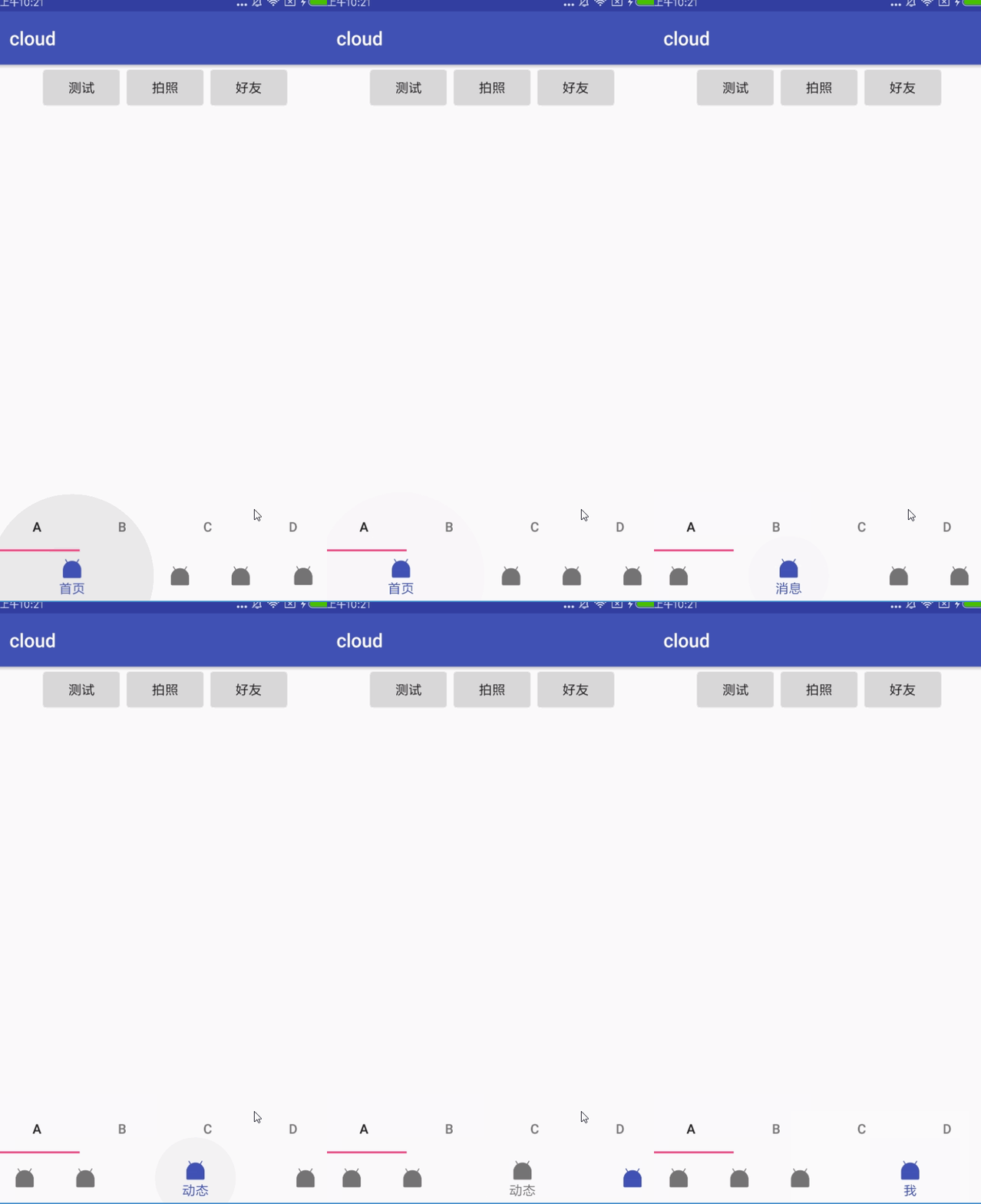
测试发现放3-4个最为合适,个人感觉3个最美观
res/color/bottom_nav_seletor.xml 修改文字选择颜色
<?xml version="1.0" encoding="utf-8"?>

<selector xmlns:android="http://schemas.android.com/apk/res/android">

    <item android:color="@color/colorPrimary" android:state_checked="true" />

    <item android:color="@color/colorPrimary" android:state_pressed="true" />

    <item android:color="@color/colorPrimary" android:state_selected="true" />

    <item android:color="@color/black" />

</selector>
在bottom_navigation.xml 增加属性
app:itemIconTint="@color/bottom_nav_seletor" 设置选择器  这个时候导航导航设置为3个能看出来效果
修改图标类似res/drawable 新建选择器
android:icon="@mipmap/ic_launcher" 这地方设置选择器的XML文件名就可以了
BottomNavigationView 使用的更多相关文章
- 关于Android中使用BottomNavigationView切换横屏导致返回主页的问题
问题: 如图,"发现"页即为主页,然后我们切换到"我"页,一切正常. 那么问题来了,如果切换到"我"页后把手机横屏,则会出现下面的情况. 嗯 ...
- 第三十七篇-BottomNavigationVIew底部导航的使用
效果图: 添加底部导航和viewpaper 设置底部导航在底部 app:layout_constraintBottom_toBottomOf="parent" 新建四个fragme ...
- Android 底部按钮BottomNavigationView + Fragment 的使用(二)
这里来试验BottomNavigationView + Fragment 底部按钮通过点击底部选项,实现中间的Fragment进行页面的切换. 使用BottomNavigationView 控件,实现 ...
- Android 底部按钮BottomNavigationView + Fragment + viewPager 的使用(一)
实现的效果,左右滑动,底部栏跟着滑动,中间加的是分帧的页面 上代码:主页面activity_main.xml <?xml version="1.0" encod ...
- BottomNavigationView结合ViewPager
BottomNavigationView是Google推出的底部导航栏组件,在没有这些底部导航组件之前,Android开发者多使用的是RadioGroup,在上一个项目开发中我们使用了Google的B ...
- BottomNavigationView的使用
BottomNavigationView的使用 废话少说, 先看东西 依赖 implementation 'com.android.support:design:26.1.0' 布局 //用这个控件需 ...
- 014 Android BottomNavigationView 底部导航组件使用
1.导入BottomNavigationView组件(点击下载按钮,安装组件) 2.新建菜单 (1)app--->src-->main--->res ,选中res目录右击new--- ...
- android BottomNavigationView 底部显示3个以上的item
你现在可以用app:labelVisibilityMode="[labeled, unlabeled, selected, auto] labeled 所有的标签都是可见的. unlabel ...
- BottomNavigationView 的使用
转载请注明出处:http://blog.csdn.net/wl9739/article/details/52875710 BottomNavigationView 很早之前就在 Material De ...
随机推荐
- CSS样式表与HTML结合的方法
从此王子和公主幸福的生活在了一起:) 层叠样式表(英文全称:Cascading Style Sheets)是一种用来表现HTML(标准通用标记语言的一个应用)或XML(标准通用标记语言的一个子集)等文 ...
- SAP 多语言文本翻译
SAP自己的东西都是有语言包的,针对很多语言有是有对应文本的翻译,巴特,比较不是专业的翻译,多以很多时候还是有这样那样的文本描述需要调整. 语言包怎么打就不说了,也不知道,知道也没打过... 标准界面 ...
- Cassandra集群:一,搭建一个三节点的集群
环境准备 JDK1.8 http://download.oracle.com/otn/java/jdk/8u171-b11/512cd62ec5174c3487ac17c61aaa89e8/jdk-8 ...
- SHOW Syntax
MySQL 5.5 Reference Manual / SQL Statement Syntax / Database Administration Statements / SHOW ...
- Alpha 冲刺11——总结
拖鞋旅游队团队事后诸葛亮会议 前言 队名:拖鞋旅游队 组长博客:https://www.cnblogs.com/Sulumer/p/10054510.html 时间:2018-12-1 20:00 地 ...
- java_opts 参数与JVM内存调优
Linux修改catalina.sh文件 如: JAVA_OPTS=”-server -Dfile.encoding=UTF-8 -Xms=512m -Xmx1024m -XX:PermSize=12 ...
- 远程链接 aws Windows Server 2016 Base Nano
第一次接触Windows Server 2016 Base Nano,平时工作中或者自己私下使用win的服务器都是带桌面版本的 而这次在aws一不小心开了一台Nano服务,刚开始我都不知道这个是什么玩 ...
- seajs引入jquery框架问题
seajs引入jquery框架时出现的问题 原因:由于seajs是遵循cmd规范,而jquery是遵循amd规范,所以在seajs调用jquery框架时,需要将amd转换为cmd 转换方法:jquer ...
- 莫烦tensorflow(9)-Save&Restore
import tensorflow as tfimport numpy as np ##save to file#rember to define the same dtype and shape w ...
- Windows系统,Tensorflow的Tensorboard工具细节问题
随着跟着TensorFlow视频学习,学到Tensorboard可视化工具这里的时候. 在windows,cmd里面运行,tensorboard --logdir=你logs文件夹地址 这行代码,一 ...