
js前端使用jOrgChart插件实现组织架构图的展示
项目要做组织架构图,要把它做成自上而下的树形结构。
需要购买阿里云产品和服务的,点击此链接领取优惠券红包,优惠购买哦,领取后一个月内有效: https://promotion.aliyun.com/ntms/yunparter/invite.html?userCode=fp9ccf07
一、说明
(1)通过后台查询数据库,生成树形数组结构,返回到前台。
(2)需要引入的js插件和css文件:
①jquery.jOrgChart.css
②jquery.min.js
③jquery.jOrgChart.js
(3)使用jOrgChart插件,根据返回的数据将其子节点加入到相应的<li></li>中。
首先,我们的数据表应该要有 id(节点),pid(父节点的id),name的字段,
那么我们要把这个数组转为树形数组结构,即将各个元素放在 pid 父类元素的 childrens字段中,下面就是简单生成树形数组的代码。至于展示出来的样式,可以在html页面中添加自定义样式覆盖它之前的样式。
注意:
后台返回的数据格式必须如下,其中id,pid字段为必须要有。childrens字段也为必须的,不过字段名可以自己定义,name字段是根据自己业务需求的字段,在这里以name字段作为要显示的文本内容:
{

  "data": [{

    "id": 1,

    "name": "企业主体信用得分",

    "pid": null,

    "childrens": [

      {

        "id": 2,

        "name": "企业素质",

        "pid": 1,

        "childrens": [

          {

            "id": 5,

            "name": "基本信息",

            "pid": 2,

            "childrens": [

              {

                "id": 10,

                "name": "企业主体信息识别",

                "pid": 5,

                "childrens": [

                ]

              },

              {

                "id": 11,

                "name": "企业持续注册时间",

                "pid": 5,

                "childrens": [

                ]

              },

              {

                "id": 12,

                "name": "注册资本",

                "pid": 5,

                "childrens": [

                ]

              }

            ]

          },

          {

            "id": 6,

            "name": "管理认证",

            "pid": 2,

            "childrens": [

              {

                "id": 13,

                "name": "国际性管理认证",

                "pid": 6,

                "childrens": [

                ]

              }

            ]

          }

        ]

      },

      {

        "id": 3,

        "name": "履约记录",

        "pid": 1,

        "childrens": [

          {

            "id": 7,

            "name": "税务执行情况",

            "pid": 3,

            "childrens": [

              {

                "id": 14,

                "name": "是否按时缴纳税款",

                "pid": 7,

                "childrens": [

                ]

              }

            ]

          },

          {

            "id": 8,

            "name": "网贷情况",

            "pid": 3,

            "childrens": [

              {

                "id": 15,

                "name": "网贷逾期",

                "pid": 8,

                "childrens": [

                ]

              }

            ]

          }

        ]

      },

      {

        "id": 4,

        "name": "公共监督",

        "pid": 1,

        "childrens": [

          {

            "id": 9,

            "name": "行政处罚",

            "pid": 4,

            "childrens": [

              {

                "id": 16,

                "name": "处罚信息",

                "pid": 9,

                "childrens": [

                ]

              }

            ]

          }

        ]

      }

    ]

  }

]

}
二、实例:
1、json文件(test.json)(即后台接口返回的json格式的数据)
{

  "data": [{

    "id": 1,

    "name": "企业主体信用得分",

    "pid": null,

    "childrens": [

      {

        "id": 2,

        "name": "企业素质",

        "pid": 1,

        "childrens": [

          {

            "id": 5,

            "name": "基本信息",

            "pid": 2,

            "childrens": [

              {

                "id": 10,

                "name": "企业主体信息识别",

                "pid": 5,

                "childrens": [

                ]

              },

              {

                "id": 11,

                "name": "企业持续注册时间",

                "pid": 5,

                "childrens": [

                ]

              },

              {

                "id": 12,

                "name": "注册资本",

                "pid": 5,

                "childrens": [

                ]

              }

            ]

          },

          {

            "id": 6,

            "name": "管理认证",

            "pid": 2,

            "childrens": [

              {

                "id": 13,

                "name": "国际性管理认证",

                "pid": 6,

                "childrens": [

                ]

              }

            ]

          }

        ]

      },

      {

        "id": 3,

        "name": "履约记录",

        "pid": 1,

        "childrens": [

          {

            "id": 7,

            "name": "税务执行情况",

            "pid": 3,

            "childrens": [

              {

                "id": 14,

                "name": "是否按时缴纳税款",

                "pid": 7,

                "childrens": [

                ]

              }

            ]

          },

          {

            "id": 8,

            "name": "网贷情况",

            "pid": 3,

            "childrens": [

              {

                "id": 15,

                "name": "网贷逾期",

                "pid": 8,

                "childrens": [

                ]

              }

            ]

          }

        ]

      },

      {

        "id": 4,

        "name": "公共监督",

        "pid": 1,

        "childrens": [

          {

            "id": 9,

            "name": "行政处罚",

            "pid": 4,

            "childrens": [

              {

                "id": 16,

                "name": "处罚信息",

                "pid": 9,

                "childrens": [

                ]

              }

            ]

          }

        ]

      }

    ]

  }

]

}
2、html页面(test.html)
<!DOCTYPE html>

<html lang="en">

<head>

    <meta charset="UTF-8">

    <title>jOrgChart异步加载</title>

    <link rel="stylesheet" href='jquery.jOrgChart.css'/>

    <script type='text/javascript' src='jquery.min.js'></script>

    <script type='text/javascript' src='jquery.jOrgChart.js'></script>

    <style>

        a {

            text-decoration: none;

            color: #fff;

            font-size: 12px;

        }

        .jOrgChart .node {

            width: 120px;

            height: 50px;

            line-height: 50px;

            border-radius: 4px;

            margin: 0 8px;

        }

    </style>

</head>

<body>

<!--显示组织架构图-->

<div id='jOrgChart'></div>

<script type='text/javascript'>

    $(function(){

        //数据返回

        $.ajax({

            url: "test.json",

            type: 'GET',

            dataType: 'JSON',

            data: {action: 'org_select'},

            success: function(result){

                var showlist = $("<ul id='org' style='display:none'></ul>");

                showall(result.data, showlist);

                $("#jOrgChart").append(showlist);

                $("#org").jOrgChart( {

                    chartElement : '#jOrgChart',//指定在某个dom生成jorgchart

                    dragAndDrop : false //设置是否可拖动

                });

            }

        });

    });

    function showall(menu_list, parent) {

        $.each(menu_list, function(index, val) {

            if(val.childrens.length > 0){

                var li = $("<li></li>");

                li.append("<a href='javascript:void(0)' onclick=getOrgId("+val.id+");>"+val.name+"</a>").append("<ul></ul>").appendTo(parent);

                //递归显示

                showall(val.childrens, $(li).children().eq(1));

            }else{

                $("<li></li>").append("<a href='javascript:void(0)' onclick=getOrgId("+val.id+");>"+val.name+"</a>").appendTo(parent);

            }

        });

    }

</script>

</body>

</html>
3、效果图(打开test.html页面后即可看到如下效果)
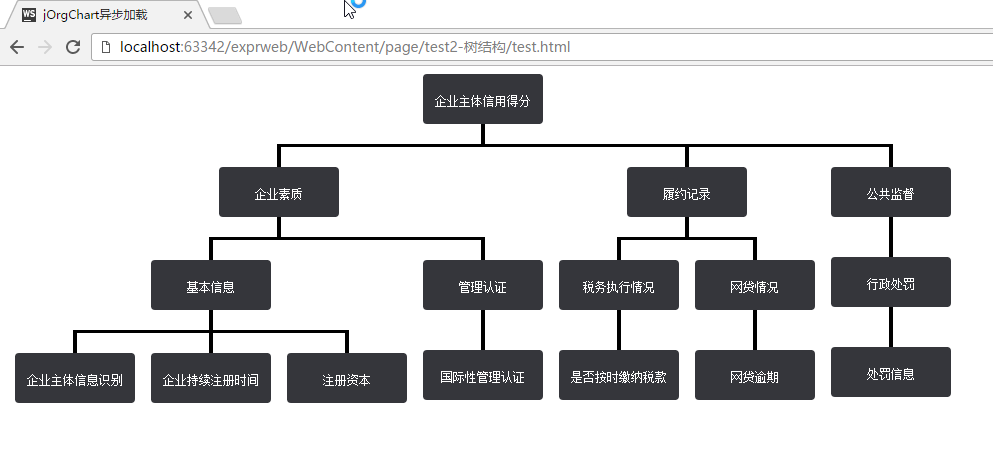
注意:由于数据是由ajax异步请求获取到的,所以直接双击html文件打开是不行的,需要在服务器环境下运行。
js前端使用jOrgChart插件实现组织架构图的展示的更多相关文章
- 使用jOrgChart插件实现组织架构图的展示
项目要做组织架构图,要把它做成自上而下的树形结构. 一.说明 (1)通过后台查询数据库,生成树形数组结构,返回到前台. (2)需要引入的js插件和css文件: ①jquery.jOrgChart.cs ...
- vue-tree 组织架构图/树形图自动生成(含添加、删除、修改)
项目中用代码生成组织架构图 有新增,编辑,删除的功能 生成树形图的组件git-hub地址: https://github.com/tower1229/Vue-Tree-Char ...
- 公司人员组织架构图用思维导图软件MindManager怎么做
有朋友一直不太明白组织架构图怎么做,其实组织架构图就是组织结构图.小编今天就在这里以一个公司为例,来给大家演示一番人员组织结构图怎么做. 老规矩,先说一下小编使用的软件跟电脑系统,这里用的是MindM ...
- Android一个炫酷的树状图组织架构图开源控件实现过程
Android一个炫酷的树状图组织架构图开源控件 文章目录 [1 简介] [2 效果展示] [3 使用步骤] [4 实现基本布局流程] [5 实现自由放缩及拖动] [6 实现添加删除及节点动画] [7 ...
- python生成组织架构图(网络拓扑图、graph.editor拓扑图编辑器)
Graph.Editor是一款基于HTML5技术的拓补图编辑器,采用jquery插件的形式,是Qunee图形组件的扩展项目,旨在提供可供扩展的拓扑图编辑工具, 拓扑图展示.编辑.导出.保存等功能,此外 ...
- JS前端三维地球渲染——中国各城市航空路线展示
前言 我还从来没有写过有关纯JS的文章(上次的矢量瓦片展示除外,相对较简单.),自己也学习过JS.CSS等前端知识,了解JQuery.React等框架,但是自己艺术天分实在不过关,不太喜欢前端设计,比 ...
- Vue组织架构图组件
vue-tree-chart :deciduous_tree: Vue2树形图组件 安装 npm i vue-tree-chart --save 使用 in template: <TreeC ...
- (六十五)c#Winform自定义控件-思维导图/组织架构图(工业)
前提 入行已经7,8年了,一直想做一套漂亮点的自定义控件,于是就有了本系列文章. GitHub:https://github.com/kwwwvagaa/NetWinformControl 码云:ht ...
- 使用jOrgChart插件, 异步加载生成组织架构图
jOrgChart插件是一个用来实现组织结构图的Jquery的插件- 一.特点 1.支持拖拽修改子节点: 2.支持节点缩放展示: 3.方便修改css定义样式: 4.超轻量型: 5.兼容性好,基本支持所 ...
随机推荐
- Web重温系列(一):利用寄宿于IIS的WCF序列化文件
这两年一直在做WinForm,对于Web已经比较生疏了,其实之前做的也不是很多. 这两天做了一个小工具,功能很简单,就是想有个地方存放办公室同事的机器名和IP的信息,包括附加的用户名和更新时间.比较之 ...
- there was an error running the selected code generator unable to retrieve metadata for
there was an error running the selected code generator unable to retrieve metadata for PROBLEM: I ha ...
- CentOS7 安装Python3,开发SocketIO 客户端
CentOS7安装Python3,开发SocketIO 客户端 参考:https://blog.csdn.net/lovefengruoqing/article/details/79284573 步骤 ...
- HyperLogLog 算法的原理讲解以及 Redis 是如何应用它的
作者:林冠宏 / 指尖下的幽灵 掘金:https://juejin.im/user/587f0dfe128fe100570ce2d8 博客:http://www.cnblogs.com/linguan ...
- ubuntu百度云下载大文件
一.实验环境 ubuntu16.04 + 百度在线云盘 二.下载小文件步骤 小文件直接点击右侧的下载按钮即可,弹出文件保存对话框 三.大文件下载步骤 大文件使用如上方式下载时提示,请使用网盘客户端下载 ...
- C - Friends and Subsequences
Mike and !Mike are old childhood rivals, they are opposite in everything they do, except programming ...
- Codeforces Round #496 (Div. 3)
一如既往地四题...好久没切了 有点犯困了明显脑子感觉不够灵活. 为了熟练度还是用java写的,,,导致观赏性很差...我好不容易拉了个队友一起切结果过掉a就tm挂机了!!! A题竟然卡了,,,用了十 ...
- js substr和substring
substr(start[,end]) 字符串截取 start从那里裁,end裁切为数 substring(start[,end = str.length]) // start和end会先处理数值较大 ...
- 动态HTMl处理
后续爬虫代码的建议 尽量减少请求次数 1. 能抓列表页就不抓详情页 2. 保存获取的html页面,供差错和重复请求使用 关注网站的所有类型的页面 1. wap页面,触屏版页面 2. H5页面 3. A ...
- What do cryptic Github comments mean?
LGTM — looks good to me ACK — acknowledgement, i.e. agreed/accepted change NACK/NAK — negative a ...