
使用jOrgChart插件实现组织架构图的展示
项目要做组织架构图,要把它做成自上而下的树形结构。
需要购买阿里云产品和服务的,点击此链接领取优惠券红包,优惠购买哦,领取后一个月内有效: https://promotion.aliyun.com/ntms/yunparter/invite.html?userCode=fp9ccf07
一、说明
(1)通过后台查询数据库,生成树形数组结构,返回到前台。
(2)需要引入的js插件和css文件:
①jquery.jOrgChart.css
②jquery.min.js
③jquery.jOrgChart.js
(3)使用jOrgChart插件,根据返回的数据将其子节点加入到相应的<li></li>中。
首先,我们的数据表应该要有 id(节点),pid(父节点的id),name的字段,
那么我们要把这个数组转为树形数组结构,即将各个元素放在 pid 父类元素的 childrens字段中,下面就是简单生成树形数组的代码。至于展示出来的样式,可以在html页面中添加自定义样式覆盖它之前的样式。
注意:
后台返回的数据格式必须如下,其中id,pid字段为必须要有。childrens字段也为必须的,不过字段名可以自己定义,name字段是根据自己业务需求的字段,在这里以name字段作为要显示的文本内容:
{

  "data": [{

    "id": 1,

    "name": "企业主体信用得分",

    "pid": null,

    "childrens": [

      {

        "id": 2,

        "name": "企业素质",

        "pid": 1,

        "childrens": [

          {

            "id": 5,

            "name": "基本信息",

            "pid": 2,

            "childrens": [

              {

                "id": 10,

                "name": "企业主体信息识别",

                "pid": 5,

                "childrens": [

                ]

              },

              {

                "id": 11,

                "name": "企业持续注册时间",

                "pid": 5,

                "childrens": [

                ]

              },

              {

                "id": 12,

                "name": "注册资本",

                "pid": 5,

                "childrens": [

                ]

              }

            ]

          },

          {

            "id": 6,

            "name": "管理认证",

            "pid": 2,

            "childrens": [

              {

                "id": 13,

                "name": "国际性管理认证",

                "pid": 6,

                "childrens": [

                ]

              }

            ]

          }

        ]

      },

      {

        "id": 3,

        "name": "履约记录",

        "pid": 1,

        "childrens": [

          {

            "id": 7,

            "name": "税务执行情况",

            "pid": 3,

            "childrens": [

              {

                "id": 14,

                "name": "是否按时缴纳税款",

                "pid": 7,

                "childrens": [

                ]

              }

            ]

          },

          {

            "id": 8,

            "name": "网贷情况",

            "pid": 3,

            "childrens": [

              {

                "id": 15,

                "name": "网贷逾期",

                "pid": 8,

                "childrens": [

                ]

              }

            ]

          }

        ]

      },

      {

        "id": 4,

        "name": "公共监督",

        "pid": 1,

        "childrens": [

          {

            "id": 9,

            "name": "行政处罚",

            "pid": 4,

            "childrens": [

              {

                "id": 16,

                "name": "处罚信息",

                "pid": 9,

                "childrens": [

                ]

              }

            ]

          }

        ]

      }

    ]

  }

]

}
二、实例:
1、json文件(test.json)(即后台接口返回的json格式的数据)
{

  "data": [{

    "id": 1,

    "name": "企业主体信用得分",

    "pid": null,

    "childrens": [

      {

        "id": 2,

        "name": "企业素质",

        "pid": 1,

        "childrens": [

          {

            "id": 5,

            "name": "基本信息",

            "pid": 2,

            "childrens": [

              {

                "id": 10,

                "name": "企业主体信息识别",

                "pid": 5,

                "childrens": [

                ]

              },

              {

                "id": 11,

                "name": "企业持续注册时间",

                "pid": 5,

                "childrens": [

                ]

              },

              {

                "id": 12,

                "name": "注册资本",

                "pid": 5,

                "childrens": [

                ]

              }

            ]

          },

          {

            "id": 6,

            "name": "管理认证",

            "pid": 2,

            "childrens": [

              {

                "id": 13,

                "name": "国际性管理认证",

                "pid": 6,

                "childrens": [

                ]

              }

            ]

          }

        ]

      },

      {

        "id": 3,

        "name": "履约记录",

        "pid": 1,

        "childrens": [

          {

            "id": 7,

            "name": "税务执行情况",

            "pid": 3,

            "childrens": [

              {

                "id": 14,

                "name": "是否按时缴纳税款",

                "pid": 7,

                "childrens": [

                ]

              }

            ]

          },

          {

            "id": 8,

            "name": "网贷情况",

            "pid": 3,

            "childrens": [

              {

                "id": 15,

                "name": "网贷逾期",

                "pid": 8,

                "childrens": [

                ]

              }

            ]

          }

        ]

      },

      {

        "id": 4,

        "name": "公共监督",

        "pid": 1,

        "childrens": [

          {

            "id": 9,

            "name": "行政处罚",

            "pid": 4,

            "childrens": [

              {

                "id": 16,

                "name": "处罚信息",

                "pid": 9,

                "childrens": [

                ]

              }

            ]

          }

        ]

      }

    ]

  }

]

}
2、html页面(test.html)
<!DOCTYPE html>

<html lang="en">

<head>

    <meta charset="UTF-8">

    <title>jOrgChart异步加载</title>

    <link rel="stylesheet" href='jquery.jOrgChart.css'/>

    <script type='text/javascript' src='jquery.min.js'></script>

    <script type='text/javascript' src='jquery.jOrgChart.js'></script>

    <style>

        a {

            text-decoration: none;

            color: #fff;

            font-size: 12px;

        }

        .jOrgChart .node {

            width: 120px;

            height: 50px;

            line-height: 50px;

            border-radius: 4px;

            margin: 0 8px;

        }

    </style>

</head>

<body>

<!--显示组织架构图-->

<div id='jOrgChart'></div>

<script type='text/javascript'>

    $(function(){

        //数据返回

        $.ajax({

            url: "test.json",

            type: 'GET',

            dataType: 'JSON',

            data: {action: 'org_select'},

            success: function(result){

                var showlist = $("<ul id='org' style='display:none'></ul>");

                showall(result.data, showlist);

                $("#jOrgChart").append(showlist);

                $("#org").jOrgChart( {

                    chartElement : '#jOrgChart',//指定在某个dom生成jorgchart

                    dragAndDrop : false //设置是否可拖动

                });

            }

        });

    });

    function showall(menu_list, parent) {

        $.each(menu_list, function(index, val) {

            if(val.childrens.length > 0){

                var li = $("<li></li>");

                li.append("<a href='javascript:void(0)' onclick=getOrgId("+val.id+");>"+val.name+"</a>").append("<ul></ul>").appendTo(parent);

                //递归显示

                showall(val.childrens, $(li).children().eq(1));

            }else{

                $("<li></li>").append("<a href='javascript:void(0)' onclick=getOrgId("+val.id+");>"+val.name+"</a>").appendTo(parent);

            }

        });

    }

</script>

</body>

</html>
3、效果图(打开test.html页面后即可看到如下效果)
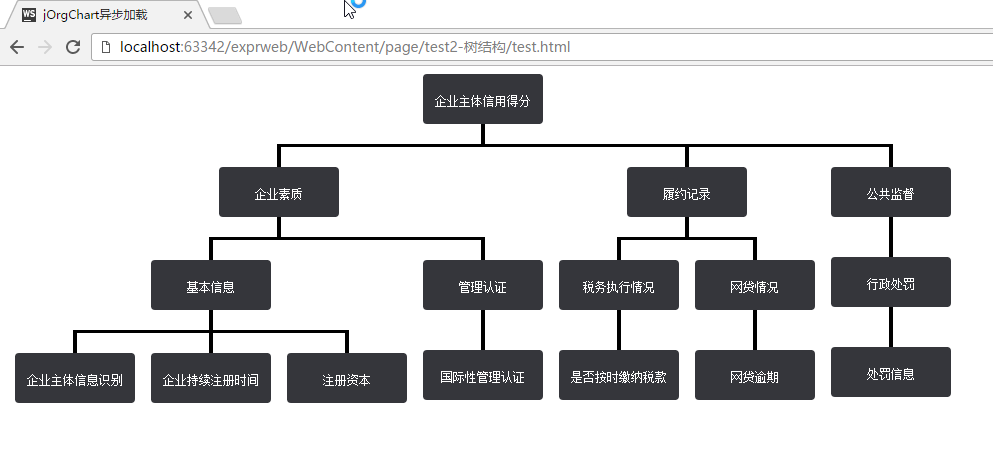
注意:由于数据是由ajax异步请求获取到的,所以直接双击html文件打开是不行的,需要在服务器环境下运行。
使用jOrgChart插件实现组织架构图的展示的更多相关文章
- js前端使用jOrgChart插件实现组织架构图的展示
项目要做组织架构图,要把它做成自上而下的树形结构. 需要购买阿里云产品的,可以点击此链接购买,有红包优惠哦: https://promotion.aliyun.com/ntms/yunparter/i ...
- vue-tree 组织架构图/树形图自动生成(含添加、删除、修改)
项目中用代码生成组织架构图 有新增,编辑,删除的功能 生成树形图的组件git-hub地址: https://github.com/tower1229/Vue-Tree-Char ...
- 公司人员组织架构图用思维导图软件MindManager怎么做
有朋友一直不太明白组织架构图怎么做,其实组织架构图就是组织结构图.小编今天就在这里以一个公司为例,来给大家演示一番人员组织结构图怎么做. 老规矩,先说一下小编使用的软件跟电脑系统,这里用的是MindM ...
- Android一个炫酷的树状图组织架构图开源控件实现过程
Android一个炫酷的树状图组织架构图开源控件 文章目录 [1 简介] [2 效果展示] [3 使用步骤] [4 实现基本布局流程] [5 实现自由放缩及拖动] [6 实现添加删除及节点动画] [7 ...
- python生成组织架构图(网络拓扑图、graph.editor拓扑图编辑器)
Graph.Editor是一款基于HTML5技术的拓补图编辑器,采用jquery插件的形式,是Qunee图形组件的扩展项目,旨在提供可供扩展的拓扑图编辑工具, 拓扑图展示.编辑.导出.保存等功能,此外 ...
- Vue组织架构图组件
vue-tree-chart :deciduous_tree: Vue2树形图组件 安装 npm i vue-tree-chart --save 使用 in template: <TreeC ...
- (六十五)c#Winform自定义控件-思维导图/组织架构图(工业)
前提 入行已经7,8年了,一直想做一套漂亮点的自定义控件,于是就有了本系列文章. GitHub:https://github.com/kwwwvagaa/NetWinformControl 码云:ht ...
- 使用jOrgChart插件, 异步加载生成组织架构图
jOrgChart插件是一个用来实现组织结构图的Jquery的插件- 一.特点 1.支持拖拽修改子节点: 2.支持节点缩放展示: 3.方便修改css定义样式: 4.超轻量型: 5.兼容性好,基本支持所 ...
- Atitit jOrgChart的使用 组织架构图css html
Atitit jOrgChart的使用 组织架构图css html 1. 项目要做组织架构图,要把它做成自上而下的树形结构,于是决定1 2. Html导入 以来的css js1 2.1. 数据来源 ...
随机推荐
- Log4net入门(ASP.NET MVC 5篇)
在前4篇Log4net入门文章中,我们讲述了log4net的一些简单用法,在这一篇中我们主要讲述如何在ASP.NET MVC 5项目中将日志信息写入SQL Server数据库中. 一.创建最简单的AS ...
- Quartz.NET Windows 服务示例
想必大家在项目中处理简单的后台持续任务或者定时触发任务的时候均使用 Thread 或者 Task 来完成,但是项目中的这种需求一旦多了的话就得将任务调度引入进来了,那今天就简单的介绍一下 Quartz ...
- 读书笔记--SQL必知必会06--用通配符进行过滤
6.1 LIKE操作符 通配符(wildcard),用来匹配某些值的的特殊字符. 在搜索子句中必须通过LIKE操作符使用通配符. 通配符搜索只能用于文本字段(字符串),非文本数据类型字段不能使用通配符 ...
- 读书笔记--SQL必知必会19--存储过程
不同的DBMS对存储过程的实现不同,差异巨大,这里不涉及具体的DBMS,仅仅说明存储过程的简单含义. 19.1 存储过程 简单来说,存储过程就是为以后使用而保存的一条或多条SQL语句. 可以将存储过程 ...
- 读书笔记--SQL必知必会--常用MySQL(MariaDB)命令
DBMS信息 显示DBMS的版本 select version(); 显示DBMS状态 status; 显示DBMS资源状态 show status; 显示DBMS支持的权限 show privile ...
- 安卓Design包之AppBar和Toolbar的联用
前面讲了Design包的的CoordinatorLayout和SnackBar的混用,现在继续理解Design包的AppBar; AppBarLayout跟它的名字一样,把容器类的组件全部作为AppB ...
- Ajax接收不到PHP return后的结果的原因
PHP在处理ajax返回值的时候,如果使用return如 return $result会失败,echo $result却没问题. 解释原因如下: 1.ajax请求从服务器端读取返回值,而且这些返回值必 ...
- ASP.NET Core 中文文档 第三章 原理(7)配置
原文:Configuration 作者:Steve Smith.Daniel Roth 翻译:刘怡(AlexLEWIS) 校对:孟帅洋(书缘) ASP.NET Core 支持多种配置选项.应用程序配置 ...
- Java DNS查询内部实现
源码分析 在Java中,DNS相关的操作都是通过通过InetAddress提供的API实现的.比如查询域名对应的IP地址: String dottedQuadIpAddress = InetAddre ...
- ASP.NET MVC传递参数(model)
一看到此标题,相信你也会.因为路由是可以从URL地址栏传过去的. 但是Insus.NET不想在地址栏传递,还是一个条件是jQuery的Ajax进行POST的.Insus.NET不清楚别人是怎样处理的, ...