
Updating and Publishing a NuGet Package - Plus making NuGet packages smarter and avoiding source edits with WebActivator
I wrote a post a few days ago called "Creating a NuGet Package in 7 easy steps - Plus using NuGet to integrate ASP.NET MVC 3 into existing Web Forms applications." Long enough title? I think so.
The post exists for two reasons: First to show folks how insanely easy it is to create a NuGet package (and prompt you to make some yourself) and second to share with you some experiments where one enables new/interesting functionality after File|New Project. In that example, we had an existing ASP.NET WebForms application and added ASP.NET MVC to it in one line, making it an easy hybrid application.

Well, not really one line. In version 0.5 of the AddMvc3ToWebForms package you still have to hook up the Areas, Routes and Filters yourself in the Global.asax. I made a helper method that gets it done to one additional line, but still, it's ever so slightly lame.
Now, to THIS post that exists for two reasons: First, to show you how to create an update to a package, and what the update process looks like for the consumer. Second, to show you how (and why) you should put a tiny bit more effort in your packages up front so that things "just work" for the user.
CREATING AN UPDATE TO A NUGET PACKAGE
Step 1 - Update the NuSpec file
I opened up my AddMvc3ToWebForms.nuspec file and changed the version a notch to 0.6. I also added a dependency to another NuGet package called WebActivator that I'm going to use to make my package just work and avoid the need for that extra line of code. I'm being specific and asking for WebActivator 1.1 or higher because that version has a specific feature I need.
|
1
2
3
4
5
6
7
8
9
10
11
12
13
14
15
16
|
<?xml version="1.0"?><package xmlns:xsd="http://www.w3.org/2001/XMLSchema" xmlns:xsi="http://www.w3.org/2001/XMLSchema-instance"> <metadata xmlns="http://schemas.microsoft.com/packaging/2010/07/nuspec.xsd"> <id>AddMvc3ToWebForms</id> <version>0.6</version> <authors>Scott Hanselman</authors> <owners>Scott Hanselman</owners> <iconUrl>http://www.hanselman.com/images/nugeticon.png</iconUrl> <requireLicenseAcceptance>false</requireLicenseAcceptance> <description>A totally unsupported way to quickly add ASP.NET MVC 3 support to your WebForms Application. Works on my machine.</description> <tags>MVC MVC3 ASP.NET WebForms</tags> <dependencies> <dependency id="WebActivator" version="1.1" /> </dependencies> </metadata></package> |
Step 2 - Make your new changes
When bringing in multiple NuGet packages it's common to want to have a few things run at application startup. Perhaps setting some context, connection strings, defaults for software factories, or dependency resolvers. There are a number of packages that need this functionality, and David Ebbo created the WebActivator package to make it easier. It's a formalized wrapper around a new ASP.NET 4 attributed called "PreApplicationStartMethod," and David also enables a PostApplicationStartMethod.
In my new version of the AddMvc3ToWebForms package I created a new file called AppStart_RegisterRoutesAreasFilters.cs.pp. Note the .pp extension that signals to NuGet to preprocess the file and replace tokens like $rootnamespace$, kind of like a mini-mini-code-generator.
The rest should look familiar; we're registering the Areas, GlobalFilters and Routes. The informal naming convention is to prefix the class and file with AppStart_ so that projects that include packages that add an AppStart_*.* will group the files together.
|
1
2
3
4
5
6
7
8
9
10
11
12
13
14
15
16
17
18
19
20
21
22
23
24
25
26
27
28
29
30
31
32
33
34
35
36
37
38
39
40
|
using System;using System.Collections.Generic;using System.Linq;using System.Web;using System.Web.Mvc;using System.Web.Routing;using Microsoft.Web.Infrastructure;[assembly: WebActivator.PostApplicationStartMethod(typeof($rootnamespace$.AppStart_RegisterRoutesAreasFilters), "Start")]namespace $rootnamespace$ { public static class AppStart_RegisterRoutesAreasFilters { public static void Start() { // Set everything up with you having to do any work. // I'm doing this because it means that // your app will just run. You might want to get rid of this // and integrate with your own Global.asax. // It's up to you. AreaRegistration.RegisterAllAreas(); RegisterGlobalFilters(GlobalFilters.Filters); RegisterRoutes(RouteTable.Routes); } public static void RegisterGlobalFilters(GlobalFilterCollection filters) { filters.Add(new HandleErrorAttribute()); } public static void RegisterRoutes(RouteCollection routes) { routes.IgnoreRoute("{resource}.axd/{*pathInfo}"); routes.MapRoute( "Default", // Route name "{controller}/{action}/{id}", // URL with parameters new { controller = "Home", action = "Index", id = UrlParameter.Optional } // Parameter defaults ); } }} |
Note the line:
[assembly: WebActivator.PostApplicationStartMethod(typeof($rootnamespace$.AppStart_RegisterRoutesAreasFilters), "Start")]
David added the "PostApplicationStart" option because PreApplicationStart happens too early in the process to register Areas, so for my package, I want things to run just after App_Start. This is all new and under development, so feel free to share with David if you have any thoughts, improvements or strong opinions.
Step 3 - Build a new NuPkg file
From the command line, call...
NuGet pack
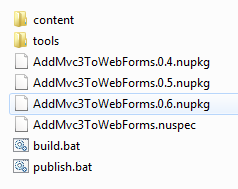
...and you'll automatically get a new file, like this screenshot:
Step 4 - Publish the Update to http://nuget.org (or any NuGet server or file share)
I could log in to my account and upload the file from the browser interface, but since I'm thinking I'll being making changes here and there, I figure it'd be nice to publish from the command line.
I'll grab my API key from the site...
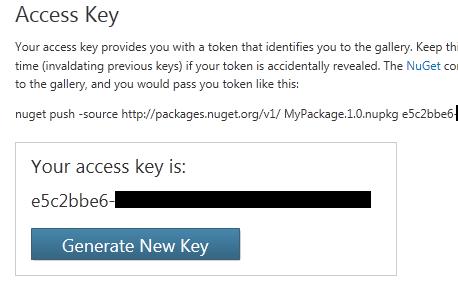
..and use it to publish from the command line (using my magic new publish.bat) with contents like these:
nuget push AddMvc3ToWebForms.0.6.nupkg e5c2bbe6-xxxx
...and the result...
C:\AddMvc3ToWebForms>nuget push AddMvc3ToWebForms.0.6.nupkg e5c2bbe6-xxxx
Creating an entry for your package [ID:AddMvc3ToWebForms Ver:0.6]...
Your package was uploaded to the server but not published.
Publishing your package [ID:AddMvc3ToWebForms Ver:0.6] to the live feed...
Your package was published to the feed.
Now I'm set. I've got version 0.6 live now. What's the experience for the user of this library?
GETTING AN UPDATE TO A NUGET PACKAGE
There's two ways to find out what NuGet packages my project is using and update them.
Package Manager Console
From the package manager console I can type Get-Package...
PM> Get-Package

Id                             Version              Description
--                             -------              -----------
AddMvc3ToWebForms              0.5                  A totally unsupported way to quickly add ASP.NET MVC 3 support to your WebForms Application. Works on my machine.
Looks like I have version 0.5. I can update it via...
PM> Update-Package AddMvc3ToWebForms
'WebActivator (≥ 1.1)' not installed. Attempting to retrieve dependency from source...
Done.
Successfully installed 'WebActivator 1.1.0.0'.
Successfully installed 'AddMvc3ToWebForms 0.6'.
Successfully removed 'AddMvc3ToWebForms 0.5' from WebApplication7.
Successfully uninstalled 'AddMvc3ToWebForms 0.5'.
Successfully added 'WebActivator 1.1.0.0' to WebApplication7.
Successfully added 'AddMvc3ToWebForms 0.6' to WebApplication7.
Notice that NuGet automatically removed AddMvc3ToWebForms 0.5 and installed AddMvc3ToWebForms 0.6. It also automatically brought in the dependency on WebActivator 1.1.
Add Library Reference
Alternatively, from Visual Studio right click on the References node in the Solution Explorer and select Add Library Reference (or select the same directly from the Tools menu).
Select Updates from the left side. A list of updates will appear. Click Update.
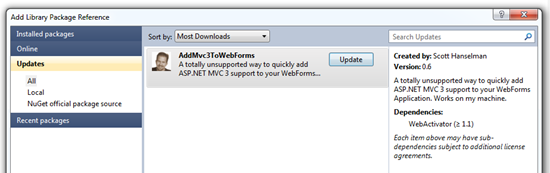
It's all good. Now my AddMvc3ToWebForms NuGet Package can add ASP.NET MVC functionality to an ASP.NET WebForms projects with no additional lines of code. This makes for a nice out of the box experience, especially if I bring in other projects that use the same functionality.
Updating and Publishing a NuGet Package - Plus making NuGet packages smarter and avoiding source edits with WebActivator的更多相关文章
- 使用 dotnet CLI 来打包和发布 .NET Core nuget package
原文链接:使用 dotnet CLI 来打包和发布 .NET Core nuget package 如何使用 visual studio 2015/2017 打包和发布 Nuget package, ...
- [转]Bootstrap 3.0.0 with ASP.NET Web Forms – Step by Step – Without NuGet Package
本文转自:http://www.mytecbits.com/microsoft/dot-net/bootstrap-3-0-0-with-asp-net-web-forms In my earlier ...
- 使用NuGet Package Project快速制作NuGet包
今天在visual studio gallery发现了一个插件NuGet Package Project,通过它可以在Visual Studio中建立Nuget Package工程,直接生成Nuget ...
- 用 NuGet Package Explorer 管理你的攻城武器
缘由:每次新建一个工程,总是要从自己的“弹药库”或者之前的工程里面手动引用一些类库和脚本插件,难免有些繁琐和遗漏.想起经常用到的NuGet,跑到NuGet主页一看,发现有 NuGet Package ...
- Visual Studio 2010 更新NuGet Package Manager出错解决办法
在Visual Studio 2010的扩展管理器中发现NuGet Package Manger有最新版本更新提示,选择更新安装提示以下错误信息: 2013/4/25 1:11:48 - Micros ...
- Error This project references NuGet package(s) that are missing on this computer. Use NuGet Package Restore to download them. For more information, see http://go.microsoft.com/fwlink/?LinkID=322105. T
错误提示: Severity Code Description Project File Line Suppression StateError This project references NuG ...
- 搭建本地Nuget服务器并使用NuGet Package Explorer工具打包nuget包
1.什么是Nuget: 百度百科描述: Nuget是 ASP .NET Gallery 的一员.NuGet 是免费.开源的包管理开发工具,专注于在 .NET 应用开发过程中,简单地合并第三方的组件库. ...
- This project references NuGet package(s) that are missing on this computer.
Install Nuget. Right click on the solution and select "Enable NuGet Package Restore". Clic ...
- vs2017中生成.Net Standard Libarary的Nuget Package
场景: Project A 对Project B存在 project to project reference.这种场景下必须为两者都生成nuget package.这样在load Project A ...
随机推荐
- 无法删除另一个分区的windows文件夹
转自:http://zhidao.baidu.com/link?url=77mJiLzVTdr9LzW4R6UYHZ8OJovvXsH8HQb0hyUKL4RKv2J3bItFJgJx-xqAEGOj ...
- python josn包
Python josn包中的编码与解码方法 对于Python数据类型进行编码解码 json.dumps 对python的数据类型进行json格式编码 :(将dict转为json格式) eg: imp ...
- oracle中计算百分比,并同时解决小数点前0不显示的问题
select a.catalog_name,decode(substr(trunc((a.s/b.count2),4)*100||'%',0,1),'.',replace(trunc((a.s/b.c ...
- java.io.File中字段的使用
File.pathSeparator指的是分隔连续多个路径字符串的分隔符,例如:Java -cp test.jar;abc.jar HelloWorld就是指“;” File.separa ...
- HDU-2032解题报告
Hdu-2032解题报告题意:实现给定行数的杨辉三角的输出. 杨辉三角的特点:每一行数据的开头和结尾是1,然后其他的数据是由其上一个数据与其左上角的数据之和组成11 11 2 11 3 3 11 4 ...
- Codeforces 992C Nastya and a Wardrobe (思维)
<题目链接> 题目大意: 你开始有X个裙子 你有K+1次增长机会 前K次会100%的增长一倍 但是增长后有50%的机会会减少一个 给你X,K(0<=X,K<=1e18), 问你 ...
- 常见素数筛选方法原理和Python实现
1. 普通筛选(常用于求解单个素数问题) 自然数中,除了1和它本身以外不再有其他因数. import math def func_get_prime(n): func = lambda x: not ...
- flume初识
一.flume特点 flume是目前大数据领域数据采集的一个利器,当然除了flume还有Fluentd和logstash,其他的目前来说并没有深入的了解,但是我觉得flume能够在大数据繁荣的今天屹立 ...
- Java反射之基础概念
0.实例准备 package com.blueStarWei.invoke; public class Student { private String name; public Student() ...
- logging模块、sys模块、shelve模块
一.logging模块 1.logging模块就是用于记录日志的,日志就是记录某个时间点,发生的事情. 2.记录日志是为了日后来复查,提取有用的信息. 3.如何去记录日志:可以直接打开文件,记录信息, ...