
Django基础,Day4 - views 详解
在Django中,网页和其他内容是通过视图传递的。每个视图由一个简单的Python函数表示,Django将通过检查请求的URL(准确地说,是域名后面的部分URL)来选择一个视图。
例如,用户在浏览器中访问 <<domain>>/newsarchive/<year>/<month>/ diango的URLConfs 将请求URL与对应的views function 匹配,调用view function 进行数据处理,然后选择对应的template模板进行渲染展示或直接数据返回。
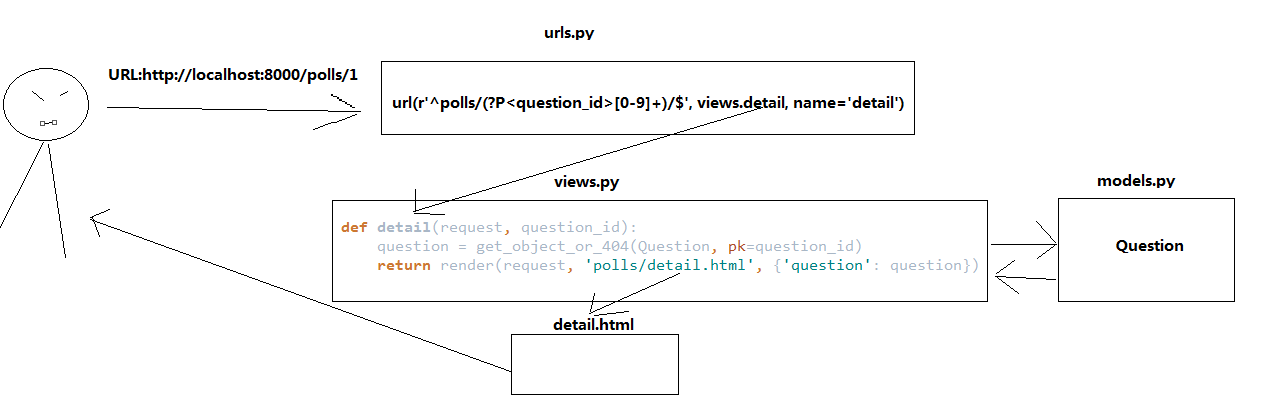
在我们的poll app中,我们将会创建以下四个视图views:
- Question “index” page – displays the latest few questions.
- Question “detail” page – displays a question text, with no results but with a form to vote.
- Question “results” page – displays results for a particular question.
- Vote action – handles voting for a particular choice in a particular question.
编写views
polls/views.py:
from django.http import HttpResponse

# Create your views here.

def index(request):

    return HttpResponse("Hello, world. You're at the polls index.")

def detail(request, question_id):

    return HttpResponse("You're looking at question %s." % question_id)

def results(request, question_id):

    response = "You're looking at the results of question %s."

    return HttpResponse(response % question_id)

def vote(request, question_id):

    return HttpResponse("You're voting on question %s." % question_id)
绑定URL与Views
polls/urls.py:
from django.conf.urls import url

from . import views

urlpatterns = [

    # ex: /polls/

    url(r'^$', views.index, name='index'),

    # ex: /polls/5/

    url(r'^(?P<question_id>[0-9]+)/$', views.detail, name='detail'),

    # ex: /polls/5/results/

    url(r'^(?P<question_id>[0-9]+)/results/$', views.results, name='results'),

    # ex: /polls/5/vote/

    url(r'^(?P<question_id>[0-9]+)/vote/$', views.vote, name='vote'),

]
URLconfs 中,正则表达式中的分组()作为参数传递给view,如url(r'^(?P<question_id>[0-9]+)/$', views.detail, name='detail')
假如请求url为 polls/34/ 相当于调用detail(request,question_id='34')
分别访问一下url可见调用不同的view 函数进行相应
http://localhost:8000/polls/
http://localhost:8000/polls/34/
http://localhost:8000/polls/34/results/
http://localhost:8000/polls/34/vote/
编写Views的数据库处理逻辑
view的主要工作:获取请求内容,调用数据库model获取数据库数据,调用业务处理Model逻辑处理,将处理结果渲染到指定的模板template中,响应response到客户端浏览器
创建 polls/templates,django会在在app目录下查找templates目录作为模板路径
创建 polls/templates/polls/index.html
Because of how the app_directories template loader works as described above, you can refer to this template within Django simply as polls/index.html.
(当然templates下不创建polls,模板路径调用index.html 也可以,但是强烈不建议这样,因为避免出现不同的app中有相同名称的模板文件时读取区分不出来)
{% if latest_question_list %}

    <ul>

        {% for question in latest_question_list %}

            <li><a href="/polls/{{ question.id }}/">{{ question.question_text }}</a></li>

        {% endfor %}

    </ul>

{% else %}

    <p>No polls are available.</p>

{% endif %}
更新 index view in polls/views.py:
def index(request):

    latest_question_list = Question.objects.order_by('-pub_date')[:5]

    context = {'latest_question_list': latest_question_list}

    return render(request, 'polls/index.html', context)
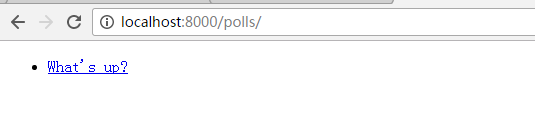
访问 http://localhost:8000/polls/
编写Views 404异常
更新detail view in polls/views.py:
def detail(request, question_id):

    question = get_object_or_404(Question, pk=question_id)

    return render(request, 'polls/detail.html', {'question': question})
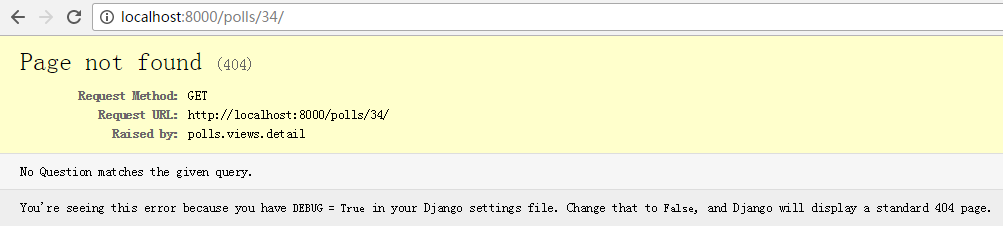
get_object_or_404(),get_list_or_404() 当获取不到对象时,返回404页面
访问 http://localhost:8000/polls/34/
使用template模板
添加 polls/templates/polls/detail.html
<h1>{{ question.question_text }}</h1>

<ul>

    {% for choice in question.choice_set.all %}

        <li>{{ choice.choice_text }}</li>

    {% endfor %}

</ul>
django模板系统使用双大括号访问变量属性,如{{question.question_text}},
django模板中,使用 {% %} 将原生pyton语句包含起来,其中以上实例中,使用了for循环:{% for %} {% endfor %}
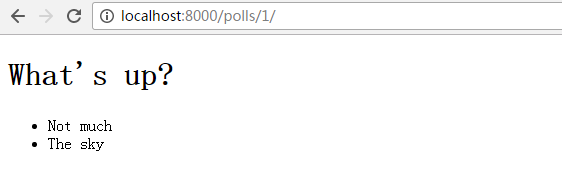
访问 http://localhost:8000/polls/1
修改template模板中的hardcoded URLs,统一使用{% url %} 标签替换
如polls/index.html 中的 <li><a href="/polls/{{ question.id }}/">{{ question.question_text }}</a></li>
修改为:<li><a href="{% url 'detail' question.id %}">{{ question.question_text }}</a></li>
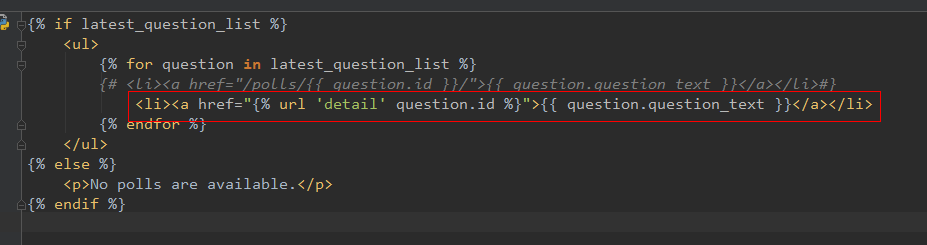
这种URL 查找方式是通过polls.urls 中的name来匹配,如:
mysite/urls.py:
url(r'^polls/', include('polls.urls', namespace="polls")),
polls/urls.py:
# the 'name' value as called by the {% url %} template tag
url(r'^(?P<question_id>[0-9]+)/$', views.detail, name='detail'),
添加 URL namespace
如上例,使用{% url 'detail' %} 可以根据polls.urls 中的name='detail' 来匹配。如果在同一个project下有多个app,其中都有name='detail' 时,又该如何匹配views呢?
解决方法是,添加namespace到URLconf中,如在polls/urls.py 中添加: app_name = 'polls'
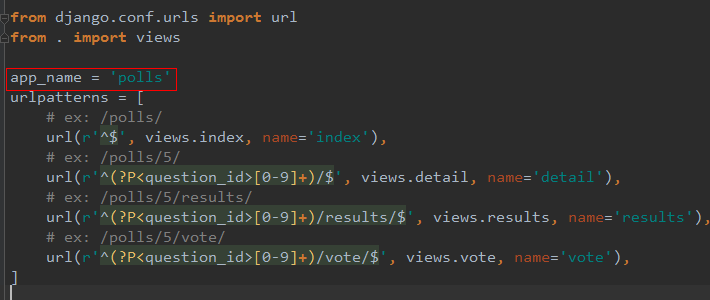
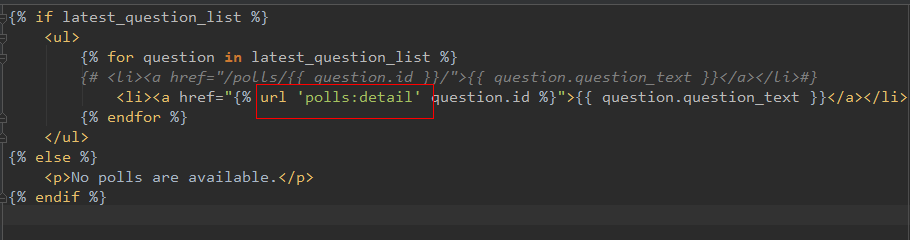
则可以在模板中修改{% url 'detail' %} 为 {% url 'polls:detail' %}
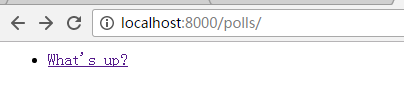
访问:http://localhost:8000/polls/
点击“what's up” 链接
***微信扫一扫,关注“python测试开发圈”,了解更多测试教程!***
Django基础,Day4 - views 详解的更多相关文章
- 基础拾遗------redis详解
基础拾遗 基础拾遗------特性详解 基础拾遗------webservice详解 基础拾遗------redis详解 基础拾遗------反射详解 基础拾遗------委托详解 基础拾遗----- ...
- 基础拾遗------webservice详解
基础拾遗 基础拾遗------特性详解 基础拾遗------webservice详解 基础拾遗------redis详解 基础拾遗------反射详解 基础拾遗------委托详解 基础拾遗----- ...
- Hadoop基础-Idea打包详解之手动添加依赖(SequenceFile的压缩编解码器案例)
Hadoop基础-Idea打包详解之手动添加依赖(SequenceFile的压缩编解码器案例) 作者:尹正杰 版权声明:原创作品,谢绝转载!否则将追究法律责任. 一.编辑配置文件(pml.xml)(我 ...
- (转)总结之:CentOS 6.5 MySQL数据库的基础以及深入详解
总结之:CentOS 6.5 MySQL数据库的基础以及深入详解 原文:http://tanxw.blog.51cto.com/4309543/1395539 前言 早期MySQL AB公司在2009 ...
- Django框架 之 querySet详解
Django框架 之 querySet详解 浏览目录 可切片 可迭代 惰性查询 缓存机制 exists()与iterator()方法 QuerySet 可切片 使用Python 的切片语法来限制查询集 ...
- python基础之函数详解
Python基础之函数详解 目录 Python基础之函数详解 一.函数的定义 二.函数的调用 三.函数返回值 四.函数的参数 4.1 位置参数 4.2 关键字参数 实参:位置实参和关键字参数的混合使用 ...
- Django url配置 正则表达式详解 分组命名匹配 命名URL 别名 和URL反向解析 命名空间模式
Django基础二之URL路由系统 本节目录 一 URL配置 二 正则表达式详解 三 分组命名匹配 四 命名URL(别名)和URL反向解析 五 命名空间模式 一 URL配置 Django 1.11版本 ...
- Django学习笔记之Django Form表单详解
知识预览 构建一个表单 在Django 中构建一个表单 Django Form 类详解 使用表单模板 回到顶部 构建一个表单 假设你想在你的网站上创建一个简单的表单,以获得用户的名字.你需要类似这样的 ...
- django用户投票系统详解
投票系统之详解 1.创建项目(mysite)与应用(polls) django-admin.py startproject mysite python manage.py startapp polls ...
随机推荐
- 关于WCF报错之调用方未由服务器进行身份验证
在我们部署好WCF服务以后,调用WCF服务会出现”调用方未由服务器进行身份验证”的错误.这个错误是怎么造成的呢? 通常我们在创建WCF后,用本机调试,一切正常,没有任何问题.其实用本机测试的时候,服务 ...
- [Erlang 0123] Erlang EPMD
epmd进程和Erlang节点进程如影随形,在Rabbitmq集群,Ejabberd集群,Couchbase集群产品文档中都会有相当多的内容讲epmd,epmd是什么呢? epmd 是Erlan ...
- 机器学习实战笔记(Python实现)-03-朴素贝叶斯
--------------------------------------------------------------------------------------- 本系列文章为<机器 ...
- memcached安装配置+基础操作
先安装依赖关系 下载libevent-2.0.21-stable.tar.gz wget https://github.com/downloads/libevent/libevent/libevent ...
- 最新官方WIN10系统32位,64位系统ghost版下载
系统来自:系统妈 随着Windows 10Build 10074 Insider Preview版发布,有理由相信,Win10离最终RTM阶段已经不远了.看来稍早前传闻的合作伙伴透露微软将在7月底正式 ...
- Selenium-java-Log4j环境搭建和
1 导入Log4j ,我这版本是1.2.17 自己选择版本 **别告诉我不会导入 2 Path 奶瓶 3 创建一个与src同目录文件 命名为 log4.properties 4 文件的内容是, ...
- PHP环境的搭建(Apache)
一,下载XAMPP集成软件包. 二,Apache的安装配置: Apache的安装就点击下一步下一步,默认路径在系统的C盘. 三,在star Apache的时候,出现了端口号80冲突(被占用),解决 ...
- [LeetCode] Best Meeting Point 最佳开会地点
A group of two or more people wants to meet and minimize the total travel distance. You are given a ...
- [LeetCode] Longest Substring with At Most Two Distinct Characters 最多有两个不同字符的最长子串
Given a string S, find the length of the longest substring T that contains at most two distinct char ...
- SQLite源程序分析之sqlite3.c
/****************************************************************************** ** This file is an a ...