
关于MySQL的wait_timeout连接超时问题报错解决方案
bug回顾 :
想必大家在用MySQL时都会遇到连接超时的问题,如下图所示:
### Cause: com.mysql.jdbc.exceptions.jdbc4.CommunicationsException: The last packet successfully received from the server was 47,795,922 milliseconds ago.  The last packet sent successfully to the server was 47,795,922 milliseconds ago. is longer than the server configured value of 'wait_timeout'. You should consider either expiring and/or testing connection validity before use in your application, increasing the server configured values for client timeouts, or using the Connector/J connection property 'autoReconnect=true' to avoid this problem.

; SQL []; The last packet successfully received from the server was 47,795,922 milliseconds ago.  The last packet sent successfully to the server was 47,795,922 milliseconds ago. is longer than the server configured value of 'wait_timeout'. You should consider either expiring and/or testing connection validity before use in your application, increasing the server configured values for client timeouts, or using the Connector/J connection property 'autoReconnect=true' to avoid this problem.; nested exception is com.mysql.jdbc.exceptions.jdbc4.CommunicationsException: The last packet successfully received from the server was 47,795,922 milliseconds ago.  The last packet sent successfully to the server was 47,795,922 milliseconds ago. is longer than the server configured value of 'wait_timeout'. You should consider either expiring and/or testing connection validity before use in your application, increasing the server configured values for client timeouts, or using the Connector/J connection property 'autoReconnect=true' to avoid this problem.
大概意思是当前的connection所进行过的最新请求是在52,587秒之前,这个时间是大于服务所配置的wait_timeout时间的。
原因分析:
MySQL连接时,服务器默认的“wait_timeout”是8小时,也就是说一个connection空闲超过8个小时,Mysql将自动断开该connection。connections如果空闲超过8小时,Mysql将其断开,而DBCP连接池并不知道该connection已经失效,如果这时有Client请求connection,DBCP将该失效的Connection提供给Client,将会造成异常。
mysql分析:
打开MySQL的控制台,运行:show variables like ‘%timeout%’,查看和连接时间有关的MySQL系统变量,得到如下结果:
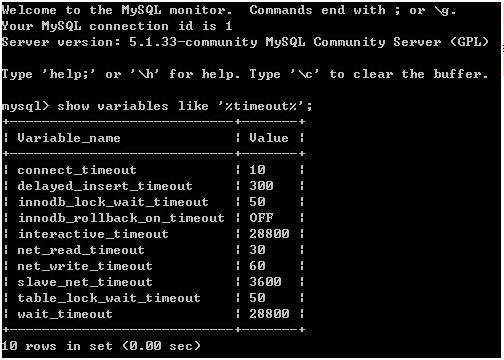
其中wait_timeout就是负责超时控制的变量,其时间为长度为28800s,就是8个小时,那么就是说MySQL的服务会在操作间隔8小时后断开,需要再次重连。也有用户在URL中使用jdbc.url=jdbc:mysql://localhost:3306/nd?autoReconnect=true来使得连接自动恢复,当然了,这是可以的,不过是MySQL4及其以下版本适用。MySQL5中已经无效了,必须调整系统变量来控制了。MySQL5手册中对两个变量有如下的说明:
interactive_timeout:服务器关闭交互式连接前等待活动的秒数。交互式客户端定义为在mysql_real_connect()中使用CLIENT_INTERACTIVE选项的客户端。又见wait_timeout
wait_timeout:服务器关闭非交互连接之前等待活动的秒数。在线程启动时,根据全局wait_timeout值或全局interactive_timeout值初始化会话wait_timeout值,取决于客户端类型(由mysql_real_connect()的连接选项CLIENT_INTERACTIVE定义),又见interactive_timeout
如此看来,两个变量是共同控制的,那么都必须对他们进行修改了。继续深入这两个变量wait_timeout的取值范围是1-2147483(Windows),1-31536000(linux),interactive_time取值随wait_timeout变动,它们的默认值都是28800。
MySQL的系统变量由配置文件控制,当配置文件中不配置时,系统使用默认值,这个28800就是默认值。要修改就只能在配置文件里修改。Windows下在%MySQL HOME%/bin下有mysql.ini配置文件,打开后在如下位置添加两个变量,赋值。(这里修改为388000)
解决方式:
1. 增加 MySQL 的 wait_timeout 属性的值 (不推荐)
修改mysql安装目录下的配置文件 my.ini文件(如果没有此文件,复制“my-default.ini”文件,生成“复件 my-default.ini”文件。将“复件 my-default.ini”文件重命名成“my.ini” ),在文件中设置:
wait_timeout=31536000

interactive_timeout=31536000
也可以使用mysql命令对这两个属性进行修改
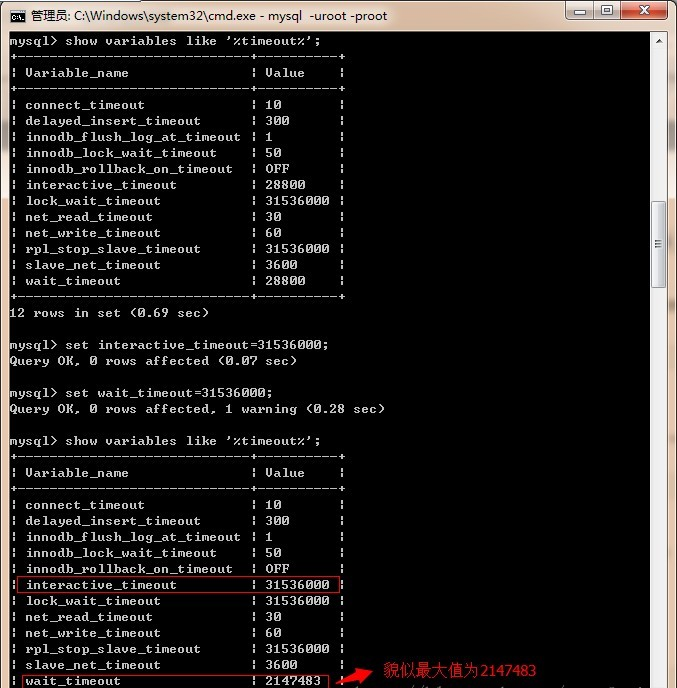
2. 减少连接池内连接的生存周期
减少连接池内连接的生存周期,使之小于上一项中所设置的wait_timeout 的值。
 <bean id="dataSource"  class="com.mchange.v2.c3p0.ComboPooledDataSource">

    <property name="maxIdleTime"value="1800"/>

    <!--other properties -->

 </bean>
3. 定期使用连接池内的连接
<bean id="dataSource" class="com.mchange.v2.c3p0.ComboPooledDataSource">

    <property name="preferredTestQuery" value="SELECT 1"/>

    <property name="idleConnectionTestPeriod" value="18000"/>

    <property name="testConnectionOnCheckout" value="true"/>

</bean>
附上dbcp和c3p0的标准配置
<bean id="dataSource" class="org.apache.commons.dbcp.BasicDataSource">

 <property name="driverClassName" value="com.mysql.jdbc.Driver" />

 <property name="url" value="jdbc:mysql://192.168.40.10:3336/XXX" />

 <property name="username" value="" />

 <property name="password" value="" />

 <property name="maxWait" value="20000"></property>

 <property name="validationQuery" value="SELECT 1"></property>

 <property name="testWhileIdle" value="true"></property>

 <property name="testOnBorrow" value="true"></property>

 <property name="timeBetweenEvictionRunsMillis" value="3600000"></property>

 <property name="numTestsPerEvictionRun" value="50"></property>

 <property name="minEvictableIdleTimeMillis" value="120000"></property>

 <property name="removeAbandoned" value="true"/>

 <property name="removeAbandonedTimeout" value="6000000"/>

</bean>
<bean id="dataSource" class="com.mchange.v2.c3p0.ComboPooledDataSource" destroy-method="close">

  <property name="driverClass"><value>oracle.jdbc.driver.OracleDriver</value></property>

  <property name="jdbcUrl"><value>jdbc:oracle:thin:@localhost:1521:Test</value></property>

  <property name="user"><value>Kay</value></property>

  <property name="password"><value>root</value></property>

  <!--连接池中保留的最小连接数。-->

  <property name="minPoolSize" value="10" />

  <!--连接池中保留的最大连接数。Default: 15 -->

  <property name="maxPoolSize" value="100" />

  <!--最大空闲时间,1800秒内未使用则连接被丢弃。若为0则永不丢弃。Default: 0 -->

  <property name="maxIdleTime" value="1800" />

  <!--当连接池中的连接耗尽的时候c3p0一次同时获取的连接数。Default: 3 -->

  <property name="acquireIncrement" value="3" />

  <property name="maxStatements" value="1000" />

  <property name="initialPoolSize" value="10" />

  <!--每60秒检查所有连接池中的空闲连接。Default: 0 -->

  <property name="idleConnectionTestPeriod" value="60" />

  <!--定义在从数据库获取新连接失败后重复尝试的次数。Default: 30 -->

  <property name="acquireRetryAttempts" value="30" />

  <property name="breakAfterAcquireFailure" value="true" />

  <property name="testConnectionOnCheckout" value="false" />

</bean>
参考:
https://my.oschina.net/guanzhenxing/blog/213364
http://sarin.iteye.com/blog/580311/
http://blog.csdn.net/wangfayinn/article/details/24623575
关于MySQL的wait_timeout连接超时问题报错解决方案的更多相关文章
- kali linux 安装 Mysql Can't read from messagefile 报错解决方案
1.下载安装包 下载地点:https://dev.mysql.com/downloads/mysql/ 或者 wget http://dev.mysql.com/get/Downloads/MySQL ...
- MySQL 连接超时:报错SQLSTATE[HY000] [2002] Connection timed out解决
当你的代码部署到服务器里的时候,你的mysql 的host 值 应该为 127.0.0.1 而不是 你的服务器ip 不然就会报错. 其实当你的代码进入到服务器里的时候,mysql和代码是相当于在同一个 ...
- MySQL 连接超时:报错SQLSTATE[HY000] [2002] Connection timed out
在网上找了一堆,结果全部是错的 后来,我明白了其实是设置问题. 当你的代码部署到服务器里的时候,你的mysql 的host 值 应该为 127.0.0.1 而不是 你的服务器ip 不然就会报错. 其实 ...
- Navicat 连接远程数据库报错:1130 - Host "XX.XX.XX.XX" is not allowed to connect to this MySQL server
Navicat 连接远程数据库报错:1130 - Host "XX.XX.XX.XX" is not allowed to connect to this MySQL server ...
- Navicat 连接远程数据库报错:2003 - Can‘’t connect to MySQL server on 'XX.XX.XX.XX' (10061)
Navicat 连接远程数据库报错:2003 - Can‘’t connect to MySQL server on '172.22.69.190' (10061) 一.原因 远程数据库使用了默认设 ...
- SpringBoot配置JDBC连接MySql数据库的时候遇到了报错:HikariPool-1 - Exception during pool initialization
使用SpringBoot做JAVA开发时,JDBC连接MySql数据库的时候遇到了报错: ERROR 10392 --- [ main] com.zaxxer.hikari.pool.HikariPo ...
- Mysql only_full_group_by以及其他关于sql_mode原因报错详细解决方案
Mysql only_full_group_by以及其他关于sql_mode原因报错详细解决方案 网上太多相关资料,但是抄袭严重,有的讲的也是之言片语的,根本不连贯(可能知道的人确实不想多说) 我总共 ...
- Sqoop- sqoop将mysql数据表导入到hive报错
sqoop将mysql数据表导入到hive报错 [root@ip---- lib]# sqoop import --connect jdbc:mysql://54.223.175.12:3308/gx ...
- 【mysql】 load local data infield 报错 ERROR 1148 (42000): The used command is not allowed with this MySQL version
mysql> load data local infile '/Users/flint/learn/mysql/pet' into table bx_pet; 执行报错 ERROR 1148 ( ...
随机推荐
- 萌新笔记——C++里创建 Trie字典树(中文词典)(三)(联想)
萌新做词典第三篇,做得不好,还请指正,谢谢大佬! 今天把词典的联想做好了,也是比较low的,还改了之前的查询.遍历等代码. Orz 一样地先放上运行结果: test1 ID : char : 件 w ...
- Key words
Key words ACL - Access Control List IDS - Intrusion Dection Systems ASLR - Address-Space Layout Rand ...
- 1597: [Usaco2008 Mar]土地购买
1597: [Usaco2008 Mar]土地购买 Time Limit: 10 Sec Memory Limit: 162 MBSubmit: 4023 Solved: 1470[Submit] ...
- [LeetCode] House Robber II 打家劫舍之二
Note: This is an extension of House Robber. After robbing those houses on that street, the thief has ...
- [LeetCode] N-Queens N皇后问题
The n-queens puzzle is the problem of placing n queens on an n×n chessboard such that no two queens ...
- 星云opencv总结
- oracle数据泵导入
假设将dmp放到/data目录下,首先在数据库中创建directory目录SQL> create directory exp as '/data/'在操作系统命令执行导入命令.impdp sys ...
- iOS学习-UIButton的imageView和titleLabel
UIButton的imageView和titleLabel的位置设置通过setImageEdgeInsets和setTitleEdgeInsets来设置 参考:http://blog.csdn.net ...
- C#定义类型转化 及 格式化字符串
operator 关键字 operator 关键字用来重载内置运算符,或提供类/结构声明中的用户定义转换.它可以定义不同类型之间采用何种转化方式和转化的结果. operator用于定义类型转化时可采用 ...
- neo4j初次使用学习简单操作-cypher语言使用
Neo4j 使用cypher语言进行操作 Cypher语言是在学习Neo4j时用到数据库操作语言(DML),涵盖对图数据的增删改查 neo4j数据库简单除暴理解的概念: Neo4j中不存在表的概念, ...