
[c#基础]集合foreach的必要条件和自定义集合
引言
最近翻看了之前的学习笔记,看到foreach,记得当时老师讲的时候,有点犯浑,不是很明白,这好比,上小学时,你不会乘法口诀,但是随着时间的增长,你不自觉的都会了,也悟出个小道理,有些东西,你当时不太懂,但随着你的阅历和经验的增长,有那么一天你会恍然大悟,哦,原来是这样。
自定义集合类
提到foreach就不得不说集合,那么就先从自定义的集合开始吧。
 using System;

 using System.Collections.Generic;

 using System.Linq;

 using System.Text;

 using System.Threading.Tasks;

 namespace Wolfy.自定义集合

 {

     /// <summary>

     /// 自定义集合类

     /// </summary>

     public class MyArrayList

     {

         /// <summary>

         /// 集合的容量属性 成倍数增加0,4,8,且只读

         /// </summary>

         public int Capacity

         {

             get

             {

                 return this.objArray.Length ==  ?  : this.index > this.objArray.Length ? this.objArray.Length *  : this.objArray.Length;

             }

         }

         /// <summary>

         /// 集合实际元素个数 且只读

         /// </summary>

         public int Count

         {

             get

             {

                 return this.index;

             }

         }

         private int index;

         private object[] objArray;

         public MyArrayList()

         {

             index = ;

             //初始化0长度的数组

             this.objArray = new object[];

         }

         /// <summary>

         /// 添加元素

         /// </summary>

         /// <param name="value">元素值</param>

         public void Add(object value)

         {

             if (index >= this.objArray.Length)

             {

                 object[] newArray = index ==  ? new object[this.objArray.Length + ] : new object[this.objArray.Length * ];

                 objArray.CopyTo(newArray, );

                 objArray = newArray;

                 objArray[index++] = value;

             }

             else

             {

                 objArray[index++] = value;

             }

         }

         /// <summary>

         /// 添加数组

         /// </summary>

         /// <param name="objs"></param>

         public void AddRange(object[] objs)

         {

             for (int i = ; i < objs.Length; i++)

             {

                 this.Add(objs[i]);

             }

         }

     }

 }
不知道自定义的集合和ArrayList是否一样,可以简单的测试一下。
 using System;

 using System.Collections;

 using System.Collections.Generic;

 using System.Linq;

 using System.Text;

 using System.Threading.Tasks;

 namespace Wolfy.自定义集合

 {

     class Program

     {

         static void Main(string[] args)

         {

             ArrayList list = new ArrayList();

             //MyArrayList list = new MyArrayList();

             Console.WriteLine("count:" + list.Count);

             Console.WriteLine("Capacity:" + list.Capacity);

             list.Add();

             list.Add();

             Console.WriteLine("count:" + list.Count);

             Console.WriteLine("Capacity:" + list.Capacity);

             list.Add();

             list.Add();

             list.Add();

             Console.WriteLine("count:" + list.Count);

             Console.WriteLine("Capacity:" + list.Capacity);

             list.Add();

             list.Add();

             list.Add();

             list.Add();

             list.Add();

             list.Add();

             Console.WriteLine("count:" + list.Count);

             Console.WriteLine("Capacity:" + list.Capacity);

             object[] arr = { , , , , ,  };

             list.AddRange(arr);

             Console.WriteLine("count:" + list.Count);

             Console.WriteLine("Capacity:" + list.Capacity);

             Console.Read();

         }

     }

 }
此时是.Net中的ArrayList,结果: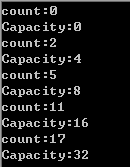
自定义的集合,结果:
输出结果一样,那么现在用foreach遍历,自定义集合中的元素。F6编译,会提示错误。

foreach语句
其实foreach是怎样工作的呢?
众所周知foreach中in后面的对象应该是实现IEnumerable接口的,程序运行时本质是在调用IEnumerable的GetEnumerator函数来返回一个IEnumerator对象,foreach就是利用IEnumerator对象的Current,MoveNext和Reset成员来进行一段数据的枚举。简单的代码实现如下:
             //System.Collections下的IEnumerator

             IEnumerator enumerator = this.objArray.GetEnumerator();

             while (enumerator.MoveNext())

             {

                 Console.WriteLine(enumerator.Current);

             }
将这个代码放在自定义集合中,定义一个方法GetArray(),然后测试一下
         /// <summary>

         /// 得到所有的元素

         /// </summary>

         public void GetArray()

         {

             //System.Collections下的IEnumerator

             IEnumerator enumerator = this.objArray.GetEnumerator();

             while (enumerator.MoveNext())

             {

                 Console.Write(enumerator.Current+“,”);

             }

         }
测试结果:

你运行会发现多出很多逗号,原因是执行后,enumerator没有被Dispose掉,而继承IDisposable的迭代器(IEnumerator)在foreach结束后会被正确处理掉(调用Dispose方法)。
自定义集合实现IEnumerable接口
实现IEnumerable接口必须实现它里面的成员GetEnumerator()方法:
         public IEnumerator GetEnumerator()

         {

             throw new NotImplementedException();

         }
该方法的返回值为实现了IEnumerator接口的类的对象。那么现在需要定义一个实现了该接口的类。
 using System;

 using System.Collections;

 using System.Collections.Generic;

 using System.Linq;

 using System.Text;

 using System.Threading.Tasks;

 namespace Wolfy.自定义集合

 {

     public class MyEnumerator : IEnumerator

     {

         /// <summary>

         /// 返回当前指针指向的元素的值

         /// </summary>

         public object Current

         {

             get { throw new NotImplementedException(); }

         }

         /// <summary>

         /// 将指针向前移动1位,并判断当前位有没有元素.指针默认在-1位置

         /// </summary>

         /// <returns></returns>

         public bool MoveNext()

         {

             throw new NotImplementedException();

         }

         /// <summary>

         /// 重置

         /// </summary>

         public void Reset()

         {

             throw new NotImplementedException();

         }

     }

 }
迭代需要数组参数,在构造函数中将自定义集合中的数组传进来,并且在MoveNext中需要判断指针是否移动到数组的末尾,那么需要数组的长度。
MyArrayList中GetEnumerator()方法实现
         public IEnumerator GetEnumerator()

         {

             return new MyEnumerator(this.objArray, this.Count);

         }
MyEnumerator类
 using System;

 using System.Collections;

 using System.Collections.Generic;

 using System.Linq;

 using System.Text;

 using System.Threading.Tasks;

 namespace Wolfy.自定义集合

 {

     public class MyEnumerator : IEnumerator

     {

         /// <summary>

         /// 指针的默认位置

         /// </summary>

         private int index = -;

         private object[] objArray;

         /// <summary>

         /// 数组长度

         /// </summary>

         private int count;

         public MyEnumerator(object[] objArray, int count)

         {

             this.objArray = objArray;

             this.count = count;

         }

         /// <summary>

         /// 返回当前指针指向的元素的值

         /// </summary>

         public object Current

         {

             get { return this.objArray[index]; }

         }

         /// <summary>

         /// 将指针向前移动1位,并判断当前位有没有元素.指针默认在-1位置

         /// </summary>

         /// <returns></returns>

         public bool MoveNext()

         {

             index++;//指针首先向前移动一位

             if (index < this.count)

             {

                 return true;

             }

             else

             {

                 return false;

             }

         }

         /// <summary>

         /// 重置

         /// </summary>

         public void Reset()

         {

             index = -;

         }

     }

 }
测试,foreach语句,然后编译不再报错,说明已经成功了,结果如下:

这次后边不会多出逗号,原因实现了迭代器接口而迭代器继承自IDisposable接口,最后调用了Dispose()方法
代码下载,请戳这里:http://pan.baidu.com/s/1pJsGyHt
总结
foreach遍历in后面的对象需实现IEnumerable接口。
迭代器概念可参考:http://msdn.microsoft.com/zh-cn/library/dscyy5s0(VS.80).aspx
东西比较基础,以上是个人理解,如理解有误,请指正,以免误人子弟。
[c#基础]集合foreach的必要条件和自定义集合的更多相关文章
- 集合、拆箱、装箱、自定义集合的foreach
集合部分 参考:http://msdn.microsoft.com/zh-cn/library/0ytkdh4s(v=vs.110).aspx 集合类型是诸如哈希表.队列.堆栈.包.字典和列表等数据集 ...
- 使用yield关键字让自定义集合实现foreach遍历
一般来说当我们创建自定义集合的时候为了让其能支持foreach遍历,就只能让其实现IEnumerable接口(可能还要实现IEnumerator接口) 但是我们也可以通过使用yield关键字构建的迭代 ...
- C# 通过IEnumberable接口和IEnumerator接口实现自定义集合类型foreach功能
1.IEnumerator和IEnumerable的作用 其实IEnumerator和IEnumerable的作用很简单,就是让除数组和集合之外的类型也能支持foreach循环,至于foreach循环 ...
- C# 通过IEnumberable接口和IEnumerator接口实现泛型和非泛型自定义集合类型foreach功能
IEnumerator和IEnumerable的作用 其实IEnumerator和IEnumerable的作用很简单,就是让除数组和集合之外的类型也能支持foreach循环,至于foreach循环,如 ...
- 《C#本质论》读书笔记(16)构建自定义集合
16.1 更多集合接口 集合类(这里指IEnumerable层次结构)实现的接口层次结构 16.1.1 IList<T>与IDictionary<TKey,TValue> 字典 ...
- 十六、C# 常用集合类及构建自定义集合(使用迭代器)
常用集合类及构建自定义集合 1.更多集合接口:IList<T>.IDictionary<TKey,TValue>.IComparable<T>.ICollectio ...
- Android零基础入门第42节:自定义BaseAdapter
原文:Android零基础入门第42节:自定义BaseAdapter 在ListView的使用中,有时候还需要在里面加入按钮等控件,实现单独的操作.也就是说,这个ListView不再只是展示数据,也不 ...
- 实现自定义集合的可枚举类型(IEnumerable)和枚举数(IEnumerator )
下面的代码示例演示如何实现自定义集合的 IEnumerable 和 IEnumerator 接口: using System; using System.Collections; using Syst ...
- Map集合的遍历方式以及TreeMap集合保存自定义对象实现比较的Comparable和Comparator两种方式
Map集合的特点 1.Map集合中保存的都是键值对,键和值是一一对应的 2.一个映射不能包含重复的值 3.每个键最多只能映射到一个值上 Map接口和Collection接口的不同 Map是双列集合的根 ...
随机推荐
- 记一次ftp服务器搭建走过的坑
记一次ftp服务器搭建走过的坑 1.安装 ①下载 wget https://security.appspot.com/downloads/vsftpd-3.0.3.tar.gz #要FQ ②解压 ta ...
- tomcat发布记录
web项目发布详细步骤 服务器 tomcat服务器1.删除webapps文件夹里面的项目war包-->ifm.war(项目war名称)2.把项目的ifm.war放到webapps里面3.删除we ...
- 内网穿透利器 Ngrok 使用教程
ngrok 服务可以分配给你一个域名让你本地的web项目提供给外网访问,特别适合向别人展示你本机的web demo 以及调试一些远程的API (比如微信公众号,企业号的开发) 下面开始教程 Step ...
- 从c到c++
1,stack模板类(头文件为<stack>)需要定义两个参数:元素类型(必要).容器类型(默认为deque), 定义stack对象 stack <string> s 基本操作 ...
- Android系列之网络(三)----使用HttpClient发送HTTP请求(分别通过GET和POST方法发送数据)
[声明] 欢迎转载,但请保留文章原始出处→_→ 生命壹号:http://www.cnblogs.com/smyhvae/ 文章来源:http://www.cnblogs.com/smyhvae/p/ ...
- 查询各个商品分类中各有多少商品的SQL语句
SELECT goods_category_id ,count(*) FROM `sw_goods` group by goods_category_id
- mysqli_stmt预处理类的使用
- 010医疗项目-模块一:用户添加的实现(Dao,Service,Action,增加页面调试,提交页面调试)
要实现的效果:
- Entity Framework版本历史概览
转自:http://www.cnblogs.com/fecktty2013/archive/2014/09/26/entityframework-overview.html EF版本 .net fra ...
- Oracle11G 7个服务说明
中的方法成功安装Oracle 11g后,共有7个服务, 这七个服务的含义分别为: 1. Oracle ORCL VSS Writer Service: Oracle卷映射拷贝写入服务,VSS(Volu ...