
C# 通过IEnumberable接口和IEnumerator接口实现自定义集合类型foreach功能
IEnumerator和IEnumerable的作用
其实IEnumerator和IEnumerable的作用很简单,就是让除数组和集合之外的类型也能支持foreach循环,至于foreach循环,如果不清楚,请参考C# foreach循环较for循环的优势与劣势
代码如下:
static void Main(string[] args)

{

       CatList cats = new CatList();

       foreach (var cat in cats)

       {

            Console.WriteLine(cat.NickName);

       }

}

public class CatList

{

       public string NickName { get; set; }

       public int Age { get; set; }

}

以上代码说明自定义集合类型(假设CatList是集合类型)是无法使用foreach进行循环的.
原因是C#中自定义集合类型要实现foreach的功能,必须通过IEnumerator和IEnumerable两个接口来实现!
1、通过IEnumerator和IEnumerable两个接口实现自定义集合类型的foreach循环功能. 非泛型版本
第一步:实现自定义集合类型实现IEnumerable接口,实现该接口的字面意思可以理解为:自定义集合类型实现了该接口,就拥有了"可枚举的功能".代码如下:
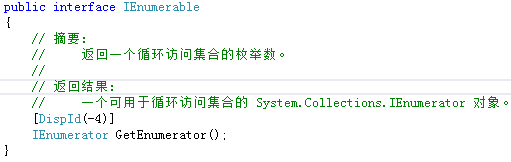
实现了IEnumerable接口之后,发现该接口规定必须返回一个IEnumerator接口(迭代器对象).ok,那么就必须返回一个IEnumerator,那么它是什么呢?别急,下面开始介绍这个接口!
第二步:通过IEnumerable要求实现的GetEnumerator()方法返回一个IEnumerator(迭代器对象),实现该接口必须实现以下三个方法/属性:
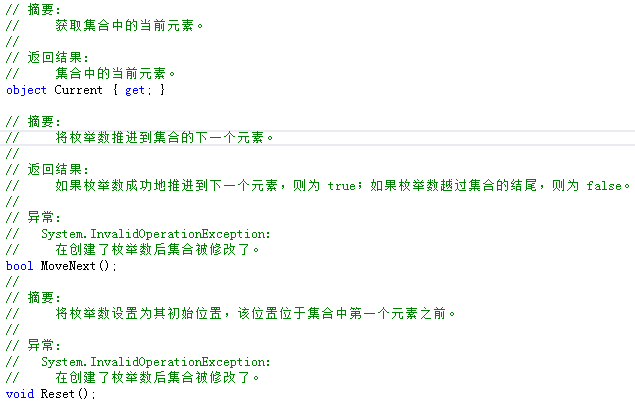
(1)、MoveNext() ---将当前遍历的枚举数推进到集合的下一个.
注:如果 MoveNext 越过集合的末尾,则枚举数将被放置在此集合中最后一个元素的后面,而且 MoveNext 返回 false。当枚举数位于此位置时,对MoveNext 的后续调用也返回 false。如果最后一次调用 MoveNext 返回 false,则调用 Current 会引发异常。若要再次将 Current 设置为集合的第一个元素,可以调用 Reset,然后再调用 MoveNext。
(2)、Current属性 ---返回正在遍历的集合中的元素,注:该属性没有set方法,所以在循环遍历的时候不能设置值.
(3)、Reset() ---重置当前正在遍历的集合中元素的索引.
第三步:具体实现
在介绍完上面两个接口之后,开始具体的实现,现在需要编写一个People类,该类是一个Person集合,要求People类拥有foreach循环的功能,代码如下:
public class People : IEnumerable

    {

        private Person[] persons;

        public People(Person[] persons)

        {

            Persons = persons;

        }

        public Person[] Persons { get => persons; set => persons = value; }

        public IEnumerator GetEnumerator()

        {

            return new PersonEnum(Persons);

        }

        public class PersonEnum : IEnumerator

        {

            private Person[] perons;

            private int _index=-;

            public PersonEnum(Person[] persons)

            {

                Perons = persons;

            }

            public object Current => Perons[_index];

            public Person[] Perons { get => perons; set => perons = value; }

            public bool MoveNext()

            {

                _index++;

                if (_index < perons.Length)

                    return true;

                else

                    return false;

            }

            public void Reset()

            {

                _index = ;

            }

        }

    }
第四步:验证代码,代码如下:
Person[] persons ={

         new Person(){FirstName="Stephen",LastName="Curry"},

         new Person(){FirstName="Lebron",LastName="James"},

         new Person(){FirstName="Kobe",LastName="Brant"}

};

People people = new People(persons);

foreach (var p in people)

{

     Console.WriteLine(((Person)p).LastName);

}

第五步:分析原理
总结分析下上面的代码,实现foreach代码的基本原理如下:
1、编写自定义集合类,实现IEnumerable接口,通过GetEnumerator()方法返回一个迭代器对象实例.
2、通过自定义集合类的构造函数,或者方法,或者属性(都可以),初始化一个类数组 !Important
3、将初始化完的类数组作为参数传递给迭代器类
4、编写迭代器类,create 构造函数,接收自定义集合类初始化完的类数组
5、实现IEnumerator(迭代器)接口,实现对应的三个方法,通过编写三个方法发现,其实迭代器就是简单的对数组进行的操作
第六步:执行自定义集合的循环
执行方式有两种:
(1)、foreach
Person[] persons ={

      new Person(){FirstName="Stephen",LastName="Curry"},

      new Person(){FirstName="Lebron",LastName="James"},

      new Person(){FirstName="Kobe",LastName="Brant"}

};

People people = new People(persons);

foreach (Person p in persons)

{

        Console.WriteLine(p.LastName);

}

Console.ReadKey();
(2)、通过自定义集合类的GetEnumerator()方法
Person[] persons ={

         new Person(){FirstName="Stephen",LastName="Curry"},

         new Person(){FirstName="Lebron",LastName="James"},

         new Person(){FirstName="Kobe",LastName="Brant"}

};

People people = new People(persons);

IEnumerator er = people.GetEnumerator();

while (er.MoveNext())

{

   Console.WriteLine(((Person)er.Current).LastName);

}

分析两种不同的调用方式,foreach语句可以理解为是第二种方式的语法糖.
2、通过IEnumerable<T>和IEnumerator<T>实现自定义集合类,并实现简单的添加功能
    class Program

    {

        static void Main(string[] args)

        {

            var list = new CustomList<int>();

            list.Add();

            list.Add();

            list.Add();

            var p = new int[] { , ,  };

            var list1 = new CustomList<int>(p);

            Console.WriteLine(list.Count+"..."+list1.Count);

            Console.ReadKey();

        }

    }

    public class CustomList<T> : IEnumerable<T>

    {

        private T[] _ts;

        private int _index = ;

        public CustomList(T[] ts)

        {

            _ts = ts;

            _index = ts.Length;

        }

        public CustomList(int capcity)

        {

            _ts = new T[capcity];

        }

        public int Count => _index;

        public void Add(T t)

        {

            if (_index >= _ts.Length)

            {

                //如果调用Add方法导致数组的长度大于我们给定的长度

                //则创建一个新的数组,并将其长度扩大为原来的两倍

                T[] newArr = new T[_ts.Length * ];

                //将原来数组中的数据拷贝到新的数组中

                Array.Copy(_ts, newArr, _ts.Length);

                //使_ts指向新的数组

                _ts = newArr;

            }

            _ts[_index++] = t;

        }

        public IEnumerator<T> GetEnumerator()

        {

            return new CustomEnumerator<T>(_ts);

        }

        IEnumerator IEnumerable.GetEnumerator()

        {

            return GetEnumerator();

        }

    }

    public class CustomEnumerator<T> : IEnumerator<T>

    {

        private T[] _ts;

        private int _position = -;

        public CustomEnumerator(T[] ts)

        {

            _ts = ts;

        }

        public T Current => _ts[_position];

        object IEnumerator.Current => this.Current;

        public bool MoveNext()

        {

            _position++;

            if (_position < _ts.Length)

                return true;

            return false;

        }

        public void Reset()

        {

            _position = ;

        }

        public void Dispose()

        {

            throw new NotImplementedException();

        }

    }

C# 通过IEnumberable接口和IEnumerator接口实现自定义集合类型foreach功能的更多相关文章
- C# 通过IEnumberable接口和IEnumerator接口实现泛型和非泛型自定义集合类型foreach功能
IEnumerator和IEnumerable的作用 其实IEnumerator和IEnumerable的作用很简单,就是让除数组和集合之外的类型也能支持foreach循环,至于foreach循环,如 ...
- 细说 C# 中的 IEnumerable和IEnumerator接口
我们先思考几个问题: 为什么在foreach中不能修改item的值? 要实现foreach需要满足什么条件? 为什么Linq to Object中要返回IEnumerable? 接下来,先开始我们的正 ...
- 迭代器学习之一:使用IEnumerable和IEnumerator接口
写博客是检验我学习的成果之一以及自我总结的一种方式,以后会经常利用这种方式进行技术交流和自我总结,其中认识不深难免会有错误,但是一直懂得不懂就问,不懂就学的道理! 1.首先看一个简单的列子 , , , ...
- foreach为什么要实现IEnumerable接口而不是直接用IEnumerator接口
在.Net中,要想被foreach遍历,那么目标对象要实现IEnumerable或IEnumerable<T>接口,这个接口有一个方法,GetEnumerator(),返回一个IEnume ...
- C#基础知识系列九(对IEnumerable和IEnumerator接口的糊涂认识)
前言 IEnumerable.IEnumerator到现在为止对这两个接口还是不太理解,不理解但是自己总是想着试着要搞明白,毕竟自己用的少,所以在此先记录一下.以备自己日后可以来翻查,同时也希望园子里 ...
- C# IEnumerable 和 IEnumerator接口浅析
温故而知新,可以为师矣,有空经常复习一下基础知识是有必要的,并且能加深理解和记忆. Foreach常用于循环访问集合,对实现IEnumerable的接口的容器进行遍历,IEnumerable和IEnu ...
- IEnumerable和IEnumerator接口
我们先思考几个问题:1.为什么在foreach中不能修改item的值?(IEnumerator的Current为只读)2.要实现foreach需要满足什么条件?(实现IEnumerator接口来实现的 ...
- IEnumerable, IEnumerator接口
IEnumerable接口 // Exposes the enumerator, which supports a simple iteration over a non-generic collec ...
- IEnumerable、IEnumerator接口(如何增加迭代器功能)
IEnumerable.IEnumerator接口封装了迭代器功能,有了它,我们不需要将内部集合暴露出去,外界只需要访问我的迭代器接口方法即可遍历数据. 在C#中,使用foreach语句来遍历集合.f ...
随机推荐
- CJOJ 1644 编辑距离 / Luogu 2758 编辑距离(动态规划)
CJOJ 1644 编辑距离 / Luogu 2758 编辑距离(动态规划) Description 字符串是数据结构和计算机语言里很重要的数据类型,在计算机语言中,对于字符串我们有很多的操作定义,因 ...
- VBA编程的工程性规划
看过很多人写的VBA代码,一团一团的,一点规划都没有,为了VBA编程更具工程性,这里讨论一下,并列出自己的一些建议:0.给VBA工程定义一个名字,而非直接使用默认的名称——"VBAProje ...
- Go语言学习笔记(三)数组 & 切片 & map
加 Golang学习 QQ群共同学习进步成家立业工作 ^-^ 群号:96933959 数组 Arrays 数组是同一种数据类型的固定长度的序列. 数组是值类型,因此改变副本的值,不会改变本身的值: 当 ...
- Unity Shader入门教程(一)
参考文献:http://www.360doc.com/content/13/0923/15/12282510_316492286.shtml Unity Shader是着色器,将纹理.网格信息输入,得 ...
- 20170721_python字符串操作_《python语言及其应用》
str = 'abcde...wxyz' [num]提取指定字符 str[0] == 'a' str[1] == 'b' str[-1] == 'z' [start:end:step]分片/切片,一定 ...
- java webservice简单的例子
开发环境:eclipse .jdk 创建服务端 demo-webservice 创建类 HelloService.java package com.hundsun.ws.service; import ...
- GetStdHandle 函数--获取标准设备的句柄
#GetStdHandle函数 来源:https://msdn.microsoft.com/en-us/library/ms683231.aspx 作用 该函数用于取得指定的标准设备的句柄(标准输入, ...
- iOS开发实战-时光记账Demo 网络版
之前写了一个本地数据库版本 戳这里 现在这个就是增加了后台 登录注册页面以及web的上传记录展示页面 含有少量php有兴趣可以看下 另外demo中包括数据库操作.json.网络请求等都没有用到第三方库 ...
- pwnable.kr bof之write up
这一题与前两题不同,用到了静态调试工具ida 首先题中给出了源码: #include <stdio.h> #include <string.h> #include <st ...
- Java工程师书单(初级、中级、高级)
简介 怎样学习才能从一名Java初级程序员成长为一名合格的架构师,或者说一名合格的架构师应该有怎样的技术知识体系,这是不仅一个刚刚踏入职场的初级程序员也是工作一两年之后开始迷茫的程序员经常会问到的问题 ...