
Node.js对MongoDB进行增删改查操作
MongoDB简介
MongoDB是一个开源的、文档型的NoSQL数据库程序。MongoDB将数据存储在类似JSON的文档中,操作起来更灵活方便。NoSQL数据库中的文档(documents)对应于SQL数据库中的一行。将一组文档组合在一起称为集合(collections),它大致相当于关系数据库中的表。
除了作为一个NoSQL数据库,MongoDB还有一些自己的特性:
- 易于安装和设置
- 使用BSON(类似于JSON的格式)来存储数据
- 将文档对象映射到应用程序代码很容易
- 具有高度可伸缩性和可用性,并支持开箱即用,无需事先定义结构
- 支持MapReduce操作,将大量数据压缩为有用的聚合结果
- 免费且开源
- ......
连接MongoDB
在Node.js中,通常使用Mongoose库对MongoDB进行操作。Mongoose是一个MongoDB对象建模工具,设计用于在异步环境中工作。
const mongoose = require('mongoose');

mongoose.connect('mongodb://localhost/playground')

    .then(() => console.log('Connected to MongoDB...'))

    .catch( err => console.error('Could not connect to MongoDB... ', err));
Schema
Mongoose中的一切都始于一个模式。每个模式都映射到一个MongoDB集合,并定义该集合中文档的形状。
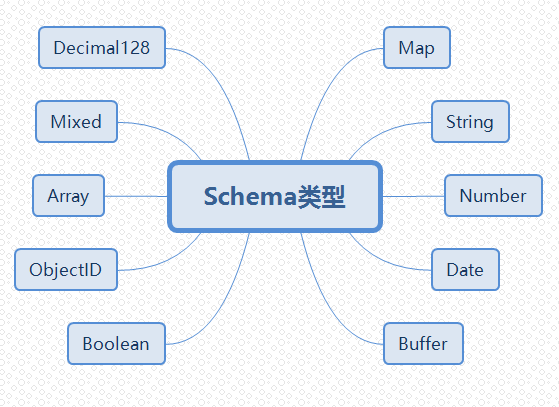
const courseSchema = new mongoose.Schema({

    name: String,

    author: String,

    tags: [String],

    date: {type: Date, default: Date.now},

    isPublished: Boolean

});
Model
模型是根据模式定义编译的构造函数,模型的实例称为文档,模型负责从底层MongoDB数据库创建和读取文档。
const Course = mongoose.model('Course', courseSchema);

const course = new Course({

    name: 'Nodejs Course',

    author: 'Hiram',

    tags: ['node', 'backend'],

    isPublished: true

});
新增(保存)一个文档
async function createCourse(){

    const course = new Course({

        name: 'Nodejs Course',

        author: 'Hiram',

        tags: ['node', 'backend'],

        isPublished: true

    });

    const result = await course.save();

    console.log(result);

}

createCourse();
查找文档
async function getCourses(){

    const courses = await Course

        .find({author: 'Hiram', isPublished: true})

        .limit(10)

        .sort({name: 1})

        .select({name: 1, tags:1});

    console.log(courses);

}

getCourses();
使用比较操作符
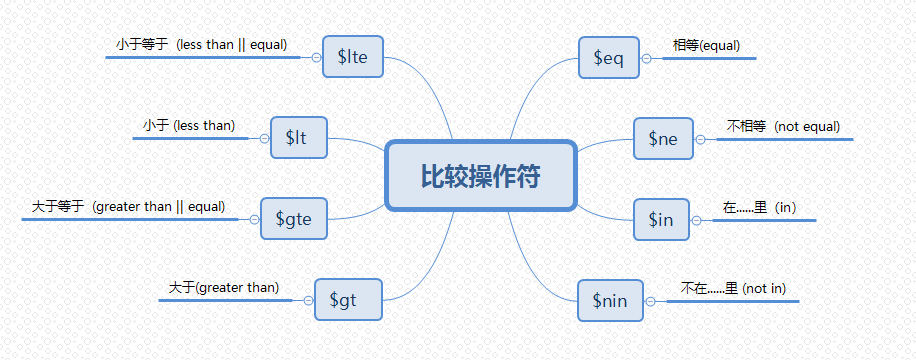
async function getCourses(){

    const courses = await Course

        // .find({author: 'Hiram', isPublished: true})

        // .find({ price: {$gt: 10, $lte: 20} })

        .find({price: {$in: [10, 15, 20]} })

        .limit(10)

        .sort({name: 1})

        .select({name: 1, tags:1});

    console.log(courses);

}

getCourses();
使用逻辑操作符
- or (或) 只要满足任意条件
- and (与) 所有条件均需满足
async function getCourses(){

    const courses = await Course

        // .find({author: 'Hiram', isPublished: true})

        .find()

        // .or([{author: 'Hiram'}, {isPublished: true}])

        .and([{author: 'Hiram', isPublished: true}])

        .limit(10)

        .sort({name: 1})

        .select({name: 1, tags:1});

    console.log(courses);

}

getCourses();
使用正则表达式
async function getCourses(){

    const courses = await Course

        // .find({author: 'Hiram', isPublished: true})

        //author字段以“Hiram”开头

        // .find({author: /^Hiram/})

        //author字段以“Pierce”结尾

        // .find({author: /Pierce$/i })

        //author字段包含“Hiram”

        .find({author: /.*Hiram.*/i })

        .limit(10)

        .sort({name: 1})

        .select({name: 1, tags:1});

    console.log(courses);

}

getCourses();
使用count()计数
async function getCourses(){

    const courses = await Course

        .find({author: 'Hiram', isPublished: true})

        .count();

    console.log(courses);

}

getCourses();
使用分页技术
通过结合使用 skip() 及 limit() 可以做到分页查询的效果
async function getCourses(){

    const pageNumber = 2;

    const pageSize = 10;

    const courses = await Course

        .find({author: 'Hiram', isPublished: true})

        .skip((pageNumber - 1) * pageSize)

        .limit(pageSize)

        .sort({name: 1})

        .select({name: 1, tags: 1});

    console.log(courses);

}

getCourses();
更新文档
先查找后更新
async function updateCourse(id){

    const course = await Course.findById(id);

    if(!course) return;

    course.isPublished = true;

    course.author = 'Another Author';

    const result = await course.save();

    console.log(result);

}
直接更新
async function updateCourse(id){

    const course = await Course.findByIdAndUpdate(id, {

        $set: {

            author: 'Jack',

            isPublished: false

        }

    }, {new: true}); //true返回修改后的文档,false返回修改前的文档

    console.log(course);

}
MongoDB更新操作符,请参考:https://docs.mongodb.com/manual/reference/operator/update/
删除文档
- deleteOne 删除一个
- deleteMany 删除多个
- findByIdAndRemove 根据ObjectID删除指定文档
async function removeCourse(id){

    // const result = await Course.deleteMany({ _id: id});

    const course = await Course.findByIdAndRemove(id);

    console.log(course)

}
Node.js对MongoDB进行增删改查操作的更多相关文章
- Scala对MongoDB的增删改查操作
=========================================== 原文链接: Scala对MongoDB的增删改查操作 转载请注明出处! ==================== ...
- python 全栈开发,Day124(MongoDB初识,增删改查操作,数据类型,$关键字以及$修改器,"$"的奇妙用法,Array Object 的特殊操作,选取跳过排序,客户端操作)
一.MongoDB初识 什么是MongoDB MongoDB 是一个基于分布式文件存储的数据库.由 C++ 语言编写.旨在为 WEB 应用提供可扩展的高性能数据存储解决方案. MongoDB 是一个介 ...
- Node.js 实现 MySQL 数据库增删改查
安装mysql $ npm isntall mysql 连接数据库 需要根据实际配置修改数据库用户名.及密码及数据库名 let mysql = require('mysql'); let connec ...
- Mongodb之增删改查操作
一.创建一个数据库 在我们使用MongoDB数据库时引进了这样一个知识,“对于mongodb,使用了不存在的对象,就等于在创建这个对象”,所以创建数据库的操作就比较简单 在我们使用mysql数据库时u ...
- MongoDB基本增删改查操作-mongo shell
基础 1.查看所有数据库: show dbs 2.选择数据库: use test 3.查看数据库中有哪些集合: show collections 如下图: 查询 1.查看集合中有哪些数据,其中abc为 ...
- MongoDB之增删改查(一)
本文主要介绍MongoDB数据库增删改查操作. 增 mongoDB和其它关系型数据库一样,通过insert来添加数据到集合中去. db.collectionName.insert(内容) 显示数据库中 ...
- 【基础篇】js对本地文件增删改查--查
前置条件: 1. 本地有安装node,点击传送门 项目目录: 1. msg.json内容 { "data": [ { "id": 1, "name&q ...
- 【基础篇】js对本地文件增删改查--改
前置条件: 1. 本地有安装node,点击传送门 项目目录: 1. msg.json内容 { "data": [ { "id": 1, "name&q ...
- 【基础篇】js对本地文件增删改查--删
前置条件: 1. 本地有安装node,点击传送门 项目目录: 1. msg.json内容 { "data": [ { "id": 1, "name&q ...
随机推荐
- apache ab工具
Apache ab并发负载压力测试 ab命令原理 Apache的ab命令模拟多线程并发请求,测试服务器负载压力,也可以测试nginx.lighthttp.IIS等其它Web服务器的压力. ab命令 ...
- js中定时器相关
每三秒(3000 毫秒)弹出 "Hello" : setInterval(function(){ alert("Hello"); }, 3000); setIn ...
- hdu-1255(线段树求面积并)模板
题目链接:传送门 思路: (1)建立线段的信息,每个线段存储l到r的线段的x位置和y的起始点与终点. 建立线段树的节点信息,每个节点代表一个区间的信息,x表示区间的横坐标的位置,l,r表示纵坐标的范围 ...
- caffe 笔记
caffe模块: blob:caffe中数据的封装,用于layer上流动 layer:输入层.输出层.神经网络层的抽象 net:神经网络结构,将layer层叠关联起来 solver:定义神经网络训练和 ...
- Mybatis-Plus 实战完整学习笔记(十)------条件构造器核心用法大全(下)
31.升序orderByAsc 31.升序orderByAsc List<Employee> employeeList = employeeMapper.selectList(new Qu ...
- mysql学习之路_外键
回顾4 连接查询: 连接多张表到一起,不管记录数如何,字段数一定会增加. 分类:内连接,外连接.自然连接,交叉连接, 交叉连接:cross join (笛卡尔积) 内连接:inner join,左右两 ...
- 振动器(Vibrator)
package com.wwj.serviceandboardcast; import android.app.Activity; import android.app.Service; impo ...
- POJ1446 Girls and Boys
Girls and Boys Time Limit: 5000MS Memory Limit: 10000K Total Submissions: 12747 Accepted: 5678 D ...
- Codeforces821A Okabe and Future Gadget Laboratory 2017-06-28 14:55 80人阅读 评论(0) 收藏
A. Okabe and Future Gadget Laboratory time limit per test 2 seconds memory limit per test 256 megaby ...
- Hdu4135 Co-prime 2017-06-27 16:03 25人阅读 评论(0) 收藏
Co-prime Time Limit : 2000/1000ms (Java/Other) Memory Limit : 32768/32768K (Java/Other) Total Subm ...