
Jaguar_websocket结合Flutter搭建简单聊天室
1.定义消息
在开始建立webSocket之前,我们需要定义消息,如:发送人,发送时间,发送人id等..
import 'dart:convert';

class ChatMessageData {

  final String id;

  final String msg;

  final DateTime created;

  final String name;

  final int role;

  ChatMessageData(

    this.id,

    this.msg,

    this.name,

    this.role,

    this.created,

  );

  static ChatMessageData formMap(Map map) => ChatMessageData(

      map['id'],

      map['msg'],

      map['name'],

      map['role'],

      DateTime.fromMicrosecondsSinceEpoch(map['created']));

  Map toMap() => {

        "id": id,

        "msg": msg,

        "name": name,

        "role":role,

        "created": created.millisecondsSinceEpoch

      };

  String toJson() => jsonEncode(toMap());

  @override

  String toString() => toMap().toString();

}
我们这里定义了一个ChatMessageData,如果你想需要更多字段,可以再添加
2.添加消息订阅
//控制消息的发送

final pub = StreamController<ChatMessageData>();

//当pub调用add(data)方法,该sub的listen会监听到

final Stream<ChatMessageData> sub = pub.stream.asBroadcastStream();
3. 定义接口
这里我们定义两个接口,一个用于连接的接口,一个用于发送消息的接口
/mini/login 提交用户的信息,如果不正确,返回相关的信息,不给连接

/min/connect 连接websocket,该接口获取到websocket对象,然后可以使用该对象
进行发送消息
登陆接口
..post('/mini/login', (ctx) async{

      User user=await ctx.bodyAsJson(convert: User.forMap);

      String username = user.username;

      String password = user.password;

      if (username.isEmpty || password.isEmpty) {

        return Response.json(apiJson.errorMsgA(-, '用户名或密码为空!').toMap());

      } else {

        User user = await userBean.findOneWhere(userBean.username.eq(username));

        if (user == null || user.password != password) {

          return Response.json(apiJson.errorMsgA(-, '用户名或密码不正确!').toMap());

        } else {

          print('用户:$username登陆成功');

          return Response.json(apiJson.successA().toMap());

        }

      }

    })
连接接口
..ws(

      '/mini/connect',

      onConnect: (ctx, ws) {

        var subscription = sub.listen((ChatMessageData data) {

          print(data.toJson());

          ws.add(data.toJson());

        });

        ws.done.then((_) {

          print('用户已退出聊天房');

          subscription.cancel();

        });

        //连接上之后返回一条信息

        ws.add(new ChatMessageData('', '欢迎登陆', '服务器', , DateTime.now()).toJson());

      },

      handler: (data) {

        //获取用户发送的消息

        ChatMessageData msg=ChatMessageData.formMap(json.decode(data));

        print(msg.toJson());

        //广播一条消息

        pub.add(msg);

      },

    )
ok,我们已经搭建好一个简单的聊天接口了,下面,我们使用Flutter简单的编辑一下客户端平台
4.Flutter建立一个简单的聊天室
这部分代码为Flutter下,可简单的编辑一个聊天室
mport 'package:flutter/cupertino.dart';

import 'package:flutter/foundation.dart';

import 'package:flutter/material.dart';

void main() {

  runApp(new FriendlychatApp());

}

final ThemeData kIOSTheme = new ThemeData(

  primarySwatch: Colors.orange,

  primaryColor: Colors.grey[],

  primaryColorBrightness: Brightness.light,

);

final ThemeData kDefaultTheme = new ThemeData(

  primarySwatch: Colors.purple,

  accentColor: Colors.orangeAccent[],

);

const String _name = "Your Name";

class FriendlychatApp extends StatelessWidget {

 @override

 Widget build(BuildContext context) {

    return new MaterialApp(

      title: "Friendlychat",

      theme: defaultTargetPlatform == TargetPlatform.iOS

        ? kIOSTheme

        : kDefaultTheme,

      home: new ChatScreen(),

    );

  }

}

class ChatMessage extends StatelessWidget {

  ChatMessage({this.text, this.animationController});

  final String text;

  final AnimationController animationController;

  @override

  Widget build(BuildContext context) {

    return new SizeTransition(

      sizeFactor: new CurvedAnimation(

        parent: animationController,

        curve: Curves.easeOut

      ),

      axisAlignment: 0.0,

      child: new Container(

        margin: const EdgeInsets.symmetric(vertical: 10.0),

        child: new Row(

          crossAxisAlignment: CrossAxisAlignment.start,

          children: <Widget>[

            new Container(

              margin: const EdgeInsets.only(right: 16.0),

              child: new CircleAvatar(child: new Text(_name[])),

            ),

            new Expanded(

              child: new Column(

                crossAxisAlignment: CrossAxisAlignment.start,

                children: <Widget>[

                  new Text(_name, style: Theme.of(context).textTheme.subhead),

                  new Container(

                    margin: const EdgeInsets.only(top: 5.0),

                    child: new Text(text),

                  ),

                ],

              ),

            ),

          ],

        ),

      )

    );

  }

}

class ChatScreen extends StatefulWidget {

  @override

  State createState() => new ChatScreenState();

}

class ChatScreenState extends State<ChatScreen> with TickerProviderStateMixin {

  final List<ChatMessage> _messages = <ChatMessage>[];

  final TextEditingController _textController = new TextEditingController();

  bool _isComposing = false;

  void _handleSubmitted(String text) {

    _textController.clear();

    setState(() {

      _isComposing = false;

    });

    ChatMessage message = new ChatMessage(

      text: text,

      animationController: new AnimationController(

        duration: new Duration(milliseconds: ),

        vsync: this,

      ),

    );

    setState(() {

      _messages.insert(, message);

    });

    message.animationController.forward();

  }

  void dispose() {

    for (ChatMessage message in _messages)

      message.animationController.dispose();

    super.dispose();

  }

   Widget _buildTextComposer() {

    return new IconTheme(

      data: new IconThemeData(color: Theme.of(context).accentColor),

      child: new Container(

          margin: const EdgeInsets.symmetric(horizontal: 8.0),

          child: new Row(children: <Widget>[

            new Flexible(

              child: new TextField(

                controller: _textController,

                onChanged: (String text) {

                  setState(() {

                    _isComposing = text.length > ;

                  });

                },

                onSubmitted: _handleSubmitted,

                decoration:

                    new InputDecoration.collapsed(hintText: "Send a message"),

              ),

            ),

            new Container(

                margin: new EdgeInsets.symmetric(horizontal: 4.0),

                child: Theme.of(context).platform == TargetPlatform.iOS

                    ? new CupertinoButton(

                        child: new Text("Send"),

                        onPressed: _isComposing

                            ? () => _handleSubmitted(_textController.text)

                            : null,

                      )

                    : new IconButton(

                        icon: new Icon(Icons.send),

                        onPressed: _isComposing

                            ? () => _handleSubmitted(_textController.text)

                            : null,

                      )),

          ]),

          decoration: Theme.of(context).platform == TargetPlatform.iOS

              ? new BoxDecoration(

                  border:

                      new Border(top: new BorderSide(color: Colors.grey[])))

              : null),

    );

  }

  Widget build(BuildContext context) {

    return new Scaffold(

      appBar: new AppBar(

        title: new Text("Friendlychat"),

        elevation:

            Theme.of(context).platform == TargetPlatform.iOS ? 0.0 : 4.0

      ),

      body: new Container(

        child: new Column(

          children: <Widget>[

          new Flexible(

            child: new ListView.builder(

              padding: new EdgeInsets.all(8.0),

              reverse: true,

              itemBuilder: (_, int index) => _messages[index],

              itemCount: _messages.length,

            )

          ),

          new Divider(height: 1.0),

          new Container(

            decoration: new BoxDecoration(

              color: Theme.of(context).cardColor),

            child: _buildTextComposer(),

          ),

         ]

       ),

       decoration: Theme.of(context).platform == TargetPlatform.iOS ? new BoxDecoration(border: new Border(top: new BorderSide(color: Colors.grey[]))) : null),//new

   );

  }

}
上面就是简单的聊天界面,我们还有主要跟服务器交互的方法
WebSocket socket;

void login() {

    httpManager.post(

        url: 'http://192.168.1.101:8080/mini/login',

        body: json.encode({

          "username": "rhyme",

          "password": "",

        }),

        onSend: () {

//key为scaffold的key

          scaffoldKey?.currentState

              ?.showSnackBar(new SnackBar(content: Text('发送请求,连接服务器')));

        },

        onSuccess: (data) {

          WebSocket.connect('ws://192.168.1.101:8080/mini/connect')

              .then((socket) {

            this.socket = socket;

            socket.listen((data) {

//该方法接收服务器信息

              print(data);

              Map map = json.decode(data);

              ChatMessageData msg=ChatMessageData.formMap(map);

              if(msg.id!=widget.user.uuid){

                _handleGetMessage(msg);

              }

            });

            socket.done.then((e){

//当与服务器连接中断调用

              scaffoldKey.currentState.showSnackBar(new SnackBar(content: Text('连接服务器中断!')));

            });

          });

        },

        onError: (error) {

          print(error);

          scaffoldKey.currentState.showSnackBar(

              new SnackBar(content: Text('连接失败!${error.toString()}')));

        });

  }
我们发送消息给服务端
socket.add(new ChatMessageData(widget.user.uuid, value, widget.user.userName, widget.user.role, DateTime.now()).toJson());
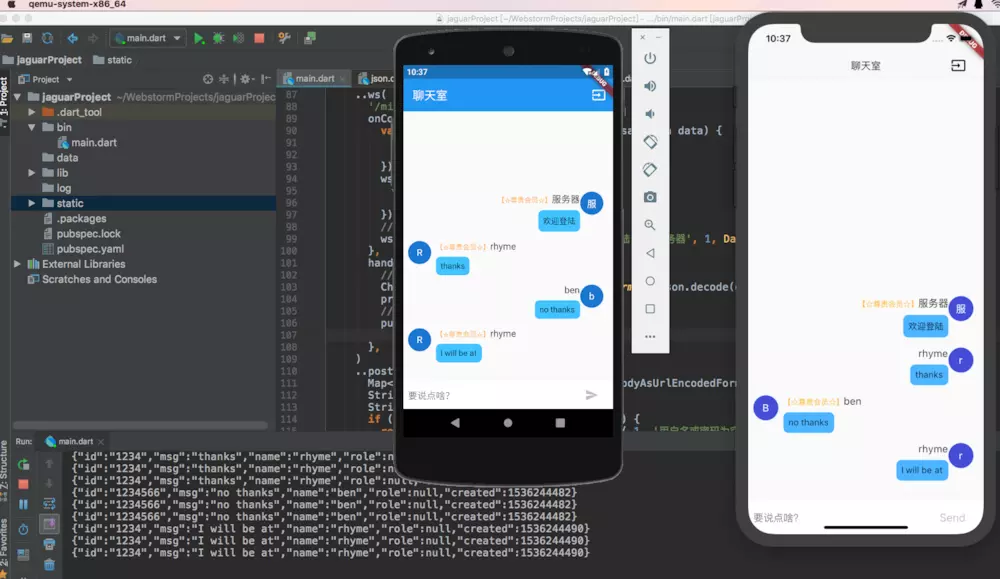
最后我们来尝试一下吧!
Jaguar_websocket结合Flutter搭建简单聊天室的更多相关文章
- SpringBoot 搭建简单聊天室
SpringBoot 搭建简单聊天室(queue 点对点) 1.引用 SpringBoot 搭建 WebSocket 链接 https://www.cnblogs.com/yi1036943655/p ...
- ASP.NET SingalR + MongoDB 实现简单聊天室(一):搭建基本框架
ASP.NET SingalR不多介绍.让我介绍不如看官网,我这里就是直接上源代码,当然代码还是写的比较简单的,考虑的也少,希望各位技友多多提意见. 先简单介绍聊天室功能: 用户加入聊天室,自动给用户 ...
- Python Socket 简单聊天室2
上篇文章写了一个简单的单线程的一问一答的简单聊天室.这次我们使用SocketServer模块搭建一个多线程异步的聊天室. 1 2 3 4 5 6 7 8 9 10 11 12 13 14 15 16 ...
- 基于Server-Sent Event的简单聊天室 Web 2.0时代,即时通信已经成为必不可少的网站功能,那实现Web即时通信的机制有哪些呢?在这门项目课中我们将一一介绍。最后我们将会实现一个基于Server-Sent Event和Flask简单的在线聊天室。
基于Server-Sent Event的简单聊天室 Web 2.0时代,即时通信已经成为必不可少的网站功能,那实现Web即时通信的机制有哪些呢?在这门项目课中我们将一一介绍.最后我们将会实现一个基于S ...
- SilverLight搭建WCF聊天室详细过程[转]
http://www.silverlightchina.net/html/zhuantixilie/getstart/2011/0424/7148.html 默认节点 SilverLight搭建WCF ...
- Asp.Net SignalR - 简单聊天室实现
简单聊天室 使用持久链接类我们就可以做一些即时通讯的应用了,我使用Group做了一个简单的聊天室,先上图技术细节下面再讲 可以加入聊天室.创建聊天室.发送消息,下面就说说我是如何通过Group做出来的 ...
- 利用socket.io+nodejs打造简单聊天室
代码地址如下:http://www.demodashi.com/demo/11579.html 界面展示: 首先展示demo的结果界面,只是简单消息的发送和接收,包括发送文字和发送图片. ws说明: ...
- C#实例之简单聊天室(状态管理)
前言 状态管理是在同一页或不同页的多个请求发生时,维护状态和页信息的过程.因为Web应用程序的通信协议使用了无状态的HTTP协议,所以当客户端请求页面时,ASP.NET服务器端都会重新生 ...
- java web利用mvc结构实现简单聊天室功能
简单聊天室采用各种内部对象不适用数据库实现. 一个聊天室要实现的基本功能是: 1.用户登录进入聊天室, 2.用户发言 3.用户可以看见别人发言 刚才算是简单的需求分析了,现在就应该是进 ...
随机推荐
- 课程一(Neural Networks and Deep Learning),第三周(Shallow neural networks)—— 1、两层神经网络的单样本向量化表示与多样本向量化表示
如上图所示的两层神经网络, 单样本向量化: ...
- 课程一(Neural Networks and Deep Learning),第三周(Shallow neural networks)—— 0、学习目标
Learn to build a neural network with one hidden layer, using forward propagation and backpropagation ...
- War文件部署
其实,开始要求将源码压缩成War文件时,一头雾水! 公司项目要求做CAS SSO单点登录 也就是这玩意.... 其实war文件就是Java中web应用程序的打包.借用一个老兄的话,“当你一个web应用 ...
- 监督学习——决策树理论与实践(下):回归决策树(CART)
介绍 决策树分为分类决策树和回归决策树: 上一篇介绍了分类决策树以及Python实现分类决策树: 监督学习——决策树理论与实践(上):分类决策树 决策树是一种依托决策而建立起来的一种 ...
- C# 多线程学习系列三之CLR线程池系列之ThreadPool
一.CLR线程池 1.进程和CLR的关系一个进程可以只包含一个CLR,也可以包含多个CLR2.CLR和AppDomain的关系一个CLR可以包含多个AppDomain3.CLR和线程池的关系一个CLR ...
- spring-boot-starter-actuator
首先在pom中添加依赖 pom.xml <?xml version="1.0" encoding="UTF-8"?> <project xml ...
- IdentityServer-Setup and Overview
设置和概述 有两种方式创建一个IdentityServer 项目: 从零开始 使用Visual Studio的ASP.NET Identity模板 如果是从零开始,我们提供一序列的帮助及内存存储,所以 ...
- 帝国CMS-后台管理工具
后台管理工具 apache+mysql 搭建的后台管理工具 参考手册*************http://www.phome.net/doc/ecmsedu/ 1.安装----- 使用的一键安装包. ...
- php实现请求分流
一个请求,同时分发到多个服务器, 正常的是: A ============> B 现在想实现的是: --------------> C A ======> B ----- ...
- Maven 入门——Maven 的安装和配置
1.安装 Windows 环境 Maven 官网下载安装文件 解压到指定目录 配置环境变量(M2_HOME) cmd 输入 mvn -v Mac环境 brew install maven 配置环境变量 ...