
Windows下调试hadoop
1. 本地模式
本地模式下调试hadoop:下载winutils.exe和hadoop.dll hadoop.lib等windows的hadoop依赖文件放在D:\proc\hadoop\bin目录下
并设置环境变量:HADOOP_HOME=D:\proc\hadoop
添加PATH=%HADOOP_HOME%\bin
D:\proc\hadoop 是一个空目录就可以.
关闭eclipse再重新启动来获取新的环境变量。
然后创建WorldCount.java:
package cn.zenith.mr;

import java.io.IOException;

import java.util.StringTokenizer;

import org.apache.hadoop.conf.Configuration;

import org.apache.hadoop.fs.Path;

import org.apache.hadoop.io.IntWritable;

import org.apache.hadoop.io.Text;

import org.apache.hadoop.mapreduce.Job;

import org.apache.hadoop.mapreduce.Mapper;

import org.apache.hadoop.mapreduce.Reducer;

import org.apache.hadoop.mapreduce.lib.input.FileInputFormat;

import org.apache.hadoop.mapreduce.lib.output.FileOutputFormat;

import org.apache.hadoop.util.GenericOptionsParser;

publicclass WordCount {

publicstaticclass TokenizerMapper

extends Mapper<Object, Text, Text, IntWritable>{

privatefinalstatic IntWritable one = new IntWritable(1);

private Text word = new Text();

publicvoid map(Object key, Text value, Context context

                    ) throws IOException, InterruptedException {

      StringTokenizer itr = new StringTokenizer(value.toString());

while (itr.hasMoreTokens()) {

word.set(itr.nextToken());

context.write(word, one);

      }

    }

  }

publicstaticclass IntSumReducer

extends Reducer<Text,IntWritable,Text,IntWritable> {

private IntWritable result = new IntWritable();

publicvoid reduce(Text key, Iterable<IntWritable>values,

                       Context context

                       ) throws IOException, InterruptedException {

intsum = 0;

for (IntWritable val : values) {

sum += val.get();

      }

result.set(sum);

context.write(key, result);

    }

  }

publicstaticvoid main(String[] args) throws Exception {

    Configuration conf = new Configuration();

    String[] otherArgs = new GenericOptionsParser(conf, args).getRemainingArgs();

if (otherArgs.length< 2) {

      System.err.println("Usage: wordcount <in> [<in>...] <out>");

      System.exit(2);

    }

    Job job = Job.getInstance(conf, "word count");

job.setJarByClass(WordCount.class);

job.setMapperClass(TokenizerMapper.class);

job.setCombinerClass(IntSumReducer.class);

job.setReducerClass(IntSumReducer.class);

job.setOutputKeyClass(Text.class);

job.setOutputValueClass(IntWritable.class);

for (inti = 0; i<otherArgs.length - 1; ++i) {

      FileInputFormat.addInputPath(job, new Path(otherArgs[i]));

    }

    FileOutputFormat.setOutputPath(job,

new Path(otherArgs[otherArgs.length - 1]));

    System.exit(job.waitForCompletion(true) ? 0 : 1);

  }

}
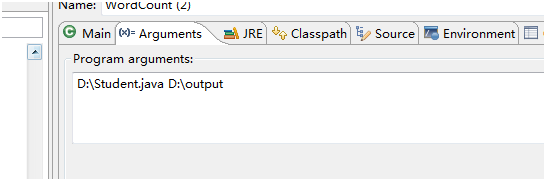
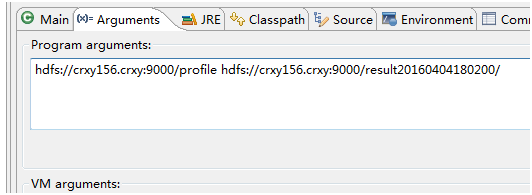
运行时:可以指定
运行时候指定本地的路径:如图:
或者远程目录:
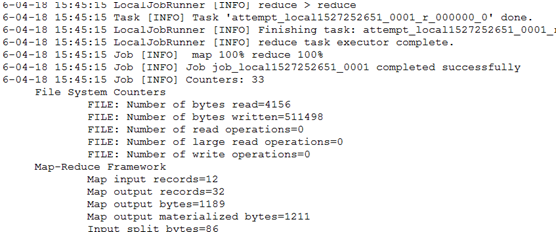
Debug或者run下结果:
2. 集群模式
集群模式是本地向集群提交作业。
1、将集群中的配置文件core-site.xml,hdfs-site.xml,mapred-site.xml,yarn-site.xml文件放在项目的resources目录下
2、在mapred-site.xml中添加:
<property>
<name>mapreduce.app-submission.cross-platform</name>
<value>true</value>
</property>
<property>
<name>mapred.jar</name>
<value>D:\\works\\cr_teach\\target\\teach-1.0-SNAPSHOT-jar-with-dependencies.jar</value>
</property>
Mapred.jar目录根据你自己的包名字来定。
3、Maven 打包 mvn clean install
4、运行。
如果提示:
Permission denied: user=zenith, access=EXECUTE, inode="/tmp/hadoop-yarn":root:supergroup:drwx------
给文件增加执行权限 hdfs dfs -chmod -R a+x /tmp
Windows下调试hadoop的更多相关文章
- Windows下运行Hadoop
Windows下运行Hadoop,通常有两种方式:一种是用VM方式安装一个Linux操作系统,这样基本可以实现全Linux环境的Hadoop运行:另一种是通过Cygwin模拟Linux环境.后者的好处 ...
- Windows下的Hadoop安装(本地模式)
时隔许久的博客.. 系统为Windows 10,Hadoop版本2.8.3. 虽然之前已经在Linux虚拟机上成功运行了Hadoop,但我还是在Windows上编码更加习惯,所以尝试了在Window上 ...
- [Hadoop] Windows 下的 Hadoop 2.7.5 环境搭建
原文地址:https://www.cnblogs.com/memento/p/9148721.html 准备说明: jdk:jdk-8u161-windows-x64.exe hadoop:hadoo ...
- Windows下编译 Hadoop
Windows下编译 Hadoop-2.9.2 系统环境 系统: Windows 10 10.0_x64 maven: Apache Maven 3.6.0 jdk: jdk_1.8.0_201 Pr ...
- 比特币学习笔记(二)---在windows下调试比特币源码
根据我一贯的学习经验,学习开源代码的话,单单看是不够的,必须一边看一边调试才能尽快理解,所以我们要想法搭建windows下bitcoin源码的调试环境. 紧接着昨天的进度,想要调试linux下的比特币 ...
- Windows 下部署 hadoop spark环境
一.先在本地安装jdk 我这里安装的jdk1.8,具体的安装过程这里不作赘述 二.部署安装maven 下载maven安装包,并解压 设置环境变量,MAVEN_HOME=D:\SoftWare\Mave ...
- Windows下安装Hadoop、Spark和HBase
1.Hadoop 安装Hadoop:下载hadoop-2.7.1.tar.gz,并解压到你想要的目录下,我放在D:\Library\hadoop-2.7.1. 配置Hadoop环境变量:HADOOP_ ...
- windows下安装hadoop
环境 windows7 64位 JDK环境已经配置好(测试的是jdk1.8.0_191) hadoop体现结构: 下载Hadoop,地址 http://archive.apache.org/dist/ ...
- windows下调试virtualbox的虚拟机串口
1.我不知道其他人是怎么实现的,我是这么实现的. 2.下载一个叫做VSPD的软件,其作用是在windosw上虚拟几个串口出来. 下载完了安装,安装完了注册,如果不是花钱买来的,那就自己想办法注册吧.我 ...
随机推荐
- spring 事务的传播特性
1.声明式事物中,一个类serviceA的方法test1()调用另一个类serviceB的方法test2() 要是serviceB的test2()事务配置在xml文件中为REQUIRED,又在此方法上 ...
- POJ3273--Monthly Expense(Binary Search)
Description Farmer John is an astounding accounting wizard and has realized he might run out of mone ...
- POJ3169--Layout(SPFA+差分系统)
Description Like everyone else, cows like to stand close to their friends when queuing for feed. FJ ...
- .net MongoDB使用
.net平台的MongoDB使用 CRL快速开发框架系列教程十二(MongoDB支持) MongoDB数据库 mongo-csharp-driver
- Stein算法求最大公约数
首先引进一个符号:gcd是greatest common divisor(最大公约数)的缩写,gcd( x,y ) 表示x和y的最大公约数.然后有一个事实需要了解:一个奇数的所有约数都是奇数.这个很容 ...
- [ 9.10 ]CF每日一题系列—— 186A模拟处理字符串
Description: 跟你两个不相同的字符串,问你能否将第一个字符串任意两个字母交换一次使得两字符串相同,YES or NO Solution: 一维模拟就好了 #include <iost ...
- poj 2531 搜索剪枝
Network Saboteur Time Limit: 2000 MS Memory Limit: 65536 KB 64-bit integer IO format: %I64d , %I64u ...
- FastReport使用技巧
使用技巧篇 1.FastReport中如果访问报表中的对象? 可以使用FindObject方法. TfrxMemoView(frxReport1.FindObject('memo ...
- Constructor in depth
There are two types of constructor:Instance Constructor and Type Constructor(or so-called Static Con ...
- Rabbit MQ 入门指南
rabbitMQ是一个在AMQP协议标准基础上完整的,可服用的企业消息系统.他遵循Mozilla Public License开源协议.采用 Erlang 实现的工业级的消息队列(MQ)服务器. Ra ...