
路由器配置——OSPF协议(1)
一、实验目的:用OSPF协议使全网互通
二、拓扑图
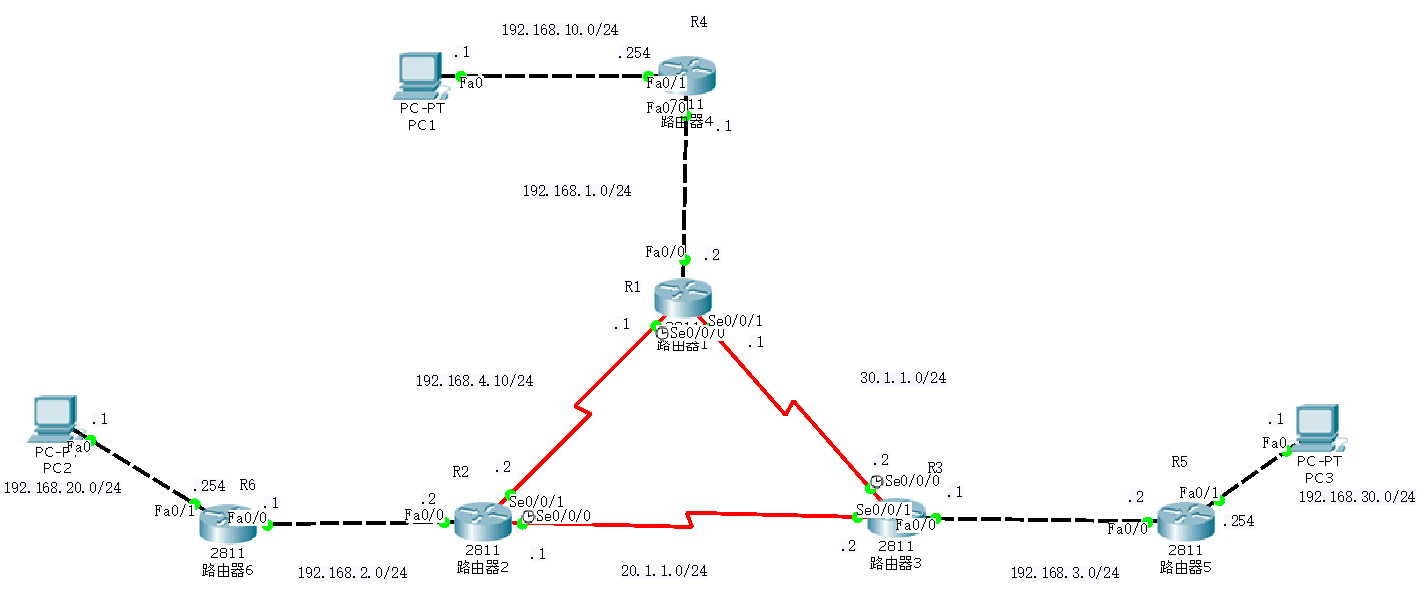
三、具体步骤配置
(1)R1路由器配置
Router>enable
Router#configure terminal
Enter configuration commands, one per line. End with CNTL/Z.
Router(config)#hostname R1
R1(config)#interface f0/0
R1(config-if)#ip address 192.168.1.2 255.255.255.0
R1(config-if)#no shutdown
R1(config-if)#interface s0/0/0
R1(config-if)#ip address 10.1.1.1 255.255.255.0
R1(config-if)#clock rate 64000
R1(config-if)#no shutdown
R1(config-if)#interface s0/0/1
R1(config-if)#ip address 30.1.1.1 255.255.255.0
R1(config-if)#clock rate 64000
This command applies only to DCE interfaces
R1(config-if)#no shutdown
R1(config-if)#exit
R1(config)#router ospf 1
R1(config-router)#router-id 1.1.1.1
R1(config-router)#network 192.168.1.0 0.0.0.255 area 0
R1(config-router)#network 10.1.1.0 0.0.0.255 area 0
R1(config-router)#network 30.1.1.0 0.0.0.255 area 0
R1(config-router)#end
(2)R2路由器配置
Router>enable
Router#configure terminal
Enter configuration commands, one per line. End with CNTL/Z.
Router(config)#hostname R2
R2(config)#interface f0/0
R2(config-if)#ip address 192.168.2.2 255.255.255.0
R2(config-if)#no shutdown
R2(config-if)#interface s0/0/0
R2(config-if)#ip address 20.1.1.1 255.255.255.0
R2(config-if)#clock rate 64000
R2(config-if)#no shutdown
R2(config-if)#interface s0/0/1
R2(config-if)#ip address 10.1.1.2 255.255.255.0
R2(config-if)#clock rate 64000
This command applies only to DCE interfaces
R2(config-if)#no shutdown
%LINK-5-CHANGED: Interface Serial0/0/1, changed state to down
R2(config-if)#exit
R2(config)#router ospf 1
R2(config-router)#router-id 2.2.2.2
R2(config-router)#network 192.168.2.0 0.0.0.255 area 0
R2(config-router)#network 20.1.1.0 0.0.0.255 area 0
R2(config-router)#network 10.1.1.0 0.0.0.255 area 0
R2(config-router)#end
(3)R3路由器配置
Router>enable
Router#configure terminal
Enter configuration commands, one per line. End with CNTL/Z.
Router(config)#hostname R3
R3(config)#interface f0/0
R3(config-if)#ip address 192.168.3.1 255.255.255.0
R3(config-if)#no shutdown
R3(config-if)#interface s0/0/0
R3(config-if)#ip address 30.1.1.2 255.255.255.0
R3(config-if)#clock rate 64000
R3(config-if)#no shutdown
%LINK-5-CHANGED: Interface Serial0/0/0, changed state to down
R3(config-if)#interface s0/0/1
R3(config-if)#ip address 20.1.1.2 255.255.255.0
R3(config-if)#clock rate 64000
This command applies only to DCE interfaces
R3(config-if)#no shutdown
%LINK-5-CHANGED: Interface Serial0/0/1, changed state to down
R3(config-if)#exit
R3(config)#router ospf 1
R3(config-router)#router-id 3.3.3.3
R3(config-router)#network 192.168.3.0 0.0.0.255 area 0
R3(config-router)#network 30.1.1.0 0.0.0.255 area 0
R3(config-router)#network 20.1.1.0 0.0.0.255 area 0
R3(config-router)#end
(4)R4路由器配置
Router>enable
Router#configure terminal
Enter configuration commands, one per line. End with CNTL/Z.
Router(config)#hostname R4
R4(config)#interface f0/0
R4(config-if)#ip address 192.168.1.1 255.255.255.0
R4(config-if)#no shutdown
R4(config-if)#interface f0/1
R4(config-if)#ip address 192.168.10.254 255.255.255.0
R4(config-if)#no shutdown
R4(config-if)#exit
R4(config)#router ospf 1
R4(config-router)#router-id 4.4.4.4
R4(config-router)#network 192.168.1.0 0.0.0.255 area 0
R4(config-router)#network 192.168.10.0 0.0.0.255 area 0
R4(config-router)#end
(5)R5路由器配置
Router>enable
Router#configure terminal
Enter configuration commands, one per line. End with CNTL/Z.
Router(config)#hostname R5
R5(config)#interface f0/0
R5(config-if)#ip address 192.168.3.2 255.255.255.0
R5(config-if)#no shutdown
R5(config-if)#interface f0/1
R5(config-if)#ip address 192.168.30.254 255.255.255.0
R5(config-if)#no shutdown
R5(config-if)#exit
R5(config)#router ospf 1
R5(config-router)#router-id 5.5.5.5
R5(config-router)#network 192.168.3.0 0.0.0.255 area 0
R5(config-router)#network 192.168.30.0 0.0.0.255 area 0
R5(config-router)#end
(6)R6路由器配置
Router>enable
Router#configure terminal
Enter configuration commands, one per line. End with CNTL/Z.
Router(config)#hostname R6
R6(config)#interface f0/0
R6(config-if)#ip address 192.168.2.1 255.255.255.0
R6(config-if)#no shutdown
R6(config-if)#interface f0/1
R6(config-if)#ip address 192.168.20.254 255.255.255.0
R6(config-if)#no shutdown
R6(config-if)#exit
R6(config)#router ospf 1
R6(config-router)#router-id 6.6.6.6
R6(config-router)#network 192.168.2.0 0.0.0.255 area 0
R6(config-router)#network 192.168.20.0 0.0.0.255 area 0
R6(config-router)#end
四、验证测试
1、查看R1路由表信息

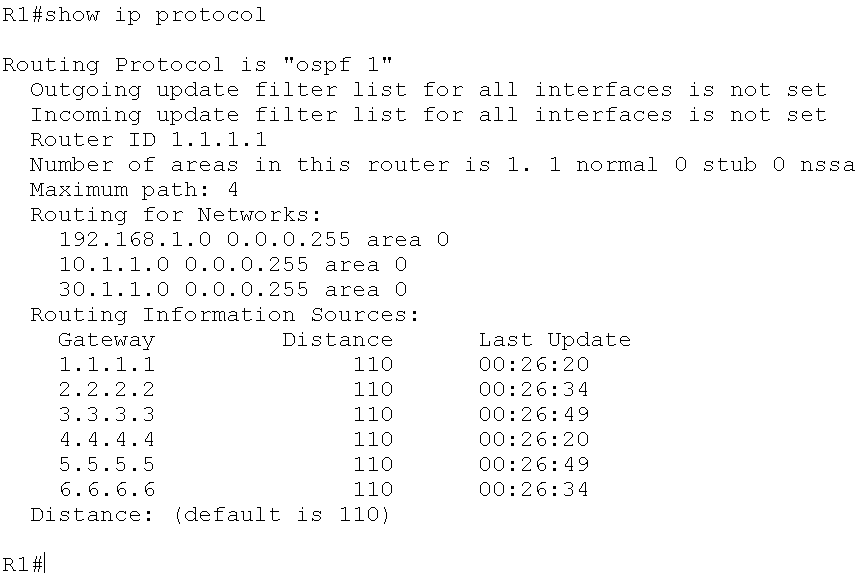
2、查看ip路由协议配置与统计信息
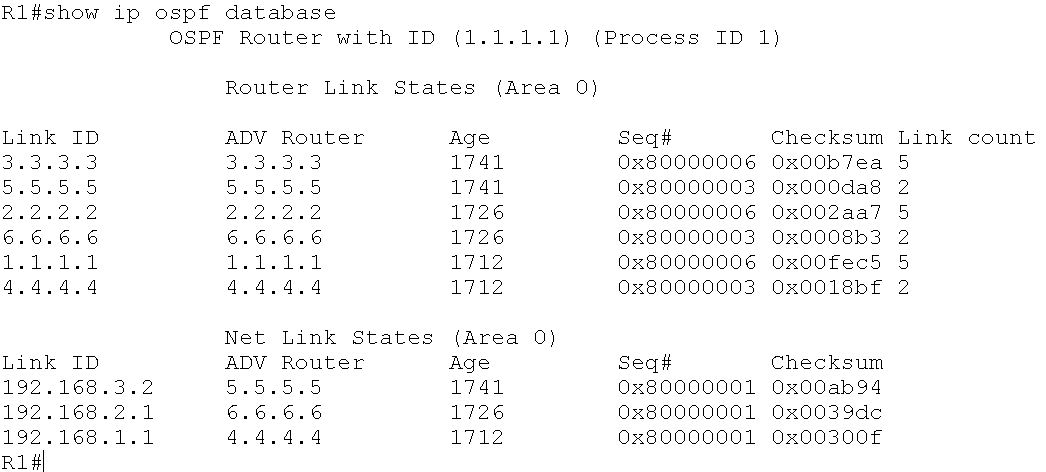
3、查看OSPF数据库信息
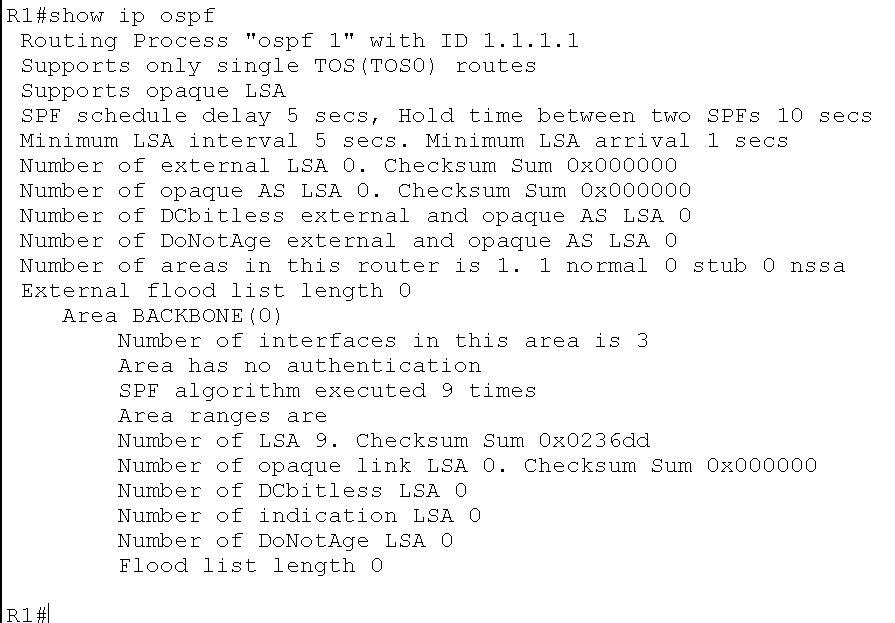
4、查看OSPF进程及区域的细节。如路由器运行SPF算法的次数
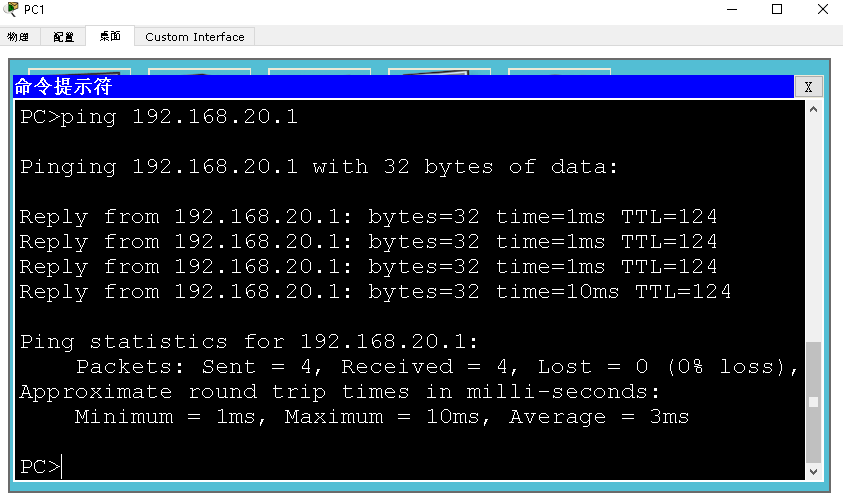
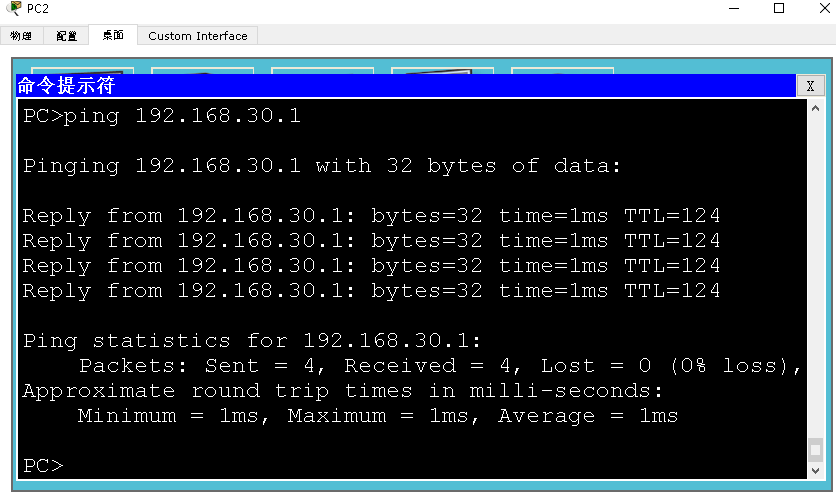
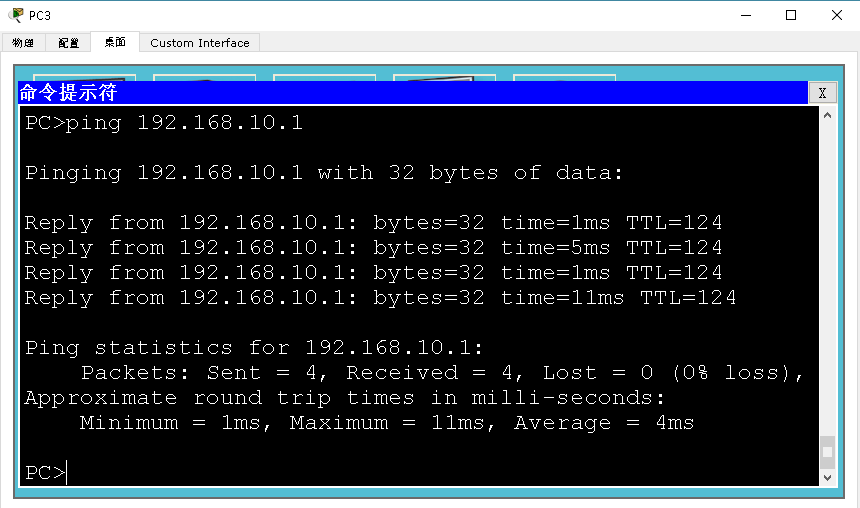
5、测试各台主机间是否互通
(1)PC1与PC2
(2)PC2与PC3
(3)PC3与PC1
路由器配置——OSPF协议(1)的更多相关文章
- 路由器配置——OSPF协议(2)
一.实验目的:使用OSPF协议达到全网互通的效果 二.拓扑图 三.具体步骤配置 (1)R1路由器配置 Router>enableRouter#configure terminalEnter co ...
- 路由器配置PPP协议 CHAP验证 PAP验证
路由器配置PPP协议 CHAP验证 PAP验证 来源 https://www.cnblogs.com/tcheng/p/5967485.html PAP是两次握手,明文传输用户密码进行认证:CHAP是 ...
- 华为路由器配置OSPF
OSPF是什么 OSPF(Open Shortest Pass First,开放最短路径优先协议),是一个最常用的内部网管协议,是一个链路状态协议. 使用场景:适用于运营商.政府机构等大型网络中多节点 ...
- OSPF协议详解
CCNP OSPF协议详解 2010-02-24 20:30:22 标签:CCNP 职场 OSPF 休闲 OSPF(Open Shortest Path Fitst,ospf)开放最短路径优先协议,是 ...
- H3C路由器配置——动态路由OSPF协议
一.介绍 1.OSPF协议介绍 (1).OSPF(Open Shortest Path First,开放最短路径优先)路由协议是用于网际协议(IP)网络的链路状态路由协议.是一个被各厂商设备广泛支持的 ...
- OSPF协议学习以及路由器配置
OSPF协议学习以及路由器配置 1.实验任务 2,使用eNsp搭建网络拓扑 3.配置路由IP ps:要使用GE(3层口),2层口(E口)需要先配置Vlan才能配置IP地址 4.配置路由器R1的ospf ...
- OSPF协议介绍及配置 (下)
4.特殊区域详解 为了让我们的讲解更加的通俗易懂,我们看上面这个拓扑,这是一个根据客户业务逻辑结构所涉及的OSPF网络,共有三个区域(实际上远远不止),骨干区域area0为一级行及二级行所部署,*** ...
- OSPF协议介绍及配置 (上)
OSPF协议介绍及配置 (上) 一.OSPF概述 回顾一下距离矢量路由协议的工作原理:运行距离矢量路由协议的路由器周期性的泛洪自己的路由表,通过路由的交互,每台路由器都从相邻的路由器学习到路由,并且加 ...
- OSPF协议介绍及配置
一.OSPF概述 回顾一下距离矢量路由协议的工作原理:运行距离矢量路由协议的路由器周期性的泛洪自己的路由表,通过路由的交互,每台路由器都从相邻的路由器学习到路由,并且加载进自己的路由表中,而对于这个网 ...
随机推荐
- 基于TCP 协议的socket 简单通信
DNS 服务器:域名解析 socket 套接字 : socket 是处于应用层与传输层之间的抽象层,也是一组操作起来非常简单的接口(接受数据),此接口接受数据之后,交由操作系统 为什么存在 soc ...
- Java打包
打成jar包 如果你使用的是maven来管理项目,执行以下命令既可以 cd 项目跟目录(和pom.xml同级)mvn clean package## 或者执行下面的命令## 排除测试代码后进行打包mv ...
- winfrom 保存图片
private void btnSave_Click(object sender, EventArgs e) { SaveFileDialog sfd = new SaveFileDialog(); ...
- 【opencv源码解析】 三、resize
resize.cpp void cv::resize( InputArray _src, OutputArray _dst, Size dsize, double inv_scale_x, doubl ...
- MySQL下载安装图文
一. MySQL下载 1. 进入MySQL官网官网地址:https://www.mysql.com/ 2. 点击DOWNLOADS 3. 点击Community(GPL) Downloads 4. 找 ...
- 关于一些JS的运算符
首先呢,什么是JavaScript:JavaScript是一种脚本语言,也是一种解释型语言,更是一种由数据值决定变量类型的弱类型语言 JavaScript主要由三部分组成 ECMAScript 这个 ...
- liunx pip安装
方法一 wget https://bootstrap.pypa.io/get-pip.py python get-pip.py 方法二 wget https://pypi.python.org/pac ...
- Django—logging日志
简介 Django使用python自带的logging 作为日志打印工具.简单介绍下logging. logging 是线程安全的,其主要由4部分组成: Logger 用户使用的直接接口,将日志传递给 ...
- 不重启linuxVMWare虚拟机添加虚拟光驱、硬盘
方法/步骤1: VMware找到要添加虚拟光驱位置,先右击点击设置,如图所示: 步骤2: 出现此界面之后点击添加: 步骤3: 直接点击下一步,如下图所示: 点击完成,天机硬盘就完毕了. 磁盘添加完成, ...
- Django:中间件与csrf
一.中间件 什么是中间件 中间件有什么用 自定义中间件 中间件应用场景 二.csrf csrf token跨站请求伪造 一.中间件 什么是中间件 中间件顾名思义,是介于request与response ...