
路由器配置——OSPF协议(2)
一、实验目的:使用OSPF协议达到全网互通的效果
二、拓扑图
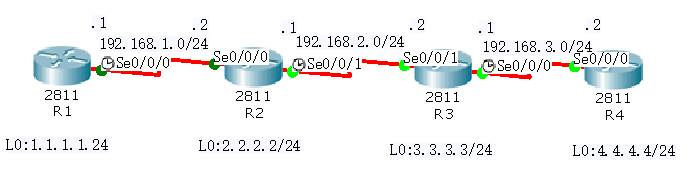
三、具体步骤配置
(1)R1路由器配置
Router>enable
Router#configure terminal
Enter configuration commands, one per line. End with CNTL/Z.
Router(config)#hostname R1
R1(config)#interface l0
R1(config-if)#ip address 1.1.1.1 255.255.255.0
R1(config-if)#no shutdown
R1(config-if)#interface s0/0/0
R1(config-if)#ip address 192.168.1.1 255.255.255.0
R1(config-if)#clock rate 64000
R1(config-if)#no shutdown
%LINK-5-CHANGED: Interface Serial0/0/0, changed state to down
R1(config-if)#exit
R1(config)#router ospf 1
R1(config-router)#router-id 1.1.1.1
R1(config-router)#network 1.1.1.0 0.0.0.255 area 0
R1(config-router)#network 192.168.1.0 0.0.0.255 area 0
R1(config-router)#end
(2)R2路由器配置
Router>enable
Router#configure terminal
Enter configuration commands, one per line. End with CNTL/Z.
Router(config)#hostname R2
R2(config)#interface l0
R2(config-if)#ip address 2.2.2.2 255.255.255.0
R2(config-if)#no shutdown
R2(config-if)#interface s0/0/0
R2(config-if)#ip address 192.168.1.2 255.255.255.0
R2(config-if)#clock rate 64000
This command applies only to DCE interfaces
R2(config-if)#no shutdown
R2(config-if)#interface s0/0/1
R2(config-if)#ip address 192.168.2.1 255.255.255.0
R2(config-if)#clock rate 64000
R2(config-if)#no shutdown
%LINK-5-CHANGED: Interface Serial0/0/1, changed state to down
R2(config-if)#exit
R2(config)#router ospf 1
R2(config-router)#router-id 2.2.2.2
R2(config-router)#network 2.2.2.0 0.0.0.255 area 0
R2(config-router)#network 192.168.1.0 0.0.0.255 area 0
R2(config-router)#network 192.168.2.0 0.0.0.255 area 0
R2(config-router)#end
(3)R3路由器配置
Router>enable
Router#configure terminal
Enter configuration commands, one per line. End with CNTL/Z.
Router(config)#hostname R3
R3(config)#interface l0
R3(config-if)#ip address 3.3.3.3 255.255.255.0
R3(config-if)#no shutdown
R3(config-if)#interface s0/0/0
R3(config-if)#ip address 192.168.3.1 255.255.255.0
R3(config-if)#clock rate 64000
R3(config-if)#no shutdown
%LINK-5-CHANGED: Interface Serial0/0/0, changed state to down
R3(config-if)#interface s0/0/1
R3(config-if)#ip address 192.168.2.2 255.255.255.0
R3(config-if)#clock rate 64000
This command applies only to DCE interfaces
R3(config-if)#no shutdown
R3(config-if)#exit
R3(config)#router ospf 1
R3(config-router)#router-id 3.3.3.3
R3(config-router)#network 3.3.3.0 0.0.0.255 area 0
R3(config-router)#network 192.168.3.0 0.0.0.255 area 0
R3(config-router)#network 192.168.2.0 0.0.0.255 area 0
R3(config-router)#end
(4)R4路由器配置
Router>enable
Router#configure terminal
Enter configuration commands, one per line. End with CNTL/Z.
Router(config)#hostname R4
R4(config)#interface l0
R4(config-if)#ip address 4.4.4.4 255.255.255.0
R4(config-if)#no shutdown
R4(config-if)#interface s0/0/0
R4(config-if)#ip address 192.168.3.2 255.255.255.0
R4(config-if)#clock rate 64000
This command applies only to DCE interfaces
R4(config-if)#no shutdown
R4(config-if)#exit
R4(config)#router ospf 1
R4(config-router)#router-id 4.4.4.4
R4(config-router)#network 4.4.4.0 0.0.0.255 area 0
R4(config-router)#network 192.168.3.0 0.0.0.255 area 0
R4(config-router)#end
四、验证测试
(1)查看R1路由表信息

(2)查看R1的OSPF协议数据库信息
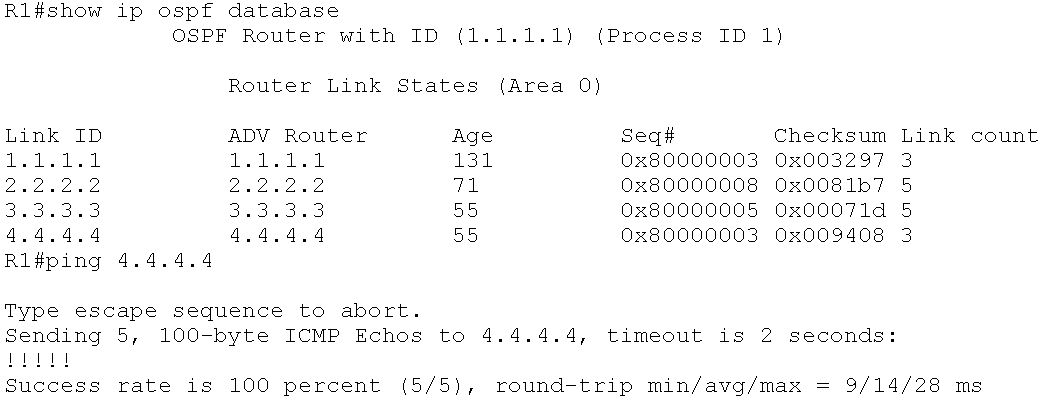
(3)测试网络是否互通
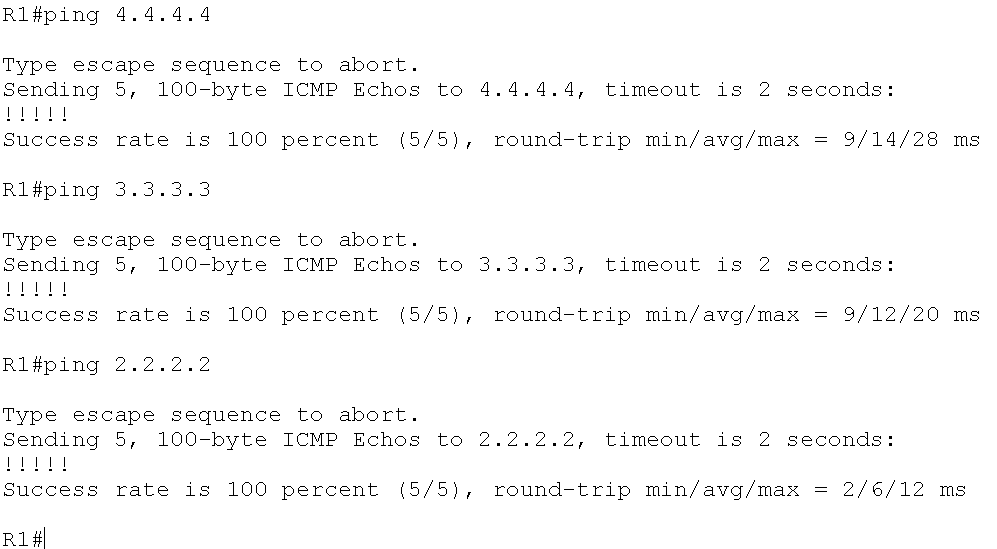
结果:全网互通成功
路由器配置——OSPF协议(2)的更多相关文章
- 路由器配置——OSPF协议(1)
一.实验目的:用OSPF协议使全网互通 二.拓扑图 三.具体步骤配置 (1)R1路由器配置 Router>enableRouter#configure terminalEnter configu ...
- 路由器配置PPP协议 CHAP验证 PAP验证
路由器配置PPP协议 CHAP验证 PAP验证 来源 https://www.cnblogs.com/tcheng/p/5967485.html PAP是两次握手,明文传输用户密码进行认证:CHAP是 ...
- 华为路由器配置OSPF
OSPF是什么 OSPF(Open Shortest Pass First,开放最短路径优先协议),是一个最常用的内部网管协议,是一个链路状态协议. 使用场景:适用于运营商.政府机构等大型网络中多节点 ...
- OSPF协议详解
CCNP OSPF协议详解 2010-02-24 20:30:22 标签:CCNP 职场 OSPF 休闲 OSPF(Open Shortest Path Fitst,ospf)开放最短路径优先协议,是 ...
- H3C路由器配置——动态路由OSPF协议
一.介绍 1.OSPF协议介绍 (1).OSPF(Open Shortest Path First,开放最短路径优先)路由协议是用于网际协议(IP)网络的链路状态路由协议.是一个被各厂商设备广泛支持的 ...
- OSPF协议学习以及路由器配置
OSPF协议学习以及路由器配置 1.实验任务 2,使用eNsp搭建网络拓扑 3.配置路由IP ps:要使用GE(3层口),2层口(E口)需要先配置Vlan才能配置IP地址 4.配置路由器R1的ospf ...
- OSPF协议介绍及配置 (下)
4.特殊区域详解 为了让我们的讲解更加的通俗易懂,我们看上面这个拓扑,这是一个根据客户业务逻辑结构所涉及的OSPF网络,共有三个区域(实际上远远不止),骨干区域area0为一级行及二级行所部署,*** ...
- OSPF协议介绍及配置 (上)
OSPF协议介绍及配置 (上) 一.OSPF概述 回顾一下距离矢量路由协议的工作原理:运行距离矢量路由协议的路由器周期性的泛洪自己的路由表,通过路由的交互,每台路由器都从相邻的路由器学习到路由,并且加 ...
- OSPF协议介绍及配置
一.OSPF概述 回顾一下距离矢量路由协议的工作原理:运行距离矢量路由协议的路由器周期性的泛洪自己的路由表,通过路由的交互,每台路由器都从相邻的路由器学习到路由,并且加载进自己的路由表中,而对于这个网 ...
随机推荐
- Python 基础(十六)--随机数模块
random随机数模块 random.randint(1,10):随机1-10包括10 random.randrange(1,10,2):在1.3.5.7.9中随机,类似切片,不包括10 random ...
- shell习题第15题:看数字找规律
[题目要求] 请仔细查看如下几个数字的规律,并使用shell脚本输出后面的十个数字 10 31 53 77 105 141... ... [核心要点] 计算两个数值之间的差值 [脚本] #!/bin/ ...
- html5手机网页开发,中文输入法下软键盘遮挡输入框
安卓手机解决办法 微信UI框架weui中给出了解决方法:weui框架http://weui.github.io/weui/example.js // .container 设置了 overflow 属 ...
- Web API 自动生成接口文档
1.添加NuGet程序包 Microsoft ASP.NET Web API 2.2 Help Page (这是微软官方的) A Simple Test Client for ASP.NET ...
- Linux常用命令(自用)
1 抓包 tcpdump port 5060 and host 192.168.1.180 tcpdump -i ethx -w 1.pcap -s 0 2. 查看硬盘使用情况 df ./ 3.查看进 ...
- 网络编程之NIO
传统的BIO(Blocking IO)的缺点: 1.基于阻塞式IO建立起来的,导致服务端一直阻塞等待着客户端发起请求,如果客户端不发起,服务端的的业务线程会一直存. 2.弹性伸缩能力差,线程数和客户端 ...
- Advanced Installer 关于桌面的快捷方式。
由于软件自动生成快捷方式,我发现桌面可以存在多个软件的快捷方式,因为快捷方式只要名字不同就可以存在多个,即使名字相同,只要备注不同,又可以存在多个. 那么由于软件自带生成快捷方式的功能,为了避免桌面出 ...
- Docker Registry搭建
一.前言 Docker官方镜像仓库 访问速度很慢,Docker Registry允许搭建我们自己的镜像仓库,为实现镜像拉取.推送提供便利. 二.安装与启动 1.创建目录 mkdir /usr/loca ...
- for in和for of的区别
for in:一般用于遍历普通对象(即没有部署Iterator接口),遍历的是属性. for of:ES6新增的遍历方式,能遍历大部分的类型,遍历的是值.for...of 允许你遍历 Arrays(数 ...
- navigateTo防止多次跳转
“wx.navigateTo” 页面跳转.在有网络延迟时多次点击会产生 多次二级页面 再使用wx.navigateBack就会多次返回到之前那页面 解决办法: 点击之前标个状态true 点击之后跳转路 ...