
路由器配置——DHCP+DHCP中继服务配置
一、实验目的:掌握DHCP服务基本配置及DHCP中继服务配置,实现全网互通
二、拓扑图:
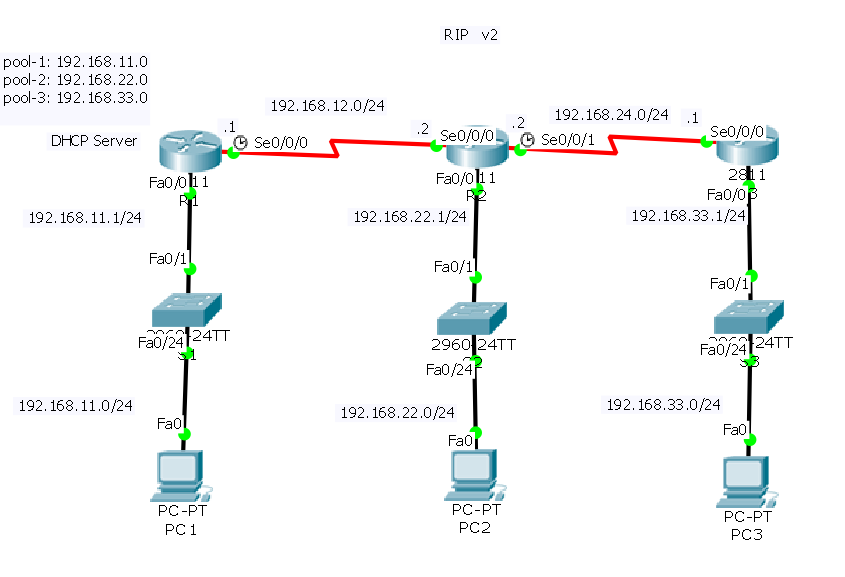
三、具体步骤配置:
(1)R1路由器配置:
Router>enable --进入特权模式
Router#configure terminal --进入全局配置模式
Enter configuration commands, one per line. End with CNTL/Z.
Router(config)#hostname R1 --修改路由器名为R1
R1(config)#interface f0/0 --进入端口
R1(config-if)#ip address 192.168.11.1 255.255.255.0 --为端口配置ip地址
R1(config-if)#no shutdown --激活端口
R1(config-if)#interface s0/0/0 --进入端口
R1(config-if)#ip address 192.168.12.1 255.255.255.0 --为端口配置ip地址
R1(config-if)#clock rate 64000 --设置时钟同步速率
R1(config-if)#no shutdown --激活端口
%LINK-5-CHANGED: Interface Serial0/0/0, changed state to down
R1(config-if)#exit --返回上一级
R1(config)#service dhcp --开启dhcp服务
R1(config)#ip dhcp pool 1 --定义地址池
R1(dhcp-config)#network 192.168.11.0 255.255.255.0 --DHCP服务器要分配的网络和掩码
R1(dhcp-config)#default-router 192.168.11.1 --默认网关,这个地址要和相应网络所连接的路由器的以太口地址相同
R1(dhcp-config)#exit --返回上一级
R1(config)#ip dhcp pool 2 --定义地址池
R1(dhcp-config)#network 192.168.22.0 255.255.255.0 --DHCP服务器要分配的网络和掩码
R1(dhcp-config)#default-router 192.168.22.1 --默认网关
R1(dhcp-config)#exit --返回上一级
R1(config)#ip dhcp pool 3 --定义地址池
R1(dhcp-config)#network 192.168.33.0 255.255.255.0 --DHCP服务器要分配的网络和掩码
R1(dhcp-config)#default-router 192.168.33.1 --默认网关
R1(dhcp-config)#exit --返回上一级
R1(config)#ip dhcp excluded-address 192.168.11.1 --排除的地址段
R1(config)#ip dhcp excluded-address 192.168.22.1 --排除的地址段
R1(config)#ip dhcp excluded-address 192.168.33.1 --排除的地址段
R1(config)#route rip --开启rip协议
R1(config-router)#version 2 --版本2
R1(config-router)#no auto-summary --关闭路由自动汇总
R1(config-router)#network 192.168.12.0 --添加直连网段到rip
R1(config-router)#network 192.168.11.0
R1(config-router)#network 192.168.22.0
R1(config-router)#network 192.168.33.0
R1(config-router)#end --返回特权模式
R1#
%LINK-5-CHANGED: Interface FastEthernet0/0, changed state to up
%LINEPROTO-5-UPDOWN: Line protocol on Interface FastEthernet0/0, changed state to up
%SYS-5-CONFIG_I: Configured from console by console
R1#
R1#
%LINK-5-CHANGED: Interface Serial0/0/0, changed state to up
%LINEPROTO-5-UPDOWN: Line protocol on Interface Serial0/0/0, changed state to up
(2)R2路由器配置:
Router>enable --进入特权模式
Router#configure terminal --进入全局配置模式
Enter configuration commands, one per line. End with CNTL/Z.
Router(config)#hostname R2 --修改路由器名为R2
R2(config)#interface f0/0 --进入端口
R2(config-if)#ip address 192.168.22.1 255.255.255.0 --为端口配置ip地址
R2(config-if)#ip helper-address 192.168.12.1 --配置帮助地址
R2(config-if)#no shutdown --激活端口
R2(config-if)#interface s0/0/0 --进入端口
R2(config-if)#ip address 192.168.12.2 255.255.255.0 --为端口配置ip地址
R2(config-if)#no shutdown --激活端口
R2(config-if)#interface s0/0/1 --进入端口
R2(config-if)#ip address 192.168.24.2 255.255.255.0 --为端口配置ip地址
R2(config-if)#clock rate 64000 --设置时钟同步速率
R2(config-if)#no shutdown --激活端口
%LINK-5-CHANGED: Interface Serial0/0/1, changed state to down
R2(config-if)#exit --返回上一级
R2(config)#route rip --开启rip协议
R2(config-router)#version 2 --版本2
R2(config-router)#no auto-summary --关闭路由自动汇总
R2(config-router)#network 192.168.12.0 --添加直连网段到rip
R2(config-router)#network 192.168.24.0
R2(config-router)#network 192.168.22.0
R2(config-router)#network
% Incomplete command.
R2(config-router)#end --返回特权模式
%LINK-5-CHANGED: Interface FastEthernet0/0, changed state to up
%LINEPROTO-5-UPDOWN: Line protocol on Interface FastEthernet0/0, changed state to up
%LINK-5-CHANGED: Interface Serial0/0/0, changed state to up
%LINEPROTO-5-UPDOWN: Line protocol on Interface Serial0/0/0, changed state to up
%LINK-5-CHANGED: Interface Serial0/0/1, changed state to up
%LINEPROTO-5-UPDOWN: Line protocol on Interface Serial0/0/1, changed state to up
(3)R3路由器配置:
Router>enable --进入特权模式
Router#configure terminal --进入全局配置模式
Enter configuration commands, one per line. End with CNTL/Z.
Router(config)#hostname R3 --修改路由器名为R3
R3(config)#interface f0/0 --进入端口
R3(config-if)#ip address 192.168.33.1 255.255.255.0 --为端口配置ip地址
R3(config-if)#ip helper-address 192.168.12.1 --配置帮助地址
R3(config-if)#no shutdown --激活端口
R3(config-if)#interface S0/0/0 --进入端口
R3(config-if)#ip address 192.168.24.1 255.255.255.0 --为端口配置ip地址
R3(config-if)#no shutdown --激活端口
R3(config-if)#exit --返回上一级
R3(config)#route rip --开启rip协议
R3(config-router)#version 2 --版本2
R3(config-router)#no auto-summary --关闭自动路由汇总
R3(config-router)#network 192.168.24.0 --添加直连网段到rip
R3(config-router)#network 192.168.33.0
R3(config-router)#network 192.168.12.0
R3(config-router)#end
%LINK-5-CHANGED: Interface FastEthernet0/0, changed state to up
%LINEPROTO-5-UPDOWN: Line protocol on Interface FastEthernet0/0, changed state to up
%LINK-5-CHANGED: Interface Serial0/0/0, changed state to up
R3#
%SYS-5-CONFIG_I: Configured from console by console
R3#
%LINEPROTO-5-UPDOWN: Line protocol on Interface Serial0/0/0, changed state to up
四、验证测试:
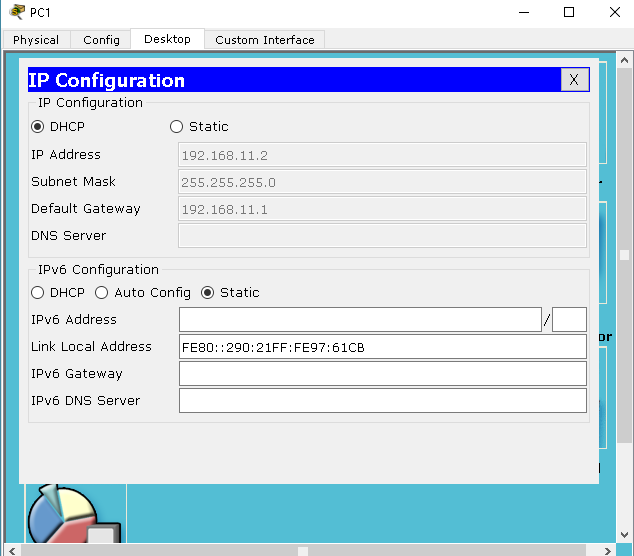
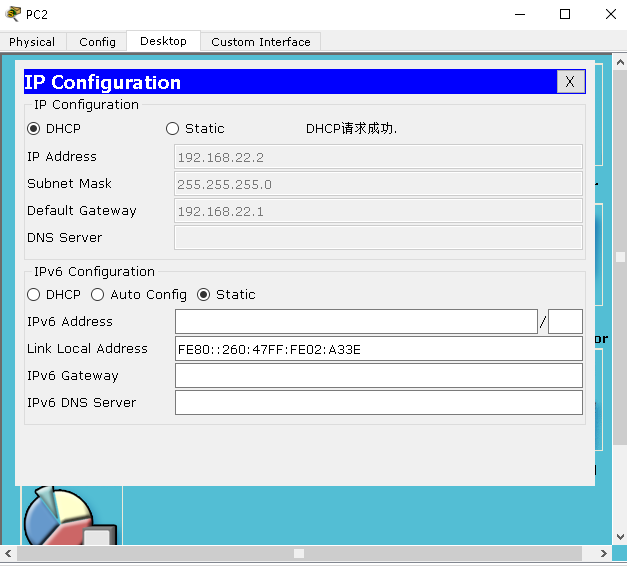
1、打开各台虚拟机的DHCP功能查看是否接收到DHCP服务所分配的地址:
(1)PC1
(2)PC2
(3)PC3
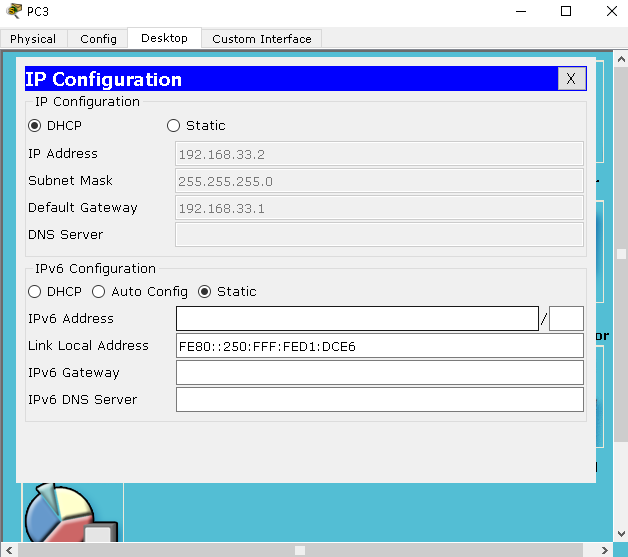
分配地址成功
2、测试各台主机之间是否互通
(1)PC1与PC2

(2)PC2与PC3
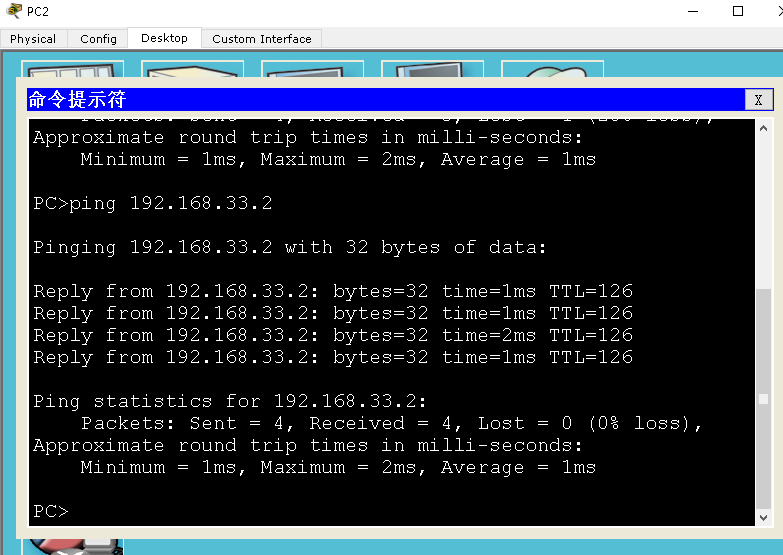
(3)PC3与PC1

结果:全网互通成功
路由器配置——DHCP+DHCP中继服务配置的更多相关文章
- CentOS6 配置阿里云 NTP 服务
本文以Centos 6.5为例介绍如何修改Linux实例时区,以及开启和配置Linux NTP服务,保证实例本地时间精确同步. 前提条件 NTP服务的通信端口为UDP 123,设置NTP服务之前请确保 ...
- Cisco基础(一):Vlan的划分、配置trunk中继链路、以太通道配置、DHCP服务配置
一.Vlan的划分 目标: VLAN(虚拟局域网)是对连接到的第二层交换机端口的网络用户的逻辑分段,不受网络用户的物理位置限制而根据用户需求进行网络分段.一个VLAN可以在 一个交换机或者跨交换机实现 ...
- (四)跟我一起玩Linux网络服务:DHCP服务配置之中继代理
继第三部分的DHCP服务器的设置成功,我们来做一个中继代理服务器的配置吧. 我们的虚拟机结构如图: 具体参考: (一)跟我一起玩Linux网络服务:DNS服务——BIND(/etc/named.con ...
- Kali Linux常用服务配置教程DHCP服务原理
Kali Linux常用服务配置教程DHCP服务原理 动态主机配置协议(Dynamic Host Configuration Protocol,简称DHCP)是一个局域网的网络协议,基于UDP协议工作 ...
- DHCP服务配置
DHCP(Dynamic Host Configuration Protocol)动态主机配置协议 -->是由Internet工作任务小组设计开发的,专用于对TCP/IP网络中的计算机自定分配T ...
- Cisco配置VLAN+DHCP中继代理+NAT转发上网
实验环境: 路由器 使得TP-link 设置NAT转发使用,tp-link路由器网关设置成 192.168.30.254 (核心层)Cisco 3550三层交换机(型号C3550-I5Q3L2-M)配 ...
- 路由器基础配置之dhcp配置
我们将以上面的拓扑图为例,router9为dhcp的服务器,为pc4,5,6分配三个不同网段的地址,pool为要分配的三个地址池,我们要把pc4设置为12网段,pc5设置成34网段,pc6设置成56网 ...
- (三)跟我一起玩Linux网络服务:DHCP服务配置之主服务器配置
我们今天来做DHCP服务器的配置,我们的前提示要实现用一台虚拟机做DHCP服务器 1.首先,我们要有DHCP软件,我们用到下面两个软件(可以使用其他方法从网上直接安装,具体方法网络搜索) dhcp-3 ...
- Kali Linux常用服务配置教程启动DHCP服务
Kali Linux常用服务配置教程启动DHCP服务 通过前面的介绍,DHCP服务就配置好了.接下来,用户就可以使用该服务器来获取IP地址了.下面将对前面配置的服务进行测试. 1.启动DHCP服务 如 ...
随机推荐
- WUSTOJ 1275: 男神的逆袭(Java)
1275: 男神的逆袭 题目 计算两个日期相差的天数.更多内容点击标题. 分析 下面说一下我的思路(自己写的,无扩展性): 给定一个日期,首先计算这个日期是这一年的第多少天. 给定两个日期,直 ...
- SAS学习笔记35 options语句
- 如何知道外围器件的器件地址PHY_ADDR
由于 S5P6818 现有的uboot没有网卡的初始化代码实现,在尝试移植网卡驱动而跟踪有关的源码的时候,不止一次地看到了类似下面的需要修改器件地址的有关写法. 根据原理图的有关硬件连接,找到对应的元 ...
- ajax回调函数,全局变量赋值后,ajax外无法获取的解决
1 ajax回调函数内,function的执行与ajax外是异步的,常导致全局变量赋值后,再次使用此变量人无法获取. 所以,可以把需要的步骤,独立放在functuon中,在ajax回调函数中执行.可较 ...
- 2019杭电多校一 C. Milk (dp)
大意: $n*m$棋盘, 初始位置$(1,1)$, 横坐标为$\frac{m+1}{2}$时可以向下走, 否则只能左右走, 每走一步花费$1$秒. 有$k$管奶, 第$i$罐位置$(r_i,c_i)$ ...
- (八)mybatis之多对多
一.需求分析 需求:查询所有用户的信息以及每个用户所属的组的信息 分析:一个用户可以有多个组,一个组也可以由多个用户. 多对多,可以设置一张中间表,该表存放的是用户表和组表的对应关系. 二.创建数据库 ...
- HTTP协议探究(五):H2中一些重要的概念
一 复习与目标 1 复习 简单密码学.对称加密与非对称加密 数字签名.数字证书 SSL/TLS HTTPS = HTTP + SSL/TLS,SSL/TLS为HTTP提供了保密性.完整性和鉴别性 2 ...
- c#基础知识梳理(二)
上期回顾 - https://www.cnblogs.com/liu-jinxin/p/10818256.html 一.变量 一个变量只不过是一个供程序操作的存储区的名字.在 C# 中,每个变量都有一 ...
- 私服nexus的权限问题,带admin和带view的区别
admin和view的区别只找到了这个解释: https://blog.csdn.net/tian_111222333/article/details/100159983 最终得出答案,我只需要给他们 ...
- meta标签常见浏览器设置
一.如何让双核浏览器默认选择 WebKit 内核渲染自己开发的网页 我们可以使用标签来指定适合自己网站的渲染内核名称,当双核浏览器访问本网页时,就会根据我们的指示,选择我们指定的渲染内核来处理网页.若 ...